By the end of this lab, you will be able to:
• Configure IPv6 static routes with different administrative distances
• Implement floating IPv6 static routes for backup path redundancy
• Configure IP SLA for IPv6 (ICMPv6) proactive link monitoring
• Use track objects to create intelligent IPv6 failover mechanisms
• Integrate IP SLA with IPv6 routing for advanced path control
• Verify and troubleshoot IPv6 route failover scenarios
• Understand the differences between IPv4 and IPv6 static routing
• Master IPv6 address configuration and link-local addressing
Lab Topology Description:
This lab features a dual-path redundant IPv6 network between Router R1 and Router R2. Two GigabitEthernet links (G0/0 and G0/1) provide primary and backup connectivity using global unicast IPv6 addresses. The scenario simulates a typical enterprise edge design where redundancy is critical in an IPv6-only or dual-stack environment.
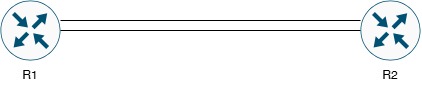
• R1 GigabitEthernet0/0 ↔ R2 GigabitEthernet0/0 (Primary IPv6 Path)
• R1 GigabitEthernet0/1 ↔ R2 GigabitEthernet0/1 (Backup IPv6 Path)
Topology Characteristics:
• Redundant dual-link IPv6 design for high availability
• Primary and backup path architecture
• Global Unicast IPv6 addressing (2001:db8::/32 documentation prefix)
• Suitable for IPv6 IP SLA monitoring and track integration
Network Addressing Scheme:
| Device | Interface | IPv6 Address | Prefix Length | Description |
|---|---|---|---|---|
| R1 | GigabitEthernet0/0 | 2001:DB8:1:1::1 | /64 | Primary Link to R2 |
| R1 | GigabitEthernet0/1 | 2001:DB8:1:2::1 | /64 | Backup Link to R2 |
| R1 | Loopback0 | 2001:DB8:A::1 | /128 | R1 Loopback (Source Network) |
| R2 | GigabitEthernet0/0 | 2001:DB8:1:1::2 | /64 | Primary Link to R1 |
| R2 | GigabitEthernet0/1 | 2001:DB8:1:2::2 | /64 | Backup Link to R1 |
| R2 | Loopback0 | 2001:DB8:B::2 | /128 | R2 Loopback (Destination Network) |
| Network | IPv6 Prefix | Purpose | Link ID |
|---|---|---|---|
| 2001:DB8:1:1::/64 | Primary WAN Segment | R1-R2 Primary Link | Primary Path |
| 2001:DB8:1:2::/64 | Backup WAN Segment | R1-R2 Backup Link | Backup Path |
| 2001:DB8:A::1/128 | Host Route | R1 Management/Test Network | Loopback |
| 2001:DB8:B::2/128 | Host Route | R2 Management/Test Network | Loopback |
• Using 2001:DB8::/32 documentation prefix (RFC 3849)
• /64 prefix for point-to-point links (standard practice)
• /128 prefix for loopback interfaces (host routes)
• Link-local addresses automatically assigned (FE80::/10)
• No NAT required - true end-to-end connectivity
• IPv6 unicast routing must be enabled globally
✓ Understanding of IPv6 addressing and subnetting
✓ Knowledge of IPv6 address types (Global Unicast, Link-Local, Unique Local)
✓ Basic knowledge of Cisco IOS CLI navigation and configuration modes
✓ Familiarity with IPv6 static routing concepts and administrative distance
✓ Understanding of ICMPv6 and Neighbor Discovery Protocol
✓ Access to Cisco routers (physical or GNS3/EVE-NG - IOS 15.0+ required for IPv6 IP SLA)
✓ Console or SSH access to all devices
✓ All devices should be in factory default or clean configuration state
Business Context:
Your company is migrating to IPv6 and operates a mission-critical WAN connection between two sites represented by R1 and R2. Due to the importance of this connectivity in the new IPv6 infrastructure, the network team has deployed redundant links. Your task is to implement an intelligent IPv6 routing solution that:
- Uses the primary IPv6 link (G0/0) as the preferred path under normal conditions
- Automatically fails over to the backup IPv6 link (G0/1) if the primary path fails
- Provides proactive monitoring using ICMPv6 echo to detect failures before routing protocols timeout
- Ensures minimal downtime during failover events in IPv6 environment
- Can be monitored and verified by network operations staff
- Demonstrates best practices for IPv6 enterprise deployments
You will implement three different IPv6 failover strategies, progressing from basic to advanced:
- Basic IPv6 Static Routes - Standard configuration with no redundancy
- Floating IPv6 Static Routes - Traditional backup using administrative distance
- IP SLA for IPv6 with Track Objects - Intelligent failover with proactive ICMPv6 monitoring
📌 Task 1: Basic IPv6 Interface Configuration
Objective: Enable IPv6, configure global unicast addresses on all interfaces and verify Layer 2/3 connectivity.
• IPv6 unicast routing must be enabled globally
• Each interface needs a global unicast IPv6 address
• Link-local addresses are auto-generated (FE80::/10)
• Use EUI-64 or manual addressing (we'll use manual)
• Neighbor Discovery Protocol (NDP) replaces ARP
Step 1.1: Enable IPv6 Routing and Configure R1 Interfaces
Router> enable
Router# configure terminal
Router(config)# hostname R1
R1(config)#
! Enable IPv6 unicast routing globally (REQUIRED!)
R1(config)# ipv6 unicast-routing
! Configure Primary Link Interface
R1(config)# interface GigabitEthernet0/0
R1(config-if)# description ** Primary IPv6 Link to R2 G0/0 **
R1(config-if)# ipv6 address 2001:DB8:1:1::1/64
R1(config-if)# no shutdown
R1(config-if)# exit
! Configure Backup Link Interface
R1(config)# interface GigabitEthernet0/1
R1(config-if)# description ** Backup IPv6 Link to R2 G0/1 **
R1(config-if)# ipv6 address 2001:DB8:1:2::1/64
R1(config-if)# no shutdown
R1(config-if)# exit
! Configure Loopback Interface
R1(config)# interface Loopback0
R1(config-if)# description ** R1 IPv6 Management/Test Network **
R1(config-if)# ipv6 address 2001:DB8:A::1/128
R1(config-if)# no shutdown
R1(config-if)# exit
R1(config)# end
R1# write memory
Step 1.2: Enable IPv6 Routing and Configure R2 Interfaces
Router> enable
Router# configure terminal
Router(config)# hostname R2
R2(config)#
! Enable IPv6 unicast routing globally (REQUIRED!)
R2(config)# ipv6 unicast-routing
! Configure Primary Link Interface
R2(config)# interface GigabitEthernet0/0
R2(config-if)# description ** Primary IPv6 Link to R1 G0/0 **
R2(config-if)# ipv6 address 2001:DB8:1:1::2/64
R2(config-if)# no shutdown
R2(config-if)# exit
! Configure Backup Link Interface
R2(config)# interface GigabitEthernet0/1
R2(config-if)# description ** Backup IPv6 Link to R1 G0/1 **
R2(config-if)# ipv6 address 2001:DB8:1:2::2/64
R2(config-if)# no shutdown
R2(config-if)# exit
! Configure Loopback Interface
R2(config)# interface Loopback0
R2(config-if)# description ** R2 IPv6 Management/Test Network **
R2(config-if)# ipv6 address 2001:DB8:B::2/128
R2(config-if)# no shutdown
R2(config-if)# exit
R2(config)# end
R2# write memory
Step 1.3: Verify IPv6 Interface Configuration
! Check IPv6 interface status
R1# show ipv6 interface brief
! View detailed IPv6 interface information
R1# show ipv6 interface GigabitEthernet0/0
! Verify IPv6 routing is enabled
R1# show ipv6 interface | include line protocol
! View IPv6 neighbors (similar to ARP in IPv4)
R1# show ipv6 neighbors
! Verify connectivity using ICMPv6
R1# ping ipv6 2001:DB8:1:1::2
R1# ping ipv6 2001:DB8:1:2::2
R2# ping ipv6 2001:DB8:1:1::1
R2# ping ipv6 2001:DB8:1:2::1
• All interfaces should be in "up/up" state
• Each interface should show both global unicast and link-local addresses
• IPv6 routing should be enabled
• Ping tests between directly connected interfaces should succeed (100% success rate)
• IPv6 neighbor table should show discovered neighbors
• Interface descriptions should be visible in show commands
📌 Task 2: Configure Basic IPv6 Static Routes (No Redundancy)
Objective: Implement basic IPv6 static routes to understand baseline behavior before adding redundancy.
ipv6 route [destination-prefix/length] [next-hop-ipv6-address | exit-interface] [administrative-distance]Key differences from IPv4:
• Use "ipv6 route" instead of "ip route"
• IPv6 addresses use colon notation
• Can use link-local or global unicast as next-hop
• Exit interface may be required with link-local next-hops
Step 2.1: Configure IPv6 Static Route on R1
R1# configure terminal
! Static route to R2's Loopback network via primary link
! Using global unicast next-hop address
R1(config)# ipv6 route 2001:DB8:B::2/128 2001:DB8:1:1::2
R1(config)# end
R1# write memory
Step 2.2: Configure IPv6 Static Route on R2
R2# configure terminal
! Static route to R1's Loopback network via primary link
! Using global unicast next-hop address
R2(config)# ipv6 route 2001:DB8:A::1/128 2001:DB8:1:1::1
R2(config)# end
R2# write memory
Step 2.3: Verify Basic IPv6 Static Route Configuration
R1# show ipv6 route static
R1# show ipv6 route 2001:DB8:B::2
R1# ping ipv6 2001:DB8:B::2 source 2001:DB8:A::1
R1# traceroute ipv6 2001:DB8:B::2 source 2001:DB8:A::1
! On R2:
R2# show ipv6 route static
R2# show ipv6 route 2001:DB8:A::1
R2# ping ipv6 2001:DB8:A::1 source 2001:DB8:B::2
R2# traceroute ipv6 2001:DB8:A::1 source 2001:DB8:B::2
With basic IPv6 static routes, when the primary link fails, there is NO automatic failover to the backup link. This results in complete connectivity loss until manual intervention. This is why we need floating IPv6 static routes!
📌 Task 3: Configure Floating IPv6 Static Routes
Objective: Implement floating IPv6 static routes using administrative distance to create automatic failover.
Step 3.1: Configure Floating IPv6 Static Route on R1
R1# configure terminal
! Remove the old basic static route first
R1(config)# no ipv6 route 2001:DB8:B::2/128 2001:DB8:1:1::2
! Primary IPv6 static route via G0/0 (default AD = 1)
R1(config)# ipv6 route 2001:DB8:B::2/128 2001:DB8:1:1::2 1
! Floating IPv6 static route via G0/1 (higher AD = 5)
R1(config)# ipv6 route 2001:DB8:B::2/128 2001:DB8:1:2::2 5
R1(config)# end
R1# write memory
Step 3.2: Configure Floating IPv6 Static Route on R2
R2# configure terminal
! Remove the old basic static route first
R2(config)# no ipv6 route 2001:DB8:A::1/128 2001:DB8:1:1::1
! Primary IPv6 static route via G0/0 (default AD = 1)
R2(config)# ipv6 route 2001:DB8:A::1/128 2001:DB8:1:1::1 1
! Floating IPv6 static route via G0/1 (higher AD = 5)
R2(config)# ipv6 route 2001:DB8:A::1/128 2001:DB8:1:2::1 5
R2(config)# end
R2# write memory
Step 3.3: Test Floating IPv6 Static Route Failover
! On R1 - Start continuous ICMPv6 ping
R1# ping ipv6 2001:DB8:B::2 source 2001:DB8:A::1 repeat 1000
! On a second R1 session, shutdown the primary interface:
R1# configure terminal
R1(config)# interface GigabitEthernet0/0
R1(config-if)# shutdown
R1(config-if)# end
! Check IPv6 routing table
R1# show ipv6 route 2001:DB8:B::2
! Route should now show via 2001:DB8:1:2::2 (backup path)
! === Test Primary Link Recovery ===
R1# configure terminal
R1(config)# interface GigabitEthernet0/0
R1(config-if)# no shutdown
R1(config-if)# end
R1# show ipv6 route 2001:DB8:B::2
! Route should revert to primary path via 2001:DB8:1:1::2
📌 Task 4: Configure IP SLA for IPv6 Proactive Monitoring
Objective: Implement Cisco IP SLA for IPv6 to actively monitor end-to-end reachability using ICMPv6.
Step 4.1: Configure IP SLA for IPv6 on R1
R1# configure terminal
! Create IP SLA operation (probe ID 1)
R1(config)# ip sla 1
! Use ICMPv6 Echo to monitor R2's loopback (end-to-end test)
R1(config-ip-sla)# icmp-echo 2001:DB8:B::2 source-ipv6 2001:DB8:A::1
! Set probe frequency to every 5 seconds
R1(config-ip-sla-echo)# frequency 5
! Set timeout to 2 seconds
R1(config-ip-sla-echo)# timeout 2000
! Set threshold for performance degradation (in milliseconds)
R1(config-ip-sla-echo)# threshold 1000
R1(config-ip-sla-echo)# exit
! Schedule the IP SLA operation to start now and run forever
R1(config)# ip sla schedule 1 start-time now life forever
R1(config)# end
R1# write memory
• ip sla 1 - Creates IP SLA operation with ID 1 (command same as IPv4)
• icmp-echo 2001:DB8:B::2 source-ipv6 2001:DB8:A::1 - Sends ICMPv6 pings from R1 loopback to R2 loopback
• frequency 5 - Sends probe every 5 seconds
• timeout 2000 - Waits 2000ms (2 seconds) for response before declaring failure
• threshold 1000 - Triggers threshold violation if RTT exceeds 1000ms (1 second)
Step 4.2: Verify IP SLA IPv6 Operation
R1# show ip sla configuration 1
R1# show ip sla statistics 1
R1# show ip sla summary
Step 4.3: Configure IP SLA for IPv6 on R2 (Optional)
R2# configure terminal
R2(config)# ip sla 1
R2(config-ip-sla)# icmp-echo 2001:DB8:A::1 source-ipv6 2001:DB8:B::2
R2(config-ip-sla-echo)# frequency 5
R2(config-ip-sla-echo)# timeout 2000
R2(config-ip-sla-echo)# threshold 1000
R2(config-ip-sla-echo)# exit
R2(config)# ip sla schedule 1 start-time now life forever
R2(config)# end
R2# write memory
📌 Task 5: Configure Track Objects to Monitor IPv6 IP SLA
Objective: Create Track objects that monitor IP SLA state for intelligent IPv6 routing decisions.
Step 5.1: Configure Track Object on R1
R1# configure terminal
! Create Track object 1 to monitor IP SLA operation 1
R1(config)# track 1 ip sla 1 reachability
! Configure delay timers
R1(config-track)# delay down 10 up 10
R1(config-track)# exit
R1(config)# end
R1# write memory
Step 5.2: Verify Track Object Status
R1# show track
R1# show track 1
R1# show track brief
Step 5.3: Configure Track Object on R2 (Optional)
R2# configure terminal
R2(config)# track 1 ip sla 1 reachability
R2(config-track)# delay down 10 up 10
R2(config-track)# exit
R2(config)# end
R2# write memory
📌 Task 6: Integrate Track Objects with IPv6 Static Routes
Objective: Configure IPv6 static routes to use Track objects for intelligent failover.
Step 6.1: Remove Previous IPv6 Static Routes on R1
R1# configure terminal
! Remove previous IPv6 static routes
R1(config)# no ipv6 route 2001:DB8:B::2/128 2001:DB8:1:1::2 1
R1(config)# no ipv6 route 2001:DB8:B::2/128 2001:DB8:1:2::2 5
Step 6.2: Configure Tracked IPv6 Static Routes on R1
R1# configure terminal
! Primary IPv6 route via G0/0 - Tracked by Track 1
! This route is ONLY installed when Track 1 is UP (IP SLA succeeds)
R1(config)# ipv6 route 2001:DB8:B::2/128 2001:DB8:1:1::2 track 1
! Backup IPv6 route via G0/1 - Not tracked, higher AD
! This route is installed when primary route is removed (Track 1 DOWN)
R1(config)# ipv6 route 2001:DB8:B::2/128 2001:DB8:1:2::2 10
R1(config)# end
R1# write memory
Step 6.3: Configure Tracked IPv6 Static Routes on R2
R2# configure terminal
! Remove old routes
R2(config)# no ipv6 route 2001:DB8:A::1/128 2001:DB8:1:1::1 1
R2(config)# no ipv6 route 2001:DB8:A::1/128 2001:DB8:1:2::1 5
! Primary IPv6 route via G0/0 - Tracked by Track 1
R2(config)# ipv6 route 2001:DB8:A::1/128 2001:DB8:1:1::1 track 1
! Backup IPv6 route via G0/1 - Not tracked
R2(config)# ipv6 route 2001:DB8:A::1/128 2001:DB8:1:2::1 10
R2(config)# end
R2# write memory
Step 6.4: Verify Tracked IPv6 Static Route Configuration
R1# show ipv6 route static
R1# show ipv6 route 2001:DB8:B::2
R1# show running-config | include ipv6 route
R1# show track 1
📌 Task 7: Test IPv6 IP SLA-Based Failover Scenarios
Objective: Verify that IPv6 IP SLA track-based failover works correctly.
Test Scenario 1: Primary IPv6 Link Failure
! Start continuous ICMPv6 ping
R1# ping ipv6 2001:DB8:B::2 source 2001:DB8:A::1 repeat 1000 timeout 1
! Check current route
R1# show ipv6 route 2001:DB8:B::2
! === Simulate Primary Link Failure ===
R1# configure terminal
R1(config)# interface GigabitEthernet0/0
R1(config-if)# shutdown
R1(config-if)# end
! === Monitor Failover Process ===
! After ~10-15 seconds, check track status:
R1# show track 1
! Check IPv6 routing table
R1# show ipv6 route 2001:DB8:B::2
! Should show backup path via 2001:DB8:1:2::2
! Verify backup path is working
R1# traceroute ipv6 2001:DB8:B::2 source 2001:DB8:A::1
Test Scenario 2: Primary IPv6 Link Recovery
R1# configure terminal
R1(config)# interface GigabitEthernet0/0
R1(config-if)# no shutdown
R1(config-if)# end
! === Monitor Recovery Process ===
! Check interface status
R1# show ipv6 interface brief GigabitEthernet0/0
! Monitor track status
R1# show track 1
! Check IPv6 routing table
R1# show ipv6 route 2001:DB8:B::2
! Should revert to primary path via 2001:DB8:1:1::2
- ☐ Step 1: IPv6 unicast routing is enabled on both routers
- ☐ Step 2: All interfaces have IPv6 global unicast addresses configured
- ☐ Step 3: All interfaces are in "up/up" state
- ☐ Step 4: Link-local IPv6 addresses are auto-generated on all interfaces
- ☐ Step 5: Direct IPv6 connectivity between R1 and R2 via both links is functional
- ☐ Step 6: IPv6 neighbors are discovered via NDP
- ☐ Step 7: IP SLA operation 1 is configured for ICMPv6 on R1
- ☐ Step 8: IP SLA operation shows "OK" status with successful ICMPv6 probes
- ☐ Step 9: Track object 1 is configured and monitoring IP SLA 1
- ☐ Step 10: Track object status is "Up" with "Reachability is Up"
- ☐ Step 11: Primary IPv6 static route is installed via 2001:DB8:1:1::2 track 1
- ☐ Step 12: Backup IPv6 static route exists in config but not in routing table
- ☐ Step 13: ICMPv6 ping from R1 loopback to R2 loopback is successful
- ☐ Step 14: Traceroute shows IPv6 traffic using primary path
- ☐ Step 15: When G0/0 is shutdown, track goes Down after delay timer
- ☐ Step 16: Failover to backup IPv6 route occurs automatically
- ☐ Step 17: When G0/0 is restored, track goes Up and primary route is restored
- ☐ Step 18: Configuration is saved on both routers
R1 - Complete Final IPv6 Configuration
! R1 Complete Configuration - IPv6 Static Routes with IP SLA Track
!
hostname R1
!
! Enable IPv6 routing globally
ipv6 unicast-routing
!
! === Interface Configuration ===
!
interface Loopback0
description ** R1 IPv6 Management/Test Network **
ipv6 address 2001:DB8:A::1/128
no shutdown
!
interface GigabitEthernet0/0
description ** Primary IPv6 Link to R2 G0/0 **
ipv6 address 2001:DB8:1:1::1/64
no shutdown
!
interface GigabitEthernet0/1
description ** Backup IPv6 Link to R2 G0/1 **
ipv6 address 2001:DB8:1:2::1/64
no shutdown
!
! === IP SLA Configuration ===
!
ip sla 1
icmp-echo 2001:DB8:B::2 source-ipv6 2001:DB8:A::1
frequency 5
timeout 2000
threshold 1000
!
ip sla schedule 1 start-time now life forever
!
! === Track Configuration ===
!
track 1 ip sla 1 reachability
delay down 10 up 10
!
! === IPv6 Static Route Configuration ===
!
! Primary IPv6 route - tracked by IP SLA
ipv6 route 2001:DB8:B::2/128 2001:DB8:1:1::2 track 1
!
! Backup IPv6 route - higher AD, not tracked
ipv6 route 2001:DB8:B::2/128 2001:DB8:1:2::2 10
!
end
R2 - Complete Final IPv6 Configuration
! R2 Complete Configuration - IPv6 Static Routes with IP SLA Track
!
hostname R2
!
! Enable IPv6 routing globally
ipv6 unicast-routing
!
! === Interface Configuration ===
!
interface Loopback0
description ** R2 IPv6 Management/Test Network **
ipv6 address 2001:DB8:B::2/128
no shutdown
!
interface GigabitEthernet0/0
description ** Primary IPv6 Link to R1 G0/0 **
ipv6 address 2001:DB8:1:1::2/64
no shutdown
!
interface GigabitEthernet0/1
description ** Backup IPv6 Link to R1 G0/1 **
ipv6 address 2001:DB8:1:2::2/64
no shutdown
!
! === IP SLA Configuration ===
!
ip sla 1
icmp-echo 2001:DB8:A::1 source-ipv6 2001:DB8:B::2
frequency 5
timeout 2000
threshold 1000
!
ip sla schedule 1 start-time now life forever
!
! === Track Configuration ===
!
track 1 ip sla 1 reachability
delay down 10 up 10
!
! === IPv6 Static Route Configuration ===
!
! Primary IPv6 route - tracked by IP SLA
ipv6 route 2001:DB8:A::1/128 2001:DB8:1:1::1 track 1
!
! Backup IPv6 route - higher AD, not tracked
ipv6 route 2001:DB8:A::1/128 2001:DB8:1:2::1 10
!
end
show ipv6 interface GigabitEthernet0/0
show ipv6 protocols
show ipv6 neighbors
show ipv6 route static
show ipv6 route 2001:DB8:B::2
show ipv6 route summary
show running-config | include ipv6 route
show ip sla configuration 1
show ip sla statistics
show ip sla statistics 1
show ip sla summary
show track 1
show track brief
show track 1 timers
ping ipv6 2001:DB8:B::2 source 2001:DB8:A::1 repeat 100
traceroute ipv6 2001:DB8:B::2 source 2001:DB8:A::1
IPv6 vs IPv4 Static Routing Differences
| Feature | IPv4 | IPv6 |
|---|---|---|
| Command Syntax | ip route | ipv6 route |
| Address Format | Dotted decimal | Colon hexadecimal |
| Neighbor Discovery | ARP | NDP (ICMPv6) |
| Global Routing Enable | Automatic | Requires "ipv6 unicast-routing" |
| Link-Local Address | N/A | Auto-generated (FE80::/10) |
| IP SLA Command | icmp-echo [ip] source-ip [ip] | icmp-echo [ipv6] source-ipv6 [ipv6] |
What You Accomplished:
✅ Completed Configuration Tasks:
- Enabled IPv6 unicast routing globally on both routers
- Configured dual-path redundant IPv6 network topology
- Implemented basic IPv6 static routes
- Configured floating IPv6 static routes for AD-based failover
- Deployed Cisco IP SLA for IPv6 using ICMPv6 proactive monitoring
- Created track objects to monitor IPv6 IP SLA state
- Integrated track objects with IPv6 static routes for intelligent failover
- Tested multiple IPv6 failover scenarios
- Verified automatic recovery mechanisms in IPv6 environment
- Documented complete working IPv6 configuration
You have successfully completed Lab 10.1: IPv6 Static Routing, Floating Routes & IP SLA Tracking.
Lab Completion Date: _________________
Instructor Signature: _________________
Student Name: _________________
Skills Verified:
☑ IPv6 static route configuration
☑ IPv6 floating route implementation
☑ IP SLA IPv6 (ICMPv6) configuration and monitoring
☑ Track object integration with IPv6 routing
☑ IPv6 failover testing and verification
☑ Troubleshooting IPv6 network redundancy
☑ IPv6 address configuration and management
CCNP Progress: IPv6 Fundamentals ✓ | Layer 3 Technologies ✓
This lab was designed for Cisco IOS routers with IPv6 support. Commands require IOS 15.0(1)M or later for IPv6 IP SLA support. Tested on Cisco IOS Software, C2900 Software Version 15.x or higher.