This lab focuses on implementing Policy-Based Routing (PBR) in conjunction with RIP version 2 dynamic routing protocol. Students will learn to manipulate traffic forwarding decisions based on defined policies rather than traditional destination-based routing. This lab demonstrates real-world traffic engineering scenarios where different traffic types need to follow different paths through the network.
• Understand Policy-Based Routing concepts and applications
• Configure RIP v2 for dynamic routing
• Implement route-maps for traffic manipulation
• Use access control lists to classify traffic
• Verify and troubleshoot PBR configurations
• Apply traffic engineering principles in enterprise networks
The lab consists of three routers forming a triangle topology with the following connections:
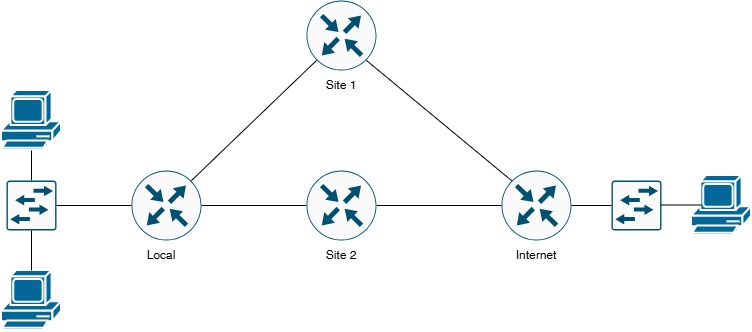
• Local Router: Central hub connecting Site-1 and Site-2
• Site-1 Router: Provides primary Internet connectivity via ISP-1
• Site-2 Router: Provides backup Internet connectivity via ISP-2
• Internet Router: Simulates ISP edge router with dual connections
| Connection # | Device A | Interface A | Device B | Interface B | Purpose |
|---|---|---|---|---|---|
| 1 | Local | GigabitEthernet0/0 | Site-1 | GigabitEthernet0/0 | Primary WAN Link |
| 2 | Local | GigabitEthernet0/1 | Site-2 | GigabitEthernet0/1 | Secondary WAN Link |
| 3 | Site-1 | GigabitEthernet1/0 | Internet | GigabitEthernet1/0 | ISP-1 Connection |
| 4 | Site-2 | GigabitEthernet1/1 | Internet | GigabitEthernet1/1 | ISP-2 Connection |
Subnet Allocation: 192.168.x.0/24 for internal networks, 203.0.113.x/30 for Internet connections
| Device | Interface | IP Address | Subnet Mask | Network Description |
|---|---|---|---|---|
| Local Router | GigabitEthernet0/0 | 192.168.10.1 | 255.255.255.0 | Local-to-Site1 WAN |
| GigabitEthernet0/1 | 192.168.20.1 | 255.255.255.0 | Local-to-Site2 WAN | |
| Loopback0 | 10.0.0.1 | 255.255.255.0 | Local LAN Simulation | |
| Site-1 Router | GigabitEthernet0/0 | 192.168.10.2 | 255.255.255.0 | Site1-to-Local WAN |
| GigabitEthernet1/0 | 203.0.113.1 | 255.255.255.252 | Site1-to-ISP1 | |
| Loopback0 | 172.16.1.1 | 255.255.255.0 | Site-1 LAN Simulation | |
| Site-2 Router | GigabitEthernet0/1 | 192.168.20.2 | 255.255.255.0 | Site2-to-Local WAN |
| GigabitEthernet1/1 | 203.0.113.5 | 255.255.255.252 | Site2-to-ISP2 | |
| Loopback0 | 172.16.2.1 | 255.255.255.0 | Site-2 LAN Simulation | |
| Internet Router | GigabitEthernet1/0 | 203.0.113.2 | 255.255.255.252 | ISP1-to-Site1 |
| GigabitEthernet1/1 | 203.0.113.6 | 255.255.255.252 | ISP2-to-Site2 | |
| Loopback0 | 8.8.8.8 | 255.255.255.255 | Public DNS Simulation |
| Network Address | Subnet Mask | Purpose | Gateway | VLAN/Segment |
|---|---|---|---|---|
| 192.168.10.0 | 255.255.255.0 (/24) | Local ↔ Site-1 WAN | 192.168.10.1 | WAN Segment 1 |
| 192.168.20.0 | 255.255.255.0 (/24) | Local ↔ Site-2 WAN | 192.168.20.1 | WAN Segment 2 |
| 203.0.113.0 | 255.255.255.252 (/30) | Site-1 ↔ ISP-1 | 203.0.113.1 | Internet Link 1 |
| 203.0.113.4 | 255.255.255.252 (/30) | Site-2 ↔ ISP-2 | 203.0.113.5 | Internet Link 2 |
| 10.0.0.0 | 255.255.255.0 (/24) | Local LAN | 10.0.0.1 | Internal Network |
| 172.16.1.0 | 255.255.255.0 (/24) | Site-1 LAN | 172.16.1.1 | Internal Network |
| 172.16.2.0 | 255.255.255.0 (/24) | Site-2 LAN | 172.16.2.1 | Internal Network |
| 8.8.8.8 | 255.255.255.255 (/32) | Public DNS (Simulated) | N/A | Internet Service |
You are a network engineer for a company with multiple sites. The organization has two Internet connections:
• ISP-1 (Primary): High-bandwidth, premium service via Site-1
• ISP-2 (Backup): Standard bandwidth, cost-effective service via Site-2
Traffic Engineering Requirements:
1. HTTP/HTTPS traffic (ports 80, 443) should use the primary ISP-1 link for better performance
2. All other traffic should use the backup ISP-2 link to balance load
3. RIP v2 should provide dynamic routing between sites
4. If the primary link fails, all traffic should automatically fail over
This scenario demonstrates real-world traffic engineering and load distribution using Policy-Based Routing.
• Ensure all physical connections are properly cabled
• Access console ports on all routers
• Have the IP addressing table readily available
• Clear any previous configurations if reusing equipment
Configure IP addresses on all router interfaces and enable them.
Local Router Configuration:Router# configure terminal
Router(config)# hostname Local
Local(config)# no ip domain-lookup
! Configure interface to Site-1
Local(config)# interface GigabitEthernet0/0
Local(config-if)# description ** WAN Link to Site-1 **
Local(config-if)# ip address 192.168.10.1 255.255.255.0
Local(config-if)# no shutdown
Local(config-if)# exit
! Configure interface to Site-2
Local(config)# interface GigabitEthernet0/1
Local(config-if)# description ** WAN Link to Site-2 **
Local(config-if)# ip address 192.168.20.1 255.255.255.0
Local(config-if)# no shutdown
Local(config-if)# exit
! Configure Loopback for LAN simulation
Local(config)# interface Loopback0
Local(config-if)# description ** Local LAN Simulation **
Local(config-if)# ip address 10.0.0.1 255.255.255.0
Local(config-if)# no shutdown
Local(config-if)# exit
Local(config)# exit
Local# write memory
Router# configure terminal
Router(config)# hostname Site-1
Site-1(config)# no ip domain-lookup
! Configure interface to Local
Site-1(config)# interface GigabitEthernet0/0
Site-1(config-if)# description ** WAN Link to Local **
Site-1(config-if)# ip address 192.168.10.2 255.255.255.0
Site-1(config-if)# no shutdown
Site-1(config-if)# exit
! Configure interface to Internet (ISP-1)
Site-1(config)# interface GigabitEthernet1/0
Site-1(config-if)# description ** ISP-1 Connection **
Site-1(config-if)# ip address 203.0.113.1 255.255.255.252
Site-1(config-if)# no shutdown
Site-1(config-if)# exit
! Configure Loopback for LAN simulation
Site-1(config)# interface Loopback0
Site-1(config-if)# description ** Site-1 LAN Simulation **
Site-1(config-if)# ip address 172.16.1.1 255.255.255.0
Site-1(config-if)# no shutdown
Site-1(config-if)# exit
Site-1(config)# exit
Site-1# write memory
Router# configure terminal
Router(config)# hostname Site-2
Site-2(config)# no ip domain-lookup
! Configure interface to Local
Site-2(config)# interface GigabitEthernet0/1
Site-2(config-if)# description ** WAN Link to Local **
Site-2(config-if)# ip address 192.168.20.2 255.255.255.0
Site-2(config-if)# no shutdown
Site-2(config-if)# exit
! Configure interface to Internet (ISP-2)
Site-2(config)# interface GigabitEthernet1/1
Site-2(config-if)# description ** ISP-2 Connection **
Site-2(config-if)# ip address 203.0.113.5 255.255.255.252
Site-2(config-if)# no shutdown
Site-2(config-if)# exit
! Configure Loopback for LAN simulation
Site-2(config)# interface Loopback0
Site-2(config-if)# description ** Site-2 LAN Simulation **
Site-2(config-if)# ip address 172.16.2.1 255.255.255.0
Site-2(config-if)# no shutdown
Site-2(config-if)# exit
Site-2(config)# exit
Site-2# write memory
Router# configure terminal
Router(config)# hostname Internet
Internet(config)# no ip domain-lookup
! Configure interface to Site-1 (ISP-1)
Internet(config)# interface GigabitEthernet1/0
Internet(config-if)# description ** ISP-1 to Site-1 **
Internet(config-if)# ip address 203.0.113.2 255.255.255.252
Internet(config-if)# no shutdown
Internet(config-if)# exit
! Configure interface to Site-2 (ISP-2)
Internet(config)# interface GigabitEthernet1/1
Internet(config-if)# description ** ISP-2 to Site-2 **
Internet(config-if)# ip address 203.0.113.6 255.255.255.252
Internet(config-if)# no shutdown
Internet(config-if)# exit
! Configure Loopback for public DNS simulation
Internet(config)# interface Loopback0
Internet(config-if)# description ** Public DNS 8.8.8.8 Simulation **
Internet(config-if)# ip address 8.8.8.8 255.255.255.255
Internet(config-if)# no shutdown
Internet(config-if)# exit
Internet(config)# exit
Internet# write memory
Enable RIP v2 routing protocol on all routers to provide dynamic routing.
• Classless routing protocol (supports VLSM and CIDR)
• Uses multicast address 224.0.0.9 for updates
• Includes subnet mask in routing updates
• Maximum hop count: 15 (16 = unreachable)
• Updates sent every 30 seconds
Local(config)# router rip
Local(config-router)# version 2
Local(config-router)# no auto-summary
Local(config-router)# network 192.168.10.0
Local(config-router)# network 192.168.20.0
Local(config-router)# network 10.0.0.0
Local(config-router)# passive-interface Loopback0
Local(config-router)# exit
Local(config)# exit
Local# write memory
Site-1(config)# router rip
Site-1(config-router)# version 2
Site-1(config-router)# no auto-summary
Site-1(config-router)# network 192.168.10.0
Site-1(config-router)# network 203.0.113.0
Site-1(config-router)# network 172.16.0.0
Site-1(config-router)# passive-interface Loopback0
Site-1(config-router)# passive-interface GigabitEthernet1/0
Site-1(config-router)# exit
Site-1(config)# exit
Site-1# write memory
Site-2(config)# router rip
Site-2(config-router)# version 2
Site-2(config-router)# no auto-summary
Site-2(config-router)# network 192.168.20.0
Site-2(config-router)# network 203.0.113.0
Site-2(config-router)# network 172.16.0.0
Site-2(config-router)# passive-interface Loopback0
Site-2(config-router)# passive-interface GigabitEthernet1/1
Site-2(config-router)# exit
Site-2(config)# exit
Site-2# write memory
Internet(config)# router rip
Internet(config-router)# version 2
Internet(config-router)# no auto-summary
Internet(config-router)# network 203.0.113.0
Internet(config-router)# network 8.0.0.0
Internet(config-router)# passive-interface Loopback0
Internet(config-router)# exit
Internet(config)# exit
Internet# write memory
show ip route rip.
Define ACLs to identify HTTP/HTTPS traffic and other traffic types.
ACLs are used to classify traffic that will be affected by policy-based routing. We'll create:
• ACL 100: Identify HTTP traffic (TCP port 80)
• ACL 101: Identify HTTPS traffic (TCP port 443)
• ACL 102: Identify all other traffic
! ACL for HTTP traffic (TCP port 80)
Local(config)# access-list 100 remark === Identify HTTP Traffic ===
Local(config)# access-list 100 permit tcp any any eq 80
! ACL for HTTPS traffic (TCP port 443)
Local(config)# access-list 101 remark === Identify HTTPS Traffic ===
Local(config)# access-list 101 permit tcp any any eq 443
! ACL for all other traffic
Local(config)# access-list 102 remark === Identify All Other Traffic ===
Local(config)# access-list 102 permit ip any any
Local(config)# exit
Local# write memory
• ACLs 100-101 identify web traffic (HTTP/HTTPS) for premium routing
• ACL 102 catches all remaining traffic for standard routing
• The order of route-map entries will matter in the next step
Create route-maps to define routing policies based on traffic classification.
Route-maps work like a combination of ACLs and routing decisions:
1. Match traffic using ACLs
2. Set the next-hop IP address for matched traffic
3. Process entries in sequence number order (lowest first)
4. If no match, use normal routing table
! Route-map for Policy-Based Routing
Local(config)# route-map PBR-TRAFFIC permit 10
Local(config-route-map)# description === Route HTTP Traffic to ISP-1 ===
Local(config-route-map)# match ip address 100
Local(config-route-map)# set ip next-hop 192.168.10.2
Local(config-route-map)# exit
Local(config)# route-map PBR-TRAFFIC permit 20
Local(config-route-map)# description === Route HTTPS Traffic to ISP-1 ===
Local(config-route-map)# match ip address 101
Local(config-route-map)# set ip next-hop 192.168.10.2
Local(config-route-map)# exit
Local(config)# route-map PBR-TRAFFIC permit 30
Local(config-route-map)# description === Route All Other Traffic to ISP-2 ===
Local(config-route-map)# match ip address 102
Local(config-route-map)# set ip next-hop 192.168.20.2
Local(config-route-map)# exit
Local(config)# exit
Local# write memory
Apply the route-map to the incoming interface where traffic originates.
PBR is applied to the incoming interface where traffic arrives. In this lab:
• Apply PBR to Loopback0 (simulates traffic originating from Local LAN)
• Traffic leaving Loopback0 will be policy-routed based on our route-map
Local(config)# interface Loopback0
Local(config-if)# ip policy route-map PBR-TRAFFIC
Local(config-if)# exit
Local(config)# exit
Local# write memory
Add default routes for redundancy and failover capability.
Configure Default Routes on Local Router:! Primary default route via Site-1 (lower AD = preferred)
Local(config)# ip route 0.0.0.0 0.0.0.0 192.168.10.2 10
! Backup default route via Site-2 (higher AD = backup)
Local(config)# ip route 0.0.0.0 0.0.0.0 192.168.20.2 20
Local(config)# exit
Local# write memory
• Primary route has AD=10 (preferred)
• Backup route has AD=20 (used only if primary fails)
• This provides automatic failover if ISP-1 link goes down
Interface IP-Address OK? Method Status Protocol
GigabitEthernet0/0 192.168.10.1 YES manual up up
GigabitEthernet0/1 192.168.20.1 YES manual up up
Loopback0 10.0.0.1 YES manual up up
Codes: R - RIP
172.16.0.0/16 is variably subnetted, 2 subnets, 2 masks
R 172.16.1.0/24 [120/1] via 192.168.10.2, 00:00:15, GigabitEthernet0/0
R 172.16.2.0/24 [120/1] via 192.168.20.2, 00:00:08, GigabitEthernet0/1
R 203.0.113.0/30 [120/1] via 192.168.10.2, 00:00:15, GigabitEthernet0/0
R 203.0.113.4/30 [120/1] via 192.168.20.2, 00:00:08, GigabitEthernet0/1
R 8.0.0.0/8 [120/2] via 192.168.20.2, 00:00:08, GigabitEthernet0/1
[120/2] via 192.168.10.2, 00:00:15, GigabitEthernet0/0
Extended IP access list 100
10 permit tcp any any eq www (5 matches)
Extended IP access list 101
10 permit tcp any any eq 443 (3 matches)
Extended IP access list 102
10 permit ip any any (12 matches)
route-map PBR-TRAFFIC, permit, sequence 10
Match clauses:
ip address (access-lists): 100
Set clauses:
ip next-hop 192.168.10.2
Policy routing matches: 5 packets, 320 bytes
route-map PBR-TRAFFIC, permit, sequence 20
Match clauses:
ip address (access-lists): 101
Set clauses:
ip next-hop 192.168.10.2
Policy routing matches: 3 packets, 192 bytes
route-map PBR-TRAFFIC, permit, sequence 30
Match clauses:
ip address (access-lists): 102
Set clauses:
ip next-hop 192.168.20.2
Policy routing matches: 12 packets, 768 bytes
Interface Route map
Loopback0 PBR-TRAFFIC
Policy routing debugging is on
! Generate traffic and observe debug output
Local# ping 8.8.8.8 source Loopback0
*Mar 1 12:34:56.789: IP: s=10.0.0.1 (Loopback0), d=8.8.8.8, len 100
*Mar 1 12:34:56.789: FIB: s=10.0.0.1 (Loopback0), d=8.8.8.8 (GigabitEthernet0/1)
*Mar 1 12:34:56.789: PBR: matched route-map PBR-TRAFFIC, sequence 30
*Mar 1 12:34:56.789: PBR: set next-hop 192.168.20.2
Local# undebug all
Local# ping 8.8.8.8 source Loopback0
Type escape sequence to abort.
Sending 5, 100-byte ICMP Echos to 8.8.8.8, timeout is 2 seconds:
Packet sent with a source address of 10.0.0.1
!!!!!
Success rate is 100 percent (5/5), round-trip min/avg/max = 1/2/4 ms
Codes: L - local, C - connected, S - static, R - RIP
Gateway of last resort is 192.168.10.2 to network 0.0.0.0
S* 0.0.0.0/0 [10/0] via 192.168.10.2
[20/0] via 192.168.20.2
10.0.0.0/8 is variably subnetted, 2 subnets, 2 masks
C 10.0.0.0/24 is directly connected, Loopback0
L 10.0.0.1/32 is directly connected, Loopback0
R 172.16.1.0/24 [120/1] via 192.168.10.2, 00:00:23, GigabitEthernet0/0
R 172.16.2.0/24 [120/1] via 192.168.20.2, 00:00:15, GigabitEthernet0/1
192.168.10.0/24 is variably subnetted, 2 subnets, 2 masks
C 192.168.10.0/24 is directly connected, GigabitEthernet0/0
L 192.168.10.1/32 is directly connected, GigabitEthernet0/0
192.168.20.0/24 is variably subnetted, 2 subnets, 2 masks
C 192.168.20.0/24 is directly connected, GigabitEthernet0/1
L 192.168.20.1/32 is directly connected, GigabitEthernet0/1
R 203.0.113.0/30 [120/1] via 192.168.10.2, 00:00:23, GigabitEthernet0/0
R 203.0.113.4/30 [120/1] via 192.168.20.2, 00:00:15, GigabitEthernet0/1
- ☐ All interfaces are up/up status
- ☐ IP addresses are correctly configured on all devices
- ☐ Ping test successful between directly connected routers
- ☐ RIP v2 is enabled and running on all routers
- ☐ RIP routing table shows learned routes from neighbors
- ☐ Access control lists are created and showing match counters
- ☐ Route-map is configured with correct sequence numbers
- ☐ Route-map shows policy routing match statistics
- ☐ PBR is applied to Loopback0 interface
- ☐ HTTP traffic (port 80) routes through Site-1 (192.168.10.2)
- ☐ HTTPS traffic (port 443) routes through Site-1 (192.168.10.2)
- ☐ Other traffic routes through Site-2 (192.168.20.2)
- ☐ End-to-end connectivity verified to Internet router (8.8.8.8)
- ☐ Default routes configured for failover capability
- ☐ All configurations saved to NVRAM
Local# telnet 8.8.8.8 80 /source-interface Loopback0
! Check route-map statistics
Local# show route-map PBR-TRAFFIC
! Verify sequence 10 (HTTP) match counter increased
Local# telnet 8.8.8.8 443 /source-interface Loopback0
! Check route-map statistics
Local# show route-map PBR-TRAFFIC
! Verify sequence 20 (HTTPS) match counter increased
Local# ping 8.8.8.8 source Loopback0
! Check route-map statistics
Local# show route-map PBR-TRAFFIC
! Verify sequence 30 (other) match counter increased
Site-1# configure terminal
Site-1(config)# interface GigabitEthernet1/0
Site-1(config-if)# shutdown
Site-1(config-if)# exit
! On Local router, verify routing changes
Local# show ip route
! Verify traffic now uses backup path through Site-2
! Restore the link
Site-1(config)# interface GigabitEthernet1/0
Site-1(config-if)# no shutdown
Site-1(config-if)# exit
Symptoms:
• Traffic not following policy routes
• Route-map match counters not incrementing
• All traffic using default routing table
Possible Causes & Solutions:
1. Route-map not applied to interface:
→ Verify with:
show ip policy→ Apply with:
interface Loopback0 then ip policy route-map PBR-TRAFFIC2. ACL not matching traffic correctly:
→ Verify with:
show access-lists→ Check match counters are incrementing
→ Review ACL permit statements for correct port numbers
3. Incorrect next-hop address:
→ Verify with:
show route-map→ Ensure next-hop addresses are reachable
→ Verify with:
ping 192.168.10.2 and ping 192.168.20.24. Traffic not sourced from correct interface:
→ PBR only affects traffic entering the interface where it's applied
→ Use:
ping 8.8.8.8 source Loopback0 to test properly
Symptoms:
•
show ip route rip shows no routes• No RIP neighbor relationships
• Cannot reach remote networks
Possible Causes & Solutions:
1. RIP not enabled properly:
→ Verify with:
show ip protocols→ Ensure version 2 is configured:
router rip then version 22. Auto-summary enabled (causes issues with discontiguous networks):
→ Verify with:
show ip protocols→ Disable with:
router rip then no auto-summary3. Network statements missing or incorrect:
→ Verify with:
show ip protocols→ Add missing networks:
router rip then network x.x.x.x4. Interface configured as passive:
→ Verify with:
show ip protocols→ Remove if needed:
no passive-interface GigabitEthernet0/05. Interfaces down or misconfigured:
→ Verify with:
show ip interface brief→ Enable interfaces:
interface GigabitEthernet0/0 then no shutdown
Symptoms:
• Ping to 8.8.8.8 fails
• Traceroute shows incomplete path
• Traffic stops at intermediate router
Possible Causes & Solutions:
1. Missing return routes:
→ Internet router needs routes back to internal networks
→ Add RIP or static routes on Internet router
2. Next-hop address unreachable:
→ Verify next-hops are in routing table
→ Check with:
show ip route 192.168.10.23. Routing loop or suboptimal routing:
→ Use:
traceroute 8.8.8.8 source Loopback0→ Verify path matches expected policy
4. ACL blocking traffic:
→ Check ACL match counters
→ Verify ACL permits the traffic type you're testing
Symptoms:
• Wrong traffic getting matched
• Some traffic not being policy-routed
• Unexpected routing behavior
Solution:
Route-map entries are processed in sequence order (10, 20, 30...). The first match wins.
→ Ensure most specific matches come first
→ Verify with:
show route-map→ Reorder if needed by removing and recreating entries
Correct Order:
1. Sequence 10: HTTP (port 80)
2. Sequence 20: HTTPS (port 443)
3. Sequence 30: All other traffic (catch-all)
Symptoms:
• Router CPU usage high
• Slow routing performance
• Debug output overwhelming
Possible Causes & Solutions:
1. Debug commands left enabled:
→ Disable all debugs:
undebug all→ Verify with:
show debugging2. PBR on high-traffic interface:
→ PBR is process-switched (uses CPU)
→ Consider Cisco Express Forwarding (CEF) based PBR in production
3. Too many ACL entries:
→ Consolidate ACL entries where possible
→ Use object-groups for complex ACLs
| Command | Purpose | What to Look For |
|---|---|---|
show ip policy |
Display PBR configuration | Route-map applied to correct interface |
show route-map |
Show route-map details | Match counters, sequence order, set actions |
show access-lists |
Display ACL configuration | Match counters, permit/deny statements |
show ip route |
Display routing table | Routes present for all networks |
show ip route rip |
Display RIP routes only | RIP-learned routes present |
show ip protocols |
Display routing protocol info | RIP version, networks, timers |
show ip interface brief |
Show interface status | All interfaces up/up |
debug ip policy |
Debug PBR operations | Route-map matches, next-hop selection |
debug ip rip |
Debug RIP protocol | RIP updates sent/received |
traceroute |
Trace packet path | Path matches policy expectations |
ping source |
Test connectivity | Successful replies, correct source |
show running-config |
Display active configuration | Verify all commands present |
undebug all
• PBR allows routing decisions based on factors other than destination IP
• Useful for traffic engineering, load distribution, and QoS implementation
• PBR overrides the routing table for matched traffic
• Applied to incoming interfaces (where traffic enters the router)
• Unmatched traffic follows normal routing table lookup
• Route-maps are processed sequentially by sequence number
• First match wins - processing stops after first successful match
• Each entry has: sequence number, permit/deny, match criteria, set actions
•
permit means "apply this policy"•
deny means "don't apply policy, use normal routing"• Implicit deny at end if no match (uses normal routing table)
• Classless routing protocol (includes subnet mask in updates)
• Uses multicast 224.0.0.9 (vs. RIPv1's broadcast)
• Supports VLSM and CIDR
• Distance vector protocol with 15 hop limit
• 30-second update interval
• Uses Bellman-Ford algorithm
• Metric = hop count (simple but not optimal for complex networks)
• ACLs classify traffic for policy routing
• Extended ACLs allow matching on source, destination, protocol, ports
• Match counters help verify traffic is being classified correctly
• Order matters: first match wins within an ACL
• Use descriptive remarks to document ACL purpose
• Always have a fallback mechanism (default route, catch-all policy)
• Test thoroughly before implementing in production
• Monitor PBR statistics regularly
• Document policy decisions for troubleshooting
• Consider performance impact (PBR is process-switched)
• Use CEF-based PBR in high-performance environments
• Load distribution across multiple WAN links
• QoS implementation (route priority traffic differently)
• Source-based routing (route based on source network)
• Service provider traffic engineering
• Security policy enforcement (route certain traffic through firewalls)
• Application-aware routing (route based on application type)
Enhance PBR reliability by tracking next-hop availability:
Local(config)# track 1 ip sla 1 reachability
Local(config)# ip sla 1
Local(config-ip-sla)# icmp-echo 192.168.10.2
Local(config-ip-sla)# frequency 10
Local(config-ip-sla)# exit
Local(config)# ip sla schedule 1 life forever start-time now
! Modify route-map to use tracked next-hop
Local(config)# route-map PBR-TRAFFIC permit 10
Local(config-route-map)# set ip next-hop verify-availability 192.168.10.2 1 track 1
Local(config-route-map)# exit
Apply PBR to locally generated traffic (traffic originating from the router itself):
Local(config)# ip local policy route-map PBR-TRAFFIC
! Verify
Local# show ip local policy
Secure RIP updates with MD5 authentication:
Local(config)# key chain RIP-KEY
Local(config-keychain)# key 1
Local(config-keychain-key)# key-string Cisco123
Local(config-keychain-key)# exit
Local(config-keychain)# exit
! Apply to interfaces
Local(config)# interface GigabitEthernet0/0
Local(config-if)# ip rip authentication mode md5
Local(config-if)# ip rip authentication key-chain RIP-KEY
Local(config-if)# exit
! Repeat on all RIP-enabled interfaces on all routers
Combine PBR with QoS marking:
Local(config)# route-map PBR-TRAFFIC permit 10
Local(config-route-map)# match ip address 100
Local(config-route-map)# set ip next-hop 192.168.10.2
Local(config-route-map)# set ip dscp ef
Local(config-route-map)# exit
! EF (Expedited Forwarding) marks traffic as high priority
Skills Demonstrated:
✓ Configured Policy-Based Routing (PBR) using route-maps
✓ Implemented RIP version 2 for dynamic routing
✓ Created and applied access control lists for traffic classification
✓ Applied routing policies to interfaces
✓ Implemented traffic engineering for load distribution
✓ Verified and troubleshot PBR and RIP configurations
✓ Tested failover and redundancy mechanisms
Real-World Applications:
• Enterprise WAN optimization and load balancing
• ISP traffic engineering and policy routing
• Application-aware routing in corporate networks
• Disaster recovery and business continuity planning
• Cost optimization through intelligent path selection
no ip domain-lookup
!
interface GigabitEthernet0/0
description ** WAN Link to Site-1 **
ip address 192.168.10.1 255.255.255.0
no shutdown
!
interface GigabitEthernet0/1
description ** WAN Link to Site-2 **
ip address 192.168.20.1 255.255.255.0
no shutdown
!
interface Loopback0
description ** Local LAN Simulation **
ip address 10.0.0.1 255.255.255.0
ip policy route-map PBR-TRAFFIC
!
router rip
version 2
network 10.0.0.0
network 192.168.10.0
network 192.168.20.0
no auto-summary
passive-interface Loopback0
!
ip route 0.0.0.0 0.0.0.0 192.168.10.2 10
ip route 0.0.0.0 0.0.0.0 192.168.20.2 20
!
access-list 100 remark === Identify HTTP Traffic ===
access-list 100 permit tcp any any eq 80
access-list 101 remark === Identify HTTPS Traffic ===
access-list 101 permit tcp any any eq 443
access-list 102 remark === Identify All Other Traffic ===
access-list 102 permit ip any any
!
route-map PBR-TRAFFIC permit 10
description === Route HTTP Traffic to ISP-1 ===
match ip address 100
set ip next-hop 192.168.10.2
!
route-map PBR-TRAFFIC permit 20
description === Route HTTPS Traffic to ISP-1 ===
match ip address 101
set ip next-hop 192.168.10.2
!
route-map PBR-TRAFFIC permit 30
description === Route All Other Traffic to ISP-2 ===
match ip address 102
set ip next-hop 192.168.20.2
!
line con 0
logging synchronous
exec-timeout 0 0
!
end
no ip domain-lookup
!
interface GigabitEthernet0/0
description ** WAN Link to Local **
ip address 192.168.10.2 255.255.255.0
no shutdown
!
interface GigabitEthernet1/0
description ** ISP-1 Connection **
ip address 203.0.113.1 255.255.255.252
no shutdown
!
interface Loopback0
description ** Site-1 LAN Simulation **
ip address 172.16.1.1 255.255.255.0
!
router rip
version 2
network 172.16.0.0
network 192.168.10.0
network 203.0.113.0
no auto-summary
passive-interface Loopback0
passive-interface GigabitEthernet1/0
!
line con 0
logging synchronous
exec-timeout 0 0
!
end
no ip domain-lookup
!
interface GigabitEthernet0/1
description ** WAN Link to Local **
ip address 192.168.20.2 255.255.255.0
no shutdown
!
interface GigabitEthernet1/1
description ** ISP-2 Connection **
ip address 203.0.113.5 255.255.255.252
no shutdown
!
interface Loopback0
description ** Site-2 LAN Simulation **
ip address 172.16.2.1 255.255.255.0
!
router rip
version 2
network 172.16.0.0
network 192.168.20.0
network 203.0.113.0
no auto-summary
passive-interface Loopback0
passive-interface GigabitEthernet1/1
!
line con 0
logging synchronous
exec-timeout 0 0
!
end
no ip domain-lookup
!
interface GigabitEthernet1/0
description ** ISP-1 to Site-1 **
ip address 203.0.113.2 255.255.255.252
no shutdown
!
interface GigabitEthernet1/1
description ** ISP-2 to Site-2 **
ip address 203.0.113.6 255.255.255.252
no shutdown
!
interface Loopback0
description ** Public DNS 8.8.8.8 Simulation **
ip address 8.8.8.8 255.255.255.255
!
router rip
version 2
network 8.0.0.0
network 203.0.113.0
no auto-summary
passive-interface Loopback0
!
line con 0
logging synchronous
exec-timeout 0 0
!
end
1. Testing: Always test PBR in a lab before deploying to production
2. Documentation: Thoroughly document all policy routing decisions
3. Monitoring: Implement monitoring for next-hop availability
4. Performance: Consider hardware-accelerated PBR (CEF) for high-bandwidth links
5. Security: Combine PBR with firewall policies and ACLs
6. Scalability: Use object-groups and modular route-maps for large deployments
7. Redundancy: Always have fallback paths for critical traffic
8. Change Control: Follow change management procedures for policy modifications
❌ Applying PBR to outgoing interface instead of incoming
❌ Forgetting to save configuration with
write memory❌ Using RIP v1 instead of v2 (no VLSM support)
❌ Not disabling auto-summary in RIP v2
❌ Creating circular routing with incorrect next-hop addresses
❌ Leaving debug commands enabled in production
❌ Not testing failover scenarios
❌ Forgetting to configure return routes on Internet router
• Explore advanced PBR features (IP SLA tracking, performance routing)
• Study other routing protocols (EIGRP, OSPF) for comparison
• Learn about BGP for Internet routing and path manipulation
• Investigate SD-WAN solutions that automate traffic engineering
• Practice troubleshooting complex multi-protocol scenarios