This comprehensive lab focuses on implementing Access Control Lists (ACLs) in a multi-site enterprise network environment. Students will master the configuration of Standard ACLs, Extended ACLs, and Named ACLs with time-based access control. Key learning outcomes include:
- Understanding ACL types, processing order, and best practices
- Implementing Standard ACLs for Telnet access control
- Configuring Extended ACLs for web server access filtering
- Creating Named ACLs with time-based security policies
- Applying ACLs to router interfaces and VTY lines
- Troubleshooting ACL misconfigurations and verification
- Understanding wildcard masks and ACL placement strategies
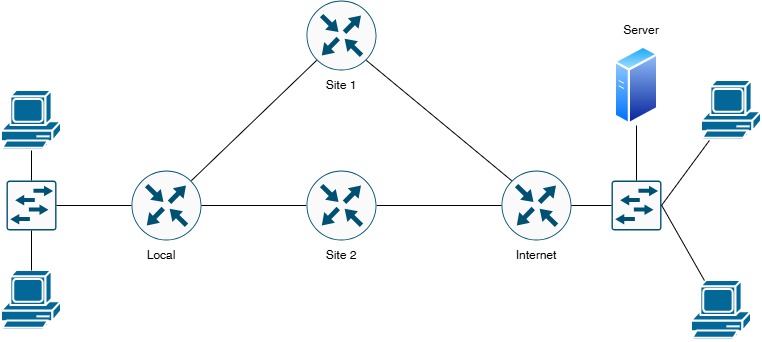
| Device Name | Device Type | Role/Function | Key Responsibilities |
|---|---|---|---|
| Local | Cisco Router | Headquarters Gateway | Main site router, ACL enforcement point, VTY access control |
| Site-1 | Cisco Router | Branch Site 1 Gateway | WAN connectivity, Internet access, routing to remote sites |
| Site-2 | Cisco Router | Branch Site 2 Gateway | WAN connectivity, Internet access, backup path routing |
| Internet | Simulated ISP Router | Internet Service Provider | Provides Internet connectivity to both sites |
| Web Server | Server | HTTP/HTTPS Server | 172.16.1.10 - Target for Extended ACL filtering |
| LAN Clients | End Devices | Local Area Network | 192.168.1.0/24 network - Source traffic for ACL testing |
| Device | Interface | IP Address | Subnet Mask | Connected To | Network Description |
|---|---|---|---|---|---|
| Local | G0/0 | 10.0.0.1 | 255.255.255.252 (/30) | Site-1 G0/0 | WAN Link - Local to Site-1 |
| Local | G0/1 | 10.0.0.5 | 255.255.255.252 (/30) | Site-2 G0/1 | WAN Link - Local to Site-2 |
| Local | G0/2 | 192.168.1.1 | 255.255.255.0 (/24) | LAN Switch | Local LAN Network |
| Site-1 | G0/0 | 10.0.0.2 | 255.255.255.252 (/30) | Local G0/0 | WAN Link - Site-1 to Local |
| Site-1 | G1/0 | 203.81.64.1 | 255.255.255.252 (/30) | Internet G1/0 | Internet Connection Site-1 |
| Site-2 | G0/1 | 10.0.0.6 | 255.255.255.252 (/30) | Local G0/1 | WAN Link - Site-2 to Local |
| Site-2 | G1/1 | 203.81.64.5 | 255.255.255.252 (/30) | Internet G1/1 | Internet Connection Site-2 |
| Internet | G1/0 | 203.81.64.2 | 255.255.255.252 (/30) | Site-1 G1/0 | ISP Link to Site-1 |
| Internet | G1/1 | 203.81.64.6 | 255.255.255.252 (/30) | Site-2 G1/1 | ISP Link to Site-2 |
| Internet | G0/0 | 172.16.1.1 | 255.255.255.0 (/24) | Remote Network | Remote Network Gateway |
| Web Server | NIC | 172.16.1.10 | 255.255.255.0 (/24) | Internet G0/0 | HTTP/HTTPS Web Server |
| Network Segment | Network Address | Subnet Mask | Usable IPs | Purpose |
|---|---|---|---|---|
| Local ↔ Site-1 WAN | 10.0.0.0 | 255.255.255.252 | 10.0.0.1 - 10.0.0.2 | Point-to-Point WAN Link |
| Local ↔ Site-2 WAN | 10.0.0.4 | 255.255.255.252 | 10.0.0.5 - 10.0.0.6 | Point-to-Point WAN Link |
| Site-1 ↔ Internet | 203.81.64.0 | 255.255.255.252 | 203.81.64.1 - 203.81.64.2 | Internet Connection 1 |
| Site-2 ↔ Internet | 203.81.64.4 | 255.255.255.252 | 203.81.64.5 - 203.81.64.6 | Internet Connection 2 |
| Local LAN | 192.168.1.0 | 255.255.255.0 | 192.168.1.1 - 192.168.1.254 | Headquarters User Network |
| Remote Network | 172.16.1.0 | 255.255.255.0 | 172.16.1.1 - 172.16.1.254 | Internet-facing Remote Site |
| ACL Type | ACL Number/Name | Purpose | Application Point |
|---|---|---|---|
| Standard ACL | ACL 10 | Telnet VTY Line Access Control | Local Router VTY Lines |
| Extended ACL | ACL 100 | Web Server HTTP/HTTPS Filtering | Local Router G0/0 (outbound) |
| Named ACL | TIME_BASED_ACCESS | Time-Range Based Access Control | Local Router G0/2 (inbound) |
| Time-Range | BUSINESS_HOURS | Define business hours: Mon-Fri 09:00-17:00 | Used by Named ACL |
Configure Local Router (Headquarters)
! Local Router Configuration
! ========================================
Router> enable
Router# configure terminal
Router(config)# hostname Local
Local(config)#
! Configure WAN Link to Site-1 (G0/0)
Local(config)# interface GigabitEthernet0/0
Local(config-if)# description ** WAN Link to Site-1 **
Local(config-if)# ip address 10.0.0.1 255.255.255.252
Local(config-if)# no shutdown
Local(config-if)# exit
! Configure WAN Link to Site-2 (G0/1)
Local(config)# interface GigabitEthernet0/1
Local(config-if)# description ** WAN Link to Site-2 **
Local(config-if)# ip address 10.0.0.5 255.255.255.252
Local(config-if)# no shutdown
Local(config-if)# exit
! Configure Local LAN Interface (G0/2)
Local(config)# interface GigabitEthernet0/2
Local(config-if)# description ** Local LAN Network 192.168.1.0/24 **
Local(config-if)# ip address 192.168.1.1 255.255.255.0
Local(config-if)# no shutdown
Local(config-if)# exit
! Save Configuration
Local(config)# end
Local# write memory
Configure Site-1 Router
! Site-1 Router Configuration
! ========================================
Router> enable
Router# configure terminal
Router(config)# hostname Site-1
Site-1(config)#
! Configure WAN Link to Local (G0/0)
Site-1(config)# interface GigabitEthernet0/0
Site-1(config-if)# description ** WAN Link to Local **
Site-1(config-if)# ip address 10.0.0.2 255.255.255.252
Site-1(config-if)# no shutdown
Site-1(config-if)# exit
! Configure Internet Link (G1/0)
Site-1(config)# interface GigabitEthernet1/0
Site-1(config-if)# description ** Internet Connection **
Site-1(config-if)# ip address 203.81.64.1 255.255.255.252
Site-1(config-if)# no shutdown
Site-1(config-if)# exit
! Save Configuration
Site-1(config)# end
Site-1# write memory
Configure Site-2 Router
! Site-2 Router Configuration
! ========================================
Router> enable
Router# configure terminal
Router(config)# hostname Site-2
Site-2(config)#
! Configure WAN Link to Local (G0/1)
Site-2(config)# interface GigabitEthernet0/1
Site-2(config-if)# description ** WAN Link to Local **
Site-2(config-if)# ip address 10.0.0.6 255.255.255.252
Site-2(config-if)# no shutdown
Site-2(config-if)# exit
! Configure Internet Link (G1/1)
Site-2(config)# interface GigabitEthernet1/1
Site-2(config-if)# description ** Internet Connection **
Site-2(config-if)# ip address 203.81.64.5 255.255.255.252
Site-2(config-if)# no shutdown
Site-2(config-if)# exit
! Save Configuration
Site-2(config)# end
Site-2# write memory
Configure Internet Router (ISP Simulation)
! Internet Router Configuration
! ========================================
Router> enable
Router# configure terminal
Router(config)# hostname Internet
Internet(config)#
! Configure Link to Site-1 (G1/0)
Internet(config)# interface GigabitEthernet1/0
Internet(config-if)# description ** ISP Link to Site-1 **
Internet(config-if)# ip address 203.81.64.2 255.255.255.252
Internet(config-if)# no shutdown
Internet(config-if)# exit
! Configure Link to Site-2 (G1/1)
Internet(config)# interface GigabitEthernet1/1
Internet(config-if)# description ** ISP Link to Site-2 **
Internet(config-if)# ip address 203.81.64.6 255.255.255.252
Internet(config-if)# no shutdown
Internet(config-if)# exit
! Configure Remote Network Interface (G0/0)
Internet(config)# interface GigabitEthernet0/0
Internet(config-if)# description ** Remote Network Gateway **
Internet(config-if)# ip address 172.16.1.1 255.255.255.0
Internet(config-if)# no shutdown
Internet(config-if)# exit
! Save Configuration
Internet(config)# end
Internet# write memory
show ip interface brief on each router. Ensure no interfaces show "administratively down" status.
Configure Static Routes on Local Router
! Local Router - Static Routing
! ========================================
Local# configure terminal
! Route to Remote Network (172.16.1.0/24) via Site-1 (primary path)
Local(config)# ip route 172.16.1.0 255.255.255.0 10.0.0.2
! Route to Internet Network (203.81.64.0/30) via Site-1
Local(config)# ip route 203.81.64.0 255.255.255.252 10.0.0.2
! Route to Internet Network (203.81.64.4/30) via Site-2
Local(config)# ip route 203.81.64.4 255.255.255.252 10.0.0.6
! Default route via Site-1 (primary Internet path)
Local(config)# ip route 0.0.0.0 0.0.0.0 10.0.0.2
! Backup default route via Site-2 (higher AD)
Local(config)# ip route 0.0.0.0 0.0.0.0 10.0.0.6 10
Local(config)# end
Local# write memory
Configure Static Routes on Site-1 Router
! Site-1 Router - Static Routing
! ========================================
Site-1# configure terminal
! Route to Local LAN (192.168.1.0/24) via Local router
Site-1(config)# ip route 192.168.1.0 255.255.255.0 10.0.0.1
! Route to Remote Network (172.16.1.0/24) via Internet
Site-1(config)# ip route 172.16.1.0 255.255.255.0 203.81.64.2
! Default route to Internet
Site-1(config)# ip route 0.0.0.0 0.0.0.0 203.81.64.2
Site-1(config)# end
Site-1# write memory
Configure Static Routes on Site-2 Router
! Site-2 Router - Static Routing
! ========================================
Site-2# configure terminal
! Route to Local LAN (192.168.1.0/24) via Local router
Site-2(config)# ip route 192.168.1.0 255.255.255.0 10.0.0.5
! Route to Remote Network (172.16.1.0/24) via Internet
Site-2(config)# ip route 172.16.1.0 255.255.255.0 203.81.64.6
! Default route to Internet
Site-2(config)# ip route 0.0.0.0 0.0.0.0 203.81.64.6
Site-2(config)# end
Site-2# write memory
Configure Static Routes on Internet Router
! Internet Router - Static Routing
! ========================================
Internet# configure terminal
! Route to Local LAN via Site-1
Internet(config)# ip route 192.168.1.0 255.255.255.0 203.81.64.1
! Route to Local-Site-1 WAN link via Site-1
Internet(config)# ip route 10.0.0.0 255.255.255.252 203.81.64.1
! Route to Local-Site-2 WAN link via Site-2
Internet(config)# ip route 10.0.0.4 255.255.255.252 203.81.64.5
Internet(config)# end
Internet# write memory
ping commands. From Local router, ping 172.16.1.10 (Web Server). Use show ip route to verify all routes are installed.
Understanding Standard ACLs
- ACL Number Range: 1-99 and 1300-1999
- Filters based on SOURCE IP ADDRESS ONLY
- Cannot filter based on destination, protocol, or port numbers
- Should be placed CLOSE TO DESTINATION
- Common use: VTY line access control, route filtering
- Implicit deny all at the end of every ACL
Scenario: Restrict Telnet access to the Local router. Only allow management from specific IP addresses in the 192.168.1.0/24 network.
Requirements:
- Allow Telnet access from 192.168.1.10 (Network Administrator PC)
- Allow Telnet access from 192.168.1.20 (IT Manager PC)
- Deny all other Telnet access attempts
Configure Standard ACL on Local Router
! Local Router - Standard ACL for Telnet
! ========================================
Local# configure terminal
! Create Standard ACL 10
Local(config)# access-list 10 remark ** VTY Access Control - Telnet Security **
Local(config)# access-list 10 permit host 192.168.1.10
Local(config)# access-list 10 permit host 192.168.1.20
Local(config)# access-list 10 deny any log
! Configure VTY Lines for Telnet/SSH
Local(config)# line vty 0 4
Local(config-line)# password cisco123
Local(config-line)# login
Local(config-line)# transport input telnet ssh
Local(config-line)# access-class 10 in
Local(config-line)# exec-timeout 10 0
Local(config-line)# logging synchronous
Local(config-line)# exit
! Enable Telnet by setting enable password
Local(config)# enable secret class123
Local(config)# service password-encryption
Local(config)# end
Local# write memory
Alternative Configuration - Using Named Standard ACL
Local(config)# ip access-list standard TELNET_ACCESS
Local(config-std-nacl)# remark Allow Network Admin
Local(config-std-nacl)# permit host 192.168.1.10
Local(config-std-nacl)# remark Allow IT Manager
Local(config-std-nacl)# permit host 192.168.1.20
Local(config-std-nacl)# deny any log
Local(config-std-nacl)# exit
Local(config)# line vty 0 4
Local(config-line)# access-class TELNET_ACCESS in
Local(config-line)# exit
Understanding Wildcard Masks
- Single Host: 0.0.0.0 or use keyword "host"
- /24 Network: 0.0.0.255 (matches 192.168.1.0 - 192.168.1.255)
- /16 Network: 0.0.255.255 (matches 172.16.0.0 - 172.16.255.255)
- Any Address: 255.255.255.255 or use keyword "any"
- Subnet /28: 0.0.0.15 (matches 16 IP addresses)
Understanding Extended ACLs
- ACL Number Range: 100-199 and 2000-2699
- Filters based on: Source IP, Destination IP, Protocol, Port Numbers
- Granular control over traffic types (TCP, UDP, ICMP, etc.)
- Should be placed CLOSE TO SOURCE
- Common use: Traffic filtering, security policies, QoS marking
- Supports "established" keyword for stateful filtering
Scenario: Control access to the Web Server (172.16.1.10) from the Local LAN. Only specific hosts can access HTTP (port 80) and HTTPS (port 443).
Requirements:
- Allow HTTP (TCP 80) access to 172.16.1.10 from 192.168.1.0/24 network
- Allow HTTPS (TCP 443) access to 172.16.1.10 from 192.168.1.0/24 network
- Deny HTTP/HTTPS from host 192.168.1.50 (Restricted user)
- Allow ICMP (ping) for network troubleshooting
- Allow established TCP connections (return traffic)
- Log denied access attempts
Configure Extended ACL on Local Router
! Local Router - Extended ACL for Web Access
! ========================================
Local# configure terminal
! Create Extended ACL 100
Local(config)# access-list 100 remark ** Web Server Access Control **
! Deny HTTP/HTTPS from restricted host 192.168.1.50
Local(config)# access-list 100 deny tcp host 192.168.1.50 host 172.16.1.10 eq 80 log
Local(config)# access-list 100 deny tcp host 192.168.1.50 host 172.16.1.10 eq 443 log
! Allow HTTP (port 80) to Web Server from Local LAN
Local(config)# access-list 100 permit tcp 192.168.1.0 0.0.0.255 host 172.16.1.10 eq 80
! Allow HTTPS (port 443) to Web Server from Local LAN
Local(config)# access-list 100 permit tcp 192.168.1.0 0.0.0.255 host 172.16.1.10 eq 443
! Allow established TCP connections (return traffic)
Local(config)# access-list 100 permit tcp any any established
! Allow ICMP for troubleshooting (ping, traceroute)
Local(config)# access-list 100 permit icmp any any
! Allow all other internal traffic between sites
Local(config)# access-list 100 permit ip 192.168.1.0 0.0.0.255 10.0.0.0 0.0.0.255
! Implicit deny all (logged)
Local(config)# access-list 100 deny ip any any log
! Apply ACL to outbound traffic on G0/0 (toward Site-1)
Local(config)# interface GigabitEthernet0/0
Local(config-if)# ip access-group 100 out
Local(config-if)# exit
Local(config)# end
Local# write memory
Extended ACL - Port Number Reference
| Service | Protocol | Port Number | ACL Syntax Example |
|---|---|---|---|
| HTTP | TCP | 80 | permit tcp any any eq 80 or eq www |
| HTTPS | TCP | 443 | permit tcp any any eq 443 |
| Telnet | TCP | 23 | permit tcp any any eq 23 or eq telnet |
| SSH | TCP | 22 | permit tcp any any eq 22 |
| FTP | TCP | 20, 21 | permit tcp any any eq 21 |
| DNS | UDP | 53 | permit udp any any eq 53 or eq domain |
| SMTP | TCP | 25 | permit tcp any any eq 25 or eq smtp |
| ICMP (Ping) | ICMP | N/A | permit icmp any any |
Understanding Named ACLs and Time-Based ACLs
- Named ACLs: Use descriptive names instead of numbers (easier to manage)
- Advantages: Insert/delete specific entries, better documentation, no number limits
- Time-Range: Apply ACL rules only during specific times/days
- Use Cases: Business hours access, bandwidth management, scheduled maintenance
- Syntax: time-range NAME → periodic days HH:MM to HH:MM
Scenario: Implement time-based access control for the Local LAN. Allow internet access only during business hours (Monday-Friday, 09:00-17:00).
Requirements:
- Define business hours: Monday-Friday, 09:00-17:00
- Allow all traffic during business hours
- Outside business hours: Block HTTP/HTTPS, allow critical services
- Always allow DNS, ICMP, and internal network traffic
- Use Named Extended ACL for better management
Step 5.1: Create Time-Range Definition
! Local Router - Time-Range Configuration
! ========================================
Local# configure terminal
! Define Business Hours Time-Range
Local(config)# time-range BUSINESS_HOURS
Local(config-time-range)# periodic Monday Tuesday Wednesday Thursday Friday 09:00 to 17:00
Local(config-time-range)# exit
! Optional: Define After-Hours Time-Range
Local(config)# time-range AFTER_HOURS
Local(config-time-range)# periodic Monday Tuesday Wednesday Thursday Friday 17:01 to 08:59
Local(config-time-range)# periodic Saturday Sunday 00:00 to 23:59
Local(config-time-range)# exit
Step 5.2: Create Named Extended ACL with Time-Based Rules
! Named Extended ACL with Time-Range
! ========================================
! Create Named Extended ACL
Local(config)# ip access-list extended TIME_BASED_ACCESS
Local(config-ext-nacl)# remark ** Time-Based Internet Access Control **
! === BUSINESS HOURS RULES (09:00-17:00 Mon-Fri) ===
Local(config-ext-nacl)# remark Allow all traffic during business hours
Local(config-ext-nacl)# permit ip 192.168.1.0 0.0.0.255 any time-range BUSINESS_HOURS
! === AFTER-HOURS RULES ===
Local(config-ext-nacl)# remark Block HTTP during after-hours
Local(config-ext-nacl)# deny tcp 192.168.1.0 0.0.0.255 any eq 80 time-range AFTER_HOURS log
Local(config-ext-nacl)# remark Block HTTPS during after-hours
Local(config-ext-nacl)# deny tcp 192.168.1.0 0.0.0.255 any eq 443 time-range AFTER_HOURS log
! === ALWAYS ALLOWED SERVICES ===
Local(config-ext-nacl)# remark Always allow DNS (critical service)
Local(config-ext-nacl)# permit udp 192.168.1.0 0.0.0.255 any eq 53
Local(config-ext-nacl)# permit tcp 192.168.1.0 0.0.0.255 any eq 53
Local(config-ext-nacl)# remark Always allow ICMP for troubleshooting
Local(config-ext-nacl)# permit icmp 192.168.1.0 0.0.0.255 any
Local(config-ext-nacl)# remark Always allow SSH (remote management)
Local(config-ext-nacl)# permit tcp 192.168.1.0 0.0.0.255 any eq 22
Local(config-ext-nacl)# remark Allow established connections (return traffic)
Local(config-ext-nacl)# permit tcp any any established
Local(config-ext-nacl)# remark Allow internal network communication
Local(config-ext-nacl)# permit ip 192.168.1.0 0.0.0.255 10.0.0.0 0.0.255.255
! === FINAL DENY (logged) ===
Local(config-ext-nacl)# deny ip any any log
Local(config-ext-nacl)# exit
! Apply Named ACL to Local LAN Interface (G0/2)
Local(config)# interface GigabitEthernet0/2
Local(config-if)# ip access-group TIME_BASED_ACCESS in
Local(config-if)# exit
Local(config)# end
Local# write memory
clock set HH:MM:SS DD MONTH YYYY command.
Step 5.3: Configure Router Clock and Timezone
Local# configure terminal
Local(config)# clock timezone SGT 8
Local(config)# exit
! Manually set clock (if NTP not available)
Local# clock set 14:30:00 15 January 2026
! Verify time-range status
Local# show time-range
Named ACL Advantages - Inserting and Deleting Entries
! Named ACL Editing Examples
! ========================================
! View ACL with sequence numbers
Local# show ip access-lists TIME_BASED_ACCESS
! Insert a new entry at sequence number 15
Local(config)# ip access-list extended TIME_BASED_ACCESS
Local(config-ext-nacl)# 15 permit tcp host 192.168.1.100 any eq 443
Local(config-ext-nacl)# exit
! Delete a specific entry by sequence number
Local(config)# ip access-list extended TIME_BASED_ACCESS
Local(config-ext-nacl)# no 15
Local(config-ext-nacl)# exit
! Add remark for documentation
Local(config)# ip access-list extended TIME_BASED_ACCESS
Local(config-ext-nacl)# remark ** VIP User Exception - Full Access **
Local(config-ext-nacl)# permit ip host 192.168.1.99 any
Local(config-ext-nacl)# exit
Numbered ACL Editing (More Restrictive)
! Remove entire ACL
Local(config)# no access-list 100
! Recreate with modifications
Local(config)# access-list 100 permit tcp 192.168.1.0 0.0.0.255 host 172.16.1.10 eq 80
! ... add remaining entries ...
ACL Resequencing
Local(config)# ip access-list resequence TIME_BASED_ACCESS 10 10
! This renumbers entries: 10, 20, 30, 40... for easier insertion
1. Verify Interface Configuration
Local# show ip interface brief
! Expected Output: All interfaces "up/up"
! G0/0, G0/1, G0/2 should show configured IP addresses
2. Verify Routing Table
Local# show ip route
! Verify routes to:
! - 172.16.1.0/24 (Remote Network)
! - 203.81.64.0/30 and 203.81.64.4/30 (Internet links)
! - Default route 0.0.0.0/0
3. Verify ACL Configuration
Local# show access-lists
! Show specific ACL
Local# show access-list 10
Local# show access-list 100
Local# show ip access-list TIME_BASED_ACCESS
! Show ACL hit counts (matches)
Local# show access-lists
! Look for "matches" count - indicates traffic hitting each rule
Expected Output - Standard ACL 10:
Standard IP access list 10
10 permit 192.168.1.10 (5 matches)
20 permit 192.168.1.20 (2 matches)
30 deny any log (15 matches)
Expected Output - Extended ACL 100:
Extended IP access list 100
10 deny tcp host 192.168.1.50 host 172.16.1.10 eq www log (3 matches)
20 deny tcp host 192.168.1.50 host 172.16.1.10 eq 443 log (1 match)
30 permit tcp 192.168.1.0 0.0.0.255 host 172.16.1.10 eq www (47 matches)
40 permit tcp 192.168.1.0 0.0.0.255 host 172.16.1.10 eq 443 (32 matches)
50 permit tcp any any established (156 matches)
60 permit icmp any any (28 matches)
70 permit ip 192.168.1.0 0.0.0.255 10.0.0.0 0.0.0.255 (89 matches)
80 deny ip any any log (12 matches)
4. Verify Time-Range Configuration
Local# show time-range
! Check if time-range is currently active
Expected Output - Time-Range:
time-range entry: BUSINESS_HOURS (active)
periodic Monday Tuesday Wednesday Thursday Friday 09:00 to 17:00
Used in: IP ACL entry TIME_BASED_ACCESS
time-range entry: AFTER_HOURS (inactive)
periodic Monday Tuesday Wednesday Thursday Friday 17:01 to 08:59
periodic Saturday Sunday 00:00 to 23:59
Used in: IP ACL entry TIME_BASED_ACCESS
5. Verify ACL Application on Interfaces
Local# show ip interface GigabitEthernet0/0
! Look for "Outgoing access list is 100"
Local# show ip interface GigabitEthernet0/2
! Look for "Inbound access list is TIME_BASED_ACCESS"
Expected Output:
GigabitEthernet0/0 is up, line protocol is up
Internet address is 10.0.0.1/30
Broadcast address is 255.255.255.255
Address determined by setup command
MTU is 1500 bytes
Helper address is not set
Directed broadcast forwarding is disabled
Outgoing access list is 100
Inbound access list is not set
...
6. Test Connectivity with Ping
Local# ping 172.16.1.10
! Test from LAN client (if possible)
PC> ping 172.16.1.10
! Traceroute to verify path
Local# traceroute 172.16.1.10
7. Test Telnet Access Control (Standard ACL)
PC-192.168.1.10> telnet 192.168.1.1
! From denied host 192.168.1.30 - SHOULD FAIL
PC-192.168.1.30> telnet 192.168.1.1
! Expected: Connection refused or timeout
! Check VTY line configuration
Local# show line vty 0 4
8. Test Web Access (Extended ACL)
PC-192.168.1.10> curl http://172.16.1.10
PC-192.168.1.10> curl https://172.16.1.10
! From restricted host 192.168.1.50 - SHOULD FAIL
PC-192.168.1.50> curl http://172.16.1.10
! Expected: Connection timeout or denied
! Check ACL hit counters
Local# show access-list 100 | include 192.168.1.50
9. Test Time-Based ACL
! All traffic should be permitted
! Outside business hours
! HTTP/HTTPS should be blocked, DNS/SSH/ICMP allowed
! Change router time to test (for lab purposes)
Local# clock set 20:00:00 15 January 2026
! Verify time-range status changed
Local# show time-range
! BUSINESS_HOURS should show (inactive)
! AFTER_HOURS should show (active)
! Test web access - should be denied
PC> curl http://172.16.1.10
! Test DNS - should still work
PC> nslookup www.example.com
10. Monitor ACL Logs
Local# show logging | include ACL
! Enable console logging for real-time monitoring
Local(config)# logging console informational
! Clear ACL counters to start fresh
Local# clear access-list counters
- ☐ Interface Status: All interfaces show "up/up" status on all routers
- ☐ IP Addressing: All interfaces have correct IP addresses assigned
- ☐ Routing: Static routes installed correctly, ping 172.16.1.10 successful
- ☐ Standard ACL 10: Created and applied to VTY lines on Local router
- ☐ Telnet Access: Host 192.168.1.10 can telnet to Local router
- ☐ Telnet Denial: Other hosts (e.g., 192.168.1.30) cannot telnet to Local router
- ☐ Extended ACL 100: Created and applied outbound on Local G0/0
- ☐ Web Access Allowed: 192.168.1.0/24 hosts (except .50) can access 172.16.1.10:80/443
- ☐ Web Access Denied: Host 192.168.1.50 denied access to web server (logged)
- ☐ Time-Range: BUSINESS_HOURS time-range created and shows correct status
- ☐ Named ACL: TIME_BASED_ACCESS created with time-range entries
- ☐ Time-Based ACL: Applied inbound on Local G0/2
- ☐ Business Hours Test: All traffic permitted during Mon-Fri 09:00-17:00
- ☐ After Hours Test: HTTP/HTTPS blocked, DNS/SSH/ICMP allowed outside business hours
- ☐ ACL Hit Counts: All ACL entries show match counters incrementing
- ☐ ACL Logging: Denied traffic generates log messages
- ☐ Router Clock: System clock set correctly for time-range accuracy
- ☐ Configuration Saved: All configurations saved with "write memory"
Symptoms: Cannot telnet to Local router even from allowed host 192.168.1.10
Possible Causes & Solutions:
| Cause | Diagnostic Command | Solution |
|---|---|---|
| VTY password not configured | show running-config | section line vty |
Configure: line vty 0 4password cisco123login |
| ACL not applied to VTY lines | show line vty 0 4 |
Apply: line vty 0 4access-class 10 in |
| Wrong source IP in ACL | show access-list 10 |
Verify permit entries match client IP addresses |
| Telnet not enabled | show line vty 0 4 |
Configure: transport input telnet ssh |
| Enable password not set | show run | include enable |
Configure: enable secret class123 |
Troubleshooting Steps:
Local# show running-config | section line vty
! 2. Check ACL configuration
Local# show access-list 10
! 3. Verify ACL applied to VTY
Local# show line vty 0 4 | include access
! 4. Test from console (should work)
Local# telnet 192.168.1.1
! 5. Check ACL hit counters
Local# show access-list 10
! Matches should increment when telnet attempted
! 6. Temporarily remove ACL to isolate issue
Local(config)# line vty 0 4
Local(config-line)# no access-class 10 in
! If telnet works now, issue is with ACL configuration
Symptoms: No traffic passing through Local router after applying ACL 100
Possible Causes & Solutions:
- Implicit Deny All: ACLs have implicit "deny any" at end - ensure permit statements cover needed traffic
- Wrong ACL Direction: Check if ACL applied "in" vs "out" - Extended ACLs typically applied outbound at source
- Wildcard Mask Error: Common mistake: using subnet mask instead of wildcard mask
- ACL Order: Deny statements before permit statements can block legitimate traffic
- Missing "Established": Forgetting to permit established TCP connections blocks return traffic
Troubleshooting Steps:
Local# show access-list 100
! 2. Verify ACL applied correctly
Local# show ip interface GigabitEthernet0/0
! Should show "Outgoing access list is 100"
! 3. Check hit counters - which rule is blocking?
Local# show access-list 100
! Look at last deny entry - high matches indicate blocking
! 4. Test with ACL temporarily removed
Local(config)# interface GigabitEthernet0/0
Local(config-if)# no ip access-group 100 out
! If traffic flows now, issue is ACL configuration
! 5. Enable ACL logging
Local(config)# access-list 100 deny ip any any log
! Check logs: show logging | include ACL
! 6. Verify wildcard masks
! Wrong: 192.168.1.0 255.255.255.0 (subnet mask)
! Right: 192.168.1.0 0.0.0.255 (wildcard mask)
Common Extended ACL Mistakes:
| Mistake | Wrong Configuration | Correct Configuration |
|---|---|---|
| Using subnet mask instead of wildcard | permit ip 192.168.1.0 255.255.255.0 any |
permit ip 192.168.1.0 0.0.0.255 any |
| Wrong protocol number | permit ip any any eq 80 |
permit tcp any any eq 80 |
| Source/destination reversed | permit tcp host 172.16.1.10 192.168.1.0 ... |
permit tcp 192.168.1.0 0.0.0.255 host 172.16.1.10 ... |
| Missing established keyword | No return traffic rule | permit tcp any any established |
Symptoms: Time-range ACL entries not activating/deactivating at correct times
Possible Causes & Solutions:
| Cause | Diagnostic Command | Solution |
|---|---|---|
| Router clock not set | show clock |
clock set 14:30:00 15 Jan 2026 |
| Wrong timezone configured | show clock detail |
clock timezone SGT 8 |
| Time-range not applied to ACL | show access-lists |
Add "time-range NAME" to ACL entry |
| Time-range syntax error | show time-range |
Verify periodic/absolute syntax correct |
| Time-range shows "inactive" when should be active | show time-range |
Check current time vs defined range |
Troubleshooting Steps:
Local# show clock detail
! Check time, date, timezone
! 2. Check time-range configuration
Local# show time-range
! Verify "active" or "inactive" status
! 3. Check time-range association with ACL
Local# show ip access-lists TIME_BASED_ACCESS
! Look for "time-range BUSINESS_HOURS" in entries
! 4. Manually test by changing time
Local# clock set 10:00:00 15 January 2026
Local# show time-range
! BUSINESS_HOURS should now be "active"
Local# clock set 20:00:00 15 January 2026
Local# show time-range
! BUSINESS_HOURS should now be "inactive"
! 5. Test traffic during both time periods
! During business hours: all traffic permitted
! After hours: HTTP/HTTPS denied, DNS/SSH allowed
! 6. Configure NTP for accurate time (production)
Local(config)# ntp server 129.6.15.28
Local# show ntp status
Possible Causes & Solutions:
- Logging Not Enabled: Configure
logging console informationalorlogging buffered - No "log" Keyword: Add "log" keyword to ACL deny statements
- Traffic Not Hitting Deny Rule: Permitted by earlier rule - check ACL order
- Buffer Full: Clear logs with
clear logging
Local(config)# logging console informational
Local(config)# logging buffered 8192
! View logs
Local# show logging | include ACL
Local# show logging | include list
! Clear old logs
Local# clear logging
Issue: Need to insert a new rule in the middle of numbered ACL 100
Solutions:
- Option 1: Convert to Named ACL (recommended)
- Option 2: Remove and recreate entire ACL
- Option 3: Use sequence numbers (IOS 12.3+ for numbered ACLs)
Local(config)# ip access-list extended ACL_100_NAMED
! Recreate all entries from ACL 100
Local(config-ext-nacl)# 10 deny tcp host 192.168.1.50 host 172.16.1.10 eq 80
Local(config-ext-nacl)# 20 permit tcp 192.168.1.0 0.0.0.255 host 172.16.1.10 eq 80
! ... etc ...
! Remove old ACL from interface
Local(config)# interface GigabitEthernet0/0
Local(config-if)# no ip access-group 100 out
! Apply new named ACL
Local(config-if)# ip access-group ACL_100_NAMED out
! Delete old numbered ACL
Local(config)# no access-list 100
! Option 2: Resequence (if available)
Local(config)# ip access-list resequence 100 10 10
! Now you can insert at any sequence number
show ip interface brief (Local Router)
Interface IP-Address OK? Method Status Protocol
GigabitEthernet0/0 10.0.0.1 YES manual up up
GigabitEthernet0/1 10.0.0.5 YES manual up up
GigabitEthernet0/2 192.168.1.1 YES manual up up
show ip route (Local Router)
Codes: L - local, C - connected, S - static, R - RIP, M - mobile, B - BGP
...
Gateway of last resort is 10.0.0.2 to network 0.0.0.0
S* 0.0.0.0/0 [1/0] via 10.0.0.2
[10/0] via 10.0.0.6
10.0.0.0/8 is variably subnetted, 4 subnets, 2 masks
C 10.0.0.0/30 is directly connected, GigabitEthernet0/0
L 10.0.0.1/32 is directly connected, GigabitEthernet0/0
C 10.0.0.4/30 is directly connected, GigabitEthernet0/1
L 10.0.0.5/32 is directly connected, GigabitEthernet0/1
S 172.16.1.0/24 [1/0] via 10.0.0.2
192.168.1.0/24 is variably subnetted, 2 subnets, 2 masks
C 192.168.1.0/24 is directly connected, GigabitEthernet0/2
L 192.168.1.1/32 is directly connected, GigabitEthernet0/2
S 203.81.64.0/30 [1/0] via 10.0.0.2
S 203.81.64.4/30 [1/0] via 10.0.0.6
show access-lists (All ACLs)
Standard IP access list 10
10 permit 192.168.1.10 (8 matches)
20 permit 192.168.1.20 (3 matches)
30 deny any log (22 matches)
Extended IP access list 100
10 deny tcp host 192.168.1.50 host 172.16.1.10 eq www log (5 matches)
20 deny tcp host 192.168.1.50 host 172.16.1.10 eq 443 log (2 matches)
30 permit tcp 192.168.1.0 0.0.0.255 host 172.16.1.10 eq www (124 matches)
40 permit tcp 192.168.1.0 0.0.0.255 host 172.16.1.10 eq 443 (89 matches)
50 permit tcp any any established (456 matches)
60 permit icmp any any (67 matches)
70 permit ip 192.168.1.0 0.0.0.255 10.0.0.0 0.0.0.255 (234 matches)
80 deny ip any any log (45 matches)
Extended IP access list TIME_BASED_ACCESS
10 permit ip 192.168.1.0 0.0.0.255 any time-range BUSINESS_HOURS (active) (1534 matches)
20 deny tcp 192.168.1.0 0.0.0.255 any eq www time-range AFTER_HOURS (inactive) (0 matches)
30 deny tcp 192.168.1.0 0.0.0.255 any eq 443 time-range AFTER_HOURS (inactive) (0 matches)
40 permit udp 192.168.1.0 0.0.0.255 any eq domain (89 matches)
50 permit tcp 192.168.1.0 0.0.0.255 any eq domain (12 matches)
60 permit icmp 192.168.1.0 0.0.0.255 any (45 matches)
70 permit tcp 192.168.1.0 0.0.0.255 any eq 22 (8 matches)
80 permit tcp any any established (567 matches)
90 permit ip 192.168.1.0 0.0.0.255 10.0.0.0 0.0.255.255 (345 matches)
100 deny ip any any log (23 matches)
show time-range
show ip interface GigabitEthernet0/0 (ACL Applied)
show running-config | section access-list
access-list 10 remark ** VTY Access Control - Telnet Security **
access-list 10 permit 192.168.1.10
access-list 10 permit 192.168.1.20
access-list 10 deny any log
!
access-list 100 remark ** Web Server Access Control **
access-list 100 deny tcp host 192.168.1.50 host 172.16.1.10 eq www log
access-list 100 deny tcp host 192.168.1.50 host 172.16.1.10 eq 443 log
access-list 100 permit tcp 192.168.1.0 0.0.0.255 host 172.16.1.10 eq www
access-list 100 permit tcp 192.168.1.0 0.0.0.255 host 172.16.1.10 eq 443
access-list 100 permit tcp any any established
access-list 100 permit icmp any any
access-list 100 permit ip 192.168.1.0 0.0.0.255 10.0.0.0 0.0.0.255
access-list 100 deny ip any any log
!
ip access-list extended TIME_BASED_ACCESS
remark ** Time-Based Internet Access Control **
permit ip 192.168.1.0 0.0.0.255 any time-range BUSINESS_HOURS
deny tcp 192.168.1.0 0.0.0.255 any eq www time-range AFTER_HOURS log
deny tcp 192.168.1.0 0.0.0.255 any eq 443 time-range AFTER_HOURS log
permit udp 192.168.1.0 0.0.0.255 any eq domain
permit tcp 192.168.1.0 0.0.0.255 any eq domain
permit icmp 192.168.1.0 0.0.0.255 any
permit tcp 192.168.1.0 0.0.0.255 any eq 22
permit tcp any any established
permit ip 192.168.1.0 0.0.0.255 10.0.0.0 0.0.255.255
deny ip any any log
- Standard ACLs (1-99, 1300-1999): Filter only on source IP address
- Extended ACLs (100-199, 2000-2699): Filter on source, destination, protocol, ports
- Named ACLs: Use descriptive names, easier to manage, support editing
- Implicit Deny: Every ACL ends with invisible "deny ip any any"
- Top-Down Processing: First match wins - order matters critically
- Cannot Edit Numbered ACLs: Must remove and recreate (use named ACLs instead)
- Standard ACLs: Place close to DESTINATION (broad filtering)
- Extended ACLs: Place close to SOURCE (precise filtering, save bandwidth)
- Direction: "in" = traffic entering interface, "out" = traffic exiting interface
- One ACL Per Protocol Per Direction Per Interface: Cannot apply two ACLs inbound on same interface
- 0 = Must Match: Binary 0 means "check this bit"
- 1 = Ignore: Binary 1 means "don't care about this bit"
- Formula: Wildcard = 255.255.255.255 - Subnet Mask
- Single Host: 0.0.0.0 or keyword "host"
- All Addresses: 255.255.255.255 or keyword "any"
- /24 Network: 0.0.0.255 (last octet ignored)
- /16 Network: 0.0.255.255 (last two octets ignored)
- Enforce business hours access policies
- Conserve bandwidth during peak hours
- Schedule maintenance windows
- Implement temporary security restrictions
- Requires accurate router clock (use NTP)
- Can use "periodic" (recurring) or "absolute" (one-time) ranges
- Security: Restrict Telnet/SSH access to routers (Standard ACL on VTY)
- Traffic Filtering: Block specific protocols/services (Extended ACL)
- NAT: Define interesting traffic for translation
- VPN: Define crypto ACL for IPsec tunnels
- QoS: Match traffic for class-maps and policy-maps
- Routing: Filter routing updates with distribute-lists
- SNMP: Restrict SNMP management access
- Using Subnet Mask Instead of Wildcard: 255.255.255.0 vs 0.0.0.255
- Wrong ACL Order: Deny all before specific permits = no traffic passes
- Forgetting "Established": Extended ACLs need established keyword for return traffic
- Wrong Protocol: Using "ip" instead of "tcp" when specifying ports
- Wrong Direction: Applying "in" when you meant "out" (or vice versa)
- Not Logging Denies: Makes troubleshooting difficult
- Editing Numbered ACLs: Use named ACLs for easier management
- Not Saving Configuration: Always "write memory" after ACL changes
| Task | Command | Example |
|---|---|---|
| Create Standard ACL | access-list NUMBER permit|deny SOURCE WILDCARD |
access-list 10 permit 192.168.1.0 0.0.0.255 |
| Create Extended ACL | access-list NUMBER permit|deny PROTOCOL SRC DST |
access-list 100 permit tcp any host 10.1.1.1 eq 80 |
| Named Standard ACL | ip access-list standard NAME |
ip access-list standard TELNET_ACL |
| Named Extended ACL | ip access-list extended NAME |
ip access-list extended WEB_FILTER |
| Apply ACL to Interface | ip access-group ACL in|out |
ip access-group 100 out |
| Apply ACL to VTY | access-class ACL in|out |
access-class 10 in |
| Create Time-Range | time-range NAME |
time-range BUSINESS_HOURS |
| Periodic Time-Range | periodic DAYS HH:MM to HH:MM |
periodic weekdays 09:00 to 17:00 |
| Apply Time-Range to ACL | permit|deny ... time-range NAME |
deny tcp any eq 80 time-range AFTER_HOURS |
| View ACLs | show access-lists |
show ip access-list 100 |
| View Time-Ranges | show time-range |
show time-range BUSINESS_HOURS |
| Clear ACL Counters | clear access-list counters |
clear access-list counters 100 |
| Delete ACL | no access-list NUMBER |
no access-list 100 |
| Delete Named ACL | no ip access-list TYPE NAME |
no ip access-list extended WEB_FILTER |
| Resequence ACL | ip access-list resequence NAME START INC |
ip access-list resequence WEB_FILTER 10 10 |
- Reflexive ACLs: Dynamic ACLs that create temporary entries for return traffic
- Dynamic (Lock-and-Key) ACLs: Require user authentication before permitting traffic
- Context-Based Access Control (CBAC): Stateful firewall features on routers
- Zone-Based Firewall (ZBF): Modern replacement for CBAC, uses security zones
- Object Groups: Group multiple IP addresses, ports, protocols for cleaner ACLs
- Turbo ACLs: Compiled ACLs for faster processing on high-speed routers
- IPv6 ACLs: Similar syntax but uses "ipv6 traffic-filter" instead of "ip access-group"
- VLAN ACLs (VACLs): Applied on switches to filter traffic within VLANs
- Port ACLs (PACLs): Applied to switch ports for Layer 2 filtering
Local Router - Full Configuration
! Local Router - Complete ACL Lab Configuration
! ========================================
hostname Local
! Interface Configuration
interface GigabitEthernet0/0
description ** WAN Link to Site-1 **
ip address 10.0.0.1 255.255.255.252
ip access-group 100 out
no shutdown
interface GigabitEthernet0/1
description ** WAN Link to Site-2 **
ip address 10.0.0.5 255.255.255.252
no shutdown
interface GigabitEthernet0/2
description ** Local LAN Network 192.168.1.0/24 **
ip address 192.168.1.1 255.255.255.0
ip access-group TIME_BASED_ACCESS in
no shutdown
! Static Routing
ip route 0.0.0.0 0.0.0.0 10.0.0.2
ip route 0.0.0.0 0.0.0.0 10.0.0.6 10
ip route 172.16.1.0 255.255.255.0 10.0.0.2
ip route 203.81.64.0 255.255.255.252 10.0.0.2
ip route 203.81.64.4 255.255.255.252 10.0.0.6
! Standard ACL for Telnet Access
access-list 10 remark ** VTY Access Control - Telnet Security **
access-list 10 permit host 192.168.1.10
access-list 10 permit host 192.168.1.20
access-list 10 deny any log
! Extended ACL for Web Server Access
access-list 100 remark ** Web Server Access Control **
access-list 100 deny tcp host 192.168.1.50 host 172.16.1.10 eq www log
access-list 100 deny tcp host 192.168.1.50 host 172.16.1.10 eq 443 log
access-list 100 permit tcp 192.168.1.0 0.0.0.255 host 172.16.1.10 eq www
access-list 100 permit tcp 192.168.1.0 0.0.0.255 host 172.16.1.10 eq 443
access-list 100 permit tcp any any established
access-list 100 permit icmp any any
access-list 100 permit ip 192.168.1.0 0.0.0.255 10.0.0.0 0.0.0.255
access-list 100 deny ip any any log
! Time-Range Definitions
time-range BUSINESS_HOURS
periodic Monday Tuesday Wednesday Thursday Friday 09:00 to 17:00
time-range AFTER_HOURS
periodic Monday Tuesday Wednesday Thursday Friday 17:01 to 08:59
periodic Saturday Sunday 00:00 to 23:59
! Named Extended ACL with Time-Based Rules
ip access-list extended TIME_BASED_ACCESS
remark ** Time-Based Internet Access Control **
permit ip 192.168.1.0 0.0.0.255 any time-range BUSINESS_HOURS
deny tcp 192.168.1.0 0.0.0.255 any eq www time-range AFTER_HOURS log
deny tcp 192.168.1.0 0.0.0.255 any eq 443 time-range AFTER_HOURS log
permit udp 192.168.1.0 0.0.0.255 any eq domain
permit tcp 192.168.1.0 0.0.0.255 any eq domain
permit icmp 192.168.1.0 0.0.0.255 any
permit tcp 192.168.1.0 0.0.0.255 any eq 22
permit tcp any any established
permit ip 192.168.1.0 0.0.0.255 10.0.0.0 0.0.255.255
deny ip any any log
! VTY Line Configuration with ACL
line vty 0 4
password cisco123
login
transport input telnet ssh
access-class 10 in
exec-timeout 10 0
logging synchronous
! Security Configuration
enable secret class123
service password-encryption
! Timezone and Clock
clock timezone SGT 8
! Logging Configuration
logging console informational
logging buffered 8192
! End Configuration
end
write memory
Congratulations! You have successfully completed Lab 11.2: Advanced Access Control Lists (ACLs). This comprehensive lab covered:
- ✅ Multi-site network topology with dual WAN links and Internet connectivity
- ✅ Static routing configuration for full end-to-end reachability
- ✅ Standard ACL (ACL 10) for Telnet VTY line access control
- ✅ Extended ACL (ACL 100) for Web Server HTTP/HTTPS traffic filtering
- ✅ Named Extended ACL with time-based access control policies
- ✅ Time-range configuration for business hours enforcement
- ✅ ACL application to interfaces and VTY lines
- ✅ Comprehensive verification procedures and troubleshooting techniques
- ✅ Wildcard mask calculations and ACL placement best practices
- ✅ Real-world security policy implementation
- Configure and apply Standard, Extended, and Named ACLs
- Implement time-based security policies with time-ranges
- Understand ACL processing order and implicit deny behavior
- Calculate wildcard masks for various network sizes
- Apply ACL best practices for placement and direction
- Troubleshoot ACL misconfigurations effectively
- Monitor ACL performance with hit counters and logging
- Edit Named ACLs without disrupting service
- 5.2: Configure and verify access control lists
- 5.3: Configure and verify Layer 2 security features (ACL concepts apply)
- 5.4: Describe Network security operations (traffic filtering, policy enforcement)
- Always test ACLs in lab before production deployment
- Document all ACL changes and maintain configuration backups
- Use Named ACLs for easier management in large networks
- Implement logging judiciously (high-traffic ACLs generate excessive logs)
- Configure NTP for accurate time-based ACL operation
- Review ACL hit counters regularly to validate policies
- Consider performance impact on high-speed routers
- Implement change management procedures for ACL modifications
Recommended Follow-Up Labs:
- 🔹 Lab 12.1: Zone-Based Firewall Configuration (Advanced Security)
- 🔹 Lab 12.2: IPv6 ACLs and Traffic Filtering
- 🔹 Lab 13.1: Network Address Translation (NAT) with ACLs
- 🔹 Lab 14.1: Quality of Service (QoS) with Classification ACLs
- 🔹 Lab 15.1: VPN Crypto ACLs and IPsec Configuration
Additional Practice Scenarios:
- Implement ACLs to block specific websites by IP address
- Configure reflexive ACLs for dynamic return traffic
- Create object groups to simplify complex ACLs
- Implement ACLs for preventing DoS attacks (rate limiting)
- Configure VLAN ACLs (VACLs) on switches
- Deploy ACLs in conjunction with NAT for DMZ security
Local# write memory
! Or use alternative command
Local# copy running-config startup-config
! Backup to TFTP server (if available)
Local# copy running-config tftp:
! Enter TFTP server IP and filename when prompted
! View saved configuration
Local# show startup-config
! Compare running vs startup
Local# show archive config differences
- ☐ All router interfaces configured and operational (up/up)
- ☐ Static routes installed and end-to-end connectivity verified
- ☐ Standard ACL 10 restricts Telnet access successfully
- ☐ Extended ACL 100 filters web traffic to 172.16.1.10 correctly
- ☐ Named ACL TIME_BASED_ACCESS enforces business hours policy
- ☐ Time-ranges show correct active/inactive status
- ☐ All ACLs applied to correct interfaces/VTY lines
- ☐ ACL hit counters increment during testing
- ☐ Denied traffic generates log messages as expected
- ☐ All configurations saved with "write memory"
- ☐ Documentation complete with topology diagram and addressing table
- ☐ Troubleshooting procedures tested and validated
🎓 Congratulations on completing Lab 11.2!
You are now proficient in Access Control List configuration and management.