This advanced lab focuses on implementing Route-Maps in conjunction with Standard Access Control Lists (ACLs) and Prefix-Lists for sophisticated route manipulation and policy-based routing. Students will master the configuration of route filtering, route redistribution, and traffic engineering techniques essential for enterprise networks. Key learning outcomes include:
- Understanding Route-Map fundamentals and match/set operations
- Configuring Route-Maps with Standard ACLs for route filtering
- Implementing Prefix-Lists for precise IP address matching
- Applying Route-Maps to route redistribution scenarios
- Configuring Policy-Based Routing (PBR) with Route-Maps
- Manipulating routing attributes (metrics, administrative distance, tags)
- Troubleshooting route-map misconfigurations and verification
- Understanding the differences between ACLs and Prefix-Lists
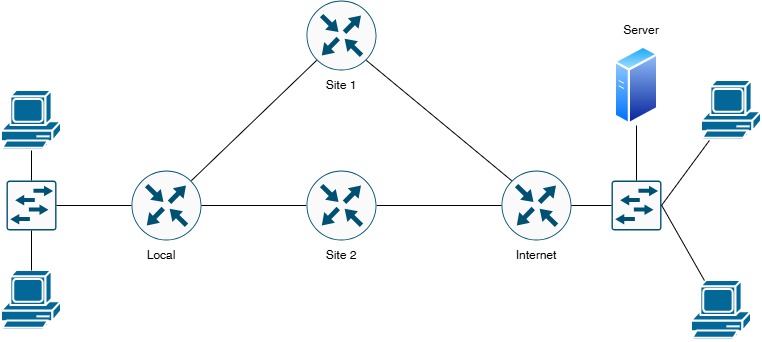
| Device Name | Device Type | Role/Function | Key Responsibilities |
|---|---|---|---|
| Local | Cisco Router | Headquarters Gateway | Route redistribution, PBR implementation, route filtering |
| Site-1 | Cisco Router | Branch Site 1 Gateway | OSPF routing, route-map application, WAN connectivity |
| Site-2 | Cisco Router | Branch Site 2 Gateway | EIGRP routing, route filtering, backup path routing |
| Internet | Simulated ISP Router | Internet Service Provider | Provides Internet connectivity and remote network access |
| Web Server | Server | HTTP/HTTPS Server | 172.16.1.10 - Target for policy-based routing |
| LAN Clients | End Devices | Local Area Network | 192.168.1.0/24 network - Source traffic for PBR |
| Device | Interface | IP Address | Subnet Mask | Connected To | Network Description |
|---|---|---|---|---|---|
| Local | G0/0 | 10.0.0.1 | 255.255.255.252 (/30) | Site-1 G0/0 | WAN Link - Local to Site-1 |
| Local | G0/1 | 10.0.0.5 | 255.255.255.252 (/30) | Site-2 G0/1 | WAN Link - Local to Site-2 |
| Local | G0/2 | 192.168.1.1 | 255.255.255.0 (/24) | LAN Switch | Local LAN Network |
| Local | Loopback0 | 1.1.1.1 | 255.255.255.255 (/32) | Loopback | Router ID / Management |
| Site-1 | G0/0 | 10.0.0.2 | 255.255.255.252 (/30) | Local G0/0 | WAN Link - Site-1 to Local |
| Site-1 | G1/0 | 203.81.64.1 | 255.255.255.252 (/30) | Internet G1/0 | Internet Connection Site-1 |
| Site-1 | Loopback0 | 2.2.2.2 | 255.255.255.255 (/32) | Loopback | Router ID / Management |
| Site-2 | G0/1 | 10.0.0.6 | 255.255.255.252 (/30) | Local G0/1 | WAN Link - Site-2 to Local |
| Site-2 | G1/1 | 203.81.64.5 | 255.255.255.252 (/30) | Internet G1/1 | Internet Connection Site-2 |
| Site-2 | Loopback0 | 3.3.3.3 | 255.255.255.255 (/32) | Loopback | Router ID / Management |
| Internet | G1/0 | 203.81.64.2 | 255.255.255.252 (/30) | Site-1 G1/0 | ISP Link to Site-1 |
| Internet | G1/1 | 203.81.64.6 | 255.255.255.252 (/30) | Site-2 G1/1 | ISP Link to Site-2 |
| Internet | G0/0 | 172.16.1.1 | 255.255.255.0 (/24) | Remote Network | Remote Network Gateway |
| Web Server | NIC | 172.16.1.10 | 255.255.255.0 (/24) | Internet G0/0 | HTTP/HTTPS Web Server |
| Network Segment | Network Address | Subnet Mask | Usable IPs | Purpose |
|---|---|---|---|---|
| Local ↔ Site-1 WAN | 10.0.0.0 | 255.255.255.252 | 10.0.0.1 - 10.0.0.2 | Point-to-Point WAN Link |
| Local ↔ Site-2 WAN | 10.0.0.4 | 255.255.255.252 | 10.0.0.5 - 10.0.0.6 | Point-to-Point WAN Link |
| Site-1 ↔ Internet | 203.81.64.0 | 255.255.255.252 | 203.81.64.1 - 203.81.64.2 | Internet Connection 1 |
| Site-2 ↔ Internet | 203.81.64.4 | 255.255.255.252 | 203.81.64.5 - 203.81.64.6 | Internet Connection 2 |
| Local LAN | 192.168.1.0 | 255.255.255.0 | 192.168.1.1 - 192.168.1.254 | Headquarters User Network |
| Remote Network | 172.16.1.0 | 255.255.255.0 | 172.16.1.1 - 172.16.1.254 | Internet-facing Remote Site |
🔍 What is a Route-Map?
A Route-Map is a powerful Cisco IOS tool that provides complex conditional logic for route manipulation and policy-based routing. Think of it as an "if-then-else" programming statement for routing:
- IF certain conditions are met (match statements)
- THEN perform specific actions (set statements)
- ELSE move to the next sequence or use default behavior
🎯 Route-Map Components
| Component | Purpose | Example |
|---|---|---|
| Sequence Number | Order of processing (10, 20, 30...) | route-map TEST permit 10 |
| Action | Permit or deny matched routes | permit or deny |
| Match Statements | Conditions to check | match ip address 10 |
| Set Statements | Actions to perform if matched | set metric 100 |
🆚 Standard ACL vs Prefix-List Comparison
| Feature | Standard ACL | Prefix-List |
|---|---|---|
| Primary Use | Traffic filtering, route matching | Route filtering only |
| Matching Precision | Uses wildcard masks | Uses prefix length (ge, le) |
| Performance | Good | Better (optimized for routing) |
| Flexibility | Match host or network | Match networks with specific prefix lengths |
| Syntax | access-list 10 permit 192.168.1.0 0.0.0.255 |
ip prefix-list TEST permit 192.168.1.0/24 |
| Best For | Simple route matching | Complex route filtering with prefix aggregation |
Configure route redistribution from static routes to OSPF on the Local router. Use a Standard ACL to filter which static routes are redistributed. Only allow the Local LAN (192.168.1.0/24) to be redistributed while denying loopback addresses.
Configure route filtering using Prefix-Lists to allow only specific prefix lengths from being advertised. Create a prefix-list that permits /24 networks but denies /32 host routes and any networks with prefix length greater than /24.
Implement Policy-Based Routing to send traffic from specific source IP addresses through different next-hop routers. Traffic from 192.168.1.10-192.168.1.50 should use Site-1 as the next hop, while traffic from 192.168.1.51-192.168.1.100 should use Site-2.
! Local Router - Basic Configuration
! ========================================
Router> enable
Router# configure terminal
Router(config)# hostname Local
! Configure WAN Link to Site-1
Local(config)# interface GigabitEthernet0/0
Local(config-if)# description ** WAN Link to Site-1 **
Local(config-if)# ip address 10.0.0.1 255.255.255.252
Local(config-if)# no shutdown
Local(config-if)# exit
! Configure WAN Link to Site-2
Local(config)# interface GigabitEthernet0/1
Local(config-if)# description ** WAN Link to Site-2 **
Local(config-if)# ip address 10.0.0.5 255.255.255.252
Local(config-if)# no shutdown
Local(config-if)# exit
! Configure Local LAN Interface
Local(config)# interface GigabitEthernet0/2
Local(config-if)# description ** Local LAN 192.168.1.0/24 **
Local(config-if)# ip address 192.168.1.1 255.255.255.0
Local(config-if)# no shutdown
Local(config-if)# exit
! Configure Loopback Interface
Local(config)# interface Loopback0
Local(config-if)# description ** Router ID and Management **
Local(config-if)# ip address 1.1.1.1 255.255.255.255
Local(config-if)# exit
! Save Configuration
Local(config)# end
Local# write memory
! Site-1 Router - Basic Configuration
! ========================================
Router> enable
Router# configure terminal
Router(config)# hostname Site-1
! Configure WAN Link to Local
Site-1(config)# interface GigabitEthernet0/0
Site-1(config-if)# description ** WAN Link to Local **
Site-1(config-if)# ip address 10.0.0.2 255.255.255.252
Site-1(config-if)# no shutdown
Site-1(config-if)# exit
! Configure Internet Connection
Site-1(config)# interface GigabitEthernet1/0
Site-1(config-if)# description ** Internet Connection **
Site-1(config-if)# ip address 203.81.64.1 255.255.255.252
Site-1(config-if)# no shutdown
Site-1(config-if)# exit
! Configure Loopback Interface
Site-1(config)# interface Loopback0
Site-1(config-if)# description ** Router ID and Management **
Site-1(config-if)# ip address 2.2.2.2 255.255.255.255
Site-1(config-if)# exit
! Save Configuration
Site-1(config)# end
Site-1# write memory
! Site-2 Router - Basic Configuration
! ========================================
Router> enable
Router# configure terminal
Router(config)# hostname Site-2
! Configure WAN Link to Local
Site-2(config)# interface GigabitEthernet0/1
Site-2(config-if)# description ** WAN Link to Local **
Site-2(config-if)# ip address 10.0.0.6 255.255.255.252
Site-2(config-if)# no shutdown
Site-2(config-if)# exit
! Configure Internet Connection
Site-2(config)# interface GigabitEthernet1/1
Site-2(config-if)# description ** Internet Connection **
Site-2(config-if)# ip address 203.81.64.5 255.255.255.252
Site-2(config-if)# no shutdown
Site-2(config-if)# exit
! Configure Loopback Interface
Site-2(config)# interface Loopback0
Site-2(config-if)# description ** Router ID and Management **
Site-2(config-if)# ip address 3.3.3.3 255.255.255.255
Site-2(config-if)# exit
! Save Configuration
Site-2(config)# end
Site-2# write memory
! Internet Router - Basic Configuration
! ========================================
Router> enable
Router# configure terminal
Router(config)# hostname Internet
! Configure ISP Link to Site-1
Internet(config)# interface GigabitEthernet1/0
Internet(config-if)# description ** ISP Link to Site-1 **
Internet(config-if)# ip address 203.81.64.2 255.255.255.252
Internet(config-if)# no shutdown
Internet(config-if)# exit
! Configure ISP Link to Site-2
Internet(config)# interface GigabitEthernet1/1
Internet(config-if)# description ** ISP Link to Site-2 **
Internet(config-if)# ip address 203.81.64.6 255.255.255.252
Internet(config-if)# no shutdown
Internet(config-if)# exit
! Configure Remote Network
Internet(config)# interface GigabitEthernet0/0
Internet(config-if)# description ** Remote Network 172.16.1.0/24 **
Internet(config-if)# ip address 172.16.1.1 255.255.255.0
Internet(config-if)# no shutdown
Internet(config-if)# exit
! Save Configuration
Internet(config)# end
Internet# write memory
show ip interface brief on each router. Ping between directly connected interfaces to verify Layer 2 connectivity.
! Local Router - OSPF Configuration
! ========================================
Local# configure terminal
! Enable OSPF Process 1
Local(config)# router ospf 1
Local(config-router)# router-id 1.1.1.1
Local(config-router)# log-adjacency-changes
! Advertise Local to Site-1 WAN link
Local(config-router)# network 10.0.0.0 0.0.0.3 area 0
! Advertise Local LAN network
Local(config-router)# network 192.168.1.0 0.0.0.255 area 0
! Advertise Loopback
Local(config-router)# network 1.1.1.1 0.0.0.0 area 0
Local(config-router)# exit
! Configure Loopback as point-to-point to advertise /32
Local(config)# interface Loopback0
Local(config-if)# ip ospf network point-to-point
Local(config-if)# exit
Local(config)# end
Local# write memory
! Site-1 Router - OSPF Configuration
! ========================================
Site-1# configure terminal
! Enable OSPF Process 1
Site-1(config)# router ospf 1
Site-1(config-router)# router-id 2.2.2.2
Site-1(config-router)# log-adjacency-changes
! Advertise Site-1 to Local WAN link
Site-1(config-router)# network 10.0.0.0 0.0.0.3 area 0
! Advertise Loopback
Site-1(config-router)# network 2.2.2.2 0.0.0.0 area 0
Site-1(config-router)# exit
! Configure Loopback as point-to-point
Site-1(config)# interface Loopback0
Site-1(config-if)# ip ospf network point-to-point
Site-1(config-if)# exit
Site-1(config)# end
Site-1# write memory
show ip ospf neighbor. Check routing tables with show ip route ospf to see learned routes.
! Local Router - EIGRP Configuration
! ========================================
Local# configure terminal
! Enable EIGRP AS 100
Local(config)# router eigrp 100
Local(config-router)# eigrp router-id 1.1.1.1
Local(config-router)# no auto-summary
! Advertise Local to Site-2 WAN link
Local(config-router)# network 10.0.0.4 0.0.0.3
! Note: We're NOT advertising 192.168.1.0 here to avoid conflicts
! It's already advertised in OSPF
Local(config-router)# exit
Local(config)# end
Local# write memory
! Site-2 Router - EIGRP Configuration
! ========================================
Site-2# configure terminal
! Enable EIGRP AS 100
Site-2(config)# router eigrp 100
Site-2(config-router)# eigrp router-id 3.3.3.3
Site-2(config-router)# no auto-summary
! Advertise Site-2 to Local WAN link
Site-2(config-router)# network 10.0.0.4 0.0.0.3
! Advertise Loopback
Site-2(config-router)# network 3.3.3.3 0.0.0.0
Site-2(config-router)# exit
Site-2(config)# end
Site-2# write memory
show ip eigrp neighbors. Check routing tables with show ip route eigrp.
! Local Router - Static Routes
! ========================================
Local# configure terminal
! Static route to Remote Network via Site-1 (primary)
Local(config)# ip route 172.16.1.0 255.255.255.0 10.0.0.2
! Static route to Remote Network via Site-2 (backup with higher AD)
Local(config)# ip route 172.16.1.0 255.255.255.0 10.0.0.6 10
! Static route to Internet via Site-1
Local(config)# ip route 203.81.64.0 255.255.255.252 10.0.0.2
! Static route to Internet via Site-2
Local(config)# ip route 203.81.64.4 255.255.255.252 10.0.0.6
Local(config)# end
Local# write memory
! Site-1 Router - Static Routes
! ========================================
Site-1# configure terminal
! Static route to Remote Network via Internet router
Site-1(config)# ip route 172.16.1.0 255.255.255.0 203.81.64.2
! Default route to Internet (for testing)
Site-1(config)# ip route 0.0.0.0 0.0.0.0 203.81.64.2
Site-1(config)# end
Site-1# write memory
! Site-2 Router - Static Routes
! ========================================
Site-2# configure terminal
! Static route to Remote Network via Internet router
Site-2(config)# ip route 172.16.1.0 255.255.255.0 203.81.64.6
! Default route to Internet (for testing)
Site-2(config)# ip route 0.0.0.0 0.0.0.0 203.81.64.6
Site-2(config)# end
Site-2# write memory
! Internet Router - Static Routes
! ========================================
Internet# configure terminal
! Static routes back to internal networks
Internet(config)# ip route 10.0.0.0 255.255.255.252 203.81.64.1
Internet(config)# ip route 10.0.0.4 255.255.255.252 203.81.64.5
Internet(config)# ip route 192.168.1.0 255.255.255.0 203.81.64.1
Internet(config)# end
Internet# write memory
ping 172.16.1.10 from Local router. Use show ip route to verify all routes are installed correctly.
! Local Router - Standard ACL for Route Filtering
! ========================================
Local# configure terminal
! Standard ACL 10 - Permit only Local LAN network
Local(config)# access-list 10 remark ** Routes allowed for redistribution **
Local(config)# access-list 10 permit 192.168.1.0 0.0.0.255
! Standard ACL 11 - Permit Remote Network for redistribution
Local(config)# access-list 11 remark ** Remote network allowed **
Local(config)# access-list 11 permit 172.16.1.0 0.0.0.255
! Standard ACL 20 - Deny loopback addresses (for demonstration)
Local(config)# access-list 20 remark ** Deny loopback networks **
Local(config)# access-list 20 deny 1.0.0.0 0.255.255.255
Local(config)# access-list 20 deny 2.0.0.0 0.255.255.255
Local(config)# access-list 20 deny 3.0.0.0 0.255.255.255
Local(config)# access-list 20 permit any
Local(config)# end
Local# write memory
! Local Router - Route-Map with Standard ACL
! ========================================
Local# configure terminal
! Route-Map for Static to OSPF Redistribution
Local(config)# route-map STATIC-TO-OSPF permit 10
Local(config-route-map)# description ** Redistribute Local LAN to OSPF **
Local(config-route-map)# match ip address 10
Local(config-route-map)# set metric 100
Local(config-route-map)# set metric-type type-1
Local(config-route-map)# set tag 100
Local(config-route-map)# exit
! Route-Map Sequence 20 - Redistribute Remote Network
Local(config)# route-map STATIC-TO-OSPF permit 20
Local(config-route-map)# description ** Redistribute Remote Network to OSPF **
Local(config-route-map)# match ip address 11
Local(config-route-map)# set metric 200
Local(config-route-map)# set metric-type type-2
Local(config-route-map)# set tag 200
Local(config-route-map)# exit
! Route-Map Sequence 30 - Deny everything else (implicit)
Local(config)# route-map STATIC-TO-OSPF deny 30
Local(config-route-map)# description ** Deny all other routes **
Local(config-route-map)# exit
Local(config)# end
Local# write memory
! Local Router - Apply Route-Map to OSPF
! ========================================
Local# configure terminal
! Enter OSPF configuration
Local(config)# router ospf 1
! Redistribute static routes using route-map
Local(config-router)# redistribute static subnets route-map STATIC-TO-OSPF
Local(config-router)# exit
Local(config)# end
Local# write memory
- Sequence 10: Matches ACL 10 (192.168.1.0/24), sets metric to 100, metric-type to type-1 (E1), and tags with 100
- Sequence 20: Matches ACL 11 (172.16.1.0/24), sets metric to 200, metric-type to type-2 (E2), and tags with 200
- Sequence 30: Denies all other routes (explicit deny for clarity)
- Result: Only 192.168.1.0/24 and 172.16.1.0/24 are redistributed into OSPF with specific attributes
show ip route ospf to verify that only 192.168.1.0/24 and 172.16.1.0/24 appear as OSPF external routes (O E1 or O E2). Check route tags with show ip route 192.168.1.0.
ge (greater than or equal) and le (less than or equal) operators.
! Local Router - Prefix-List Configuration
! ========================================
Local# configure terminal
! Prefix-List to permit only /24 networks
Local(config)# ip prefix-list PERMIT-24-ONLY description ** Allow only /24 networks **
Local(config)# ip prefix-list PERMIT-24-ONLY seq 5 permit 0.0.0.0/0 ge 24 le 24
! Prefix-List to deny /32 host routes
Local(config)# ip prefix-list DENY-HOST-ROUTES description ** Deny /32 host routes **
Local(config)# ip prefix-list DENY-HOST-ROUTES seq 5 deny 0.0.0.0/0 ge 32
Local(config)# ip prefix-list DENY-HOST-ROUTES seq 10 permit 0.0.0.0/0 le 31
! Prefix-List to permit LAN networks only (10.x.x.x, 172.16.x.x, 192.168.x.x)
Local(config)# ip prefix-list PERMIT-PRIVATE description ** RFC1918 Private Networks **
Local(config)# ip prefix-list PERMIT-PRIVATE seq 5 permit 10.0.0.0/8 le 32
Local(config)# ip prefix-list PERMIT-PRIVATE seq 10 permit 172.16.0.0/12 le 32
Local(config)# ip prefix-list PERMIT-PRIVATE seq 15 permit 192.168.0.0/16 le 32
! Prefix-List to permit specific networks with aggregation
Local(config)# ip prefix-list SPECIFIC-NETS description ** Specific networks allowed **
Local(config)# ip prefix-list SPECIFIC-NETS seq 5 permit 192.168.1.0/24
Local(config)# ip prefix-list SPECIFIC-NETS seq 10 permit 172.16.1.0/24
Local(config)# ip prefix-list SPECIFIC-NETS seq 15 permit 10.0.0.0/30
Local(config)# ip prefix-list SPECIFIC-NETS seq 20 permit 10.0.0.4/30
Local(config)# end
Local# write memory
📚 Prefix-List Syntax Explained
Format: ip prefix-list NAME [seq #] {permit|deny} network/length [ge min-length] [le max-length]
- network/length: Base network and prefix length
- ge (greater than or equal): Minimum prefix length to match
- le (less than or equal): Maximum prefix length to match
Examples:
permit 192.168.0.0/16 ge 24 le 24- Matches all /24 subnets of 192.168.0.0/16permit 0.0.0.0/0 ge 32- Matches all /32 host routespermit 10.0.0.0/8 le 24- Matches 10.0.0.0/8 through 10.0.0.0/24permit 172.16.1.0/24- Matches exactly 172.16.1.0/24
! Local Router - Route-Map with Prefix-Lists
! ========================================
Local# configure terminal
! Route-Map for OSPF Route Filtering with Prefix-Lists
Local(config)# route-map OSPF-FILTER-PREFIX permit 10
Local(config-route-map)# description ** Permit /24 networks only **
Local(config-route-map)# match ip address prefix-list PERMIT-24-ONLY
Local(config-route-map)# set metric 50
Local(config-route-map)# exit
! Deny /32 host routes
Local(config)# route-map OSPF-FILTER-PREFIX deny 20
Local(config-route-map)# description ** Deny host routes **
Local(config-route-map)# match ip address prefix-list DENY-HOST-ROUTES
Local(config-route-map)# exit
! Permit RFC1918 private networks
Local(config)# route-map OSPF-FILTER-PREFIX permit 30
Local(config-route-map)# description ** Permit private networks **
Local(config-route-map)# match ip address prefix-list PERMIT-PRIVATE
Local(config-route-map)# set metric 100
Local(config-route-map)# exit
Local(config)# end
Local# write memory
! Local Router - Apply Prefix-List Route-Map to EIGRP
! ========================================
Local# configure terminal
! Enter EIGRP configuration
Local(config)# router eigrp 100
! Redistribute OSPF into EIGRP with prefix-list filtering
Local(config-router)# redistribute ospf 1 metric 10000 100 255 1 1500 route-map OSPF-FILTER-PREFIX
Local(config-router)# exit
Local(config)# end
Local# write memory
bandwidth delay reliability load MTU. In this example: 10000 100 255 1 1500 represents 10Mbps bandwidth, 100 microseconds delay, 255/255 reliability, 1/255 load, and 1500 byte MTU.
show ip route eigrp to verify redistributed routes. Use show ip prefix-list to view prefix-list hit counts. Verify only /24 networks are redistributed.
! Local Router - ACLs for Policy-Based Routing
! ========================================
Local# configure terminal
! Extended ACL 101 - Match traffic from first half of LAN (192.168.1.10-50)
Local(config)# access-list 101 remark ** PBR - Traffic via Site-1 **
Local(config)# access-list 101 permit ip 192.168.1.0 0.0.0.63 any
! Extended ACL 102 - Match traffic from second half of LAN (192.168.1.64-127)
Local(config)# access-list 102 remark ** PBR - Traffic via Site-2 **
Local(config)# access-list 102 permit ip 192.168.1.64 0.0.0.63 any
! Extended ACL 103 - Match traffic to Remote Network
Local(config)# access-list 103 remark ** PBR - Traffic to Remote Network **
Local(config)# access-list 103 permit ip any 172.16.1.0 0.0.0.255
Local(config)# end
Local# write memory
! Local Router - PBR Route-Map
! ========================================
Local# configure terminal
! Route-Map for Policy-Based Routing
Local(config)# route-map PBR-LOAD-BALANCE permit 10
Local(config-route-map)# description ** Send first half of LAN via Site-1 **
Local(config-route-map)# match ip address 101
Local(config-route-map)# set ip next-hop 10.0.0.2
Local(config-route-map)# set ip next-hop verify-availability
Local(config-route-map)# exit
! Route-Map Sequence 20 - Second half via Site-2
Local(config)# route-map PBR-LOAD-BALANCE permit 20
Local(config-route-map)# description ** Send second half of LAN via Site-2 **
Local(config-route-map)# match ip address 102
Local(config-route-map)# set ip next-hop 10.0.0.6
Local(config-route-map)# set ip next-hop verify-availability
Local(config-route-map)# exit
! Route-Map Sequence 30 - Remote Network traffic via Site-1 (primary)
Local(config)# route-map PBR-LOAD-BALANCE permit 30
Local(config-route-map)# description ** Remote Network via Site-1 **
Local(config-route-map)# match ip address 103
Local(config-route-map)# set ip next-hop 10.0.0.2
Local(config-route-map)# set ip next-hop 10.0.0.6
Local(config-route-map)# exit
Local(config)# end
Local# write memory
! Local Router - Apply PBR to LAN Interface
! ========================================
Local# configure terminal
! Apply PBR to incoming traffic on LAN interface
Local(config)# interface GigabitEthernet0/2
Local(config-if)# description ** Local LAN - PBR Applied **
Local(config-if)# ip policy route-map PBR-LOAD-BALANCE
Local(config-if)# exit
! Enable PBR debugging (optional, for testing)
Local(config)# ip local policy route-map PBR-LOAD-BALANCE
Local(config)# end
Local# write memory
- Interface PBR: Applied to incoming traffic on an interface with
ip policy route-map - Local PBR: Applied to locally generated traffic with
ip local policy route-map - Next-Hop Verification:
set ip next-hop verify-availabilityensures next-hop is reachable before using - Multiple Next-Hops: List multiple next-hops for failover (first reachable is used)
show route-map to view PBR route-map statistics and match counts. Use show ip policy to see which interfaces have PBR applied. Test with traceroute from different source IPs.
! Local Router - Advanced Route Manipulation
! ========================================
Local# configure terminal
! Route-Map to manipulate route attributes
Local(config)# route-map MANIPULATE-ATTRIBUTES permit 10
Local(config-route-map)# description ** Modify OSPF route attributes **
Local(config-route-map)# match ip address prefix-list SPECIFIC-NETS
! Set multiple attributes
Local(config-route-map)# set metric 150
Local(config-route-map)# set metric-type type-1
Local(config-route-map)# set tag 999
Local(config-route-map)# set level level-1-2
Local(config-route-map)# exit
! Route-Map sequence for default route manipulation
Local(config)# route-map DEFAULT-ROUTE permit 10
Local(config-route-map)# description ** Inject default route **
Local(config-route-map)# match ip address prefix-list DEFAULT-ONLY
Local(config-route-map)# set metric 10
Local(config-route-map)# set metric-type type-1
Local(config-route-map)# exit
! Create prefix-list for default route
Local(config)# ip prefix-list DEFAULT-ONLY description ** Match default route **
Local(config)# ip prefix-list DEFAULT-ONLY seq 5 permit 0.0.0.0/0
Local(config)# end
Local# write memory
! Local Router - Route Tagging with Route-Maps
! ========================================
Local# configure terminal
! Route-Map to tag routes based on source
Local(config)# route-map TAG-ROUTES permit 10
Local(config-route-map)# description ** Tag routes from OSPF **
Local(config-route-map)# match tag 100
Local(config-route-map)# set tag 200
Local(config-route-map)# exit
! Filter routes based on tags
Local(config)# route-map FILTER-BY-TAG deny 10
Local(config-route-map)# description ** Deny routes with tag 999 **
Local(config-route-map)# match tag 999
Local(config-route-map)# exit
Local(config)# route-map FILTER-BY-TAG permit 20
Local(config-route-map)# description ** Permit all other routes **
Local(config-route-map)# exit
Local(config)# end
Local# write memory
Local Router - Complete Route-Map Configuration
! Local Router - Complete Configuration
! ========================================
hostname Local
!
! Interface Configuration
interface GigabitEthernet0/0
description ** WAN Link to Site-1 **
ip address 10.0.0.1 255.255.255.252
no shutdown
!
interface GigabitEthernet0/1
description ** WAN Link to Site-2 **
ip address 10.0.0.5 255.255.255.252
no shutdown
!
interface GigabitEthernet0/2
description ** Local LAN - PBR Applied **
ip address 192.168.1.1 255.255.255.0
ip policy route-map PBR-LOAD-BALANCE
no shutdown
!
interface Loopback0
description ** Router ID and Management **
ip address 1.1.1.1 255.255.255.255
ip ospf network point-to-point
!
! OSPF Configuration
router ospf 1
router-id 1.1.1.1
redistribute static subnets route-map STATIC-TO-OSPF
network 1.1.1.1 0.0.0.0 area 0
network 10.0.0.0 0.0.0.3 area 0
network 192.168.1.0 0.0.0.255 area 0
!
! EIGRP Configuration
router eigrp 100
network 10.0.0.4 0.0.0.3
redistribute ospf 1 metric 10000 100 255 1 1500 route-map OSPF-FILTER-PREFIX
no auto-summary
eigrp router-id 1.1.1.1
!
! Static Routes
ip route 172.16.1.0 255.255.255.0 10.0.0.2
ip route 172.16.1.0 255.255.255.0 10.0.0.6 10
ip route 203.81.64.0 255.255.255.252 10.0.0.2
ip route 203.81.64.4 255.255.255.252 10.0.0.6
!
! Standard ACLs
access-list 10 remark ** Routes allowed for redistribution **
access-list 10 permit 192.168.1.0 0.0.0.255
access-list 11 remark ** Remote network allowed **
access-list 11 permit 172.16.1.0 0.0.0.255
access-list 20 remark ** Deny loopback networks **
access-list 20 deny 1.0.0.0 0.255.255.255
access-list 20 deny 2.0.0.0 0.255.255.255
access-list 20 deny 3.0.0.0 0.255.255.255
access-list 20 permit any
!
! Extended ACLs for PBR
access-list 101 remark ** PBR - Traffic via Site-1 **
access-list 101 permit ip 192.168.1.0 0.0.0.63 any
access-list 102 remark ** PBR - Traffic via Site-2 **
access-list 102 permit ip 192.168.1.64 0.0.0.63 any
access-list 103 remark ** PBR - Traffic to Remote Network **
access-list 103 permit ip any 172.16.1.0 0.0.0.255
!
! Prefix-Lists
ip prefix-list PERMIT-24-ONLY description ** Allow only /24 networks **
ip prefix-list PERMIT-24-ONLY seq 5 permit 0.0.0.0/0 ge 24 le 24
!
ip prefix-list DENY-HOST-ROUTES description ** Deny /32 host routes **
ip prefix-list DENY-HOST-ROUTES seq 5 deny 0.0.0.0/0 ge 32
ip prefix-list DENY-HOST-ROUTES seq 10 permit 0.0.0.0/0 le 31
!
ip prefix-list PERMIT-PRIVATE description ** RFC1918 Private Networks **
ip prefix-list PERMIT-PRIVATE seq 5 permit 10.0.0.0/8 le 32
ip prefix-list PERMIT-PRIVATE seq 10 permit 172.16.0.0/12 le 32
ip prefix-list PERMIT-PRIVATE seq 15 permit 192.168.0.0/16 le 32
!
ip prefix-list SPECIFIC-NETS description ** Specific networks allowed **
ip prefix-list SPECIFIC-NETS seq 5 permit 192.168.1.0/24
ip prefix-list SPECIFIC-NETS seq 10 permit 172.16.1.0/24
ip prefix-list SPECIFIC-NETS seq 15 permit 10.0.0.0/30
ip prefix-list SPECIFIC-NETS seq 20 permit 10.0.0.4/30
!
ip prefix-list DEFAULT-ONLY description ** Match default route **
ip prefix-list DEFAULT-ONLY seq 5 permit 0.0.0.0/0
!
! Route-Maps
route-map STATIC-TO-OSPF permit 10
description ** Redistribute Local LAN to OSPF **
match ip address 10
set metric 100
set metric-type type-1
set tag 100
!
route-map STATIC-TO-OSPF permit 20
description ** Redistribute Remote Network to OSPF **
match ip address 11
set metric 200
set metric-type type-2
set tag 200
!
route-map STATIC-TO-OSPF deny 30
description ** Deny all other routes **
!
route-map OSPF-FILTER-PREFIX permit 10
description ** Permit /24 networks only **
match ip address prefix-list PERMIT-24-ONLY
set metric 50
!
route-map OSPF-FILTER-PREFIX deny 20
description ** Deny host routes **
match ip address prefix-list DENY-HOST-ROUTES
!
route-map OSPF-FILTER-PREFIX permit 30
description ** Permit private networks **
match ip address prefix-list PERMIT-PRIVATE
set metric 100
!
route-map PBR-LOAD-BALANCE permit 10
description ** Send first half of LAN via Site-1 **
match ip address 101
set ip next-hop verify-availability
set ip next-hop 10.0.0.2
!
route-map PBR-LOAD-BALANCE permit 20
description ** Send second half of LAN via Site-2 **
match ip address 102
set ip next-hop verify-availability
set ip next-hop 10.0.0.6
!
route-map PBR-LOAD-BALANCE permit 30
description ** Remote Network via Site-1 **
match ip address 103
set ip next-hop 10.0.0.2
set ip next-hop 10.0.0.6
!
! Local PBR for router-generated traffic
ip local policy route-map PBR-LOAD-BALANCE
!
end
write memory
Local# show ip interface brief
! Verify interface IP addresses
Local# show ip interface GigabitEthernet0/0
Local# show ip interface GigabitEthernet0/1
Local# show ip interface GigabitEthernet0/2
Interface IP-Address OK? Method Status Protocol
GigabitEthernet0/0 10.0.0.1 YES manual up up
GigabitEthernet0/1 10.0.0.5 YES manual up up
GigabitEthernet0/2 192.168.1.1 YES manual up up
Loopback0 1.1.1.1 YES manual up up
Local# show ip ospf neighbor
! View OSPF routes
Local# show ip route ospf
! Check OSPF database
Local# show ip ospf database
! Verify redistributed routes on Site-1
Site-1# show ip route ospf
Site-1# show ip route 192.168.1.0
Neighbor ID Pri State Dead Time Address Interface
2.2.2.2 1 FULL/BDR 00:00:34 10.0.0.2 GigabitEthernet0/0
Local# show ip eigrp neighbors
! View EIGRP routes
Local# show ip route eigrp
! Check EIGRP topology
Local# show ip eigrp topology
! Verify redistributed routes on Site-2
Site-2# show ip route eigrp
Site-2# show ip route 192.168.1.0
EIGRP-IPv4 Neighbors for AS(100)
H Address Interface Hold Uptime SRTT RTO Q Seq
(sec) (ms) Cnt Num
0 10.0.0.6 Gi0/1 13 00:15:42 12 200 0 5
Local# show route-map
! View specific route-map with statistics
Local# show route-map STATIC-TO-OSPF
Local# show route-map OSPF-FILTER-PREFIX
Local# show route-map PBR-LOAD-BALANCE
! Check ACL configurations
Local# show access-lists
Local# show access-lists 10
Local# show access-lists 101
route-map STATIC-TO-OSPF, permit, sequence 10
Match clauses:
ip address (access-lists): 10
Set clauses:
metric 100
metric-type type-1
tag 100
Policy routing matches: 0 packets, 0 bytes
route-map STATIC-TO-OSPF, permit, sequence 20
Match clauses:
ip address (access-lists): 11
Set clauses:
metric 200
metric-type type-2
tag 200
Policy routing matches: 0 packets, 0 bytes
route-map STATIC-TO-OSPF, deny, sequence 30
Match clauses:
Set clauses:
Policy routing matches: 0 packets, 0 bytes
Local# show ip prefix-list
! View specific prefix-list with statistics
Local# show ip prefix-list PERMIT-24-ONLY
Local# show ip prefix-list PERMIT-PRIVATE
Local# show ip prefix-list SPECIFIC-NETS
! Check prefix-list detail (shows hit counts)
Local# show ip prefix-list detail
ip prefix-list PERMIT-24-ONLY: 1 entries
seq 5 permit 0.0.0.0/0 ge 24 le 24 (hit count: 15)
Local# show ip policy
! View PBR statistics
Local# show route-map PBR-LOAD-BALANCE
! Debug PBR (use with caution in production)
Local# debug ip policy
! Test PBR with traceroute from different sources
Local# traceroute 172.16.1.10 source 192.168.1.10
Local# traceroute 172.16.1.10 source 192.168.1.70
! Turn off debug
Local# undebug all
Interface Route map
Gi0/2 PBR-LOAD-BALANCE
Local# show ip route static
Site-1# show ip route ospf | include E1|E2
Site-2# show ip route eigrp | include EX
! Verify route tags
Local# show ip route 192.168.1.0
Site-1# show ip route 192.168.1.0
! Check redistribution configuration
Local# show run | section router ospf
Local# show run | section router eigrp
O E1 192.168.1.0/24 [110/101] via 10.0.0.1, 00:15:42, GigabitEthernet0/0
O E2 172.16.1.0/24 [110/200] via 10.0.0.1, 00:15:42, GigabitEthernet0/0
Local# ping 172.16.1.10 source 192.168.1.1
! Traceroute to verify path
Local# traceroute 172.16.1.10
! Traceroute with specific source to test PBR
Local# traceroute 172.16.1.10 source 192.168.1.10
Local# traceroute 172.16.1.10 source 192.168.1.70
! Extended ping for detailed testing
Local# ping
Protocol [ip]:
Target IP address: 172.16.1.10
Repeat count [5]: 100
Datagram size [100]:
Timeout in seconds [2]:
Extended commands [n]: y
Source address or interface: 192.168.1.10
Type of service [0]:
Set DF bit in IP header? [no]:
Validate reply data? [no]:
Data pattern [0xABCD]:
Loose, Strict, Record, Timestamp, Verbose[none]:
Sweep range of sizes [n]:
- ☐ All router interfaces configured and showing "up/up" status
- ☐ OSPF adjacency formed between Local and Site-1 routers
- ☐ EIGRP adjacency formed between Local and Site-2 routers
- ☐ Static routes installed to remote network (172.16.1.0/24)
- ☐ Standard ACLs 10, 11, 20 created and configured
- ☐ Extended ACLs 101, 102, 103 created for PBR
- ☐ Route-Map STATIC-TO-OSPF created with 3 sequences
- ☐ Route redistribution from static to OSPF working (verify on Site-1)
- ☐ Only 192.168.1.0/24 and 172.16.1.0/24 redistributed into OSPF
- ☐ Route metrics set correctly (100 for LAN, 200 for Remote)
- ☐ Route tags applied (100 and 200) and visible in routing table
- ☐ Prefix-Lists created (PERMIT-24-ONLY, DENY-HOST-ROUTES, PERMIT-PRIVATE, SPECIFIC-NETS)
- ☐ Route-Map OSPF-FILTER-PREFIX created for EIGRP redistribution
- ☐ OSPF routes redistributed into EIGRP with prefix-list filtering
- ☐ Only /24 networks appear in EIGRP on Site-2
- ☐ No /32 host routes redistributed into EIGRP
- ☐ Route-Map PBR-LOAD-BALANCE created with 3 sequences
- ☐ PBR applied to GigabitEthernet0/2 interface
- ☐ Traffic from 192.168.1.0-63 routed via Site-1 (10.0.0.2)
- ☐ Traffic from 192.168.1.64-127 routed via Site-2 (10.0.0.6)
- ☐ PBR match counters incrementing when traffic passes
- ☐ Traceroute shows correct path selection based on source IP
- ☐ End-to-end connectivity verified (Local LAN to Remote Network)
- ☐ All configurations saved with "write memory"
Symptoms: Static routes not appearing in OSPF on Site-1 router
Troubleshooting Steps:
Local# show run | section router ospf
! Look for: redistribute static subnets route-map STATIC-TO-OSPF
! 2. Check route-map configuration
Local# show route-map STATIC-TO-OSPF
! Verify match clauses and set clauses are correct
! 3. Check ACL matches
Local# show access-list 10
Local# show access-list 11
! Verify ACL permits the correct networks
! 4. Verify static routes exist in routing table
Local# show ip route static
! Routes must exist before they can be redistributed
! 5. Check OSPF process is running
Local# show ip ospf
Local# show ip ospf neighbor
! 6. Debug redistribution (use with caution)
Local# debug ip routing
Local# debug ip ospf events
! 7. Verify on remote router
Site-1# show ip route ospf
Site-1# show ip ospf database external
| Issue | Likely Cause | Solution |
|---|---|---|
| No routes redistributed | Route-map not applied | redistribute static subnets route-map STATIC-TO-OSPF |
| Wrong routes redistributed | ACL misconfigured | Verify ACL wildcard masks match intended networks |
| Routes redistributed but wrong metric | Set clause missing or wrong | Check set metric and set metric-type |
| Route-map shows 0 matches | ACL doesn't match any routes | Verify static routes exist and ACL syntax is correct |
Symptoms: Prefix-list allows or denies wrong networks, or all routes are blocked
Troubleshooting Steps:
Local# show ip prefix-list
Local# show ip prefix-list PERMIT-24-ONLY detail
! 2. Check prefix-list syntax (ge/le operators)
! Format: permit network/length [ge min] [le max]
! Example: permit 0.0.0.0/0 ge 24 le 24 matches all /24 networks
! 3. Test prefix-list matching
! No direct test command, but check hit counts
Local# show ip prefix-list detail
! Look for "(hit count: X)" - should increment when routes match
! 4. Verify route-map uses prefix-list correctly
Local# show route-map OSPF-FILTER-PREFIX
! Look for: match ip address prefix-list PERMIT-24-ONLY
! 5. Check routes being filtered
Local# show ip route ospf
Site-2# show ip route eigrp
! Verify only expected routes appear
! 6. Common prefix-list mistakes:
! Wrong: permit 192.168.1.0/24 ge 32 (no /32 matches /24 base)
! Right: permit 192.168.1.0/24 (exact match)
! Wrong: permit 0.0.0.0/0 le 24 (matches /0 to /24, too broad)
! Right: permit 0.0.0.0/0 ge 24 le 24 (matches only /24)
| Issue | Likely Cause | Solution |
|---|---|---|
| All routes blocked | No permit statement matches | Add permit 0.0.0.0/0 le 32 at end to permit all remaining |
| Wrong prefix lengths matched | Incorrect ge/le values | Review ge (>=) and le (<=) logic; ge must be >= prefix length |
| Prefix-list not applied | Route-map doesn't reference it | match ip address prefix-list NAME |
| Hit count is 0 | No routes match criteria | Verify routes exist and prefix-list syntax is correct |
Symptoms: Traffic not following PBR policy, all traffic uses routing table
Troubleshooting Steps:
Local# show ip policy
! Should show: Gi0/2 -> PBR-LOAD-BALANCE
! 2. Check route-map configuration and statistics
Local# show route-map PBR-LOAD-BALANCE
! Look at "Policy routing matches: X packets, Y bytes"
! If 0, traffic is not matching
! 3. Verify ACLs used in route-map
Local# show access-list 101
Local# show access-list 102
! Check hit counts - should increment when traffic passes
! 4. Check next-hop reachability
Local# show ip route 10.0.0.2
Local# ping 10.0.0.2
! Next-hop must be reachable for PBR to work
! 5. Enable PBR debugging
Local# debug ip policy
! Generate traffic and watch debug output
! Should see "PBR: ... using route map PBR-LOAD-BALANCE"
! 6. Test with traceroute from specific sources
Local# traceroute 172.16.1.10 source 192.168.1.10
! Should show path through 10.0.0.2 (Site-1)
Local# traceroute 172.16.1.10 source 192.168.1.70
! Should show path through 10.0.0.6 (Site-2)
! 7. Verify interface is up and receiving traffic
Local# show interface GigabitEthernet0/2
! Check input packets counter
! 8. Turn off debug
Local# undebug all
| Issue | Likely Cause | Solution |
|---|---|---|
| PBR not applied | Missing ip policy command |
interface G0/2 then ip policy route-map NAME |
| Traffic doesn't match ACL | Wrong source IP range in ACL | Verify ACL wildcard masks cover correct IP ranges |
| Next-hop not reachable | Routing issue or interface down | Verify next-hop connectivity, use set ip next-hop verify-availability |
| PBR works for some traffic, not all | Route-map sequence order | Check sequence numbers, first match wins |
| Match count is 0 | No traffic entering interface | Verify traffic source and interface counters |
Symptoms: Routes processed by wrong sequence, unexpected permit/deny behavior
Troubleshooting Steps:
Local# show route-map
! Note sequence numbers (10, 20, 30...) and order
! 2. Understand route-map logic
! - Sequences processed in order (10, then 20, then 30...)
! - First match wins (stops processing)
! - If no match, implicit deny at end
! - "permit" action allows route, "deny" action blocks route
! 3. Check for overlapping match conditions
! If sequence 10 matches "any", sequence 20 never processes
! 4. Verify match and set clauses
Local# show route-map STATIC-TO-OSPF
! Ensure each sequence has correct match and set statements
! 5. Test by removing sequences
Local(config)# no route-map STATIC-TO-OSPF permit 10
! See if behavior changes (restore afterward)
! 6. Add explicit deny for clarity
Local(config)# route-map STATIC-TO-OSPF deny 999
! Makes implicit deny explicit
Symptoms: Routes from OSPF not appearing in EIGRP or vice versa
Troubleshooting Steps:
Local# show run | section router eigrp
! Look for: redistribute ospf 1 metric ... route-map NAME
! 2. Check EIGRP metrics are provided
! EIGRP requires: bandwidth delay reliability load MTU
! Example: metric 10000 100 255 1 1500
! 3. Verify routing protocols are running
Local# show ip protocols
! Should show both OSPF and EIGRP
! 4. Check route-map is allowing routes
Local# show route-map OSPF-FILTER-PREFIX
! Verify "permit" actions and match counts > 0
! 5. Verify routes exist in source protocol
Local# show ip route ospf
! Routes must exist before redistribution
! 6. Check on destination router
Site-2# show ip route eigrp
! Look for "D EX" (EIGRP external) routes
! 7. Check for routing loops or split-horizon
! Redistribution can cause loops - verify route filtering
- Route-Maps are "If-Then" Logic: If conditions match, then perform actions
- Sequence Numbers Matter: Processed in order (10, 20, 30...), first match wins
- Permit vs Deny: "Permit" allows route (and applies set clauses), "Deny" blocks route
- Implicit Deny: If no sequence matches, route is denied (like ACLs)
- Match Clauses: Define conditions (ACL, prefix-list, metric, tag, interface...)
- Set Clauses: Define actions (metric, next-hop, tag, metric-type, local-preference...)
- Multiple Applications: Route redistribution, PBR, BGP policy, route filtering
- Simple Network Matching: Best for matching entire networks or hosts
- Wildcard Masks: 0 = must match, 1 = don't care
- Use Cases: Basic route filtering, simple traffic classification
- Limitations: Cannot match prefix length, less flexible than prefix-lists
- Syntax:
access-list 10 permit 192.168.1.0 0.0.0.255 - Route-Map Application:
match ip address 10
- Optimized for Routing: Better performance than ACLs for route filtering
- Prefix Length Matching: Can match specific prefix lengths using ge/le
- Flexibility: Match ranges of prefix lengths (e.g., all /24 networks)
- Syntax:
ip prefix-list NAME permit 192.168.0.0/16 ge 24 le 24 - ge Operator: Greater than or equal (minimum prefix length)
- le Operator: Less than or equal (maximum prefix length)
- Route-Map Application:
match ip address prefix-list NAME
- Traffic Engineering: Route traffic based on criteria other than destination
- Source-Based Routing: Different paths for different source IPs
- Load Balancing: Distribute traffic across multiple paths
- Next-Hop Control:
set ip next-hopoverrides routing table - Interface Application:
ip policy route-mapon incoming interface - Local PBR:
ip local policy route-mapfor router-generated traffic - Verification:
set ip next-hop verify-availabilitychecks reachability
- Always Use Route-Maps: Never redistribute without filtering
- Prevent Routing Loops: Filter routes to avoid feedback loops
- Set Appropriate Metrics: Ensure redistributed routes have reasonable metrics
- Use Route Tags: Tag routes to track redistribution source and prevent loops
- Control Redistribution Direction: Be explicit about what gets redistributed
- Seed Metrics: EIGRP requires explicit metrics (bandwidth, delay, etc.)
- Subnets Keyword: OSPF requires "subnets" to redistribute subnets, not just classful
- Forgetting "subnets" in OSPF Redistribution: Without it, only classful networks redistributed
- Wrong Wildcard Masks in ACLs: Use wildcard (0.0.0.255), not subnet mask (255.255.255.0)
- Incorrect Prefix-List ge/le Values: ge must be >= prefix length, le must be >= ge
- Route-Map Without Match Clause: Matches all routes (usually not desired)
- PBR Next-Hop Not Reachable: Use
verify-availabilityto check - Overlapping Route-Map Sequences: First match wins, later sequences may never execute
- Missing EIGRP Seed Metrics: Redistribution fails without metric values
- Not Using Route Tags: Makes loop prevention and troubleshooting harder
- Redistributing Default Routes: Can cause black holes if not careful
| Task | Command | Example |
|---|---|---|
| Create Route-Map | route-map NAME {permit|deny} SEQ |
route-map TEST permit 10 |
| Match ACL | match ip address ACL |
match ip address 10 |
| Match Prefix-List | match ip address prefix-list NAME |
match ip address prefix-list PERMIT-24 |
| Set Metric | set metric VALUE |
set metric 100 |
| Set Next-Hop (PBR) | set ip next-hop IP |
set ip next-hop 10.0.0.2 |
| Set Route Tag | set tag VALUE |
set tag 100 |
| Create Prefix-List | ip prefix-list NAME permit NET/LEN |
ip prefix-list TEST permit 192.168.1.0/24 |
| Prefix-List with ge/le | permit NET/LEN ge MIN le MAX |
permit 0.0.0.0/0 ge 24 le 24 |
| Redistribute into OSPF | redistribute PROTOCOL subnets route-map NAME |
redistribute static subnets route-map TEST |
| Redistribute into EIGRP | redistribute PROTOCOL metric BW DLY REL LOAD MTU route-map NAME |
redistribute ospf 1 metric 10000 100 255 1 1500 |
| Apply PBR to Interface | ip policy route-map NAME |
ip policy route-map PBR-TEST |
| View Route-Maps | show route-map [NAME] |
show route-map TEST |
| View Prefix-Lists | show ip prefix-list [NAME] |
show ip prefix-list TEST detail |
| View PBR Config | show ip policy |
show ip policy |
| Debug PBR | debug ip policy |
debug ip policy |
Congratulations! You have successfully completed Lab 11.2: Advanced Route-Maps with ACLs & Prefix-Lists. This comprehensive lab covered:
- ✅ Multi-site network topology with OSPF and EIGRP routing protocols
- ✅ Standard ACL creation for route matching and filtering
- ✅ Route-Map configuration with Standard ACLs for route redistribution
- ✅ Static route redistribution into OSPF with attribute manipulation
- ✅ Prefix-List configuration for precise route filtering
- ✅ Route-Map with Prefix-Lists for OSPF to EIGRP redistribution
- ✅ Policy-Based Routing (PBR) for traffic engineering and load balancing
- ✅ Route attribute manipulation (metrics, tags, metric-types)
- ✅ Comprehensive verification procedures and troubleshooting techniques
- ✅ Understanding differences between ACLs and Prefix-Lists
- Configure and apply Route-Maps for route redistribution
- Create Standard ACLs for route matching
- Create and apply Prefix-Lists with ge/le operators
- Implement Policy-Based Routing for traffic steering
- Manipulate route attributes (metric, tag, metric-type)
- Redistribute between OSPF, EIGRP, and static routes
- Troubleshoot route-map and redistribution issues
- Verify PBR functionality with appropriate commands
- CCNP 350-401 (ENCOR) 3.2: Configure and verify OSPF (multi-area, redistribution)
- CCNP 350-401 (ENCOR) 3.3: Configure and verify EIGRP (named mode, redistribution)
- CCNP 300-410 (ENARSI) 1.2: Implement route redistribution with route filtering
- CCNP 300-410 (ENARSI) 1.4: Implement policy-based routing
- CCNP 300-410 (ENARSI) 2.4: Troubleshoot redistribution and PBR
🎓 Congratulations on completing Lab 11.2!
You are now proficient in Route-Map configuration with ACLs and Prefix-Lists.