Upon completion of this lab, you will be able to:
- ✓ Configure EIGRP across multiple autonomous systems (AS 100, 200, 300, 400, 500)
- ✓ Implement EIGRP route redistribution between different autonomous systems
- ✓ Configure manual route summarization at network boundaries
- ✓ Implement unequal cost load balancing using variance
- ✓ Configure EIGRP in both Classic Mode and Named Mode
- ✓ Manipulate EIGRP metrics for optimal path selection
- ✓ Verify route redistribution and summarization operations
- ✓ Troubleshoot complex multi-AS EIGRP environments
- ✓ Analyze EIGRP external routes and their administrative distances
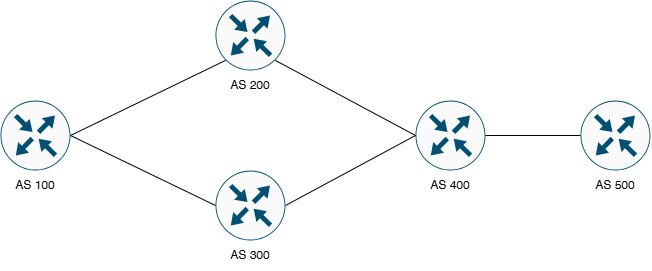
Figure 1: Multi-AS EIGRP Advanced Configuration Topology
This advanced lab consists of five routers (AS100, AS200, AS300, AS400, AS500) running EIGRP in different autonomous systems. AS400 acts as the central redistribution point between AS 100 (connecting AS200 and AS300) and AS 500. The topology demonstrates advanced EIGRP features including inter-AS redistribution, route summarization, and unequal cost load balancing.
| Device Name | Device Type | EIGRP AS | Role | IOS Version |
|---|---|---|---|---|
| AS100 | Cisco Router | AS 100 | Core Router - AS 100 | IOS 15.x or higher |
| AS200 | Cisco Router | AS 200 | Distribution Router - AS 200 | IOS 15.x or higher |
| AS300 | Cisco Router | AS 300 | Distribution Router - AS 300 | IOS 15.x or higher |
| AS400 | Cisco Router | AS 100, 400 | Redistribution Point (Multiple AS) | IOS 15.x or higher |
| AS500 | Cisco Router | AS 400 | Edge Router - AS 400 | IOS 15.x or higher |
| Device | Interface | IP Address | Subnet Mask | Network |
|---|---|---|---|---|
| AS100 | GigabitEthernet0/0 | 203.18.64.1 | 255.255.255.252 (/30) | 203.18.64.0/30 |
| AS100 | GigabitEthernet0/1 | 203.18.64.5 | 255.255.255.252 (/30) | 203.18.64.4/30 |
| AS100 | Loopback0 | 192.168.1.1 | 255.255.255.0 (/24) | 192.168.1.0/24 |
| AS200 | GigabitEthernet0/0 | 203.18.64.2 | 255.255.255.252 (/30) | 203.18.64.0/30 |
| AS200 | GigabitEthernet1/0 | 203.18.65.1 | 255.255.255.252 (/30) | 203.18.65.0/30 |
| AS200 | Loopback0 | 192.168.2.1 | 255.255.255.0 (/24) | 192.168.2.0/24 |
| AS300 | GigabitEthernet0/1 | 203.18.64.6 | 255.255.255.252 (/30) | 203.18.64.4/30 |
| AS300 | GigabitEthernet1/1 | 203.18.65.5 | 255.255.255.252 (/30) | 203.18.65.4/30 |
| AS300 | Loopback0 | 192.168.3.1 | 255.255.255.0 (/24) | 192.168.3.0/24 |
| AS400 | GigabitEthernet1/0 | 203.18.65.2 | 255.255.255.252 (/30) | 203.18.65.0/30 |
| AS400 | GigabitEthernet1/1 | 203.18.65.6 | 255.255.255.252 (/30) | 203.18.65.4/30 |
| AS400 | GigabitEthernet0/0 | 203.18.66.1 | 255.255.255.252 (/30) | 203.18.66.0/30 |
| AS400 | Loopback0 | 192.168.4.1 | 255.255.255.0 (/24) | 192.168.4.0/24 |
| AS500 | GigabitEthernet0/0 | 203.18.66.2 | 255.255.255.252 (/30) | 203.18.66.0/30 |
| AS500 | Loopback0 | 192.168.5.1 | 255.255.255.0 (/24) | 192.168.5.0/24 |
| Connection | Device 1 | Interface 1 | Device 2 | Interface 2 | Network |
|---|---|---|---|---|---|
| Link 1 | AS100 | G0/0 | AS200 | G0/0 | 203.18.64.0/30 |
| Link 2 | AS100 | G0/1 | AS300 | G0/1 | 203.18.64.4/30 |
| Link 3 | AS200 | G1/0 | AS400 | G1/0 | 203.18.65.0/30 |
| Link 4 | AS300 | G1/1 | AS400 | G1/1 | 203.18.65.4/30 |
| Link 5 | AS400 | G0/0 | AS500 | G0/0 | 203.18.66.0/30 |
| Network | Network Address | CIDR | Purpose | EIGRP AS |
|---|---|---|---|---|
| AS100-AS200 Link | 203.18.64.0 | /30 | WAN Connection | AS 100 |
| AS100-AS300 Link | 203.18.64.4 | /30 | WAN Connection | AS 100 |
| AS200-AS400 Link | 203.18.65.0 | /30 | WAN Connection | AS 200 / AS 100 |
| AS300-AS400 Link | 203.18.65.4 | /30 | WAN Connection | AS 300 / AS 100 |
| AS400-AS500 Link | 203.18.66.0 | /30 | WAN Connection | AS 400 |
| AS100 Loopback | 192.168.1.0 | /24 | Internal Network | AS 100 |
| AS200 Loopback | 192.168.2.0 | /24 | Internal Network | AS 200 |
| AS300 Loopback | 192.168.3.0 | /24 | Internal Network | AS 300 |
| AS400 Loopback | 192.168.4.0 | /24 | Internal Network | AS 100 / AS 400 |
| AS500 Loopback | 192.168.5.0 | /24 | Internal Network | AS 400 |
• Completion of Lab 12.1 (EIGRP Basic Configuration)
• Advanced understanding of EIGRP operations and DUAL algorithm
• Knowledge of route redistribution concepts
• Understanding of administrative distance and route preference
• Familiarity with EIGRP metrics and metric calculations
• Experience with Cisco IOS CLI and routing protocol configuration
• Understanding of route summarization and aggregation concepts
• Knowledge of load balancing mechanisms in routing protocols
AS100# configure terminal
AS100(config)# hostname AS100
! Configure GigabitEthernet0/0 (to AS200)
AS100(config)# interface gigabitethernet 0/0
AS100(config-if)# description ** Link to AS200 **
AS100(config-if)# ip address 203.18.64.1 255.255.255.252
AS100(config-if)# no shutdown
AS100(config-if)# exit
! Configure GigabitEthernet0/1 (to AS300)
AS100(config)# interface gigabitethernet 0/1
AS100(config-if)# description ** Link to AS300 **
AS100(config-if)# ip address 203.18.64.5 255.255.255.252
AS100(config-if)# no shutdown
AS100(config-if)# exit
! Configure Loopback0
AS100(config)# interface loopback 0
AS100(config-if)# description ** AS100 Internal Network **
AS100(config-if)# ip address 192.168.1.1 255.255.255.0
AS100(config-if)# exit
AS100(config)# end
AS100# write memory
AS200# configure terminal
AS200(config)# hostname AS200
! Configure GigabitEthernet0/0 (to AS100)
AS200(config)# interface gigabitethernet 0/0
AS200(config-if)# description ** Link to AS100 **
AS200(config-if)# ip address 203.18.64.2 255.255.255.252
AS200(config-if)# no shutdown
AS200(config-if)# exit
! Configure GigabitEthernet1/0 (to AS400)
AS200(config)# interface gigabitethernet 1/0
AS200(config-if)# description ** Link to AS400 **
AS200(config-if)# ip address 203.18.65.1 255.255.255.252
AS200(config-if)# no shutdown
AS200(config-if)# exit
! Configure Loopback0
AS200(config)# interface loopback 0
AS200(config-if)# description ** AS200 Internal Network **
AS200(config-if)# ip address 192.168.2.1 255.255.255.0
AS200(config-if)# exit
AS200(config)# end
AS200# write memory
AS300# configure terminal
AS300(config)# hostname AS300
! Configure GigabitEthernet0/1 (to AS100)
AS300(config)# interface gigabitethernet 0/1
AS300(config-if)# description ** Link to AS100 **
AS300(config-if)# ip address 203.18.64.6 255.255.255.252
AS300(config-if)# no shutdown
AS300(config-if)# exit
! Configure GigabitEthernet1/1 (to AS400)
AS300(config)# interface gigabitethernet 1/1
AS300(config-if)# description ** Link to AS400 **
AS300(config-if)# ip address 203.18.65.5 255.255.255.252
AS300(config-if)# no shutdown
AS300(config-if)# exit
! Configure Loopback0
AS300(config)# interface loopback 0
AS300(config-if)# description ** AS300 Internal Network **
AS300(config-if)# ip address 192.168.3.1 255.255.255.0
AS300(config-if)# exit
AS300(config)# end
AS300# write memory
AS400# configure terminal
AS400(config)# hostname AS400
! Configure GigabitEthernet1/0 (to AS200)
AS400(config)# interface gigabitethernet 1/0
AS400(config-if)# description ** Link to AS200 **
AS400(config-if)# ip address 203.18.65.2 255.255.255.252
AS400(config-if)# no shutdown
AS400(config-if)# exit
! Configure GigabitEthernet1/1 (to AS300)
AS400(config)# interface gigabitethernet 1/1
AS400(config-if)# description ** Link to AS300 **
AS400(config-if)# ip address 203.18.65.6 255.255.255.252
AS400(config-if)# no shutdown
AS400(config-if)# exit
! Configure GigabitEthernet0/0 (to AS500)
AS400(config)# interface gigabitethernet 0/0
AS400(config-if)# description ** Link to AS500 **
AS400(config-if)# ip address 203.18.66.1 255.255.255.252
AS400(config-if)# no shutdown
AS400(config-if)# exit
! Configure Loopback0
AS400(config)# interface loopback 0
AS400(config-if)# description ** AS400 Internal Network **
AS400(config-if)# ip address 192.168.4.1 255.255.255.0
AS400(config-if)# exit
AS400(config)# end
AS400# write memory
AS500# configure terminal
AS500(config)# hostname AS500
! Configure GigabitEthernet0/0 (to AS400)
AS500(config)# interface gigabitethernet 0/0
AS500(config-if)# description ** Link to AS400 **
AS500(config-if)# ip address 203.18.66.2 255.255.255.252
AS500(config-if)# no shutdown
AS500(config-if)# exit
! Configure Loopback0
AS500(config)# interface loopback 0
AS500(config-if)# description ** AS500 Internal Network **
AS500(config-if)# ip address 192.168.5.1 255.255.255.0
AS500(config-if)# exit
AS500(config)# end
AS500# write memory
AS100# show ip interface brief
AS200# show ip interface brief
AS300# show ip interface brief
AS400# show ip interface brief
AS500# show ip interface brief
! Test connectivity between directly connected routers
AS100# ping 203.18.64.2
AS100# ping 203.18.64.6
AS200# ping 203.18.65.2
AS300# ping 203.18.65.6
AS400# ping 203.18.66.2
! Configure EIGRP AS 100
AS100(config)# router eigrp 100
AS100(config-router)# network 203.18.64.0 0.0.0.3
AS100(config-router)# network 203.18.64.4 0.0.0.3
AS100(config-router)# network 192.168.1.0 0.0.0.255
AS100(config-router)# no auto-summary
AS100(config-router)# eigrp router-id 1.1.1.1
AS100(config-router)# exit
AS100(config)# end
AS100# write memory
! Configure EIGRP AS 100 (for link to AS100)
AS200(config)# router eigrp 100
AS200(config-router)# network 203.18.64.0 0.0.0.3
AS200(config-router)# no auto-summary
AS200(config-router)# eigrp router-id 2.2.2.2
AS200(config-router)# exit
! Configure EIGRP AS 200 (for link to AS400 and loopback)
AS200(config)# router eigrp 200
AS200(config-router)# network 203.18.65.0 0.0.0.3
AS200(config-router)# network 192.168.2.0 0.0.0.255
AS200(config-router)# no auto-summary
AS200(config-router)# eigrp router-id 2.2.2.2
AS200(config-router)# exit
AS200(config)# end
AS200# write memory
! Configure EIGRP AS 100 (for link to AS100)
AS300(config)# router eigrp 100
AS300(config-router)# network 203.18.64.4 0.0.0.3
AS300(config-router)# no auto-summary
AS300(config-router)# eigrp router-id 3.3.3.3
AS300(config-router)# exit
! Configure EIGRP AS 300 (for link to AS400 and loopback)
AS300(config)# router eigrp 300
AS300(config-router)# network 203.18.65.4 0.0.0.3
AS300(config-router)# network 192.168.3.0 0.0.0.255
AS300(config-router)# no auto-summary
AS300(config-router)# eigrp router-id 3.3.3.3
AS300(config-router)# exit
AS300(config)# end
AS300# write memory
! Configure EIGRP AS 100 (for links to AS200 and AS300)
AS400(config)# router eigrp 100
AS400(config-router)# network 203.18.65.0 0.0.0.3
AS400(config-router)# network 203.18.65.4 0.0.0.3
AS400(config-router)# network 192.168.4.0 0.0.0.255
AS400(config-router)# no auto-summary
AS400(config-router)# eigrp router-id 4.4.4.4
AS400(config-router)# exit
! Configure EIGRP AS 400 (for link to AS500)
AS400(config)# router eigrp 400
AS400(config-router)# network 203.18.66.0 0.0.0.3
AS400(config-router)# network 192.168.4.0 0.0.0.255
AS400(config-router)# no auto-summary
AS400(config-router)# eigrp router-id 4.4.4.4
AS400(config-router)# exit
AS400(config)# end
AS400# write memory
! Configure EIGRP AS 400
AS500(config)# router eigrp 400
AS500(config-router)# network 203.18.66.0 0.0.0.3
AS500(config-router)# network 192.168.5.0 0.0.0.255
AS500(config-router)# no auto-summary
AS500(config-router)# eigrp router-id 5.5.5.5
AS500(config-router)# exit
AS500(config)# end
AS500# write memory
AS100# show ip eigrp neighbors
! Should see AS200 and AS300 as neighbors in AS 100
! Verify EIGRP neighbors on AS200
AS200# show ip eigrp 100 neighbors
AS200# show ip eigrp 200 neighbors
! AS 100: Should see AS100
! AS 200: Should see AS400
! Verify EIGRP neighbors on AS300
AS300# show ip eigrp 100 neighbors
AS300# show ip eigrp 300 neighbors
! AS 100: Should see AS100
! AS 300: Should see AS400
! Verify EIGRP neighbors on AS400
AS400# show ip eigrp 100 neighbors
AS400# show ip eigrp 400 neighbors
! AS 100: Should see AS200 and AS300
! AS 400: Should see AS500
! Verify EIGRP neighbors on AS500
AS500# show ip eigrp neighbors
! Should see AS400 as neighbor in AS 400
Route redistribution is required to exchange routes between different EIGRP autonomous systems. AS200, AS300, and AS400 will perform redistribution.
Task 3.1: Configure Redistribution on AS200! Redistribute AS 100 into AS 200
AS200(config)# router eigrp 200
AS200(config-router)# redistribute eigrp 100 metric 1000000 10 255 1 1500
AS200(config-router)# exit
! Redistribute AS 200 into AS 100
AS200(config)# router eigrp 100
AS200(config-router)# redistribute eigrp 200 metric 1000000 10 255 1 1500
AS200(config-router)# exit
AS200(config)# end
AS200# write memory
metric 1000000 10 255 1 1500
• 1000000 = Bandwidth in Kbps (1 Gbps)
• 10 = Delay in tens of microseconds (100 µs)
• 255 = Reliability (255 = 100%)
• 1 = Load (1 = minimal load)
• 1500 = MTU in bytes
These seed metrics are required when redistributing into EIGRP.
! Redistribute AS 100 into AS 300
AS300(config)# router eigrp 300
AS300(config-router)# redistribute eigrp 100 metric 1000000 10 255 1 1500
AS300(config-router)# exit
! Redistribute AS 300 into AS 100
AS300(config)# router eigrp 100
AS300(config-router)# redistribute eigrp 300 metric 1000000 10 255 1 1500
AS300(config-router)# exit
AS300(config)# end
AS300# write memory
! Redistribute AS 400 into AS 100
AS400(config)# router eigrp 100
AS400(config-router)# redistribute eigrp 400 metric 1000000 10 255 1 1500
AS400(config-router)# exit
! Redistribute AS 100 into AS 400
AS400(config)# router eigrp 400
AS400(config-router)# redistribute eigrp 100 metric 1000000 10 255 1 1500
AS400(config-router)# exit
AS400(config)# end
AS400# write memory
AS100# show ip route eigrp
! Should see routes marked with "D EX" (EIGRP External)
! Look for 192.168.2.0, 192.168.3.0, 192.168.4.0, 192.168.5.0
! Check administrative distance
AS100# show ip route 192.168.5.0
! External EIGRP routes have AD of 170 (vs 90 for internal)
AS500# show ip route eigrp
! Should see routes from AS100, AS200, AS300 as external routes
! Verify end-to-end reachability
AS500# ping 192.168.1.1 source 192.168.5.1
AS500# ping 192.168.2.1 source 192.168.5.1
AS500# ping 192.168.3.1 source 192.168.5.1
• Redistributed routes appear as "D EX" (EIGRP External)
• External EIGRP routes have Administrative Distance of 170 (vs 90 for internal)
• External routes require seed metrics for redistribution
• Be careful with redistribution to avoid routing loops in complex topologies
Route summarization reduces routing table size and improves scalability by advertising aggregate routes instead of individual subnets.
Task 4.1: Configure Summarization on AS100! Summarize 192.168.1.0/24 on both outbound interfaces
AS100(config)# interface gigabitethernet 0/0
AS100(config-if)# ip summary-address eigrp 100 192.168.1.0 255.255.255.0
AS100(config-if)# exit
AS100(config)# interface gigabitethernet 0/1
AS100(config-if)# ip summary-address eigrp 100 192.168.1.0 255.255.255.0
AS100(config-if)# exit
AS100(config)# end
AS100# write memory
! Summarize 192.168.2.0/24 on G1/0 interface (to AS400)
AS200(config)# interface gigabitethernet 1/0
AS200(config-if)# ip summary-address eigrp 200 192.168.2.0 255.255.255.0
AS200(config-if)# exit
AS200(config)# end
AS200# write memory
! Summarize 192.168.3.0/24 on G1/1 interface (to AS400)
AS300(config)# interface gigabitethernet 1/1
AS300(config-if)# ip summary-address eigrp 300 192.168.3.0 255.255.255.0
AS300(config-if)# exit
AS300(config)# end
AS300# write memory
! Summarize multiple networks into larger aggregate
! Summary 192.168.0.0/22 covers 192.168.0.0 - 192.168.3.255
! This includes 192.168.1.0, 192.168.2.0, 192.168.3.0
AS400(config)# interface gigabitethernet 0/0
AS400(config-if)# ip summary-address eigrp 400 192.168.0.0 255.255.252.0
AS400(config-if)# exit
AS400(config)# end
AS400# write memory
Summarizing 192.168.1.0/24, 192.168.2.0/24, 192.168.3.0/24:
• Binary: 192.168.00000001.0 - 192.168.00000011.0
• Common bits: 192.168.000000xx.x
• Summary: 192.168.0.0/22 (255.255.252.0)
• Covers: 192.168.0.0 - 192.168.3.255 (4 networks)
AS100# show ip route | include Null
AS200# show ip route | include Null
AS300# show ip route | include Null
AS400# show ip route | include Null
! Verify summary routes in topology
AS100# show ip eigrp topology | include Summary
! On AS500, check if summary route is received
AS500# show ip route eigrp
! Should see 192.168.0.0/22 summary instead of individual /24 routes
EIGRP supports unequal cost load balancing using the variance command. This allows traffic to be distributed across multiple paths with different metrics.
Task 5.1: Analyze Current Path MetricsAS100# show ip eigrp topology 192.168.4.0/24
! Expected output shows multiple paths:
! P 192.168.4.0/24, 1 successors, FD is XXXXX
! via 203.18.64.2 (XXXXX/XXXXX), GigabitEthernet0/0
! via 203.18.64.6 (XXXXX/XXXXX), GigabitEthernet0/1
! Configure variance to enable unequal cost load balancing
AS100(config)# router eigrp 100
AS100(config-router)# variance 2
AS100(config-router)# exit
! Optionally configure maximum paths (default is 4)
AS100(config)# router eigrp 100
AS100(config-router)# maximum-paths 4
AS100(config-router)# exit
AS100(config)# end
AS100# write memory
variance 2 means:
• EIGRP will load balance across paths with metrics up to 2x the best path
• If best path metric is 1000, paths with metric ≤ 2000 will be used
• Feasibility condition must still be met (RD < FD of successor)
• variance 1 = equal cost load balancing only (default behavior)
• variance 128 = maximum value (allows all feasible successors)
! Configure variance for AS 400
AS400(config)# router eigrp 400
AS400(config-router)# variance 2
AS400(config-router)# maximum-paths 4
AS400(config-router)# exit
AS400(config)# end
AS400# write memory
AS100# show ip route 192.168.4.0
! Should show multiple next-hops if paths meet variance criteria
! Verify variance configuration
AS100# show ip protocols | include variance
! Output: EIGRP maximum hopcount 100
! EIGRP maximum metric variance 2
! Check topology for all links
AS100# show ip eigrp topology all-links
! Shows successors and feasible successors
! Monitor load balancing in action
AS100# show ip route 192.168.5.0
! Multiple paths indicate load balancing is active
AS100# ping 192.168.5.1 source 192.168.1.1 repeat 100
! Check CEF load balancing
AS100# show ip cef 192.168.5.1 internal
! View interface statistics
AS100# show interface gigabitethernet 0/0 | include packets
AS100# show interface gigabitethernet 0/1 | include packets
! Packet counts should increase on both interfaces
EIGRP Named Mode (introduced in IOS 15.0) provides a more structured and scalable configuration format with enhanced features.
Task 6.1: Migrate AS500 to EIGRP Named Mode! Remove classic mode EIGRP configuration first
AS500(config)# no router eigrp 400
! Configure EIGRP Named Mode
AS500(config)# router eigrp LAB-EIGRP
AS500(config-router)# address-family ipv4 unicast autonomous-system 400
! Configure network statements
AS500(config-router-af)# network 203.18.66.0 0.0.0.3
AS500(config-router-af)# network 192.168.5.0 0.0.0.255
! Configure router ID
AS500(config-router-af)# eigrp router-id 5.5.5.5
! Configure topology and metrics
AS500(config-router-af)# topology base
AS500(config-router-af-topology)# variance 2
AS500(config-router-af-topology)# maximum-paths 4
AS500(config-router-af-topology)# exit-af-topology
! Exit address family
AS500(config-router-af)# exit-address-family
AS500(config-router)# exit
AS500(config)# end
AS500# write memory
AS500(config)# key chain EIGRP-AUTH
AS500(config-keychain)# key 1
AS500(config-keychain-key)# key-string Cisco123!
AS500(config-keychain-key)# exit
AS500(config-keychain)# exit
! Apply authentication in named mode
AS500(config)# router eigrp LAB-EIGRP
AS500(config-router)# address-family ipv4 unicast autonomous-system 400
AS500(config-router-af)# af-interface gigabitethernet 0/0
AS500(config-router-af-interface)# authentication mode md5
AS500(config-router-af-interface)# authentication key-chain EIGRP-AUTH
AS500(config-router-af-interface)# exit-af-interface
AS500(config-router-af)# exit-address-family
AS500(config-router)# exit
! Add authentication to match AS500
AS400(config)# key chain EIGRP-AUTH
AS400(config-keychain)# key 1
AS400(config-keychain-key)# key-string Cisco123!
AS400(config-keychain-key)# exit
AS400(config-keychain)# exit
! Apply to interface in classic mode
AS400(config)# interface gigabitethernet 0/0
AS400(config-if)# ip authentication mode eigrp 400 md5
AS400(config-if)# ip authentication key-chain eigrp 400 EIGRP-AUTH
AS400(config-if)# exit
AS400(config)# end
AS400# write memory
AS500# show eigrp address-family ipv4
! Check neighbors (should still see AS400)
AS500# show eigrp address-family ipv4 neighbors
! View named mode topology
AS500# show eigrp address-family ipv4 topology
! Check authentication
AS500# show eigrp address-family ipv4 interfaces detail
! Verify routes are still present
AS500# show ip route eigrp
• Hierarchical configuration structure
• Single configuration block per instance (vs per-AS)
• IPv4 and IPv6 support in same instance
• Per-interface and per-AF configuration
• Improved authentication configuration
• Better scalability for large deployments
• Backward compatible with classic mode
AS200# configure terminal
! Increase bandwidth value for better metric
AS200(config)# interface gigabitethernet 1/0
AS200(config-if)# bandwidth 100000
AS200(config-if)# exit
AS200(config)# end
AS200# write memory
! Verify metric changes
AS200# show ip eigrp topology
! Metrics should be recalculated based on new bandwidth
AS300# configure terminal
AS300(config)# interface gigabitethernet 1/1
AS300(config-if)# delay 200
AS300(config-if)# exit
AS300(config)# end
AS300# write memory
! Verify topology changes
AS300# show ip eigrp topology 192.168.4.0/24
! FD should increase due to higher delay
AS100# show ip route 192.168.4.0
! View detailed topology information
AS100# show ip eigrp topology 192.168.4.0/24
! Shows FD and AD for all paths
! Check interface metrics
AS200# show interface gigabitethernet 1/0 | include BW
AS300# show interface gigabitethernet 1/1 | include DLY
Metric = 256 × [(K1 × Bandwidth) + (K3 × Delay)]
With default K-values (K1=1, K2=0, K3=1, K4=0, K5=0):
Metric = 256 × [(10^7 / min_BW_kbps) + (cumulative_delay / 10)]
• Bandwidth: 10^7 divided by minimum bandwidth in path (in Kbps)
• Delay: Sum of delays along path (in tens of microseconds)
• Lower metrics are preferred
• Bandwidth changes have larger impact than delay changes
! AS100 Complete Configuration - Lab 12.2
!
hostname AS100
!
interface Loopback0
description ** AS100 Internal Network **
ip address 192.168.1.1 255.255.255.0
!
interface GigabitEthernet0/0
description ** Link to AS200 **
ip address 203.18.64.1 255.255.255.252
ip summary-address eigrp 100 192.168.1.0 255.255.255.0
no shutdown
!
interface GigabitEthernet0/1
description ** Link to AS300 **
ip address 203.18.64.5 255.255.255.252
ip summary-address eigrp 100 192.168.1.0 255.255.255.0
no shutdown
!
router eigrp 100
network 192.168.1.0 0.0.0.255
network 203.18.64.0 0.0.0.3
network 203.18.64.4 0.0.0.3
variance 2
maximum-paths 4
no auto-summary
eigrp router-id 1.1.1.1
!
end
! AS200 Complete Configuration - Lab 12.2
!
hostname AS200
!
interface Loopback0
description ** AS200 Internal Network **
ip address 192.168.2.1 255.255.255.0
!
interface GigabitEthernet0/0
description ** Link to AS100 **
ip address 203.18.64.2 255.255.255.252
no shutdown
!
interface GigabitEthernet1/0
description ** Link to AS400 **
ip address 203.18.65.1 255.255.255.252
ip summary-address eigrp 200 192.168.2.0 255.255.255.0
bandwidth 100000
no shutdown
!
router eigrp 100
network 203.18.64.0 0.0.0.3
redistribute eigrp 200 metric 1000000 10 255 1 1500
no auto-summary
eigrp router-id 2.2.2.2
!
router eigrp 200
network 192.168.2.0 0.0.0.255
network 203.18.65.0 0.0.0.3
redistribute eigrp 100 metric 1000000 10 255 1 1500
no auto-summary
eigrp router-id 2.2.2.2
!
end
! AS300 Complete Configuration - Lab 12.2
!
hostname AS300
!
interface Loopback0
description ** AS300 Internal Network **
ip address 192.168.3.1 255.255.255.0
!
interface GigabitEthernet0/1
description ** Link to AS100 **
ip address 203.18.64.6 255.255.255.252
no shutdown
!
interface GigabitEthernet1/1
description ** Link to AS400 **
ip address 203.18.65.5 255.255.255.252
ip summary-address eigrp 300 192.168.3.0 255.255.255.0
delay 200
no shutdown
!
router eigrp 100
network 203.18.64.4 0.0.0.3
redistribute eigrp 300 metric 1000000 10 255 1 1500
no auto-summary
eigrp router-id 3.3.3.3
!
router eigrp 300
network 192.168.3.0 0.0.0.255
network 203.18.65.4 0.0.0.3
redistribute eigrp 100 metric 1000000 10 255 1 1500
no auto-summary
eigrp router-id 3.3.3.3
!
end
! AS400 Complete Configuration - Lab 12.2
!
hostname AS400
!
key chain EIGRP-AUTH
key 1
key-string Cisco123!
!
interface Loopback0
description ** AS400 Internal Network **
ip address 192.168.4.1 255.255.255.0
!
interface GigabitEthernet0/0
description ** Link to AS500 **
ip address 203.18.66.1 255.255.255.252
ip authentication mode eigrp 400 md5
ip authentication key-chain eigrp 400 EIGRP-AUTH
no shutdown
!
interface GigabitEthernet1/0
description ** Link to AS200 **
ip address 203.18.65.2 255.255.255.252
no shutdown
!
interface GigabitEthernet1/1
description ** Link to AS300 **
ip address 203.18.65.6 255.255.255.252
no shutdown
!
router eigrp 100
network 192.168.4.0 0.0.0.255
network 203.18.65.0 0.0.0.3
network 203.18.65.4 0.0.0.3
redistribute eigrp 400 metric 1000000 10 255 1 1500
variance 3
maximum-paths 4
no auto-summary
eigrp router-id 4.4.4.4
!
router eigrp 400
network 192.168.4.0 0.0.0.255
network 203.18.66.0 0.0.0.3
redistribute eigrp 100 metric 1000000 10 255 1 1500
variance 2
maximum-paths 4
no auto-summary
eigrp router-id 4.4.4.4
!
end
! AS500 Complete Configuration - Lab 12.2 (EIGRP Named Mode)
!
hostname AS500
!
key chain EIGRP-AUTH
key 1
key-string Cisco123!
!
interface Loopback0
description ** AS500 Internal Network **
ip address 192.168.5.1 255.255.255.0
!
interface GigabitEthernet0/0
description ** Link to AS400 **
ip address 203.18.66.2 255.255.255.252
no shutdown
!
router eigrp LAB-EIGRP
address-family ipv4 unicast autonomous-system 400
network 192.168.5.0 0.0.0.255
network 203.18.66.0 0.0.0.3
eigrp router-id 5.5.5.5
topology base
variance 2
maximum-paths 4
exit-af-topology
af-interface GigabitEthernet0/0
authentication mode md5
authentication key-chain EIGRP-AUTH
exit-af-interface
exit-address-family
!
end
AS200# show ip eigrp 100 neighbors
AS200# show ip eigrp 200 neighbors
AS300# show ip eigrp 100 neighbors
AS300# show ip eigrp 300 neighbors
AS400# show ip eigrp 100 neighbors
AS400# show ip eigrp 400 neighbors
AS500# show eigrp address-family ipv4 neighbors
AS100# show ip route eigrp | include D EX
! Verify administrative distance of external routes
AS100# show ip route 192.168.5.0
! Should show [170/XXXXX] for external routes
! Check redistribution configuration
AS200# show ip protocols | section redistribute
AS300# show ip protocols | section redistribute
AS400# show ip protocols | section redistribute
AS100# show ip route | include Null0
AS400# show ip route | include Null0
! Verify summary in topology table
AS100# show ip eigrp topology | include Summary
! On AS500, verify aggregate route is received
AS500# show ip route 192.168.0.0
! Should see summary route 192.168.0.0/22
AS100# show ip protocols | include variance
AS400# show ip protocols | include variance
! View multiple paths in routing table
AS100# show ip route 192.168.4.0
! Multiple next-hops indicate load balancing
! Check all available paths (including FD and AD)
AS100# show ip eigrp topology all-links
AS500# show eigrp address-family ipv4 neighbors
AS500# show eigrp address-family ipv4 topology
AS500# show eigrp address-family ipv4 interfaces
AS500# show eigrp address-family ipv4 interfaces detail
AS200# show interface gigabitethernet 1/0 | include BW|DLY
AS300# show interface gigabitethernet 1/1 | include BW|DLY
! View calculated metrics
AS100# show ip eigrp topology 192.168.4.0/24
! Shows FD (Feasible Distance) and RD (Reported Distance)
AS100# ping 192.168.5.1 source 192.168.1.1
! Test from AS500 to all networks
AS500# ping 192.168.1.1 source 192.168.5.1
AS500# ping 192.168.2.1 source 192.168.5.1
AS500# ping 192.168.3.1 source 192.168.5.1
AS500# ping 192.168.4.1 source 192.168.5.1
! Traceroute to verify path
AS100# traceroute 192.168.5.1 source 192.168.1.1
AS400# show ip eigrp 100 traffic
AS400# show ip eigrp 400 traffic
AS500# show eigrp address-family ipv4 traffic
AS100# show ip eigrp topology
AS400# show ip eigrp topology
! View all links (including non-successors)
AS100# show ip eigrp topology all-links
! View specific prefix
AS100# show ip eigrp topology 192.168.5.0/24
AS200# show ip route
AS300# show ip route
AS400# show ip route
AS500# show ip route
! Filter for EIGRP routes only
AS100# show ip route eigrp
! Count routes
AS100# show ip route summary
- ☑ All interfaces configured with correct IP addresses and in "up/up" state
- ☑ EIGRP AS 100 configured on AS100, AS200, AS300, AS400
- ☑ EIGRP AS 200 configured on AS200 and AS400
- ☑ EIGRP AS 300 configured on AS300 and AS400
- ☑ EIGRP AS 400 configured on AS400 and AS500
- ☑ EIGRP neighbors established within each autonomous system
- ☑ Route redistribution configured on AS200 (AS 100 ↔ AS 200)
- ☑ Route redistribution configured on AS300 (AS 100 ↔ AS 300)
- ☑ Route redistribution configured on AS400 (AS 100 ↔ AS 400)
- ☑ External EIGRP routes visible with "D EX" designation
- ☑ External routes have AD of 170 (vs 90 for internal)
- ☑ Manual summarization configured on AS100, AS200, AS300
- ☑ Advanced summarization configured on AS400 (192.168.0.0/22)
- ☑ Null0 routes automatically created for summaries
- ☑ AS500 receives aggregate route 192.168.0.0/22
- ☑ Variance configured on AS100 (variance 2)
- ☑ Variance configured on AS400 (variance 2-3)
- ☑ Multiple paths visible in routing table (load balancing active)
- ☑ AS500 migrated to EIGRP Named Mode
- ☑ Authentication configured between AS400 and AS500
- ☑ Named mode neighbor relationship with classic mode AS400
- ☑ Bandwidth adjusted on AS200 G1/0 (100000)
- ☑ Delay adjusted on AS300 G1/1 (200)
- ☑ Metrics recalculated based on bandwidth/delay changes
- ☑ End-to-end connectivity verified (AS100 to AS500)
- ☑ All loopback networks reachable from all routers
- ☑ Traceroute shows correct routing path
- ☑ Configurations saved on all routers
• External routes not appearing in routing table
• "show ip route eigrp" shows no "D EX" routes
• Networks from other AS are not reachable
AS200# show run | section router eigrp
! Look for "redistribute eigrp" commands
! Step 2: Check if seed metrics are specified
AS200# show ip protocols
! Redistribution requires seed metrics for EIGRP
! Step 3: Verify source AS has routes to redistribute
AS200# show ip route eigrp
! Source AS must have routes before redistributing them
! Step 4: Check administrative distance
AS100# show ip route 192.168.2.0
! External routes should show [170/metric]
! Step 5: Enable debug to see redistribution
AS200# debug ip eigrp
AS200# clear ip route *
! Watch for redistribution messages
AS200# undebug all
| Cause | Solution |
|---|---|
| Missing redistribution command | Add: redistribute eigrp [AS] metric 1000000 10 255 1 1500 |
| No seed metric specified | Always specify metric when redistributing into EIGRP |
| Redistribution in wrong direction | Configure mutual redistribution (both directions) |
| Source AS has no routes | Verify EIGRP is running and routes exist in source AS |
| Route filtering blocking routes | Check distribute-lists and route-maps |
• Specific routes still advertised instead of summary
• No Null0 route created
• Neighbors receive individual routes instead of aggregate
AS100# show run interface gigabitethernet 0/0
! Look for "ip summary-address eigrp" command
! Step 2: Check if Null0 route exists
AS100# show ip route | include Null
! Should show summary route pointing to Null0
! Step 3: Verify summary in topology
AS100# show ip eigrp topology | include Summary
! Step 4: Check neighbor's routing table
AS200# show ip route 192.168.1.0
! Should show summary, not specific routes
! Step 5: Verify component routes exist
AS100# show ip route 192.168.1.0
! At least one component route must exist
| Cause | Solution |
|---|---|
| Summary on wrong interface | Configure summary on outbound interface toward neighbor |
| Incorrect summary address | Recalculate summary to cover all component networks |
| Wrong AS number in command | Match AS number with EIGRP process: ip summary-address eigrp [AS] |
| No component routes active | Ensure at least one specific route exists before summarizing |
| Auto-summary interfering | Ensure "no auto-summary" is configured |
• Only one path installed despite multiple available
• Variance configured but not taking effect
• Traffic using single path instead of load balancing
AS100# show ip protocols | include variance
! Should show "EIGRP maximum metric variance X"
! Step 2: Check if feasibility condition is met
AS100# show ip eigrp topology all-links
! RD must be < FD of successor for feasible successor
! Step 3: View routing table
AS100# show ip route 192.168.4.0
! Multiple next-hops should be listed if variance criteria met
! Step 4: Check maximum-paths setting
AS100# show ip protocols | include Maximum
! Should be 2-32 (default is 4)
! Step 5: Verify path metrics
AS100# show ip eigrp topology 192.168.4.0/24
! Check if alternate path metric is within variance multiplier
| Cause | Solution |
|---|---|
| Variance not configured | Add: variance [multiplier] under router eigrp |
| Feasibility condition not met | RD must be < FD; adjust metrics if needed |
| Variance too small | Increase variance value to include desired paths |
| maximum-paths set to 1 | Increase: maximum-paths 4 (or desired value) |
| Only one feasible path exists | Add redundant paths or adjust metrics |
| CEF load balancing disabled | Enable: ip cef (globally) |
• Named mode configuration not working
• Neighbors not forming after migration
• Syntax errors in named mode commands
AS500# show version | include IOS
! IOS 15.0(1)M or higher required
! Step 2: Check named mode configuration
AS500# show eigrp address-family ipv4
! Step 3: Verify AS number matches
AS500# show eigrp address-family ipv4 | include AS
! Must match classic mode neighbor
! Step 4: Check neighbors
AS500# show eigrp address-family ipv4 neighbors
! Step 5: Verify authentication matches
AS500# show eigrp address-family ipv4 interfaces detail
| Cause | Solution |
|---|---|
| IOS version too old | Upgrade to IOS 15.0(1)M or higher |
| AS number mismatch | Ensure AS matches between named and classic mode |
| Authentication mismatch | Key-string must match exactly on both sides |
| Network statements missing | Add network statements under address-family |
| Classic mode not removed | Use "no router eigrp [AS]" before configuring named mode |
• External routes not preferred when they should be
• Wrong routes being used due to AD issues
• Unexpected routing behavior after redistribution
AS100# show ip route 192.168.5.0
! External EIGRP should show [170/metric]
! Step 2: Verify route source
AS100# show ip eigrp topology 192.168.5.0/24
! Check if external or internal
! Step 3: Compare with other protocols
AS100# show ip protocols
! Check if other protocols have better AD
! Step 4: Check if distance command is used
AS100# show run | include distance
| Administrative Distance Values | Value |
|---|---|
| EIGRP Internal | 90 (default) |
| EIGRP External | 170 (default) |
| OSPF | 110 |
| RIP | 120 |
| BGP | 20 (eBGP) / 200 (iBGP) |
To modify AD:
AS100(config-router)# distance eigrp 90 170
! First value: internal AD, Second value: external AD
• Redistribution configured and routes present
• Ping still fails between networks
• Traceroute shows incomplete path
AS200# show ip protocols | section redistribute
! Must redistribute in both directions
! Step 2: Check return path
AS500# show ip route 192.168.1.0
! Return route must exist
! Step 3: Verify routing loops
AS100# traceroute 192.168.5.1 source 192.168.1.1
! Look for loops or dead ends
! Step 4: Check for route filtering
AS200# show ip protocols | include filter
! Step 5: Test intermediate hops
AS100# ping 203.18.66.1
! Test connectivity to AS400
- ✓ Ensure mutual redistribution (both directions)
- ✓ Verify seed metrics are reasonable
- ✓ Check for ACLs blocking ICMP
- ✓ Verify no distribute-lists filtering routes
- ✓ Ensure no routing loops exist
- ✓ Check that all intermediate routers have routes
- ✓ Redistribution exchanges routes between different EIGRP AS or routing protocols
- ✓ Seed metrics are mandatory when redistributing into EIGRP
- ✓ Redistributed routes become "external" (D EX) with AD of 170
- ✓ Mutual redistribution required for bidirectional communication
- ✓ Redistribution can create suboptimal routing and loops if not carefully planned
- ✓ Use route-maps and distribute-lists to control what gets redistributed
- ✓ Summarization reduces routing table size and improves scalability
- ✓ Configure summarization on outbound interfaces
- ✓ Null0 routes automatically created to prevent routing loops
- ✓ Summary metric based on best component route
- ✓ Summarization reduces query scope and improves convergence
- ✓ Plan summarization hierarchically at network boundaries
- ✓ Ensure summary covers only intended networks to avoid black holes
- ✓ Variance enables load balancing across paths with different metrics
- ✓ Feasibility condition must still be met (RD < FD)
- ✓ Variance multiplier determines which paths are used
- ✓ Maximum-paths limits number of parallel paths (1-32, default 4)
- ✓ CEF (Cisco Express Forwarding) performs actual load balancing
- ✓ Load distribution can be per-packet or per-destination
- ✓ Monitor load distribution with interface statistics
- ✓ Hierarchical and structured configuration
- ✓ Single instance supports both IPv4 and IPv6
- ✓ Per-interface and per-address-family configuration
- ✓ Improved authentication configuration options
- ✓ Better VRF support and scalability
- ✓ Backward compatible with classic mode
- ✓ Required for advanced features like wide metrics
- ✓ Bandwidth affects metric more than delay
- ✓ Use bandwidth command to influence path selection
- ✓ Delay command provides fine-tuning of metrics
- ✓ Interface metrics don't affect actual throughput
- ✓ Bandwidth in Kbps, Delay in tens of microseconds
- ✓ Consistent metric tuning across all routers recommended
- ✓ Document all metric changes for troubleshooting
- ✓ Multiple AS can provide administrative and security boundaries
- ✓ Redistribution points should be carefully planned
- ✓ Route summarization critical at AS boundaries
- ✓ Consider using route-maps for redistribution control
- ✓ Monitor external route count to prevent routing table bloat
- ✓ Use route tagging to track redistributed routes
- ✓ Document AS design and redistribution points
- ✓ External routes marked with "EX" in routing table
- ✓ Default AD of 170 (vs 90 for internal)
- ✓ Can be modified with distance command
- ✓ Carry original protocol information
- ✓ Subject to different query rules than internal routes
- ✓ Summary routes can suppress external route details
- ✓ Always verify bidirectional connectivity
- ✓ Check both internal and external route tables
- ✓ Verify redistribution in both directions
- ✓ Monitor EIGRP topology for all paths
- ✓ Use traceroute to verify actual forwarding path
- ✓ Check administrative distance when multiple protocols exist
- ✓ Review summarization boundaries for black holes
- ✓ Verify variance and feasibility conditions for load balancing
- ✓ Plan AS boundaries based on administrative domains
- ✓ Implement authentication on all EIGRP links
- ✓ Use summarization to reduce routing table size
- ✓ Document redistribution points and seed metrics
- ✓ Implement passive-interface for security
- ✓ Monitor query propagation and SIA conditions
- ✓ Use stub routing at network edges
- ✓ Test failover scenarios thoroughly
- ✓ Maintain consistent router IDs
- ✓ EIGRP redistribution between multiple AS
- ✓ Route summarization configuration and verification
- ✓ Unequal cost load balancing with variance
- ✓ EIGRP Named Mode configuration
- ✓ Metric manipulation (bandwidth, delay)
- ✓ External route identification and administrative distance
- ✓ Troubleshooting multi-AS EIGRP environments
- ✓ DUAL algorithm and feasibility condition
You have successfully completed Lab 12.2: Advanced EIGRP - Redistribution, Summarization & Load Balancing.
Advanced Skills Mastered:
• Multi-AS EIGRP configuration across 5 routers
• Route redistribution between different autonomous systems
• Manual and aggregate route summarization techniques
• Unequal cost load balancing using variance
• EIGRP Named Mode configuration and migration
• EIGRP metric manipulation and path control
• Complex EIGRP troubleshooting methodologies
• External vs internal route identification
Next Steps:
• Review all verification commands and expected outputs
• Practice troubleshooting by intentionally breaking configurations
• Experiment with different variance values and observe effects
• Try migrating all routers to Named Mode
• Explore route filtering with distribute-lists and route-maps
• Move on to EIGRP advanced topics (stub routing, graceful restart, BFD)
• Continue with OSPF or BGP labs to complete CCNP training
• Save all router configurations for reference
• Document redistribution points and seed metrics used
• Create network diagrams showing AS boundaries
• Note any issues encountered and solutions applied
• Keep records of metric values and variance settings
• Practice this lab multiple times to build confidence
• Time yourself to improve efficiency for exam scenarios
• Always use authentication in production EIGRP deployments
• Plan redistribution carefully to avoid routing loops
• Implement route filtering at redistribution points
• Use route tagging to track redistributed routes
• Monitor external route counts to prevent table bloat
• Document all AS boundaries and redistribution policies
• Implement summarization at hierarchical boundaries
• Test failover scenarios before production deployment
• Maintain consistent router IDs across the network
• Use passive-interface for user-facing segments
• Redistribution can cause routing loops if misconfigured
• Always test in lab before implementing in production
• Schedule changes during maintenance windows
• Have rollback plan ready before making changes
• Verify bidirectional redistribution is configured
• Be cautious with variance - can cause packet reordering
• Monitor CPU usage after enabling debug commands
• Summarization can create black holes if miscalculated
• External routes have different AD - verify route preference
• Named Mode migration requires careful planning and testing
🏆 End of Lab 12.2 🏆
Advanced EIGRP - Redistribution, Summarization & Load Balancing
Lab Duration: 150-180 minutes
CCNP Enterprise (ENCOR 350-401 & ENARSI 300-410)
Excellent work on completing this advanced EIGRP lab!
Keep practicing and good luck with your CCNP certification journey!