Upon completion of this lab, you will be able to:
- ✓ Understand EIGRP Stuck in Active (SIA) condition and its causes
- ✓ Configure EIGRP on a complex 6-router topology
- ✓ Simulate and observe SIA conditions in EIGRP networks
- ✓ Implement EIGRP stub routing to prevent query propagation
- ✓ Configure route summarization to limit query scope
- ✓ Monitor and troubleshoot SIA-related issues
- ✓ Implement Active Timer adjustments for SIA prevention
- ✓ Use EIGRP event logging to track SIA occurrences
- ✓ Apply best practices for preventing SIA in production networks
- ✓ Analyze EIGRP topology states (Passive, Active, SIA-Query, SIA-Reply)
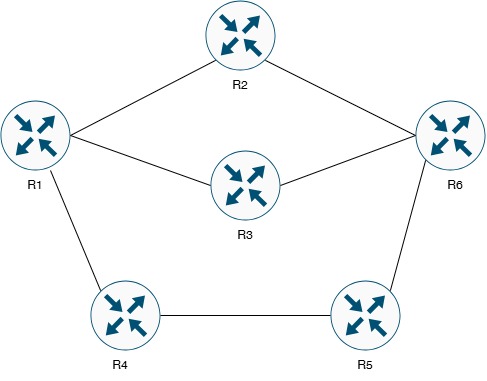
Figure 1: EIGRP SIA Troubleshooting Topology (6 Routers)
This lab features a complex 6-router EIGRP topology designed to demonstrate and troubleshoot Stuck in Active (SIA) conditions. R1 acts as the core router with connections to R2, R3, and R4. R6 serves as a convergence point receiving routes from multiple paths through R2, R3, and R5. This topology is ideal for observing query propagation and implementing SIA prevention techniques.
| Device Name | Device Type | EIGRP AS | Role | IOS Version |
|---|---|---|---|---|
| R1 | Cisco Router | AS 100 | Core Router / Query Source | IOS 15.x or higher |
| R2 | Cisco Router | AS 100 | Distribution Router | IOS 15.x or higher |
| R3 | Cisco Router | AS 100 | Distribution Router | IOS 15.x or higher |
| R4 | Cisco Router | AS 100 | Distribution Router | IOS 15.x or higher |
| R5 | Cisco Router | AS 100 | Edge Router / Stub Candidate | IOS 15.x or higher |
| R6 | Cisco Router | AS 100 | Convergence Point / Edge Router | IOS 15.x or higher |
| Device | Interface | IP Address | Subnet Mask | Network |
|---|---|---|---|---|
| R1 | GigabitEthernet0/0 | 203.18.61.1 | 255.255.255.252 (/30) | 203.18.61.0/30 |
| R1 | GigabitEthernet0/1 | 203.18.61.5 | 255.255.255.252 (/30) | 203.18.61.4/30 |
| R1 | GigabitEthernet1/0 | 203.18.61.9 | 255.255.255.252 (/30) | 203.18.61.8/30 |
| R1 | Loopback0 | 192.168.1.1 | 255.255.255.0 (/24) | 192.168.1.0/24 |
| R2 | GigabitEthernet0/0 | 203.18.61.2 | 255.255.255.252 (/30) | 203.18.61.0/30 |
| R2 | GigabitEthernet1/0 | 203.18.62.1 | 255.255.255.252 (/30) | 203.18.62.0/30 |
| R2 | Loopback0 | 192.168.2.1 | 255.255.255.0 (/24) | 192.168.2.0/24 |
| R3 | GigabitEthernet0/1 | 203.18.61.6 | 255.255.255.252 (/30) | 203.18.61.4/30 |
| R3 | GigabitEthernet1/1 | 203.18.63.1 | 255.255.255.252 (/30) | 203.18.63.0/30 |
| R3 | Loopback0 | 192.168.3.1 | 255.255.255.0 (/24) | 192.168.3.0/24 |
| R4 | GigabitEthernet1/0 | 203.18.61.10 | 255.255.255.252 (/30) | 203.18.61.8/30 |
| R4 | GigabitEthernet0/0 | 203.18.64.1 | 255.255.255.252 (/30) | 203.18.64.0/30 |
| R4 | Loopback0 | 192.168.4.1 | 255.255.255.0 (/24) | 192.168.4.0/24 |
| R5 | GigabitEthernet0/0 | 203.18.64.2 | 255.255.255.252 (/30) | 203.18.64.0/30 |
| R5 | GigabitEthernet0/1 | 203.18.65.1 | 255.255.255.252 (/30) | 203.18.65.0/30 |
| R5 | Loopback0 | 192.168.5.1 | 255.255.255.0 (/24) | 192.168.5.0/24 |
| R6 | GigabitEthernet1/0 | 203.18.62.2 | 255.255.255.252 (/30) | 203.18.62.0/30 |
| R6 | GigabitEthernet1/1 | 203.18.63.2 | 255.255.255.252 (/30) | 203.18.63.0/30 |
| R6 | GigabitEthernet0/1 | 203.18.65.2 | 255.255.255.252 (/30) | 203.18.65.0/30 |
| R6 | Loopback0 | 192.168.6.1 | 255.255.255.0 (/24) | 192.168.6.0/24 |
| Connection | Device 1 | Interface 1 | Device 2 | Interface 2 | Network |
|---|---|---|---|---|---|
| Link 1 | R1 | G0/0 | R2 | G0/0 | 203.18.61.0/30 |
| Link 2 | R1 | G0/1 | R3 | G0/1 | 203.18.61.4/30 |
| Link 3 | R1 | G1/0 | R4 | G1/0 | 203.18.61.8/30 |
| Link 4 | R2 | G1/0 | R6 | G1/0 | 203.18.62.0/30 |
| Link 5 | R3 | G1/1 | R6 | G1/1 | 203.18.63.0/30 |
| Link 6 | R4 | G0/0 | R5 | G0/0 | 203.18.64.0/30 |
| Link 7 | R5 | G0/1 | R6 | G0/1 | 203.18.65.0/30 |
• Completion of Lab 12.1 and Lab 12.2 strongly recommended
• Deep understanding of EIGRP DUAL algorithm and FSM
• Knowledge of EIGRP query and reply mechanisms
• Understanding of Feasible Distance (FD) and Reported Distance (RD)
• Familiarity with EIGRP topology states (Passive, Active)
• Experience with EIGRP route summarization and stub routing
• Advanced Cisco IOS CLI troubleshooting skills
• Understanding of network convergence concepts
Definition: SIA occurs when a router sends EIGRP queries about a route but does not receive replies from all neighbors within the Active Timer period (default 3 minutes / 180 seconds).
Consequences:
• Neighbor relationships are reset with routers that didn't reply
• Routing instability and convergence issues
• Potential network outages
• CPU and memory resource consumption
Root Causes:
• Slow WAN links delaying query/reply propagation
• Routing loops causing queries to circulate
• Large network diameter with many hops
• Congested links dropping EIGRP packets
• Misconfigured or missing route summarization
• Router resource exhaustion (CPU/memory)
• Lack of stub routing implementation
Normal Operation:
1. Route goes down (successor lost)
2. Router checks for Feasible Successor (FS)
3. If FS exists: Immediate convergence (route in Passive state)
4. If NO FS: Router enters Active state and sends Queries
5. Queries propagate to all neighbors (except route source)
6. Each neighbor must Reply to the Query
7. Once all Replies received: Route returns to Passive state
SIA Condition:
• If any neighbor fails to Reply within 180 seconds → SIA
• Router resets neighbor relationship with non-responding router
• Can trigger cascading SIA across network
R1# configure terminal
R1(config)# hostname R1
! Configure G0/0 (to R2)
R1(config)# interface gigabitethernet 0/0
R1(config-if)# description ** Link to R2 **
R1(config-if)# ip address 203.18.61.1 255.255.255.252
R1(config-if)# no shutdown
R1(config-if)# exit
! Configure G0/1 (to R3)
R1(config)# interface gigabitethernet 0/1
R1(config-if)# description ** Link to R3 **
R1(config-if)# ip address 203.18.61.5 255.255.255.252
R1(config-if)# no shutdown
R1(config-if)# exit
! Configure G1/0 (to R4)
R1(config)# interface gigabitethernet 1/0
R1(config-if)# description ** Link to R4 **
R1(config-if)# ip address 203.18.61.9 255.255.255.252
R1(config-if)# no shutdown
R1(config-if)# exit
! Configure Loopback0
R1(config)# interface loopback 0
R1(config-if)# description ** R1 Internal Network **
R1(config-if)# ip address 192.168.1.1 255.255.255.0
R1(config-if)# exit
R1(config)# end
R1# write memory
R2(config)# hostname R2
! Configure G0/0 (to R1)
R2(config)# interface gigabitethernet 0/0
R2(config-if)# description ** Link to R1 **
R2(config-if)# ip address 203.18.61.2 255.255.255.252
R2(config-if)# no shutdown
R2(config-if)# exit
! Configure G1/0 (to R6)
R2(config)# interface gigabitethernet 1/0
R2(config-if)# description ** Link to R6 **
R2(config-if)# ip address 203.18.62.1 255.255.255.252
R2(config-if)# no shutdown
R2(config-if)# exit
! Configure Loopback0
R2(config)# interface loopback 0
R2(config-if)# description ** R2 Internal Network **
R2(config-if)# ip address 192.168.2.1 255.255.255.0
R2(config-if)# exit
R2(config)# end
R2# write memory
R3(config)# hostname R3
! Configure G0/1 (to R1)
R3(config)# interface gigabitethernet 0/1
R3(config-if)# description ** Link to R1 **
R3(config-if)# ip address 203.18.61.6 255.255.255.252
R3(config-if)# no shutdown
R3(config-if)# exit
! Configure G1/1 (to R6)
R3(config)# interface gigabitethernet 1/1
R3(config-if)# description ** Link to R6 **
R3(config-if)# ip address 203.18.63.1 255.255.255.252
R3(config-if)# no shutdown
R3(config-if)# exit
! Configure Loopback0
R3(config)# interface loopback 0
R3(config-if)# description ** R3 Internal Network **
R3(config-if)# ip address 192.168.3.1 255.255.255.0
R3(config-if)# exit
R3(config)# end
R3# write memory
R4(config)# hostname R4
! Configure G1/0 (to R1)
R4(config)# interface gigabitethernet 1/0
R4(config-if)# description ** Link to R1 **
R4(config-if)# ip address 203.18.61.10 255.255.255.252
R4(config-if)# no shutdown
R4(config-if)# exit
! Configure G0/0 (to R5)
R4(config)# interface gigabitethernet 0/0
R4(config-if)# description ** Link to R5 **
R4(config-if)# ip address 203.18.64.1 255.255.255.252
R4(config-if)# no shutdown
R4(config-if)# exit
! Configure Loopback0
R4(config)# interface loopback 0
R4(config-if)# description ** R4 Internal Network **
R4(config-if)# ip address 192.168.4.1 255.255.255.0
R4(config-if)# exit
R4(config)# end
R4# write memory
R5(config)# hostname R5
! Configure G0/0 (to R4)
R5(config)# interface gigabitethernet 0/0
R5(config-if)# description ** Link to R4 **
R5(config-if)# ip address 203.18.64.2 255.255.255.252
R5(config-if)# no shutdown
R5(config-if)# exit
! Configure G0/1 (to R6)
R5(config)# interface gigabitethernet 0/1
R5(config-if)# description ** Link to R6 **
R5(config-if)# ip address 203.18.65.1 255.255.255.252
R5(config-if)# no shutdown
R5(config-if)# exit
! Configure Loopback0
R5(config)# interface loopback 0
R5(config-if)# description ** R5 Internal Network **
R5(config-if)# ip address 192.168.5.1 255.255.255.0
R5(config-if)# exit
R5(config)# end
R5# write memory
R6(config)# hostname R6
! Configure G1/0 (to R2)
R6(config)# interface gigabitethernet 1/0
R6(config-if)# description ** Link to R2 **
R6(config-if)# ip address 203.18.62.2 255.255.255.252
R6(config-if)# no shutdown
R6(config-if)# exit
! Configure G1/1 (to R3)
R6(config)# interface gigabitethernet 1/1
R6(config-if)# description ** Link to R3 **
R6(config-if)# ip address 203.18.63.2 255.255.255.252
R6(config-if)# no shutdown
R6(config-if)# exit
! Configure G0/1 (to R5)
R6(config)# interface gigabitethernet 0/1
R6(config-if)# description ** Link to R5 **
R6(config-if)# ip address 203.18.65.2 255.255.255.252
R6(config-if)# no shutdown
R6(config-if)# exit
! Configure Loopback0
R6(config)# interface loopback 0
R6(config-if)# description ** R6 Internal Network **
R6(config-if)# ip address 192.168.6.1 255.255.255.0
R6(config-if)# exit
R6(config)# end
R6# write memory
R1# show ip interface brief
R2# show ip interface brief
R3# show ip interface brief
R4# show ip interface brief
R5# show ip interface brief
R6# show ip interface brief
! Test connectivity between directly connected routers
R1# ping 203.18.61.2
R1# ping 203.18.61.6
R1# ping 203.18.61.10
R1(config)# router eigrp 100
R1(config-router)# network 203.18.61.0 0.0.0.3
R1(config-router)# network 203.18.61.4 0.0.0.3
R1(config-router)# network 203.18.61.8 0.0.0.3
R1(config-router)# network 192.168.1.0 0.0.0.255
R1(config-router)# no auto-summary
R1(config-router)# eigrp router-id 1.1.1.1
R1(config-router)# exit
R1(config)# end
R1# write memory
R2(config)# router eigrp 100
R2(config-router)# network 203.18.61.0 0.0.0.3
R2(config-router)# network 203.18.62.0 0.0.0.3
R2(config-router)# network 192.168.2.0 0.0.0.255
R2(config-router)# no auto-summary
R2(config-router)# eigrp router-id 2.2.2.2
R2(config-router)# exit
R2(config)# end
R2# write memory
R3(config)# router eigrp 100
R3(config-router)# network 203.18.61.4 0.0.0.3
R3(config-router)# network 203.18.63.0 0.0.0.3
R3(config-router)# network 192.168.3.0 0.0.0.255
R3(config-router)# no auto-summary
R3(config-router)# eigrp router-id 3.3.3.3
R3(config-router)# exit
R3(config)# end
R3# write memory
R4(config)# router eigrp 100
R4(config-router)# network 203.18.61.8 0.0.0.3
R4(config-router)# network 203.18.64.0 0.0.0.3
R4(config-router)# network 192.168.4.0 0.0.0.255
R4(config-router)# no auto-summary
R4(config-router)# eigrp router-id 4.4.4.4
R4(config-router)# exit
R4(config)# end
R4# write memory
R5(config)# router eigrp 100
R5(config-router)# network 203.18.64.0 0.0.0.3
R5(config-router)# network 203.18.65.0 0.0.0.3
R5(config-router)# network 192.168.5.0 0.0.0.255
R5(config-router)# no auto-summary
R5(config-router)# eigrp router-id 5.5.5.5
R5(config-router)# exit
R5(config)# end
R5# write memory
R6(config)# router eigrp 100
R6(config-router)# network 203.18.62.0 0.0.0.3
R6(config-router)# network 203.18.63.0 0.0.0.3
R6(config-router)# network 203.18.65.0 0.0.0.3
R6(config-router)# network 192.168.6.0 0.0.0.255
R6(config-router)# no auto-summary
R6(config-router)# eigrp router-id 6.6.6.6
R6(config-router)# exit
R6(config)# end
R6# write memory
R1# show ip eigrp neighbors
! Should see R2, R3, R4
R2# show ip eigrp neighbors
! Should see R1, R6
R3# show ip eigrp neighbors
! Should see R1, R6
R4# show ip eigrp neighbors
! Should see R1, R5
R5# show ip eigrp neighbors
! Should see R4, R6
R6# show ip eigrp neighbors
! Should see R2, R3, R5
R1# show ip route eigrp
! Should see routes to all loopbacks
R6# show ip route eigrp
! Should see routes to all loopbacks including R1's
! Test end-to-end connectivity
R1# ping 192.168.6.1 source 192.168.1.1
R6# ping 192.168.1.1 source 192.168.6.1
R1# configure terminal
R1(config)# router eigrp 100
R1(config-router)# eigrp event-log-size 100000
R1(config-router)# eigrp log-neighbor-changes
R1(config-router)# eigrp log-neighbor-warnings
R1(config-router)# exit
R1(config)# end
! Repeat on R2, R3, R4, R5, R6
! (Use same commands on each router)
• eigrp event-log-size 100000: Stores up to 100,000 EIGRP events
• eigrp log-neighbor-changes: Logs neighbor up/down events
• eigrp log-neighbor-warnings: Logs SIA and other warnings
These logs are critical for identifying SIA occurrences and troubleshooting!
! Output: Event-log enabled, Maximum size: 100000
R1# show eigrp address-family ipv4 events
! Shows EIGRP event log (currently should be mostly neighbor events)
The following steps will intentionally create a Stuck in Active condition for educational purposes. This will cause temporary routing instability. In production networks, NEVER intentionally create SIA conditions.
R1# debug eigrp fsm
R1# debug eigrp packets query
R1# debug eigrp packets reply
! Monitor EIGRP topology
R1# show ip eigrp topology 192.168.6.0/24
! Note the current state (should be Passive)
Method 1: Temporarily Block EIGRP Communication on R6
R6# configure terminal
R6(config)# access-list 100 deny eigrp any any
R6(config)# access-list 100 permit ip any any
! Apply to interfaces (temporarily)
R6(config)# interface gigabitethernet 1/0
R6(config-if)# ip access-group 100 in
R6(config-if)# exit
R6(config)# interface gigabitethernet 1/1
R6(config-if)# ip access-group 100 in
R6(config-if)# exit
R6(config)# end
R5# configure terminal
R5(config)# interface loopback 0
R5(config-if)# shutdown
R5(config-if)# end
! R1 will send queries for 192.168.5.0/24
! Watch debug output on R1
R1# show ip eigrp topology active
! Will show routes in Active state
! Check EIGRP events
R1# show eigrp address-family ipv4 events | include SIA
! After 90 seconds, EIGRP sends SIA-Query
! After 180 seconds total, SIA condition declared
! Watch for neighbor reset messages:
! %DUAL-5-NBRCHANGE: EIGRP-IPv4 100: Neighbor X.X.X.X (interface)
! is down: stuck in active
R6# configure terminal
R6(config)# interface gigabitethernet 1/0
R6(config-if)# no ip access-group 100 in
R6(config-if)# exit
R6(config)# interface gigabitethernet 1/1
R6(config-if)# no ip access-group 100 in
R6(config-if)# exit
R6(config)# no access-list 100
R6(config)# end
! Bring R5 loopback back up
R5# configure terminal
R5(config)# interface loopback 0
R5(config-if)# no shutdown
R5(config-if)# end
! Disable debugs on R1
R1# undebug all
! Allow EIGRP to reconverge (may take 1-2 minutes)
R1# show eigrp address-family ipv4 events | include SIA
! Example output:
! 00:15:23.456 SIA-QUERY sent for 192.168.5.0/24
! 00:18:23.789 SIA declared for 192.168.5.0/24
! 00:18:23.790 Neighbor 203.18.61.2 reset: stuck in active
! Check EIGRP traffic statistics
R1# show ip eigrp traffic
! Look for SIA-Queries and SIA-Replies counts
EIGRP stub routing prevents query propagation to stub routers, significantly reducing the query domain and preventing SIA.
Task 5.1: Configure R5 as EIGRP Stub RouterR5(config)# router eigrp 100
R5(config-router)# eigrp stub connected
R5(config-router)# exit
R5(config)# end
R5# write memory
• eigrp stub connected: Advertise only connected routes
• eigrp stub summary: Advertise only summary routes
• eigrp stub static: Advertise only static routes
• eigrp stub redistributed: Advertise only redistributed routes
• eigrp stub receive-only: Don't advertise any routes
• eigrp stub: Default = connected + summary
Stub routers do NOT receive queries, preventing SIA propagation!
R5# show ip protocols | include Stub
! Output: Routing Protocol is "eigrp 100"
! Stub, connected
! On R4 (neighbor of R5), verify stub status
R4# show ip eigrp neighbors detail
! Look for "Stub Peer Advertising ( CONNECTED )" in output
! Example output:
! H Address Interface Hold Uptime SRTT RTO Q Seq
! (sec) (ms) Cnt Num
! 1 203.18.64.2 Gi0/0 14 00:05:23 5 100 0 15
! Version 15.0/1.0, Retrans: 0, Retries: 0, Prefixes: 2
! Topology-ids from peer - 0
! Stub Peer Advertising ( CONNECTED ) Routes
R6# configure terminal
R6(config)# interface loopback 0
R6(config-if)# shutdown
R6(config-if)# end
! On R1, check if queries were sent to all neighbors
R1# show ip eigrp topology active
! Enable query debugging on R5
R5# debug eigrp packets query
! Notice: R5 does NOT receive queries (stub router)
! Bring R6 loopback back up
R6(config)# interface loopback 0
R6(config-if)# no shutdown
R6(config-if)# end
R5# undebug all
Route summarization creates query boundaries, preventing queries from propagating beyond the summary point.
Task 6.1: Configure Summarization on R2, R3, R4R2# configure terminal
R2(config)# interface gigabitethernet 1/0
R2(config-if)# ip summary-address eigrp 100 192.168.0.0 255.255.252.0
R2(config-if)# exit
R2(config)# end
R2# write memory
! On R3, summarize routes toward R6
R3# configure terminal
R3(config)# interface gigabitethernet 1/1
R3(config-if)# ip summary-address eigrp 100 192.168.0.0 255.255.252.0
R3(config-if)# exit
R3(config)# end
R3# write memory
! On R4, summarize routes toward R5
R4# configure terminal
R4(config)# interface gigabitethernet 0/0
R4(config-if)# ip summary-address eigrp 100 192.168.0.0 255.255.252.0
R4(config-if)# exit
R4(config)# end
R4# write memory
• Covers 192.168.0.0 through 192.168.3.255
• Includes 192.168.1.0/24, 192.168.2.0/24, 192.168.3.0/24
• Creates Null0 route for loop prevention
• Queries stop at summary boundary
R2# show ip route | include Null0
R3# show ip route | include Null0
R4# show ip route | include Null0
! On R6, verify summary route is received
R6# show ip route 192.168.0.0
! Should show aggregate route 192.168.0.0/22
! Test that specific routes are hidden
R6# show ip route 192.168.1.0 longer-prefixes
! Should show summary, not specific /24 routes
R1# configure terminal
R1(config)# interface loopback 0
R1(config-if)# shutdown
R1(config-if)# end
! Enable query debugging on R6
R6# debug eigrp packets query
! R6 should NOT receive queries for 192.168.1.0/24
! because R2 and R3 advertised summary
! Restore R1 loopback
R1# configure terminal
R1(config)# interface loopback 0
R1(config-if)# no shutdown
R1(config-if)# end
R6# undebug all
The Active Timer determines how long EIGRP waits for query replies before declaring SIA. Default is 3 minutes (180 seconds).
Task 7.1: View Current Active Timer! Default: EIGRP Active Time: 3 min
R1# configure terminal
R1(config)# router eigrp 100
R1(config-router)# timers active-time 120
R1(config-router)# exit
R1(config)# end
R1# write memory
! Verify change
R1# show ip protocols | include active
! Should show: EIGRP Active Time: 2 min
• Decreasing active timer causes faster SIA detection but may lead to premature neighbor resets
• Increasing active timer allows more time for slow replies but delays SIA detection
• Default 180 seconds is appropriate for most networks
• Only adjust if you have slow WAN links or deep network hierarchy
• Changes should be consistent across all routers in AS
R1# configure terminal
R1(config)# router eigrp 100
R1(config-router)# no timers active-time
R1(config-router)# exit
R1(config)# end
R1# write memory
! R1 Complete Configuration - Lab 12.3
!
hostname R1
!
interface Loopback0
description ** R1 Internal Network **
ip address 192.168.1.1 255.255.255.0
!
interface GigabitEthernet0/0
description ** Link to R2 **
ip address 203.18.61.1 255.255.255.252
no shutdown
!
interface GigabitEthernet0/1
description ** Link to R3 **
ip address 203.18.61.5 255.255.255.252
no shutdown
!
interface GigabitEthernet1/0
description ** Link to R4 **
ip address 203.18.61.9 255.255.255.252
no shutdown
!
router eigrp 100
network 192.168.1.0 0.0.0.255
network 203.18.61.0 0.0.0.3
network 203.18.61.4 0.0.0.3
network 203.18.61.8 0.0.0.3
eigrp event-log-size 100000
eigrp log-neighbor-changes
eigrp log-neighbor-warnings
no auto-summary
eigrp router-id 1.1.1.1
!
end
! R2 Complete Configuration - Lab 12.3
!
hostname R2
!
interface Loopback0
description ** R2 Internal Network **
ip address 192.168.2.1 255.255.255.0
!
interface GigabitEthernet0/0
description ** Link to R1 **
ip address 203.18.61.2 255.255.255.252
no shutdown
!
interface GigabitEthernet1/0
description ** Link to R6 **
ip address 203.18.62.1 255.255.255.252
ip summary-address eigrp 100 192.168.0.0 255.255.252.0
no shutdown
!
router eigrp 100
network 192.168.2.0 0.0.0.255
network 203.18.61.0 0.0.0.3
network 203.18.62.0 0.0.0.3
eigrp event-log-size 100000
eigrp log-neighbor-changes
eigrp log-neighbor-warnings
no auto-summary
eigrp router-id 2.2.2.2
!
end
! R5 Complete Configuration - Lab 12.3 (EIGRP Stub)
!
hostname R5
!
interface Loopback0
description ** R5 Internal Network **
ip address 192.168.5.1 255.255.255.0
!
interface GigabitEthernet0/0
description ** Link to R4 **
ip address 203.18.64.2 255.255.255.252
no shutdown
!
interface GigabitEthernet0/1
description ** Link to R6 **
ip address 203.18.65.1 255.255.255.252
no shutdown
!
router eigrp 100
network 192.168.5.0 0.0.0.255
network 203.18.64.0 0.0.0.3
network 203.18.65.0 0.0.0.3
eigrp stub connected
eigrp event-log-size 100000
eigrp log-neighbor-changes
eigrp log-neighbor-warnings
no auto-summary
eigrp router-id 5.5.5.5
!
end
R1# show ip eigrp neighbors detail
! Check for "Stub Peer" indication on neighbors
R1# show eigrp address-family ipv4 events | include SIA
! Look for SIA-related events
! All routes should be in "P" (Passive) state under normal conditions
R1# show ip eigrp topology active
! Should show no active routes (empty output = good)
! Should show stub configuration
R4# show ip eigrp neighbors detail | include Stub
! Should show R5 as stub peer
! Should show summary route to Null0
R6# show ip route 192.168.0.0
! Should receive summary route 192.168.0.0/22
! Check active timer value (default 3 min)
! Look for Query, Reply, SIA-Query, SIA-Reply counts
! Shows all paths including non-successors
R2# debug eigrp packets query
R2# debug eigrp packets reply
! Cause topology change and observe query propagation
! Then disable debug
R2# undebug all
! Shows SIA statistics if available in IOS version
- ☑ All 6 routers have interfaces configured and in "up/up" state
- ☑ EIGRP AS 100 configured on all routers
- ☑ EIGRP neighbor relationships established (R1-R2-R3-R4-R5-R6)
- ☑ All loopback networks reachable from all routers
- ☑ EIGRP event logging enabled on all routers (size 100000)
- ☑ Event logs capturing neighbor changes and warnings
- ☑ SIA condition successfully simulated and observed
- ☑ SIA events logged in EIGRP event log
- ☑ R5 configured as EIGRP stub router (connected)
- ☑ R4 recognizes R5 as stub peer (show neighbors detail)
- ☑ Route summarization configured on R2, R3, R4
- ☑ Null0 routes created for summaries (192.168.0.0/22)
- ☑ R6 receives summary route instead of specific routes
- ☑ Query boundaries verified at summary points
- ☑ Stub router does not receive queries
- ☑ Active timer settings verified (default or adjusted)
- ☑ No routes in Active state under normal conditions
- ☑ EIGRP traffic statistics show query/reply activity
- ☑ End-to-end connectivity maintained after SIA prevention
- ☑ All configurations saved on all routers
• Neighbor relationships frequently resetting
• "Stuck in active" messages in logs
• Routes constantly in Active state
• Network instability and packet loss
R1# show eigrp address-family ipv4 events | include SIA
! Identify which routes and neighbors are affected
! Step 2: Check current active routes
R1# show ip eigrp topology active
! If many routes are active, investigate why
! Step 3: Check neighbor stability
R1# show ip eigrp neighbors
! Look at uptime - frequent resets indicate issues
! Step 4: Check query/reply statistics
R1# show ip eigrp traffic
! High query counts with low reply counts = problem
! Step 5: Verify network diameter
! Too many hops can cause query timeouts
! Step 6: Check for routing loops
R1# traceroute 192.168.X.1
! Loops cause queries to circulate indefinitely
| Cause | Solution |
|---|---|
| Large network diameter | Implement route summarization at boundaries |
| Missing feasible successors | Add redundant paths with proper metrics |
| No stub routing | Configure edge routers as EIGRP stubs |
| Slow WAN links | Increase active timer or improve bandwidth |
| Router resource exhaustion | Upgrade router CPU/memory or reduce routing table |
| Routing loops | Check for misconfigured redistribution or filters |
• Stub router still receiving queries
• SIA still occurring despite stub configuration
• Neighbor not recognizing stub status
R5# show ip protocols | include Stub
! Should show "Routing Protocol is eigrp 100" with Stub indication
! Step 2: Verify neighbor sees stub status
R4# show ip eigrp neighbors detail
! Look for "Stub Peer Advertising" line
! Step 3: Check if queries are being sent
R5# debug eigrp packets query
! Should NOT receive queries
! Step 4: Verify EIGRP is running
R5# show ip eigrp neighbors
! Neighbors must be up for stub to work
! Step 5: Check stub options
R5# show run | section router eigrp
! Verify "eigrp stub" command is present
| Cause | Solution |
|---|---|
| Stub command not configured | Add "eigrp stub connected" under router eigrp |
| Neighbor relationship down | Troubleshoot neighbor connectivity |
| Wrong stub options | Use appropriate options (connected, summary, etc.) |
| Old IOS version | Upgrade to IOS 12.0(7)T or higher |
| Queries from non-stub neighbor | This is normal - stub only affects query TO stub router |
• Queries propagating beyond summary boundary
• Specific routes visible despite summary
• Null0 route not created
R2# show run interface gigabitethernet 1/0
! Look for "ip summary-address eigrp" command
! Step 2: Check for Null0 route
R2# show ip route | include Null0
! Should show summary route to Null0
! Step 3: Verify neighbor receives summary
R6# show ip route 192.168.0.0
! Should show aggregate, not specific routes
! Step 4: Check if component routes exist
R2# show ip route 192.168.1.0
! At least one component must exist for summary
! Step 5: Verify correct AS number
! Summary must match EIGRP AS number
| Cause | Solution |
|---|---|
| Summary on wrong interface | Apply summary on outbound interface toward query source |
| Incorrect summary mask | Recalculate summary to cover component routes |
| No component routes active | Ensure at least one specific route exists |
| Wrong AS number in command | Match AS number: ip summary-address eigrp 100 |
| Auto-summary interfering | Use "no auto-summary" under router eigrp |
• SIA occurring before queries can be answered
• Slow WAN links timing out
• Legitimate neighbors being reset
R1# show ip protocols | include active
! Default is 3 minutes (180 seconds)
! Step 2: Check network delay
R1# ping 203.18.62.2
! Check round-trip times
! Step 3: Calculate query propagation time
! Query must traverse all hops and return
! Time = (hops × 2 × delay) + processing
! Step 4: Check for packet loss
R1# show interface gigabitethernet 0/0
! Look for output drops or errors
! Step 5: Monitor query timing
R1# debug eigrp packets query
R1# debug eigrp packets reply
! Time between query sent and reply received
| Cause | Solution |
|---|---|
| Slow WAN links | Increase active timer: timers active-time 240 |
| Deep network hierarchy | Implement summarization to reduce query scope |
| High latency paths | Improve link quality or increase timer |
| Link congestion | Implement QoS for EIGRP (protocol 88) |
| Router overload | Reduce routing table size or upgrade hardware |
• Queries sent but no replies received
• SIA-Query sent but no SIA-Reply
• Specific neighbor causing SIA
R1# show eigrp address-family ipv4 events | include SIA
! Note which neighbor didn't reply
! Step 2: Check if neighbor is reachable
R1# ping 203.18.61.2
! Basic connectivity test
! Step 3: Check EIGRP traffic on neighbor
R2# show ip eigrp traffic
! Verify queries are being received
! Step 4: Check for ACLs blocking EIGRP
R2# show ip interface gigabitethernet 0/0
! Look for "Outgoing access list" or "Ingoing access list"
! Step 5: Check neighbor topology state
R2# show ip eigrp topology active
! Is neighbor also stuck waiting for replies?
! Step 6: Check for routing loops
R2# show ip eigrp topology | include Active
! Loop can cause query to come back to originator
| Cause | Solution |
|---|---|
| ACL blocking EIGRP | Permit EIGRP (protocol 88) in ACLs |
| Neighbor waiting for other replies | Implement stub routing to break query chain |
| Router resource exhaustion | Reduce load or upgrade router |
| Routing loop | Check split-horizon and route filtering |
| Link congestion/packet loss | Implement QoS or increase bandwidth |
| Misconfigured route filtering | Review distribute-lists and route-maps |
- ✓ SIA occurs when queries don't receive replies within Active Timer (180s default)
- ✓ DUAL algorithm requires all neighbors to reply to queries
- ✓ Route must be in Active state waiting for query replies
- ✓ SIA causes neighbor relationship reset with non-responding routers
- ✓ Cascading SIA can affect entire network if not prevented
- ✓ SIA is symptom of design/configuration issues, not EIGRP bug
- ✓ Queries sent when no Feasible Successor exists
- ✓ Queries propagate to all EIGRP neighbors except successor
- ✓ Each router must query its neighbors and wait for replies
- ✓ Query scope determines convergence time
- ✓ Large query domains increase SIA risk
- ✓ Query boundary = point where queries stop propagating
- ✓ Prevents queries from being sent to stub routers
- ✓ Reduces query domain significantly
- ✓ Ideal for spoke routers in hub-and-spoke topologies
- ✓ Improves convergence time
- ✓ Reduces CPU and memory usage on stub routers
- ✓ Prevents SIA propagation to edge of network
- ✓ Various stub options for different deployment scenarios
- ✓ Creates natural query boundaries
- ✓ Queries stop at summary advertisement point
- ✓ Reduces routing table size
- ✓ Improves network scalability
- ✓ Null0 route prevents routing loops
- ✓ Should be implemented hierarchically
- ✓ Critical for large EIGRP deployments
- ✓ Default 180 seconds (3 minutes) appropriate for most networks
- ✓ Increasing timer helps on slow WAN links
- ✓ Decreasing timer causes faster SIA detection but higher risk
- ✓ Should be consistent across AS
- ✓ Not a substitute for proper network design
- ✓ SIA-Query/Reply mechanism helps with slow links
- ✓ Essential for troubleshooting SIA issues
- ✓ Captures complete EIGRP FSM transitions
- ✓ Shows query/reply timing
- ✓ Identifies problematic neighbors
- ✓ Should be enabled on all routers
- ✓ Adjust log size based on network complexity
- ✓ Implement EIGRP stub routing at network edges
- ✓ Configure route summarization at hierarchical boundaries
- ✓ Design networks with Feasible Successors when possible
- ✓ Limit network diameter (hop count)
- ✓ Monitor EIGRP event logs regularly
- ✓ Implement QoS for EIGRP packets on congested links
- ✓ Ensure adequate router resources (CPU/memory)
- ✓ Avoid routing loops through proper design
- ✓ Use authentication to prevent unauthorized routers
- ✓ Check event logs first for SIA history
- ✓ Identify specific routes and neighbors involved
- ✓ Verify query/reply statistics
- ✓ Check for routes stuck in Active state
- ✓ Verify stub and summary configurations
- ✓ Monitor neighbor stability and uptime
- ✓ Test query propagation with controlled changes
- ✓ Use debug commands carefully (high CPU usage)
- ✓ Plan query boundaries before deployment
- ✓ Document stub and summary locations
- ✓ Test SIA prevention measures in lab first
- ✓ Monitor for SIA events proactively
- ✓ Maintain redundant paths with proper metrics
- ✓ Review EIGRP topology regularly
- ✓ Keep IOS versions current for SIA improvements
- ✓ Implement network monitoring for EIGRP health
- ✓ Understand SIA causes and symptoms
- ✓ Know how to configure EIGRP stub routing
- ✓ Understand query propagation mechanism
- ✓ Know how summarization creates query boundaries
- ✓ Understand Active Timer and SIA-Query/Reply
- ✓ Be able to troubleshoot SIA from logs
- ✓ Know DUAL algorithm and FSM states
- ✓ Understand relationship between FS and SIA
You have successfully completed Lab 12.3: EIGRP Stuck in Active (SIA) - Troubleshooting & Prevention.
Advanced Skills Mastered:
• Deep understanding of EIGRP SIA condition and causes
• Hands-on experience simulating SIA conditions
• EIGRP event logging and analysis
• EIGRP stub routing implementation
• Route summarization for query scoping
• Active Timer adjustment and tuning
• Comprehensive SIA troubleshooting methodology
• Production-ready SIA prevention techniques
Next Steps:
• Practice all troubleshooting scenarios multiple times
• Experiment with different stub options
• Create intentional SIA conditions for learning
• Review DUAL algorithm and FSM states in detail
• Study SIA-Query and SIA-Reply mechanisms
• Move on to other EIGRP advanced topics (BFD, graceful restart)
• Continue with other routing protocols (OSPF, BGP)
• Always implement stub routing at network edges
• Configure route summarization at hierarchical boundaries
• Monitor EIGRP event logs for SIA occurrences
• Design networks to have Feasible Successors
• Limit network diameter to reduce query scope
• Implement QoS for EIGRP protocol packets
• Ensure routers have adequate CPU and memory
• Test failover scenarios in lab before production
• Document all stub and summary configurations
• Keep IOS versions current for SIA improvements
• Never intentionally create SIA in production networks
• Debug commands consume significant CPU - use carefully
• Test all SIA prevention measures in lab first
• Document baseline before making changes
• Have rollback plan before implementing stub/summary
• Schedule changes during maintenance windows
• Monitor network closely after SIA prevention implementation
• Don't rely solely on Active Timer adjustment
• Understand that SIA indicates design issues, not EIGRP bugs
• Cascading SIA can affect entire network - prevent proactively
🏆 End of Lab 12.3 🏆
EIGRP Stuck in Active - Troubleshooting & Prevention
Lab Duration: 120-150 minutes
CCNP Enterprise (ENCOR 350-401 & ENARSI 300-410)
Outstanding work completing this advanced EIGRP SIA lab!
You now have the skills to prevent and troubleshoot one of
the most challenging EIGRP issues in enterprise networks.
Keep practicing and good luck with your CCNP certification journey!