🔧 Lab 12.4: EIGRP Stub Configuration - Advanced Stub Options
Cisco CCNP 350-401 (ENCOR) & 300-410 (ENARSI) - EIGRP Stub Routing Mastery
🎯 Lab Objectives
Upon completion of this lab, you will be able to:
- ✓ Understand EIGRP stub routing fundamentals and benefits
- ✓ Configure EIGRP stub with connected routes option
- ✓ Configure EIGRP stub with static routes option
- ✓ Configure EIGRP stub with summary routes option
- ✓ Implement EIGRP stub receive-only mode
- ✓ Combine multiple stub options (connected + static + summary)
- ✓ Verify stub configuration and route advertisement
- ✓ Understand query scoping with stub routers
- ✓ Compare different stub options and use cases
- ✓ Troubleshoot EIGRP stub configuration issues
- ✓ Apply stub routing best practices for hub-and-spoke topologies
📊 Network Topology
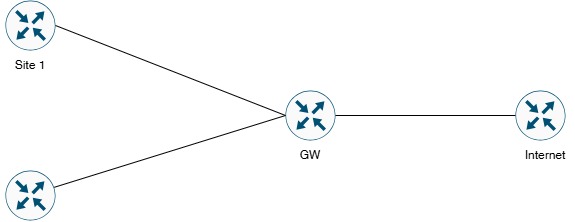
Figure 1: EIGRP Stub Configuration Topology (Hub-and-Spoke Design)
ℹ️ Topology Description:
This lab features a classic hub-and-spoke topology with GW acting as the hub router connecting to two spoke sites (Site1 and Site2) and the Internet. This design is perfect for demonstrating EIGRP stub routing, where spoke routers are configured as stubs to prevent query propagation and optimize routing convergence. The topology includes static routes and multiple loopback networks to demonstrate different stub options.
This lab features a classic hub-and-spoke topology with GW acting as the hub router connecting to two spoke sites (Site1 and Site2) and the Internet. This design is perfect for demonstrating EIGRP stub routing, where spoke routers are configured as stubs to prevent query propagation and optimize routing convergence. The topology includes static routes and multiple loopback networks to demonstrate different stub options.
🖥️ Device Information
| Device Name | Device Type | EIGRP AS | Role | IOS Version |
|---|---|---|---|---|
| GW | Cisco Router | AS 100 | Hub Router / Gateway | IOS 15.x or higher |
| Site1 | Cisco Router | AS 100 | Spoke Router / Stub Candidate | IOS 15.x or higher |
| Site2 | Cisco Router | AS 100 | Spoke Router / Stub Candidate | IOS 15.x or higher |
| Internet | Cisco Router | AS 100 | Simulated Internet / External Network | IOS 15.x or higher |
📋 IP Addressing Table
| Device | Interface | IP Address | Subnet Mask | Network |
|---|---|---|---|---|
| Site1 | GigabitEthernet0/0 | 203.18.61.2 | 255.255.255.252 (/30) | 203.18.61.0/30 |
| Site1 | Loopback0 | 192.168.3.1 | 255.255.255.0 (/24) | 192.168.3.0/24 |
| Site1 | Loopback1 | 192.168.4.1 | 255.255.255.0 (/24) | 192.168.4.0/24 |
| Site2 | GigabitEthernet0/1 | 203.18.61.6 | 255.255.255.252 (/30) | 203.18.61.4/30 |
| Site2 | Loopback0 | 192.168.5.1 | 255.255.255.0 (/24) | 192.168.5.0/24 |
| Site2 | Loopback1 | 192.168.6.1 | 255.255.255.0 (/24) | 192.168.6.0/24 |
| GW | GigabitEthernet0/0 | 203.18.61.1 | 255.255.255.252 (/30) | 203.18.61.0/30 |
| GW | GigabitEthernet0/1 | 203.18.61.5 | 255.255.255.252 (/30) | 203.18.61.4/30 |
| GW | GigabitEthernet1/0 | 203.18.62.1 | 255.255.255.252 (/30) | 203.18.62.0/30 |
| GW | Loopback0 | 192.168.7.1 | 255.255.255.0 (/24) | 192.168.7.0/24 |
| Internet | GigabitEthernet1/0 | 203.18.62.2 | 255.255.255.252 (/30) | 203.18.62.0/30 |
| Internet | Loopback0 | 192.168.1.1 | 255.255.255.0 (/24) | 192.168.1.0/24 |
| Internet | Loopback1 | 192.168.2.1 | 255.255.255.0 (/24) | 192.168.2.0/24 |
🔌 Cable Connection Information
| Connection | Device 1 | Interface 1 | Device 2 | Interface 2 | Network |
|---|---|---|---|---|---|
| Link 1 | Site1 | G0/0 | GW | G0/0 | 203.18.61.0/30 |
| Link 2 | Site2 | G0/1 | GW | G0/1 | 203.18.61.4/30 |
| Link 3 | GW | G1/0 | Internet | G1/0 | 203.18.62.0/30 |
📚 Prerequisites
⚠️ Before You Begin:
• Basic EIGRP configuration knowledge required
• Understanding of EIGRP DUAL algorithm
• Familiarity with query/reply mechanism
• Knowledge of EIGRP neighbor relationships
• Understanding of static routing concepts
• Familiarity with route summarization
• Basic Cisco IOS CLI skills
• Completion of Lab 12.1, 12.2, and 12.3 recommended
• Basic EIGRP configuration knowledge required
• Understanding of EIGRP DUAL algorithm
• Familiarity with query/reply mechanism
• Knowledge of EIGRP neighbor relationships
• Understanding of static routing concepts
• Familiarity with route summarization
• Basic Cisco IOS CLI skills
• Completion of Lab 12.1, 12.2, and 12.3 recommended
📖 Understanding EIGRP Stub Routing
🎓 What is EIGRP Stub Routing?
Definition: EIGRP stub routing is a feature that limits query propagation and route advertisement from stub routers, improving network stability and convergence time.
Key Benefits:
• Prevents queries from being sent to stub routers
• Reduces query domain and SIA risk
• Improves convergence time
• Reduces CPU and memory usage on stub routers
• Ideal for hub-and-spoke topologies
• Simplifies network design and troubleshooting
When to Use Stub Routing:
• Spoke routers in hub-and-spoke topology
• Branch offices with single uplink
• Remote sites with no transit traffic
• Edge routers with limited resources
• Networks requiring fast convergence
Definition: EIGRP stub routing is a feature that limits query propagation and route advertisement from stub routers, improving network stability and convergence time.
Key Benefits:
• Prevents queries from being sent to stub routers
• Reduces query domain and SIA risk
• Improves convergence time
• Reduces CPU and memory usage on stub routers
• Ideal for hub-and-spoke topologies
• Simplifies network design and troubleshooting
When to Use Stub Routing:
• Spoke routers in hub-and-spoke topology
• Branch offices with single uplink
• Remote sites with no transit traffic
• Edge routers with limited resources
• Networks requiring fast convergence
🔍 EIGRP Stub Options Explained
📘 Available Stub Options:
1️⃣ eigrp stub connected
• Advertises only connected routes
• Does NOT advertise summary, static, or redistributed routes
• Best for: Basic spoke sites with only locally connected networks
• Command:
• Advertises only connected routes
• Does NOT advertise summary, static, or redistributed routes
• Best for: Basic spoke sites with only locally connected networks
• Command:
eigrp stub connected
2️⃣ eigrp stub static
• Advertises only static routes
• Does NOT advertise connected, summary, or redistributed routes
• Best for: Sites with static routes to be advertised
• Command:
• Advertises only static routes
• Does NOT advertise connected, summary, or redistributed routes
• Best for: Sites with static routes to be advertised
• Command:
eigrp stub static
3️⃣ eigrp stub summary
• Advertises only summary routes
• Does NOT advertise connected, static, or redistributed routes
• Best for: Sites advertising aggregated routes
• Command:
• Advertises only summary routes
• Does NOT advertise connected, static, or redistributed routes
• Best for: Sites advertising aggregated routes
• Command:
eigrp stub summary
4️⃣ eigrp stub redistributed
• Advertises only redistributed routes
• Does NOT advertise connected, static, or summary routes
• Best for: Sites redistributing routes from other protocols
• Command:
• Advertises only redistributed routes
• Does NOT advertise connected, static, or summary routes
• Best for: Sites redistributing routes from other protocols
• Command:
eigrp stub redistributed
5️⃣ eigrp stub receive-only
• Does NOT advertise ANY routes
• Only receives routes from neighbors
• Best for: Sites that should never advertise routes
• Command:
• Does NOT advertise ANY routes
• Only receives routes from neighbors
• Best for: Sites that should never advertise routes
• Command:
eigrp stub receive-only
6️⃣ eigrp stub (default)
• Equivalent to:
• Advertises connected AND summary routes
• Most common configuration
• Command:
• Equivalent to:
eigrp stub connected summary• Advertises connected AND summary routes
• Most common configuration
• Command:
eigrp stub
7️⃣ eigrp stub connected static summary
• Advertises connected, static, AND summary routes
• Combines multiple options
• Best for: Complex sites needing multiple route types
• Command:
• Advertises connected, static, AND summary routes
• Combines multiple options
• Best for: Complex sites needing multiple route types
• Command:
eigrp stub connected static summary
💡 Important Notes:
• Stub options can be combined (except receive-only)
• Stub routers do NOT receive queries (query scoping)
• Hub routers recognize stub status automatically
• Stub configuration is local to the router
• Changing stub options requires clearing neighbors
• Receive-only cannot be combined with other options
• Stub options can be combined (except receive-only)
• Stub routers do NOT receive queries (query scoping)
• Hub routers recognize stub status automatically
• Stub configuration is local to the router
• Changing stub options requires clearing neighbors
• Receive-only cannot be combined with other options
⚙️ Step-by-Step Configuration Guide
📝 Step 1: Basic Interface Configuration on All Routers
Task 1.1: Configure Site1 Router (Spoke 1)Site1> enable
Site1# configure terminal
Site1(config)# hostname Site1
! Configure G0/0 (to GW)
Site1(config)# interface gigabitethernet 0/0
Site1(config-if)# description ** Link to GW Hub Router **
Site1(config-if)# ip address 203.18.61.2 255.255.255.252
Site1(config-if)# no shutdown
Site1(config-if)# exit
! Configure Loopback0 (Internal Network 1)
Site1(config)# interface loopback 0
Site1(config-if)# description ** Site1 LAN Network 1 **
Site1(config-if)# ip address 192.168.3.1 255.255.255.0
Site1(config-if)# exit
! Configure Loopback1 (Internal Network 2)
Site1(config)# interface loopback 1
Site1(config-if)# description ** Site1 LAN Network 2 **
Site1(config-if)# ip address 192.168.4.1 255.255.255.0
Site1(config-if)# exit
Site1(config)# end
Site1# write memory
Task 1.2: Configure Site2 Router (Spoke 2)Site2# configure terminal
Site2(config)# hostname Site2
! Configure G0/1 (to GW)
Site2(config)# interface gigabitethernet 0/1
Site2(config-if)# description ** Link to GW Hub Router **
Site2(config-if)# ip address 203.18.61.6 255.255.255.252
Site2(config-if)# no shutdown
Site2(config-if)# exit
! Configure Loopback0 (Internal Network 1)
Site2(config)# interface loopback 0
Site2(config-if)# description ** Site2 LAN Network 1 **
Site2(config-if)# ip address 192.168.5.1 255.255.255.0
Site2(config-if)# exit
! Configure Loopback1 (Internal Network 2)
Site2(config)# interface loopback 1
Site2(config-if)# description ** Site2 LAN Network 2 **
Site2(config-if)# ip address 192.168.6.1 255.255.255.0
Site2(config-if)# exit
Site2(config)# end
Site2# write memory
Task 1.3: Configure GW Router (Hub)GW# configure terminal
GW(config)# hostname GW
! Configure G0/0 (to Site1)
GW(config)# interface gigabitethernet 0/0
GW(config-if)# description ** Link to Site1 **
GW(config-if)# ip address 203.18.61.1 255.255.255.252
GW(config-if)# no shutdown
GW(config-if)# exit
! Configure G0/1 (to Site2)
GW(config)# interface gigabitethernet 0/1
GW(config-if)# description ** Link to Site2 **
GW(config-if)# ip address 203.18.61.5 255.255.255.252
GW(config-if)# no shutdown
GW(config-if)# exit
! Configure G1/0 (to Internet)
GW(config)# interface gigabitethernet 1/0
GW(config-if)# description ** Link to Internet **
GW(config-if)# ip address 203.18.62.1 255.255.255.252
GW(config-if)# no shutdown
GW(config-if)# exit
! Configure Loopback0 (GW Internal Network)
GW(config)# interface loopback 0
GW(config-if)# description ** GW Internal Network **
GW(config-if)# ip address 192.168.7.1 255.255.255.0
GW(config-if)# exit
GW(config)# end
GW# write memory
Task 1.4: Configure Internet RouterInternet# configure terminal
Internet(config)# hostname Internet
! Configure G1/0 (to GW)
Internet(config)# interface gigabitethernet 1/0
Internet(config-if)# description ** Link to GW **
Internet(config-if)# ip address 203.18.62.2 255.255.255.252
Internet(config-if)# no shutdown
Internet(config-if)# exit
! Configure Loopback0 (Simulated Internet Network 1)
Internet(config)# interface loopback 0
Internet(config-if)# description ** Internet Network 1 **
Internet(config-if)# ip address 192.168.1.1 255.255.255.0
Internet(config-if)# exit
! Configure Loopback1 (Simulated Internet Network 2)
Internet(config)# interface loopback 1
Internet(config-if)# description ** Internet Network 2 **
Internet(config-if)# ip address 192.168.2.1 255.255.255.0
Internet(config-if)# exit
Internet(config)# end
Internet# write memory
Task 1.5: Verify Interface Configuration! Verify on each router
Site1# show ip interface brief
Site2# show ip interface brief
GW# show ip interface brief
Internet# show ip interface brief
! Test connectivity between directly connected routers
Site1# ping 203.18.61.1
Site2# ping 203.18.61.5
GW# ping 203.18.62.2
✅ Checkpoint 1: All interfaces configured and in "up/up" state. Basic connectivity verified between directly connected routers.
📝 Step 2: Basic EIGRP Configuration (AS 100) - Without Stub
Task 2.1: Configure EIGRP on Site1Site1# configure terminal
Site1(config)# router eigrp 100
Site1(config-router)# network 203.18.61.0 0.0.0.3
Site1(config-router)# network 192.168.3.0 0.0.0.255
Site1(config-router)# network 192.168.4.0 0.0.0.255
Site1(config-router)# no auto-summary
Site1(config-router)# eigrp router-id 1.1.1.1
Site1(config-router)# exit
Site1(config)# end
Site1# write memory
Task 2.2: Configure EIGRP on Site2Site2# configure terminal
Site2(config)# router eigrp 100
Site2(config-router)# network 203.18.61.4 0.0.0.3
Site2(config-router)# network 192.168.5.0 0.0.0.255
Site2(config-router)# network 192.168.6.0 0.0.0.255
Site2(config-router)# no auto-summary
Site2(config-router)# eigrp router-id 2.2.2.2
Site2(config-router)# exit
Site2(config)# end
Site2# write memory
Task 2.3: Configure EIGRP on GW (Hub)GW# configure terminal
GW(config)# router eigrp 100
GW(config-router)# network 203.18.61.0 0.0.0.3
GW(config-router)# network 203.18.61.4 0.0.0.3
GW(config-router)# network 203.18.62.0 0.0.0.3
GW(config-router)# network 192.168.7.0 0.0.0.255
GW(config-router)# no auto-summary
GW(config-router)# eigrp router-id 3.3.3.3
GW(config-router)# exit
GW(config)# end
GW# write memory
Task 2.4: Configure EIGRP on Internet RouterInternet# configure terminal
Internet(config)# router eigrp 100
Internet(config-router)# network 203.18.62.0 0.0.0.3
Internet(config-router)# network 192.168.1.0 0.0.0.255
Internet(config-router)# network 192.168.2.0 0.0.0.255
Internet(config-router)# no auto-summary
Internet(config-router)# eigrp router-id 4.4.4.4
Internet(config-router)# exit
Internet(config)# end
Internet# write memory
Task 2.5: Verify EIGRP Neighbor Relationships! Check neighbors on all routers
Site1# show ip eigrp neighbors
! Should see GW (203.18.61.1)
Site2# show ip eigrp neighbors
! Should see GW (203.18.61.5)
GW# show ip eigrp neighbors
! Should see Site1, Site2, Internet
Internet# show ip eigrp neighbors
! Should see GW (203.18.62.1)
Task 2.6: Verify EIGRP Routing Tables! Check routing tables
GW# show ip route eigrp
! Should see routes from all neighbors
Site1# show ip route eigrp
! Should see routes to all networks
! Test end-to-end connectivity
Site1# ping 192.168.2.1 source 192.168.3.1
Site2# ping 192.168.1.1 source 192.168.5.1
✅ Checkpoint 2: EIGRP neighbors established. Full routing convergence achieved. End-to-end connectivity verified. NO stub configuration yet - this is the baseline.
📝 Step 3: Configure Static Routes (for Stub Static Testing)
We'll add static routes on Site1 and Site2 to demonstrate the "eigrp stub static" option.
Task 3.1: Add Static Routes on Site1Site1# configure terminal
! Create static route to a simulated network
Site1(config)# ip route 10.10.10.0 255.255.255.0 null0
! Redistribute static into EIGRP
Site1(config)# router eigrp 100
Site1(config-router)# redistribute static metric 1000 100 255 1 1500
Site1(config-router)# exit
Site1(config)# end
Site1# write memory
Task 3.2: Add Static Routes on Site2Site2# configure terminal
! Create static route to a simulated network
Site2(config)# ip route 10.20.20.0 255.255.255.0 null0
! Redistribute static into EIGRP
Site2(config)# router eigrp 100
Site2(config-router)# redistribute static metric 1000 100 255 1 1500
Site2(config-router)# exit
Site2(config)# end
Site2# write memory
Task 3.3: Verify Static Route Redistribution! On GW, check for redistributed static routes
GW# show ip route eigrp
! Look for D EX (external) routes: 10.10.10.0/24 and 10.20.20.0/24
GW# show ip route 10.10.10.0
! Should show route via Site1
GW# show ip route 10.20.20.0
! Should show route via Site2
✅ Checkpoint 3: Static routes configured and redistributed into EIGRP. GW receiving external routes from both sites.
📝 Step 4: Configure EIGRP Stub - Connected Option
Task 4.1: Configure Site1 as Stub (Connected Only)Site1# configure terminal
Site1(config)# router eigrp 100
Site1(config-router)# eigrp stub connected
Site1(config-router)# exit
Site1(config)# end
Site1# write memory
! Note: Neighbor relationship will reset
⚠️ Expected Behavior:
With "eigrp stub connected":
• Site1 will advertise ONLY connected routes (192.168.3.0/24, 192.168.4.0/24, 203.18.61.0/30)
• Static route 10.10.10.0/24 will NO LONGER be advertised
• Site1 will NOT receive queries from GW
• GW will recognize Site1 as stub peer
Task 4.2: Verify Stub Connected ConfigurationWith "eigrp stub connected":
• Site1 will advertise ONLY connected routes (192.168.3.0/24, 192.168.4.0/24, 203.18.61.0/30)
• Static route 10.10.10.0/24 will NO LONGER be advertised
• Site1 will NOT receive queries from GW
• GW will recognize Site1 as stub peer
! On Site1, verify stub configuration
Site1# show ip protocols | section eigrp
! Look for "Stub, connected"
! On GW, verify stub status
GW# show ip eigrp neighbors detail
! Look for "Stub Peer Advertising ( CONNECTED ) Routes"
! Check what routes GW receives from Site1
GW# show ip route eigrp | include 192.168.3
GW# show ip route eigrp | include 192.168.4
! Should see these connected routes
GW# show ip route 10.10.10.0
! Should NOT see this static route anymore!
Task 4.3: Test Query Behavior! On Site1, enable query debugging
Site1# debug eigrp packets query
! On Internet, shut down a loopback to trigger queries
Internet# configure terminal
Internet(config)# interface loopback 0
Internet(config-if)# shutdown
Internet(config-if)# end
! Watch Site1 - it should NOT receive queries
! GW knows Site1 is a stub, so no queries sent
! Restore Internet loopback
Internet# configure terminal
Internet(config)# interface loopback 0
Internet(config-if)# no shutdown
Internet(config-if)# end
! Disable debugging
Site1# undebug all
✅ Checkpoint 4: Site1 configured as stub with "connected" option. Only connected routes advertised. Queries no longer sent to Site1.
📝 Step 5: Configure EIGRP Stub - Connected + Static Options
Task 5.1: Change Site1 to Stub (Connected + Static)Site1# configure terminal
Site1(config)# router eigrp 100
Site1(config-router)# eigrp stub connected static
Site1(config-router)# exit
Site1(config)# end
Site1# write memory
⚠️ Expected Behavior:
With "eigrp stub connected static":
• Site1 will advertise connected routes (192.168.3.0/24, 192.168.4.0/24, 203.18.61.0/30)
• Site1 will ALSO advertise static route (10.10.10.0/24)
• Combines both "connected" and "static" options
• Still no queries received
Task 5.2: Verify Connected + Static ConfigurationWith "eigrp stub connected static":
• Site1 will advertise connected routes (192.168.3.0/24, 192.168.4.0/24, 203.18.61.0/30)
• Site1 will ALSO advertise static route (10.10.10.0/24)
• Combines both "connected" and "static" options
• Still no queries received
! On Site1, verify updated stub configuration
Site1# show ip protocols | section eigrp
! Look for "Stub, connected, static"
! On GW, verify stub status
GW# show ip eigrp neighbors detail
! Look for "Stub Peer Advertising ( CONNECTED STATIC ) Routes"
! Check if static route is now advertised
GW# show ip route 10.10.10.0
! Should NOW see the static route from Site1
GW# show ip route eigrp | include 10.10.10
! Route should be marked as D EX (external)
✅ Checkpoint 5: Site1 configured as stub with "connected static" options. Both connected and static routes advertised. Queries still not sent to Site1.
📝 Step 6: Configure Route Summarization (for Stub Summary Testing)
Task 6.1: Configure Summarization on Site2Site2# configure terminal
! Summarize 192.168.5.0/24 and 192.168.6.0/24 into 192.168.4.0/22
Site2(config)# interface gigabitethernet 0/1
Site2(config-if)# ip summary-address eigrp 100 192.168.4.0 255.255.252.0
Site2(config-if)# exit
Site2(config)# end
Site2# write memory
Task 6.2: Verify Summarization! Check for Null0 summary route on Site2
Site2# show ip route | include Null0
! Should see 192.168.4.0/22 via Null0
! On GW, verify summary is received
GW# show ip route 192.168.4.0
! Should show summary route 192.168.4.0/22 (not /24s)
GW# show ip route 192.168.5.0 longer-prefixes
! Should show summary, not specific routes
✅ Checkpoint 6: Route summarization configured on Site2. Summary route 192.168.4.0/22 advertised instead of specific /24 routes.
📝 Step 7: Configure EIGRP Stub - Connected + Static + Summary Options
Task 7.1: Configure Site2 as Stub (Connected + Static + Summary)Site2# configure terminal
Site2(config)# router eigrp 100
Site2(config-router)# eigrp stub connected static summary
Site2(config-router)# exit
Site2(config)# end
Site2# write memory
⚠️ Expected Behavior:
With "eigrp stub connected static summary":
• Site2 will advertise connected routes
• Site2 will advertise static routes (10.20.20.0/24)
• Site2 will advertise summary routes (192.168.4.0/22)
• Combines all three options
• Still no queries received
Task 7.2: Verify Connected + Static + Summary ConfigurationWith "eigrp stub connected static summary":
• Site2 will advertise connected routes
• Site2 will advertise static routes (10.20.20.0/24)
• Site2 will advertise summary routes (192.168.4.0/22)
• Combines all three options
• Still no queries received
! On Site2, verify stub configuration
Site2# show ip protocols | section eigrp
! Look for "Stub, connected, static, summary"
! On GW, verify stub status
GW# show ip eigrp neighbors detail
! Look for "Stub Peer Advertising ( CONNECTED STATIC SUMMARY ) Routes"
! Verify all route types are advertised
GW# show ip route eigrp | include 192.168.4
! Should see summary route
GW# show ip route eigrp | include 10.20.20
! Should see static route
GW# show ip route eigrp | include 203.18.61.4
! Should see connected route
✅ Checkpoint 7: Site2 configured as stub with "connected static summary" options. All three route types advertised. Comprehensive stub configuration.
📝 Step 8: Configure EIGRP Stub - Receive-Only Option
Task 8.1: Test Receive-Only on Site1 (Temporary)! Save current configuration first
Site1# write memory
Site1# configure terminal
Site1(config)# router eigrp 100
Site1(config-router)# eigrp stub receive-only
Site1(config-router)# exit
Site1(config)# end
⚠️ CRITICAL - Receive-Only Behavior:
With "eigrp stub receive-only":
• Site1 will NOT advertise ANY routes
• Site1 will ONLY receive routes from GW
• GW will lose all routes to Site1's networks
• Site1's loopbacks will become unreachable from GW
• This is the most restrictive stub option
• Useful only when site should never advertise routes
• Cannot be combined with other stub options
Task 8.2: Verify Receive-Only ConfigurationWith "eigrp stub receive-only":
• Site1 will NOT advertise ANY routes
• Site1 will ONLY receive routes from GW
• GW will lose all routes to Site1's networks
• Site1's loopbacks will become unreachable from GW
• This is the most restrictive stub option
• Useful only when site should never advertise routes
• Cannot be combined with other stub options
! On Site1, verify stub configuration
Site1# show ip protocols | section eigrp
! Look for "Stub, receive-only"
! On GW, verify stub status
GW# show ip eigrp neighbors detail
! Look for "Stub Peer Advertising ( RECEIVE-ONLY ) Routes"
! CRITICAL: Check if Site1 routes disappeared from GW
GW# show ip route 192.168.3.0
! Route should NOT exist (Site1 not advertising)
GW# show ip route 192.168.4.0
! Route should NOT exist
! Test - this will fail
GW# ping 192.168.3.1
! Will fail - no route to Site1's networks
Task 8.3: Restore Previous Configuration! Receive-only is too restrictive for most scenarios
! Restore previous "connected static" configuration
Site1# configure terminal
Site1(config)# router eigrp 100
Site1(config-router)# no eigrp stub receive-only
Site1(config-router)# eigrp stub connected static
Site1(config-router)# exit
Site1(config)# end
Site1# write memory
! Wait for convergence
! Verify routes are back
GW# show ip route 192.168.3.0
! Route should be restored
✅ Checkpoint 8: Receive-only mode tested and understood. Configuration restored to "connected static". Receive-only is useful only for specific scenarios where no routes should be advertised.
📄 Complete Router Configurations with EIGRP Stub
Site1 - Complete Configuration (Stub: Connected + Static)
!
! Site1 Complete Configuration - Lab 12.4
!
hostname Site1
!
interface Loopback0
description ** Site1 LAN Network 1 **
ip address 192.168.3.1 255.255.255.0
!
interface Loopback1
description ** Site1 LAN Network 2 **
ip address 192.168.4.1 255.255.255.0
!
interface GigabitEthernet0/0
description ** Link to GW Hub Router **
ip address 203.18.61.2 255.255.255.252
no shutdown
!
! Static route for stub testing
ip route 10.10.10.0 255.255.255.0 Null0
!
router eigrp 100
network 192.168.3.0 0.0.0.255
network 192.168.4.0 0.0.0.255
network 203.18.61.0 0.0.0.3
redistribute static metric 1000 100 255 1 1500
no auto-summary
eigrp stub connected static
eigrp router-id 1.1.1.1
!
end
Site2 - Complete Configuration (Stub: Connected + Static + Summary)
!
! Site2 Complete Configuration - Lab 12.4
!
hostname Site2
!
interface Loopback0
description ** Site2 LAN Network 1 **
ip address 192.168.5.1 255.255.255.0
!
interface Loopback1
description ** Site2 LAN Network 2 **
ip address 192.168.6.1 255.255.255.0
!
interface GigabitEthernet0/1
description ** Link to GW Hub Router **
ip address 203.18.61.6 255.255.255.252
ip summary-address eigrp 100 192.168.4.0 255.255.252.0
no shutdown
!
! Static route for stub testing
ip route 10.20.20.0 255.255.255.0 Null0
!
router eigrp 100
network 192.168.5.0 0.0.0.255
network 192.168.6.0 0.0.0.255
network 203.18.61.4 0.0.0.3
redistribute static metric 1000 100 255 1 1500
no auto-summary
eigrp stub connected static summary
eigrp router-id 2.2.2.2
!
end
GW - Complete Configuration (Hub Router - No Stub)
!
! GW Complete Configuration - Lab 12.4
!
hostname GW
!
interface Loopback0
description ** GW Internal Network **
ip address 192.168.7.1 255.255.255.0
!
interface GigabitEthernet0/0
description ** Link to Site1 **
ip address 203.18.61.1 255.255.255.252
no shutdown
!
interface GigabitEthernet0/1
description ** Link to Site2 **
ip address 203.18.61.5 255.255.255.252
no shutdown
!
interface GigabitEthernet1/0
description ** Link to Internet **
ip address 203.18.62.1 255.255.255.252
no shutdown
!
router eigrp 100
network 192.168.7.0 0.0.0.255
network 203.18.61.0 0.0.0.3
network 203.18.61.4 0.0.0.3
network 203.18.62.0 0.0.0.3
no auto-summary
eigrp router-id 3.3.3.3
!
end
Internet - Complete Configuration
!
! Internet Complete Configuration - Lab 12.4
!
hostname Internet
!
interface Loopback0
description ** Internet Network 1 **
ip address 192.168.1.1 255.255.255.0
!
interface Loopback1
description ** Internet Network 2 **
ip address 192.168.2.1 255.255.255.0
!
interface GigabitEthernet1/0
description ** Link to GW **
ip address 203.18.62.2 255.255.255.252
no shutdown
!
router eigrp 100
network 192.168.1.0 0.0.0.255
network 192.168.2.0 0.0.0.255
network 203.18.62.0 0.0.0.3
no auto-summary
eigrp router-id 4.4.4.4
!
end
✅ Comprehensive Verification Commands
1. Verify EIGRP Neighbor Relationships and Stub Status
! Check neighbors
GW# show ip eigrp neighbors
! Check detailed neighbor information with stub status
GW# show ip eigrp neighbors detail
! Look for "Stub Peer Advertising" lines for each stub neighbor
! Site1 should show: Stub Peer Advertising ( CONNECTED STATIC )
! Site2 should show: Stub Peer Advertising ( CONNECTED STATIC SUMMARY )
2. Verify Stub Configuration on Spoke Routers
! On Site1
Site1# show ip protocols | section eigrp
! Look for: Stub, connected, static
! On Site2
Site2# show ip protocols | section eigrp
! Look for: Stub, connected, static, summary
3. Verify Route Advertisement
! On GW, check all routes
GW# show ip route eigrp
! Verify Site1 connected routes
GW# show ip route 192.168.3.0
GW# show ip route 192.168.4.0
! Verify Site1 static route
GW# show ip route 10.10.10.0
! Should be D EX (external)
! Verify Site2 summary route
GW# show ip route 192.168.4.0 255.255.252.0
! Should show /22 summary
! Verify Site2 static route
GW# show ip route 10.20.20.0
4. Verify Query Behavior (No Queries to Stub)
! Enable debug on stub router
Site1# debug eigrp packets query
! Trigger topology change on GW or Internet
Internet# configure terminal
Internet(config)# interface loopback 0
Internet(config-if)# shutdown
Internet(config-if)# no shutdown
Internet(config-if)# end
! Site1 should NOT receive queries
! Disable debug
Site1# undebug all
5. Verify EIGRP Topology
! Check EIGRP topology
GW# show ip eigrp topology
! All routes should be in Passive state
! Check specific route
GW# show ip eigrp topology 192.168.3.0/24
! Should show route via Site1
6. Verify Static Route Redistribution
! Check redistributed routes
GW# show ip route eigrp | include EX
! Should show external routes (D EX)
! On Site1, verify redistribution
Site1# show ip protocols | section redistribute
! Should show: Redistributing: static
7. Verify Route Summarization
! On Site2, check Null0 summary
Site2# show ip route | include Null0
! Should show 192.168.4.0/22
! On GW, verify summary received
GW# show ip route 192.168.4.0
! Should show /22, not /24s
8. Test End-to-End Connectivity
! From Site1 to all networks
Site1# ping 192.168.1.1 source 192.168.3.1
Site1# ping 192.168.2.1 source 192.168.3.1
Site1# ping 192.168.5.1 source 192.168.3.1
Site1# ping 192.168.7.1 source 192.168.3.1
! From Site2 to all networks
Site2# ping 192.168.1.1 source 192.168.5.1
Site2# ping 192.168.3.1 source 192.168.5.1
9. Verify EIGRP Traffic Statistics
! Check EIGRP packet statistics
GW# show ip eigrp traffic
! Look for Query/Reply counts
! Stub routers should have low Query counts
10. Compare Stub Options
! Show all neighbors with stub details
GW# show ip eigrp neighbors detail | include Stub
! Compare what each stub router advertises
📋 Lab Verification Checklist
- ☑ All 4 routers have interfaces configured and operational
- ☑ Basic IP connectivity verified between directly connected routers
- ☑ EIGRP AS 100 configured on all routers
- ☑ EIGRP neighbor relationships established (Site1-GW, Site2-GW, GW-Internet)
- ☑ Static routes configured on Site1 and Site2
- ☑ Static routes redistributed into EIGRP
- ☑ Route summarization configured on Site2
- ☑ Site1 configured as stub with "connected static" options
- ☑ Site2 configured as stub with "connected static summary" options
- ☑ GW recognizes both sites as stub peers
- ☑ GW shows correct stub options for each neighbor
- ☑ Connected routes advertised from stub routers
- ☑ Static routes advertised from stub routers
- ☑ Summary route advertised from Site2
- ☑ Queries NOT sent to stub routers
- ☑ Receive-only option tested and understood
- ☑ End-to-end connectivity maintained with stub configuration
- ☑ All routes reachable from all routers
- ☑ EIGRP topology in Passive state
- ☑ All configurations saved on all routers
📊 EIGRP Stub Options Comparison Table
| Stub Option | Command | Advertises | Use Case |
|---|---|---|---|
| Connected | eigrp stub connected | Connected routes only | Basic spoke sites with local networks |
| Static | eigrp stub static | Static routes only | Sites with static routes to advertise |
| Summary | eigrp stub summary | Summary routes only | Sites advertising aggregated routes |
| Redistributed | eigrp stub redistributed | Redistributed routes only | Sites redistributing other protocols |
| Receive-Only | eigrp stub receive-only | Nothing (no routes) | Sites that should never advertise (rare) |
| Default | eigrp stub | Connected + Summary | Most common configuration |
| Connected + Static | eigrp stub connected static | Connected + Static routes | Sites with local networks and statics |
| Connected + Summary | eigrp stub connected summary | Connected + Summary routes | Same as default stub |
| All Options | eigrp stub connected static summary | Connected + Static + Summary | Complex sites needing all route types |
🔧 Comprehensive Troubleshooting Guide
Problem 1: Stub Router Not Recognized by Hub
Symptoms:
• GW doesn't show "Stub Peer" in neighbor details
• Queries still being sent to spoke routers
• Stub configuration not taking effect
Troubleshooting Steps:
• GW doesn't show "Stub Peer" in neighbor details
• Queries still being sent to spoke routers
• Stub configuration not taking effect
! Step 1: Verify stub configuration on spoke
Site1# show run | section router eigrp
! Look for "eigrp stub" command
! Step 2: Check if command is correct
Site1# show ip protocols | include Stub
! Should show stub mode
! Step 3: Verify neighbor relationship
Site1# show ip eigrp neighbors
! Neighbor must be up
! Step 4: Clear neighbor to force update
Site1# clear ip eigrp neighbors *
! Wait for convergence
! Step 5: Verify on hub
GW# show ip eigrp neighbors detail
! Should now show stub status
Solutions:
| Cause | Solution |
|---|---|
| Stub command not configured | Add "eigrp stub" command under router eigrp |
| Neighbor relationship down | Troubleshoot connectivity, check interface status |
| Configuration not applied | Exit to privileged mode and verify with show commands |
| Old IOS version | Upgrade to IOS 12.0(7)T or higher |
| Cached neighbor info | Clear EIGRP neighbors to refresh |
Symptoms:
• Expected routes not appearing on hub router
• Connectivity lost after stub configuration
• Static or summary routes not advertised
Troubleshooting Steps:
• Expected routes not appearing on hub router
• Connectivity lost after stub configuration
• Static or summary routes not advertised
! Step 1: Check stub options configured
Site1# show ip protocols | section Stub
! Verify correct options (connected, static, summary, etc.)
! Step 2: Check what routes should be advertised
Site1# show ip route
! Identify connected, static, and summary routes
! Step 3: Verify redistribution (if using static)
Site1# show ip protocols | section redistribute
! Static routes must be redistributed
! Step 4: Check if routes exist locally
Site1# show ip route 10.10.10.0
! Route must exist to be advertised
! Step 5: Check hub routing table
GW# show ip route eigrp
! Look for expected routes
Solutions:
| Cause | Solution |
|---|---|
| Wrong stub options | Use correct combination: connected, static, summary |
| Receive-only mode | Change to other stub options (receive-only advertises nothing) |
| Static not redistributed | Add "redistribute static" under router eigrp |
| Summary not configured | Add "ip summary-address eigrp" on interface |
| Route doesn't exist | Create the route first (static, connected, etc.) |
| Network not advertised | Add "network" command for connected routes |
Symptoms:
• Static routes were advertised before stub config
• After stub, static routes disappeared from hub
• "eigrp stub connected" doesn't include statics
Troubleshooting Steps:
• Static routes were advertised before stub config
• After stub, static routes disappeared from hub
• "eigrp stub connected" doesn't include statics
! Step 1: Check current stub configuration
Site1# show ip protocols | section Stub
! If shows only "connected", static won't be advertised
! Step 2: Verify static route exists
Site1# show ip route static
! Should see 10.10.10.0/24
! Step 3: Check redistribution
Site1# show run | section router eigrp
! Look for "redistribute static"
! Step 4: Change stub to include static
Site1(config)# router eigrp 100
Site1(config-router)# eigrp stub connected static
! Step 5: Verify on hub
GW# show ip route 10.10.10.0
! Should now appear
Solutions:
| Cause | Solution |
|---|---|
| "eigrp stub connected" only | Change to "eigrp stub connected static" |
| Static not redistributed | Add "redistribute static metric..." command |
| Static route removed | Re-add static route configuration |
| Wrong stub option | Use "static" option in stub command |
Symptoms:
• Stub router receives queries despite configuration
• Debug shows query packets arriving
• Expected query scoping not working
Troubleshooting Steps:
• Stub router receives queries despite configuration
• Debug shows query packets arriving
• Expected query scoping not working
! Step 1: Verify stub is configured
Site1# show ip protocols | include Stub
! Step 2: Verify hub sees stub
GW# show ip eigrp neighbors detail | include Stub
! Must show "Stub Peer"
! Step 3: Check if queries are from hub or elsewhere
Site1# debug eigrp packets query
! Note source of queries
! Step 4: Verify EIGRP AS matches
! Queries from different AS won't respect stub
! Step 5: Clear and reestablish neighbors
Site1# clear ip eigrp neighbors *
Solutions:
| Cause | Solution |
|---|---|
| Stub not configured | Add "eigrp stub" command |
| Neighbor not aware | Clear neighbors to update stub status |
| Queries from non-hub | Normal - queries from peers, not hub |
| Different AS | Ensure all routers in same AS |
| Old IOS version | Upgrade IOS to support stub properly |
Symptoms:
• After "eigrp stub receive-only", spoke networks unreachable
• Hub lost routes to spoke
• Connectivity broken
Troubleshooting Steps:
• After "eigrp stub receive-only", spoke networks unreachable
• Hub lost routes to spoke
• Connectivity broken
! Step 1: Understand receive-only behavior
! Receive-only advertises NO routes
! Step 2: Check hub routing table
GW# show ip route 192.168.3.0
! Route will not exist
! Step 3: Change to appropriate stub option
Site1(config)# router eigrp 100
Site1(config-router)# no eigrp stub receive-only
Site1(config-router)# eigrp stub connected
! Step 4: Wait for convergence
! Routes should reappear on hub
Solutions:
| Cause | Solution |
|---|---|
| Receive-only advertises nothing | Change to connected, static, or summary options |
| Wrong use case | Receive-only only for special scenarios |
| Misunderstood behavior | Review stub options and select appropriate one |
📚 Key Learning Points & Best Practices
1. EIGRP Stub Fundamentals:
- ✓ Stub routing prevents query propagation to stub routers
- ✓ Ideal for hub-and-spoke topologies
- ✓ Reduces SIA risk significantly
- ✓ Improves convergence time
- ✓ Reduces CPU and memory on stub routers
- ✓ Simplifies network design
- ✓ Connected: Basic sites with only local networks
- ✓ Static: Sites with static routes to advertise
- ✓ Summary: Sites using route summarization
- ✓ Redistributed: Sites redistributing other protocols
- ✓ Receive-Only: Sites that should never advertise (rare)
- ✓ Default (connected + summary): Most common
- ✓ Multiple options: Can combine (except receive-only)
- ✓ Hub routers don't send queries to stub routers
- ✓ Reduces query domain dramatically
- ✓ Faster convergence during failures
- ✓ Prevents SIA conditions
- ✓ Lower CPU usage during convergence
- ✓ More predictable network behavior
- ✓ Always configure spoke routers as stubs
- ✓ Never configure hub as stub
- ✓ Use appropriate stub options for each spoke
- ✓ Document stub configurations
- ✓ Test connectivity after stub configuration
- ✓ Monitor for query behavior
- ✓ Combine with summarization for best results
- ✓ Stub options control what routes are advertised
- ✓ Connected routes require "connected" option
- ✓ Static routes require "static" option AND redistribution
- ✓ Summary routes require "summary" option AND summary config
- ✓ Receive-only advertises nothing
- ✓ Multiple options can be combined
- ✓ Static routes must be redistributed into EIGRP
- ✓ Use "redistribute static metric..." command
- ✓ Stub must include "static" option
- ✓ Static routes appear as D EX (external) on hub
- ✓ Metric must be specified for redistribution
- ✓ Summarization complements stub routing
- ✓ Creates additional query boundaries
- ✓ Reduces routing table size
- ✓ Stub must include "summary" option
- ✓ Configure on outbound interface
- ✓ Null0 route created automatically
- ✓ Most restrictive stub option
- ✓ Advertises NO routes
- ✓ Use only when spoke should never advertise
- ✓ Breaks connectivity to spoke networks
- ✓ Cannot be combined with other options
- ✓ Rare use case in production
- ✓ Verify stub configuration with show ip protocols
- ✓ Check hub recognizes stub with show neighbors detail
- ✓ Verify expected routes are advertised
- ✓ Test query behavior with debug
- ✓ Clear neighbors if stub status not updated
- ✓ Match stub options to requirements
- ✓ Plan stub configuration before deployment
- ✓ Document which sites are stubs
- ✓ Test in lab first
- ✓ Deploy during maintenance window
- ✓ Verify connectivity after configuration
- ✓ Monitor for query behavior
- ✓ Use consistent stub options per site type
🎓 Lab Completion Summary
✅ Congratulations!
You have successfully completed Lab 12.4: EIGRP Stub Configuration - Advanced Stub Options.
Skills Mastered:
• Understanding of all EIGRP stub options
• Configuration of eigrp stub connected
• Configuration of eigrp stub static
• Configuration of eigrp stub summary
• Configuration of eigrp stub receive-only
• Combining multiple stub options
• Query scoping with stub routing
• Static route redistribution with stub
• Route summarization with stub
• Hub-and-spoke topology optimization
• Comprehensive verification techniques
• Advanced troubleshooting skills
Next Steps:
• Practice different stub option combinations
• Design and implement hub-and-spoke topologies
• Study EIGRP Named Mode (advanced)
• Explore EIGRP over DMVPN scenarios
• Continue with other routing protocols (OSPF, BGP)
• Prepare for CCNP ENCOR and ENARSI exams
You have successfully completed Lab 12.4: EIGRP Stub Configuration - Advanced Stub Options.
Skills Mastered:
• Understanding of all EIGRP stub options
• Configuration of eigrp stub connected
• Configuration of eigrp stub static
• Configuration of eigrp stub summary
• Configuration of eigrp stub receive-only
• Combining multiple stub options
• Query scoping with stub routing
• Static route redistribution with stub
• Route summarization with stub
• Hub-and-spoke topology optimization
• Comprehensive verification techniques
• Advanced troubleshooting skills
Next Steps:
• Practice different stub option combinations
• Design and implement hub-and-spoke topologies
• Study EIGRP Named Mode (advanced)
• Explore EIGRP over DMVPN scenarios
• Continue with other routing protocols (OSPF, BGP)
• Prepare for CCNP ENCOR and ENARSI exams
⚠️ Important Final Notes
EIGRP Stub Best Practices:
• Always use stub routing in hub-and-spoke topologies
• Choose stub options based on what routes should be advertised
• Document stub configurations clearly
• Test connectivity after stub configuration
• Combine with route summarization for optimal results
• Monitor query behavior to verify stub is working
• Never configure hub routers as stub
• Use receive-only sparingly (only when appropriate)
• Clear neighbors after changing stub options
• Keep IOS versions current for stub features
• Always use stub routing in hub-and-spoke topologies
• Choose stub options based on what routes should be advertised
• Document stub configurations clearly
• Test connectivity after stub configuration
• Combine with route summarization for optimal results
• Monitor query behavior to verify stub is working
• Never configure hub routers as stub
• Use receive-only sparingly (only when appropriate)
• Clear neighbors after changing stub options
• Keep IOS versions current for stub features
📘 Stub Options Quick Reference:
• eigrp stub connected: Advertise connected routes
• eigrp stub static: Advertise static routes
• eigrp stub summary: Advertise summary routes
• eigrp stub redistributed: Advertise redistributed routes
• eigrp stub receive-only: Advertise nothing
• eigrp stub: Default = connected + summary
• eigrp stub connected static: Connected + static
• eigrp stub connected static summary: All three types
Remember: Multiple options can be combined (except receive-only)!
• eigrp stub connected: Advertise connected routes
• eigrp stub static: Advertise static routes
• eigrp stub summary: Advertise summary routes
• eigrp stub redistributed: Advertise redistributed routes
• eigrp stub receive-only: Advertise nothing
• eigrp stub: Default = connected + summary
• eigrp stub connected static: Connected + static
• eigrp stub connected static summary: All three types
Remember: Multiple options can be combined (except receive-only)!
🏆 End of Lab 12.4 🏆
EIGRP Stub Configuration - Advanced Stub Options
Lab Duration: 90-120 minutes
CCNP Enterprise (ENCOR 350-401 & ENARSI 300-410)
Excellent work mastering EIGRP stub routing!
You now have the knowledge to optimize hub-and-spoke
topologies and prevent SIA conditions effectively.
This is a critical skill for enterprise network design!
Keep practicing and good luck with your CCNP journey!