🔧 Lab 13.1 - OSPF Multi-Area with Route Summarization
Cisco CCNP 350-401 (ENCOR) & 300-410 (ENARSI) - OSPF Implementation, Authentication & Summarization
Lab Focus: OSPF Multi-Area Design, MD5 Authentication, Route Summarization, ABR Configuration | Password Protected
Duration: 120-150 minutes | Difficulty Level: Advanced | Lab Version: 2.0
CCNP Exam Topics: 350-401 ENCOR (3.2), 300-410 ENARSI (2.4-2.6)
🎯 Lab Objective
This comprehensive CCNP-level lab covers OSPF multi-area design with route summarization. You will configure Area 0 as the backbone connecting to Area 1 and Area 2, implement MD5 authentication, and configure route summarization at ABR boundaries to reduce routing overhead.
Upon completion, you will master:
- OSPF multi-area design with Area 0, Area 1, and Area 2
- Area Border Router (ABR) configuration on Core-1 and Core-2
- OSPF MD5 authentication for secure routing updates
- OSPF route summarization at ABR boundaries (NEW FEATURE)
- Inter-area routing with Type 3 LSAs
- OSPF verification and troubleshooting techniques
🗺️ Network Topology
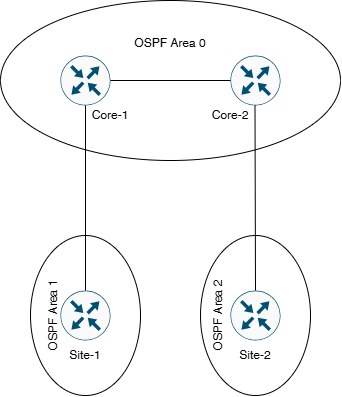
Topology Description:
- Core-1 & Core-2: Backbone routers in Area 0 (ABRs)
- Site-1: Remote site in Area 1 (connected to Core-1)
- Site-2: Remote site in Area 2 (connected to Core-2)
- Design: Hub-and-spoke with Area 0 as central backbone
ℹ️ Enhanced Design Note: This lab uses standard OSPF areas (Area 0, 1, 2) instead of higher numbers, demonstrating proper enterprise design. Route summarization is configured at ABR boundaries to minimize Type 3 LSA flooding.
📋 Device Information
| Device |
Role |
OSPF Areas |
Router ID |
| Core-1 |
ABR (Area Border Router) |
Area 0, Area 1 |
1.1.1.1 |
| Core-2 |
ABR (Area Border Router) |
Area 0, Area 2 |
2.2.2.2 |
| Site-1 |
Remote Site Router |
Area 1 |
11.11.11.11 |
| Site-2 |
Remote Site Router |
Area 2 |
22.22.22.22 |
🌐 IP Addressing Table
| Device |
Interface |
IP Address |
Subnet Mask |
Connected To |
| Core-1 |
G0/0 |
203.18.61.1 |
255.255.255.252 (/30) |
Core-2 G0/0 |
| Core-1 |
G0/1 |
203.18.62.1 |
255.255.255.252 (/30) |
Site-1 G0/1 |
| Core-1 |
Loopback0 |
192.168.1.1 |
255.255.255.0 (/24) |
Internal Network |
| Core-2 |
G0/0 |
203.18.61.2 |
255.255.255.252 (/30) |
Core-1 G0/0 |
| Core-2 |
G1/0 |
203.18.62.5 |
255.255.255.252 (/30) |
Site-2 G1/0 |
| Core-2 |
Loopback0 |
192.168.2.1 |
255.255.255.0 (/24) |
Internal Network |
| Site-1 |
G0/1 |
203.18.62.2 |
255.255.255.252 (/30) |
Core-1 G0/1 |
| Site-1 |
Loopback0 |
192.168.11.1 |
255.255.255.0 (/24) |
Internal Network |
| Site-2 |
G1/0 |
203.18.62.6 |
255.255.255.252 (/30) |
Core-2 G1/0 |
| Site-2 |
Loopback0 |
192.168.22.1 |
255.255.255.0 (/24) |
Internal Network |
🔌 Cable Connection Summary
| Connection |
Network Subnet |
Purpose |
OSPF Area |
| Core-1 (G0/0) ↔ Core-2 (G0/0) |
203.18.61.0/30 |
Backbone Link |
Area 0 |
| Core-1 (G0/1) ↔ Site-1 (G0/1) |
203.18.62.0/30 |
Area 1 Connection |
Area 1 |
| Core-2 (G1/0) ↔ Site-2 (G1/0) |
203.18.62.4/30 |
Area 2 Connection |
Area 2 |
🏗️ OSPF Design Architecture
| OSPF Area |
Type |
Routers |
Networks |
Summary Routes |
| Area 0 |
Backbone |
Core-1, Core-2 |
203.18.61.0/30
192.168.1.0/24
192.168.2.0/24 |
None (backbone) |
| Area 1 |
Standard |
Core-1 (ABR), Site-1 |
203.18.62.0/30
192.168.11.0/24 |
192.168.11.0/24 → Summarized by Core-1 |
| Area 2 |
Standard |
Core-2 (ABR), Site-2 |
203.18.62.4/30
192.168.22.0/24 |
192.168.22.0/24 → Summarized by Core-2 |
⚠️ Route Summarization Strategy:
• Core-1 (ABR) summarizes Area 1 routes: 192.168.11.0/24
• Core-2 (ABR) summarizes Area 2 routes: 192.168.22.0/24
• Reduces Type 3 LSAs in Area 0
• Improves scalability and reduces routing table size
⚙️ Lab Configuration Tasks
ℹ️ Configuration Sequence: Complete tasks in order. Verify each step before proceeding.
📝 Task 1: Basic Interface Configuration
Objective: Configure all interfaces with correct IP addressing.
Step 1.1: Configure Core-1
Core-1(config)# hostname Core-1
Core-1(config)#
Core-1(config)# interface GigabitEthernet0/0
Core-1(config-if)# description ** Link to Core-2 - Area 0 **
Core-1(config-if)# ip address 203.18.61.1 255.255.255.252
Core-1(config-if)# no shutdown
Core-1(config-if)# exit
Core-1(config)#
Core-1(config)# interface GigabitEthernet0/1
Core-1(config-if)# description ** Link to Site-1 - Area 1 **
Core-1(config-if)# ip address 203.18.62.1 255.255.255.252
Core-1(config-if)# no shutdown
Core-1(config-if)# exit
Core-1(config)#
Core-1(config)# interface Loopback0
Core-1(config-if)# description ** Core-1 Internal Network **
Core-1(config-if)# ip address 192.168.1.1 255.255.255.0
Core-1(config-if)# exit
Step 1.2: Configure Core-2
Core-2(config)# hostname Core-2
Core-2(config)#
Core-2(config)# interface GigabitEthernet0/0
Core-2(config-if)# description ** Link to Core-1 - Area 0 **
Core-2(config-if)# ip address 203.18.61.2 255.255.255.252
Core-2(config-if)# no shutdown
Core-2(config-if)# exit
Core-2(config)#
Core-2(config)# interface GigabitEthernet1/0
Core-2(config-if)# description ** Link to Site-2 - Area 2 **
Core-2(config-if)# ip address 203.18.62.5 255.255.255.252
Core-2(config-if)# no shutdown
Core-2(config-if)# exit
Core-2(config)#
Core-2(config)# interface Loopback0
Core-2(config-if)# description ** Core-2 Internal Network **
Core-2(config-if)# ip address 192.168.2.1 255.255.255.0
Core-2(config-if)# exit
Step 1.3: Configure Site-1
Site-1(config)# hostname Site-1
Site-1(config)#
Site-1(config)# interface GigabitEthernet0/1
Site-1(config-if)# description ** Link to Core-1 **
Site-1(config-if)# ip address 203.18.62.2 255.255.255.252
Site-1(config-if)# no shutdown
Site-1(config-if)# exit
Site-1(config)#
Site-1(config)# interface Loopback0
Site-1(config-if)# description ** Site-1 Internal Network **
Site-1(config-if)# ip address 192.168.11.1 255.255.255.0
Site-1(config-if)# exit
Step 1.4: Configure Site-2
Site-2(config)# hostname Site-2
Site-2(config)#
Site-2(config)# interface GigabitEthernet1/0
Site-2(config-if)# description ** Link to Core-2 **
Site-2(config-if)# ip address 203.18.62.6 255.255.255.252
Site-2(config-if)# no shutdown
Site-2(config-if)# exit
Site-2(config)#
Site-2(config)# interface Loopback0
Site-2(config-if)# description ** Site-2 Internal Network **
Site-2(config-if)# ip address 192.168.22.1 255.255.255.0
Site-2(config-if)# exit
✅ Verification Task 1:
Core-1# show ip interface brief
Core-1# ping 203.18.61.2
Core-1# ping 203.18.62.2
📝 Task 2: Configure OSPF with Multi-Area Design
Objective: Configure OSPF Process 1 with proper area assignments.
ℹ️ Area Design:
• Area 0: Backbone (Core-1 ↔ Core-2)
• Area 1: Site-1 networks (connected via Core-1 ABR)
• Area 2: Site-2 networks (connected via Core-2 ABR)
Step 2.1: Configure Core-1 (ABR for Area 0 and Area 1)
Core-1(config)# router ospf 1
Core-1(config-router)# router-id 1.1.1.1
Core-1(config-router)# log-adjacency-changes
Core-1(config-router)#
Core-1(config-router)# ! Area 0 Networks
Core-1(config-router)# network 203.18.61.0 0.0.0.3 area 0
Core-1(config-router)# network 192.168.1.0 0.0.0.255 area 0
Core-1(config-router)#
Core-1(config-router)# ! Area 1 Networks
Core-1(config-router)# network 203.18.62.0 0.0.0.3 area 1
Core-1(config-router)# exit
Step 2.2: Configure Core-2 (ABR for Area 0 and Area 2)
Core-2(config)# router ospf 1
Core-2(config-router)# router-id 2.2.2.2
Core-2(config-router)# log-adjacency-changes
Core-2(config-router)#
Core-2(config-router)# ! Area 0 Networks
Core-2(config-router)# network 203.18.61.0 0.0.0.3 area 0
Core-2(config-router)# network 192.168.2.0 0.0.0.255 area 0
Core-2(config-router)#
Core-2(config-router)# ! Area 2 Networks
Core-2(config-router)# network 203.18.62.4 0.0.0.3 area 2
Core-2(config-router)# exit
Step 2.3: Configure Site-1 (Area 1)
Site-1(config)# router ospf 1
Site-1(config-router)# router-id 11.11.11.11
Site-1(config-router)# log-adjacency-changes
Site-1(config-router)#
Site-1(config-router)# ! Area 1 Networks
Site-1(config-router)# network 203.18.62.0 0.0.0.3 area 1
Site-1(config-router)# network 192.168.11.0 0.0.0.255 area 1
Site-1(config-router)# exit
Step 2.4: Configure Site-2 (Area 2)
Site-2(config)# router ospf 1
Site-2(config-router)# router-id 22.22.22.22
Site-2(config-router)# log-adjacency-changes
Site-2(config-router)#
Site-2(config-router)# ! Area 2 Networks
Site-2(config-router)# network 203.18.62.4 0.0.0.3 area 2
Site-2(config-router)# network 192.168.22.0 0.0.0.255 area 2
Site-2(config-router)# exit
✅ Verification Task 2:
Core-1# show ip ospf neighbor
Core-1# show ip ospf interface brief
Core-1# show ip route ospf
! Expected: Core-1 has neighbors in Area 0 (Core-2) and Area 1 (Site-1)
📝 Task 3: Configure OSPF MD5 Authentication
Objective: Secure OSPF routing updates with MD5 authentication per area.
⚠️ Security Critical: OSPF without authentication is vulnerable to routing attacks. Always implement authentication in production.
Step 3.1: Configure Area 0 Authentication (Core-1 & Core-2)
Core-1:
Core-1(config)# router ospf 1
Core-1(config-router)# area 0 authentication message-digest
Core-1(config-router)# exit
Core-1(config)#
Core-1(config)# interface GigabitEthernet0/0
Core-1(config-if)# ip ospf message-digest-key 1 md5 CCNP_Area0_Secure
Core-1(config-if)# exit
Core-2:
Core-2(config)# router ospf 1
Core-2(config-router)# area 0 authentication message-digest
Core-2(config-router)# exit
Core-2(config)#
Core-2(config)# interface GigabitEthernet0/0
Core-2(config-if)# ip ospf message-digest-key 1 md5 CCNP_Area0_Secure
Core-2(config-if)# exit
Step 3.2: Configure Area 1 Authentication (Core-1 & Site-1)
Core-1:
Core-1(config)# router ospf 1
Core-1(config-router)# area 1 authentication message-digest
Core-1(config-router)# exit
Core-1(config)#
Core-1(config)# interface GigabitEthernet0/1
Core-1(config-if)# ip ospf message-digest-key 1 md5 Area1_Secure_Key
Core-1(config-if)# exit
Site-1:
Site-1(config)# router ospf 1
Site-1(config-router)# area 1 authentication message-digest
Site-1(config-router)# exit
Site-1(config)#
Site-1(config)# interface GigabitEthernet0/1
Site-1(config-if)# ip ospf message-digest-key 1 md5 Area1_Secure_Key
Site-1(config-if)# exit
Step 3.3: Configure Area 2 Authentication (Core-2 & Site-2)
Core-2:
Core-2(config)# router ospf 1
Core-2(config-router)# area 2 authentication message-digest
Core-2(config-router)# exit
Core-2(config)#
Core-2(config)# interface GigabitEthernet1/0
Core-2(config-if)# ip ospf message-digest-key 1 md5 Area2_Secure_Key
Core-2(config-if)# exit
Site-2:
Site-2(config)# router ospf 1
Site-2(config-router)# area 2 authentication message-digest
Site-2(config-router)# exit
Site-2(config)#
Site-2(config)# interface GigabitEthernet1/0
Site-2(config-if)# ip ospf message-digest-key 1 md5 Area2_Secure_Key
Site-2(config-if)# exit
✅ Verification Task 3:
Core-1# show ip ospf interface | include authentication
Core-1# show ip ospf neighbor
! Expected: "Message digest authentication enabled" on all OSPF interfaces
📝 Task 4: Configure Route Summarization (NEW FEATURE)
Objective: Configure route summarization at ABR boundaries to reduce Type 3 LSA flooding.
⚠️ Route Summarization Benefits:
• Reduces routing table size
• Minimizes Type 3 LSA propagation
• Improves network scalability
• Faster SPF convergence
• Configured on ABRs only
Step 4.1: Configure Route Summarization on Core-1 (ABR)
Core-1(config)# router ospf 1
Core-1(config-router)# ! Summarize Area 1 routes into Area 0
Core-1(config-router)# area 1 range 192.168.11.0 255.255.255.0
Core-1(config-router)# exit
! Explanation:
! - Summarizes all Area 1 subnets (192.168.11.0/24)
! - Advertises single Type 3 LSA to Area 0
! - Reduces LSA flooding in backbone
Step 4.2: Configure Route Summarization on Core-2 (ABR)
Core-2(config)# router ospf 1
Core-2(config-router)# ! Summarize Area 2 routes into Area 0
Core-2(config-router)# area 2 range 192.168.22.0 255.255.255.0
Core-2(config-router)# exit
! Explanation:
! - Summarizes all Area 2 subnets (192.168.22.0/24)
! - Advertises single Type 3 LSA to Area 0
! - Reduces LSA flooding in backbone
ℹ️ Route Summarization Verification:
Before summarization: Each /24 subnet generates separate Type 3 LSA
After summarization: Single summary route (Type 3 LSA) advertised to Area 0
Command: show ip ospf database summary
✅ Verification Task 4:
Core-1# show ip ospf database summary
Core-2# show ip route ospf
Site-1# show ip route ospf
! On Core-2, verify you see summarized route 192.168.11.0/24 (from Area 1)
! On Site-1, verify you see summarized route 192.168.22.0/24 (from Area 2)
📝 Task 5: OSPF Optimization
Objective: Optimize OSPF for faster convergence and reduced overhead.
Step 5.1: Configure Point-to-Point Network Type
! Core-1
Core-1(config)# interface GigabitEthernet0/0
Core-1(config-if)# ip ospf network point-to-point
Core-1(config-if)# exit
Core-1(config)# interface GigabitEthernet0/1
Core-1(config-if)# ip ospf network point-to-point
Core-1(config-if)# exit
! Core-2
Core-2(config)# interface GigabitEthernet0/0
Core-2(config-if)# ip ospf network point-to-point
Core-2(config-if)# exit
Core-2(config)# interface GigabitEthernet1/0
Core-2(config-if)# ip ospf network point-to-point
Core-2(config-if)# exit
! Site-1
Site-1(config)# interface GigabitEthernet0/1
Site-1(config-if)# ip ospf network point-to-point
Site-1(config-if)# exit
! Site-2
Site-2(config)# interface GigabitEthernet1/0
Site-2(config-if)# ip ospf network point-to-point
Site-2(config-if)# exit
Step 5.2: Configure Passive Interfaces
! Core-1
Core-1(config)# router ospf 1
Core-1(config-router)# passive-interface Loopback0
Core-1(config-router)# exit
! Core-2
Core-2(config)# router ospf 1
Core-2(config-router)# passive-interface Loopback0
Core-2(config-router)# exit
! Site-1
Site-1(config)# router ospf 1
Site-1(config-router)# passive-interface Loopback0
Site-1(config-router)# exit
! Site-2
Site-2(config)# router ospf 1
Site-2(config-router)# passive-interface Loopback0
Site-2(config-router)# exit
✅ Verification Task 5:
Core-1# show ip ospf interface brief
Core-1# show ip protocols | section Passive
📝 Task 6: Complete Verification
Objective: Verify full OSPF operation with summarization.
Step 6.1: Verify OSPF Neighbors
Core-1# show ip ospf neighbor
! Expected Output:
Neighbor ID Pri State Dead Time Address Interface
2.2.2.2 0 FULL/ - 00:00:35 203.18.61.2 GigabitEthernet0/0
11.11.11.11 0 FULL/ - 00:00:36 203.18.62.2 GigabitEthernet0/1
Step 6.2: Verify OSPF Routing Table
Core-1# show ip route ospf
! Expected: See summarized routes from other areas
O IA 192.168.2.0/24 [110/2] via 203.18.61.2, GigabitEthernet0/0
O IA 192.168.22.0/24 [110/3] via 203.18.61.2, GigabitEthernet0/0
O 192.168.11.0/24 [110/2] via 203.18.62.2, GigabitEthernet0/1
Step 6.3: Verify Route Summarization
Core-1# show ip ospf database summary
! Verify Type 3 LSAs show summarized routes
! Should see 192.168.11.0/24 summarized for Area 1
Core-2# show ip route ospf | include 192.168.11
! Should see summarized route 192.168.11.0/24 from Core-1
Step 6.4: Test End-to-End Connectivity
Site-1# ping 192.168.22.1 source 192.168.11.1
Site-1# traceroute 192.168.22.1 source 192.168.11.1
! Should successfully ping across areas via Area 0 backbone
📄 Complete Device Configurations
ℹ️ Complete Configurations: Copy-paste ready configurations for all devices.
Core-1 Complete Configuration:
hostname Core-1
!
interface GigabitEthernet0/0
description ** Link to Core-2 - Area 0 **
ip address 203.18.61.1 255.255.255.252
ip ospf message-digest-key 1 md5 CCNP_Area0_Secure
ip ospf network point-to-point
no shutdown
!
interface GigabitEthernet0/1
description ** Link to Site-1 - Area 1 **
ip address 203.18.62.1 255.255.255.252
ip ospf message-digest-key 1 md5 Area1_Secure_Key
ip ospf network point-to-point
no shutdown
!
interface Loopback0
description ** Core-1 Internal Network **
ip address 192.168.1.1 255.255.255.0
!
router ospf 1
router-id 1.1.1.1
log-adjacency-changes
area 0 authentication message-digest
area 1 authentication message-digest
area 1 range 192.168.11.0 255.255.255.0
passive-interface Loopback0
network 203.18.61.0 0.0.0.3 area 0
network 192.168.1.0 0.0.0.255 area 0
network 203.18.62.0 0.0.0.3 area 1
!
end
Core-2 Complete Configuration:
hostname Core-2
!
interface GigabitEthernet0/0
description ** Link to Core-1 - Area 0 **
ip address 203.18.61.2 255.255.255.252
ip ospf message-digest-key 1 md5 CCNP_Area0_Secure
ip ospf network point-to-point
no shutdown
!
interface GigabitEthernet1/0
description ** Link to Site-2 - Area 2 **
ip address 203.18.62.5 255.255.255.252
ip ospf message-digest-key 1 md5 Area2_Secure_Key
ip ospf network point-to-point
no shutdown
!
interface Loopback0
description ** Core-2 Internal Network **
ip address 192.168.2.1 255.255.255.0
!
router ospf 1
router-id 2.2.2.2
log-adjacency-changes
area 0 authentication message-digest
area 2 authentication message-digest
area 2 range 192.168.22.0 255.255.255.0
passive-interface Loopback0
network 203.18.61.0 0.0.0.3 area 0
network 192.168.2.0 0.0.0.255 area 0
network 203.18.62.4 0.0.0.3 area 2
!
end
Site-1 Complete Configuration:
hostname Site-1
!
interface GigabitEthernet0/1
description ** Link to Core-1 **
ip address 203.18.62.2 255.255.255.252
ip ospf message-digest-key 1 md5 Area1_Secure_Key
ip ospf network point-to-point
no shutdown
!
interface Loopback0
description ** Site-1 Internal Network **
ip address 192.168.11.1 255.255.255.0
!
router ospf 1
router-id 11.11.11.11
log-adjacency-changes
area 1 authentication message-digest
passive-interface Loopback0
network 203.18.62.0 0.0.0.3 area 1
network 192.168.11.0 0.0.0.255 area 1
!
end
Site-2 Complete Configuration:
hostname Site-2
!
interface GigabitEthernet1/0
description ** Link to Core-2 **
ip address 203.18.62.6 255.255.255.252
ip ospf message-digest-key 1 md5 Area2_Secure_Key
ip ospf network point-to-point
no shutdown
!
interface Loopback0
description ** Site-2 Internal Network **
ip address 192.168.22.1 255.255.255.0
!
router ospf 1
router-id 22.22.22.22
log-adjacency-changes
area 2 authentication message-digest
passive-interface Loopback0
network 203.18.62.4 0.0.0.3 area 2
network 192.168.22.0 0.0.0.255 area 2
!
end
✅ Lab Verification Checklist
- ☐ All interfaces up/up (show ip interface brief)
- ☐ Ping connectivity between neighbors verified
- ☐ OSPF process running on all routers
- ☐ Explicit Router IDs configured (1.1.1.1, 2.2.2.2, 11.11.11.11, 22.22.22.22)
- ☐ OSPF area assignments correct (Area 0, 1, 2)
- ☐ All OSPF neighbors in FULL state
- ☐ MD5 authentication enabled on all OSPF interfaces
- ☐ Point-to-point network type configured
- ☐ Passive interfaces configured (Loopbacks)
- ☐ Route summarization configured on ABRs (NEW)
- ☐ Summary routes visible in OSPF database (NEW)
- ☐ All remote networks in routing table
- ☐ Inter-area routes (O IA) present
- ☐ End-to-end ping successful (Site-1 to Site-2)
- ☐ Traceroute shows correct path via Area 0
- ☐ No OSPF errors in logs
🔍 Verification Commands Reference
| Command |
Purpose |
| show ip ospf neighbor |
Verify OSPF adjacencies |
| show ip ospf interface brief |
View OSPF-enabled interfaces |
| show ip route ospf |
View OSPF routes |
| show ip ospf database summary |
View Type 3 LSAs (summarization) |
| show ip ospf border-routers |
View ABR information |
| show ip protocols |
View OSPF configuration |
| show ip ospf |
View OSPF process details |
| show ip ospf interface | include auth |
Verify authentication status |
🔧 Troubleshooting Guide
⚠️ Common Issues: Use systematic approach to identify and resolve problems.
Issue 1: OSPF Neighbors Not Forming
| Problem |
Cause |
Solution |
| Neighbor stuck in INIT |
Area mismatch |
Verify both sides have same area ID |
| Authentication failure |
Password mismatch |
Verify MD5 keys match exactly (case-sensitive) |
| Hello/Dead timer mismatch |
Different timers configured |
Ensure timers match on both sides |
| MTU mismatch |
Different MTU values |
Use "ip ospf mtu-ignore" or adjust MTU |
Troubleshooting Commands:
! Check neighbor status
show ip ospf neighbor
! Detailed interface info
show ip ospf interface GigabitEthernet0/0
! Enable debugging (use carefully!)
debug ip ospf adj
debug ip ospf hello
! Check for errors
show logging | include OSPF
! Disable debugging
undebug all
Issue 2: Route Summarization Not Working
| Problem |
Cause |
Solution |
| Summary route not advertised |
Not configured on ABR |
Configure "area X range" on ABR only |
| Individual routes still visible |
Wrong area specified |
Verify area number in range command |
| Summary route with wrong mask |
Incorrect subnet mask |
Verify mask covers all subnets |
Summarization Verification:
! On ABR (Core-1 or Core-2)
show ip ospf database summary
! Verify summary route
show ip route ospf | include 192.168
! Check ABR configuration
show run | section router ospf
Issue 3: Missing Routes in Routing Table
! Check OSPF is advertising networks
show ip protocols
! View OSPF database
show ip ospf database
! Check for filters
show ip prefix-list
show route-map
! Verify area configuration
show ip ospf interface brief
🎓 Key Learning Points
1. OSPF Multi-Area Design
- Area 0 (Backbone): Central transit area, all other areas connect to it
- ABR (Area Border Router): Connects multiple areas, generates Type 3 LSAs
- Inter-Area Routing: Uses Type 3 Summary LSAs between areas
- Each area maintains separate LSDB, reduces SPF calculations
2. Route Summarization (Key Feature)
- Purpose: Reduces routing table size and Type 3 LSA flooding
- Configuration:
area X range A.B.C.D mask (on ABR only)
- Benefits: Faster convergence, reduced memory, improved scalability
- Best Practice: Summarize at ABR boundaries
- Creates Null0 route on ABR to prevent routing loops
3. OSPF Authentication
- MD5 Authentication: Secure cryptographic hash
- Area-level:
area X authentication message-digest
- Interface-level:
ip ospf message-digest-key ID md5 PASSWORD
- Different keys per area enhances security
4. OSPF Optimization
- Point-to-Point: No DR/BDR election, faster convergence
- Passive Interface: Prevents unnecessary Hello packets
- Explicit Router IDs: Prevents topology changes
5. OSPF LSA Types
- Type 1 (Router LSA): Flooded within area only
- Type 2 (Network LSA): Generated by DR on broadcast segments
- Type 3 (Summary LSA): Generated by ABR for inter-area routes
- Summarization reduces number of Type 3 LSAs
🚀 Advanced Topics
1. Stub Areas
- Blocks Type 5 LSAs (external routes)
- Uses default route for external destinations
- Configuration:
area X stub
2. Advanced Summarization
- Summary route calculation: Find common bits
- Null0 route prevents loops
- Can suppress advertisement:
not-advertise
3. Virtual Links
- Connect non-contiguous Area 0
- Logical tunnel through transit area
- Configuration:
area X virtual-link router-id
📖 Lab Summary
| Component |
Configuration |
Status |
| Network Topology |
4 routers, 3 OSPF areas |
✅ Configured |
| OSPF Areas |
Area 0, Area 1, Area 2 |
✅ Configured |
| Authentication |
MD5 (3 different keys) |
✅ Secured |
| Route Summarization |
ABR summarization enabled |
✅ Optimized |
| ABRs |
Core-1, Core-2 |
✅ Configured |
| Optimization |
Point-to-Point, Passive interfaces |
✅ Optimized |
🎉 Lab 13.1 Completed!
OSPF Multi-Area with Route Summarization
Skills Mastered: Multi-Area Design | MD5 Authentication | Route Summarization | ABR Configuration
CCNP Enterprise Track - Advanced Lab Series
🔖 Quick Reference Card
| Task |
Command |
| Enable OSPF |
router ospf [process-id] |
| Set Router ID |
router-id X.X.X.X |
| Add Network |
network A.B.C.D wildcard area X |
| Enable Area Auth |
area X authentication message-digest |
| Set MD5 Key |
ip ospf message-digest-key ID md5 PASSWORD |
| Summarize Routes |
area X range A.B.C.D mask |
| Set Network Type |
ip ospf network point-to-point |
| Passive Interface |
passive-interface [interface] |