ℹ️ Lab Objective:
This expert-level lab provides comprehensive understanding of all OSPF LSA types (Type 1 through Type 7). You will configure multi-area OSPF with EIGRP redistribution, implement Stub and NSSA areas, and learn to identify each LSA type in the OSPF database. The lab includes interactive tabs for each LSA type with detailed explanations, verification commands, and real-world examples.
🎯 Lab Learning Outcomes
Upon completion of this lab, you will master:
LSA Type 1 (Router LSA): Intra-area router advertisements
LSA Type 2 (Network LSA): Multi-access network advertisements (DR)
LSA Type 3 (Summary LSA): Inter-area route advertisements (ABR)
LSA Type 4 (ASBR-Summary LSA): ASBR location advertisements
LSA Type 5 (External LSA): External routes (redistributed from other protocols)
LSA Type 7 (NSSA External LSA): External routes within NSSA
EIGRP-to-OSPF redistribution with seed metrics
Configuring Stub and NSSA areas to reduce LSA flooding
Virtual link configuration through transit area
Advanced OSPF troubleshooting and verification
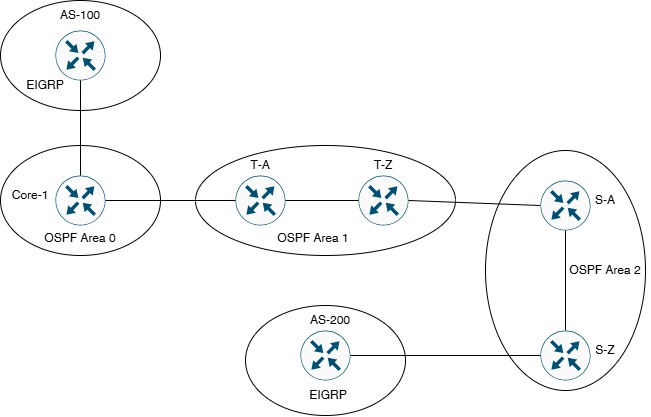
🗺️ Network Topology
Topology Description:
AS-100: EIGRP 100 autonomous system (172.16.1.0/24)
Core-1: ASBR + ABR (EIGRP 100 ↔ OSPF Area 0 & Area 1)
T-A & T-Z: Area 1 routers (Transit area for Virtual Link)
S-A & S-Z: Area 2 routers (will be configured as Stub, then NSSA)
AS-200: EIGRP 200 autonomous system (172.16.2.0/24)
Design: Multi-protocol network with OSPF backbone and EIGRP edges
⚠️ Important Design Notes:
• Core-1 acts as ASBR (redistributing EIGRP 100 into OSPF)
• S-Z acts as ASBR (redistributing EIGRP 200 into OSPF)
• Area 2 NOT directly connected to Area 0 (requires Virtual Link)
• Area 2 will be configured TWICE: First as Stub, then as NSSA
• Each configuration allows observation of different LSA types
✅ Key Design Insights:
• Area 0: Backbone area receives all LSA types including Type 5 (external)
• Area 1: Normal area allows all LSA types (transit area for virtual link)
• Area 2 (Stub): Blocks Type 5 LSAs, uses default route instead
• Area 2 (NSSA): Allows Type 7 LSAs (converted to Type 5 at ABR)
• Virtual Link: Required because Area 2 not directly connected to Area 0
⚙️ Lab Configuration Tasks Overview
ℹ️ Configuration Sequence: Complete tasks in order for proper LSA observation.
Task 4: Configure Virtual Link (T-Z ↔ S-A through Area 1)
Task 5: Configure EIGRP-to-OSPF Redistribution
Task 6: Configure Area 2 as Stub Area (Observe LSA changes)
Task 7: Reconfigure Area 2 as NSSA (Observe Type 7 LSAs)
Task 8: Complete Verification of All LSA Types
📝 Task 1: Basic Interface Configuration
Objective: Configure all interfaces with correct IP addressing on all 7 routers.
Step 1.1: Configure AS-100 (EIGRP 100 Router)
! ========================================
! AS-100 Configuration
! Role: EIGRP 100 Edge Router
! ========================================
hostname AS-100
!
interface GigabitEthernet0/1
description ** Link to Core-1 - EIGRP 100 **
ip address 203.18.60.1 255.255.255.252
no shutdown
!
interface Loopback0
description ** AS-100 Internal Network - EIGRP 100 **
ip address 172.16.1.1 255.255.255.0
!
end
Step 1.2: Configure Core-1 (ASBR + ABR)
! ========================================
! Core-1 Configuration
! Role: ASBR + ABR (EIGRP 100 ↔ OSPF Area 0/1)
! ========================================
hostname Core-1
!
interface GigabitEthernet0/1
description ** Link to AS-100 - EIGRP 100 **
ip address 203.18.60.2 255.255.255.252
no shutdown
!
interface GigabitEthernet0/0
description ** Link to T-A - OSPF Area 1 **
ip address 203.18.61.1 255.255.255.252
no shutdown
!
interface Loopback0
description ** Core-1 Internal Network - Area 0 **
ip address 192.168.1.1 255.255.255.0
!
end
Step 1.3: Configure T-A (Area 1 Router)
! ========================================
! T-A Configuration
! Role: Area 1 Internal Router
! ========================================
hostname T-A
!
interface GigabitEthernet0/0
description ** Link to Core-1 - OSPF Area 1 **
ip address 203.18.61.2 255.255.255.252
no shutdown
!
interface GigabitEthernet0/1
description ** Link to T-Z - OSPF Area 1 **
ip address 203.18.62.1 255.255.255.252
no shutdown
!
interface Loopback0
description ** T-A Internal Network - Area 1 **
ip address 192.168.2.1 255.255.255.0
!
end
Step 1.4: Configure T-Z (ABR Area 1 ↔ Area 2)
! ========================================
! T-Z Configuration
! Role: ABR (Area 1 ↔ Area 2) + VL Endpoint
! ========================================
hostname T-Z
!
interface GigabitEthernet0/1
description ** Link to T-A - OSPF Area 1 **
ip address 203.18.62.2 255.255.255.252
no shutdown
!
interface GigabitEthernet1/0
description ** Link to S-A - OSPF Area 2 **
ip address 203.18.63.1 255.255.255.252
no shutdown
!
interface Loopback0
description ** T-Z Internal Network - Area 1 **
ip address 192.168.3.1 255.255.255.0
!
end
Step 1.5: Configure S-A (Area 2 Router + VL Endpoint)
! ========================================
! S-A Configuration
! Role: Area 2 Router + Virtual Link Endpoint
! ========================================
hostname S-A
!
interface GigabitEthernet1/0
description ** Link to T-Z - OSPF Area 2 **
ip address 203.18.63.2 255.255.255.252
no shutdown
!
interface GigabitEthernet0/0
description ** Link to S-Z - OSPF Area 2 **
ip address 203.18.64.1 255.255.255.252
no shutdown
!
interface Loopback0
description ** S-A Internal Network - Area 2 **
ip address 192.168.4.1 255.255.255.0
!
end
Step 1.6: Configure S-Z (Area 2 ASBR)
! ========================================
! S-Z Configuration
! Role: ASBR in Area 2 (OSPF ↔ EIGRP 200)
! ========================================
hostname S-Z
!
interface GigabitEthernet0/0
description ** Link to S-A - OSPF Area 2 **
ip address 203.18.64.2 255.255.255.252
no shutdown
!
interface GigabitEthernet0/1
description ** Link to AS-200 - EIGRP 200 **
ip address 203.18.65.1 255.255.255.252
no shutdown
!
interface Loopback0
description ** S-Z Internal Network - Area 2 **
ip address 192.168.5.1 255.255.255.0
!
end
Step 1.7: Configure AS-200 (EIGRP 200 Router)
! ========================================
! AS-200 Configuration
! Role: EIGRP 200 Edge Router
! ========================================
hostname AS-200
!
interface GigabitEthernet0/1
description ** Link to S-Z - EIGRP 200 **
ip address 203.18.65.2 255.255.255.252
no shutdown
!
interface Loopback0
description ** AS-200 Internal Network - EIGRP 200 **
ip address 172.16.2.1 255.255.255.0
!
end
✅ Verification Task 1:
! On each router - Verify interfaces
Router# show ip interface brief
! Expected output: All interfaces should be up/up
! Test connectivity between directly connected routers
AS-100# ping 203.18.60.2
Core-1# ping 203.18.61.2
T-A# ping 203.18.62.2
T-Z# ping 203.18.63.2
S-A# ping 203.18.64.2
S-Z# ping 203.18.65.2
📝 Task 2: Configure EIGRP
Objective: Configure EIGRP 100 and EIGRP 200 autonomous systems.
! On AS-100
AS-100# show ip eigrp neighbors
! Should see Core-1 (203.18.60.2) as neighbor
AS-100# show ip route eigrp
! Should see EIGRP routes
! On AS-200
AS-200# show ip eigrp neighbors
! Should see S-Z (203.18.65.1) as neighbor
AS-200# show ip route eigrp
! Should see EIGRP routes
! Test EIGRP connectivity
AS-100# ping 203.18.60.2
AS-200# ping 203.18.65.1
📝 Task 3: Configure Multi-Area OSPF
Objective: Configure OSPF with proper area assignments (Area 0, Area 1, Area 2).
Step 3.4: Configure S-A (Area 2 Router + VL Endpoint)
! ========================================
! S-A OSPF Configuration (Area 2)
! ========================================
S-A(config)# router ospf 1
S-A(config-router)# router-id 4.4.4.4
S-A(config-router)# log-adjacency-changes
S-A(config-router)#
S-A(config-router)# ! All networks in Area 2
S-A(config-router)# network 203.18.63.0 0.0.0.3 area 2
S-A(config-router)# network 203.18.64.0 0.0.0.3 area 2
S-A(config-router)# network 192.168.4.0 0.0.0.255 area 2
S-A(config-router)#
S-A(config-router)# passive-interface Loopback0
S-A(config-router)# exit
Step 3.5: Configure S-Z (Area 2 ASBR)
! ========================================
! S-Z OSPF Configuration (Area 2 ASBR)
! ========================================
S-Z(config)# router ospf 1
S-Z(config-router)# router-id 5.5.5.5
S-Z(config-router)# log-adjacency-changes
S-Z(config-router)#
S-Z(config-router)# ! All networks in Area 2
S-Z(config-router)# network 203.18.64.0 0.0.0.3 area 2
S-Z(config-router)# network 192.168.5.0 0.0.0.255 area 2
S-Z(config-router)#
S-Z(config-router)# passive-interface Loopback0
S-Z(config-router)# exit
⚠️ Expected Issue After Task 3:
Area 2 (S-A, S-Z) will NOT be able to reach Area 0 (Core-1) because Area 2 is not directly connected to Area 0. This is normal and will be fixed in Task 4 with Virtual Link configuration.
✅ Verification Task 3:
! On all OSPF routers
Router# show ip ospf neighbor
! Verify OSPF neighbors are in FULL state
! On Core-1 - Check routes
Core-1# show ip route ospf
! Should see Area 1 routes (192.168.2.0, 192.168.3.0)
! Will NOT see Area 2 routes yet (Virtual Link needed)
! On T-Z - Verify ABR status
T-Z# show ip ospf
! Should show: "It is an area border router"
! On S-A - Observe problem
S-A# show ip route ospf
! Will NOT see Area 0 routes (192.168.1.0/24)
! This confirms Area 2 is isolated from Area 0
📝 Task 4: Configure Virtual Link
Objective: Create virtual link to connect Area 2 to Area 0 through Area 1 (transit area).
ℹ️ Virtual Link Configuration:
Since Area 2 is not directly connected to Area 0, we need a virtual link through Area 1 (transit area). Endpoints: T-Z (3.3.3.3) ↔ S-A (4.4.4.4) Transit Area: Area 1 Why: OSPF requires all areas to connect to Area 0 (backbone) Solution: Virtual link creates logical Area 0 connection through Area 1
Step 4.1: Configure Virtual Link on T-A (ABR in Area 1)
! ========================================
! T-A Virtual Link Configuration
! ========================================
T-A(config)# router ospf 1
T-A(config-router)# ! Virtual link through Area 1 to T-Z
T-A(config-router)# area 1 virtual-link 3.3.3.3
T-A(config-router)# exit
! Configuration Explained:
! - "area 1" = Transit area (Area 1 is between T-A and T-Z)
! - "virtual-link 2.2.2.2" = T-Z's Router ID (endpoint)
! - T-Z is ABR in both Area 1 and Area 2
Step 4.2: Configure Virtual Link on S-A (Area 2 Router)
! ========================================
! S-A Virtual Link Configuration
! ========================================
S-A(config)# router ospf 1
S-A(config-router)# ! Virtual link through Area 2 to S-Z
S-A(config-router)# area 2 virtual-link 5.5.5.5
S-A(config-router)# exit
! Configuration Explained:
! - "area 2" = Transit area (must match S-Z configuration)
! - "virtual-link 4.4.4.4" = S-Z's Router ID (endpoint)
! - Creates logical Area 0 extension through Area 1
! - S-A becomes ABR after virtual link is established
✅ Verification Task 4:
! On T-Z - Verify virtual link status
T-Z# show ip ospf virtual-links
! Expected output:
! Virtual Link OSPF_VL0 to router 4.4.4.4 is up
! Transit area 1, via interface GigabitEthernet1/0
! On S-A - Verify virtual link status
S-A# show ip ospf virtual-links
! Expected output:
! Virtual Link OSPF_VL0 to router 3.3.3.3 is up
! Transit area 1, via interface GigabitEthernet1/0
! On Core-1 - Now should see Area 2 routes
Core-1# show ip route ospf
! Should now see:
! O IA 192.168.4.0/24 (Area 2 network via S-A)
! O IA 192.168.5.0/24 (Area 2 network via S-Z)
! On S-A - Now should see Area 0 routes
S-A# show ip route ospf
! Should now see:
! O IA 192.168.1.0/24 (Area 0 network)
! Test end-to-end connectivity
Core-1# ping 192.168.4.1 source 192.168.1.1
! Should succeed via virtual link
S-A# ping 192.168.1.1 source 192.168.4.1
! Should succeed via virtual link
📝 Task 5: Configure EIGRP-to-OSPF Redistribution
Objective: Redistribute EIGRP routes into OSPF to create Type 5 LSAs (External LSAs).
Step 5.1: Redistribute EIGRP 100 into OSPF on Core-1
! ========================================
! Core-1 Redistribution Configuration
! ========================================
Core-1(config)# router ospf 1
Core-1(config-router)# ! Redistribute EIGRP 100 into OSPF
Core-1(config-router)# redistribute eigrp 100 subnets
Core-1(config-router)# default-metric 100
Core-1(config-router)# exit
! Configuration Explained:
! - "redistribute eigrp 100" = Redistribute EIGRP AS 100 routes
! - "subnets" = Include subnets (required for classless routing)
! - "default-metric 100" = Set OSPF cost to 100 for redistributed routes
! - This creates Type 5 LSAs (External LSAs)
! - Core-1 becomes ASBR (Autonomous System Boundary Router)
Step 5.2: Redistribute EIGRP 200 into OSPF on S-Z
! ========================================
! S-Z Redistribution Configuration
! ========================================
S-Z(config)# router ospf 1
S-Z(config-router)# ! Redistribute EIGRP 200 into OSPF
S-Z(config-router)# redistribute eigrp 200 subnets
S-Z(config-router)# default-metric 100
S-Z(config-router)# exit
! Configuration Explained:
! - S-Z becomes ASBR in Area 2
! - Redistributes EIGRP 200 routes (172.16.2.0/24) into OSPF
! - In normal area, this creates Type 5 LSAs
! - Later, in NSSA, this will create Type 7 LSAs instead
✅ Verification Task 5 - Observe Type 5 LSAs:
! On Core-1 - Check OSPF database for Type 5 LSAs
Core-1# show ip ospf database external
! Expected output:
! Type-5 AS External Link States
! Link State ID: 172.16.1.0 (from EIGRP 100 on Core-1)
! Advertising Router: 1.1.1.1
! Link State ID: 172.16.2.0 (from EIGRP 200 on S-Z)
! Advertising Router: 5.5.5.5
! On T-A - Verify external routes in routing table
T-A# show ip route ospf | include E2
! Should see:
! O E2 172.16.1.0/24 [110/100] via ...
! O E2 172.16.2.0/24 [110/100] via ...
! E2 = OSPF External Type 2 routes
! On S-A - Verify external routes
S-A# show ip route ospf | include E2
! Should see both external routes (172.16.1.0 and 172.16.2.0)
! Test connectivity to external networks
T-A# ping 172.16.1.1 source 192.168.2.1
! Should succeed
S-A# ping 172.16.2.1 source 192.168.4.1
! Should succeed
! On T-A - Check Type 4 LSAs (ASBR location)
T-A# show ip ospf database asbr-summary
! Should show Type 4 LSAs pointing to:
! - Core-1 (1.1.1.1) as ASBR
! - S-Z (5.5.5.5) as ASBR
ℹ️ LSA Types Created So Far:
At this point, you should observe:
• Type 1 LSAs: Router LSAs in all areas
• Type 2 LSAs: Network LSAs on multi-access segments (if any)
• Type 3 LSAs: Summary LSAs at ABR boundaries
• Type 4 LSAs: ASBR-Summary LSAs (pointing to Core-1 and S-Z)
• Type 5 LSAs: External LSAs for redistributed EIGRP routes
Next, we'll configure Stub and NSSA areas to observe how LSA types change!
📝 Task 6: Configure Area 2 as Stub Area
Objective: Configure Area 2 as Stub to block Type 5 LSAs and observe LSA changes.
⚠️ Important: Stub Area Characteristics
When Area 2 becomes a Stub area:
• Blocks: Type 5 LSAs (External LSAs)
• Blocks: Type 4 LSAs (ASBR-Summary LSAs)
• Allows: Type 1, 2, 3 LSAs only
• Replacement: ABR injects default route (0.0.0.0/0) into stub area
• Result: S-Z's redistributed EIGRP routes will NOT appear in Area 2 as Type 5
• Requirement: ALL routers in Area 2 must be configured as stub
Step 6.1: Configure Stub Area on T-Z (ABR)
! ========================================
! T-Z Stub Area Configuration
! ========================================
T-Z(config)# router ospf 1
T-Z(config-router)# ! Configure Area 2 as Stub
T-Z(config-router)# area 2 stub
T-Z(config-router)# exit
! Configuration Explained:
! - "area 2 stub" = Configures Area 2 as stub area
! - T-Z is ABR, so it will inject default route into Area 2
! - Blocks Type 5 and Type 4 LSAs from entering Area 2
! - Must be configured on ALL Area 2 routers
Step 6.2: Configure Stub Area on S-A
! ========================================
! S-A Stub Area Configuration
! ========================================
S-A(config)# router ospf 1
S-A(config-router)# ! Configure Area 2 as Stub
S-A(config-router)# area 2 stub
S-A(config-router)# exit
! Configuration Explained:
! - ALL routers in stub area must have "area 2 stub" configured
! - If not configured on all routers, OSPF adjacencies will fail
! - S-A will receive default route from T-Z (ABR)
Step 6.3: Configure Stub Area on S-Z
! ========================================
! S-Z Stub Area Configuration
! ========================================
S-Z(config)# router ospf 1
S-Z(config-router)# ! Configure Area 2 as Stub
S-Z(config-router)# area 2 stub
S-Z(config-router)# exit
! Configuration Explained:
! - Even though S-Z is ASBR redistributing EIGRP 200,
! it still must be configured for stub area
! - S-Z's redistributed routes will NOT appear as Type 5 in Area 2
! - External connectivity uses default route instead
⚠️ Problem with Stub Configuration:
After configuring Area 2 as Stub, you'll notice a problem:
• S-Z is ASBR (redistributing EIGRP 200) inside a Stub area
• Stub areas CANNOT contain ASBRs!
• S-Z's EIGRP 200 redistribution creates a conflict
• External routes (172.16.2.0/24) still redistributed but not ideal
Solution: Use NSSA (Not-So-Stubby Area) instead! (Task 7)
✅ Verification Task 6 - Observe Stub Area LSAs:
! On S-A - Check OSPF database (inside Stub area)
S-A# show ip ospf database
! Expected output:
! Router Link States (Area 2) - Type 1 LSAs ✅
! Net Link States (Area 2) - Type 2 LSAs (if multi-access) ✅
! Summary Net Link States (Area 2) - Type 3 LSAs ✅
! NO Type 4 LSAs ❌
! NO Type 5 LSAs ❌
! On S-A - Check routing table for default route
S-A# show ip route ospf | include 0.0.0.0
! Should see default route (0.0.0.0/0) from T-Z (ABR)
! O*IA 0.0.0.0/0 [110/1] via 203.18.63.1
! On S-A - Verify external routes use default route
S-A# show ip route 172.16.1.0
! Should route via default route (not specific Type 5 LSA)
! On T-Z - Verify default route injection
T-Z# show ip ospf database summary | include 0.0.0.0
! Should show Type 3 LSA for default route into Area 2
! Test external connectivity (using default route)
S-A# ping 172.16.1.1 source 192.168.4.1
! Should succeed via default route through T-Z
! On S-Z - Verify ASBR status still active
S-Z# show ip ospf
! Should still show: "It is an autonomous system boundary router"
! But Type 5 LSAs blocked from Area 2
📝 Task 7: Reconfigure Area 2 as NSSA
Objective: Remove Stub configuration and configure Area 2 as NSSA to allow Type 7 LSAs.
✅ NSSA Benefits:
NSSA (Not-So-Stubby Area) solves the problem of having ASBR in a stub area:
• Blocks: Type 5 LSAs from entering NSSA (like Stub)
• Allows: Type 7 LSAs (NSSA External) within the area
• Allows: Type 1, 2, 3 LSAs
• Conversion: ABR translates Type 7 LSAs to Type 5 LSAs when sending to other areas
• Result: S-Z can redistribute EIGRP 200 as Type 7 LSAs in Area 2
• Default Route: ABR can inject default route into NSSA
Step 7.1: Remove Stub and Configure NSSA on T-Z (ABR)
! ========================================
! T-Z NSSA Configuration
! ========================================
T-Z(config)# router ospf 1
T-Z(config-router)# ! Remove stub configuration
T-Z(config-router)# no area 2 stub
T-Z(config-router)#
T-Z(config-router)# ! Configure Area 2 as NSSA
T-Z(config-router)# area 2 nssa default-information-originate
T-Z(config-router)# exit
! Configuration Explained:
! - "no area 2 stub" = Removes stub configuration
! - "area 2 nssa" = Configures Area 2 as NSSA
! - "default-information-originate" = Injects default route into NSSA
! - T-Z (ABR) will translate Type 7 LSAs to Type 5 LSAs for other areas
Step 7.2: Remove Stub and Configure NSSA on S-A
! ========================================
! S-A NSSA Configuration
! ========================================
S-A(config)# router ospf 1
S-A(config-router)# ! Remove stub configuration
S-A(config-router)# no area 2 stub
S-A(config-router)#
S-A(config-router)# ! Configure Area 2 as NSSA
S-A(config-router)# area 2 nssa
S-A(config-router)# exit
! Configuration Explained:
! - ALL routers in NSSA must have "area 2 nssa" configured
! - S-A will receive Type 7 LSAs from S-Z (ASBR)
! - S-A will also receive default route from T-Z
Step 7.3: Remove Stub and Configure NSSA on S-Z (ASBR)
! ========================================
! S-Z NSSA Configuration
! ========================================
S-Z(config)# router ospf 1
S-Z(config-router)# ! Remove stub configuration
S-Z(config-router)# no area 2 stub
S-Z(config-router)#
S-Z(config-router)# ! Configure Area 2 as NSSA
S-Z(config-router)# area 2 nssa
S-Z(config-router)# exit
! Configuration Explained:
! - S-Z (ASBR) can now redistribute EIGRP 200 into OSPF properly
! - Redistributed routes will appear as Type 7 LSAs in Area 2
! - T-Z (ABR) will translate Type 7 to Type 5 for other areas (Area 0, Area 1)
! - This is the correct way to have ASBR in a stub-like area
✅ Verification Task 7 - Observe Type 7 LSAs:
! On S-A - Check OSPF database for Type 7 LSAs (inside NSSA)
S-A# show ip ospf database nssa-external
! Expected output:
! Type-7 AS External Link States (Area 2)
! Link State ID: 172.16.2.0 (EIGRP 200 route from S-Z)
! Advertising Router: 5.5.5.5 (S-Z)
! Metric Type: 2 (External Type 2)
! Metric: 100
! On S-Z - Verify Type 7 LSA generation (self-originated)
S-Z# show ip ospf database nssa-external self-originate
! Expected output:
! Type-7 AS External Link States (Area 2)
! Link State ID: 172.16.2.0
! Advertising Router: 5.5.5.5 (self)
! On T-Z - Verify Type 7 to Type 5 translation (ABR function)
T-Z# show ip ospf database external | include 172.16.2
! Expected output:
! Type-5 AS External Link States
! Link State ID: 172.16.2.0
! Advertising Router: 3.3.3.3 (T-Z translates Type 7→Type 5)
! Note: Advertising Router changes from S-Z (5.5.5.5) to T-Z (3.3.3.3)
! On Core-1 - Verify Type 5 LSA (translated from Type 7)
Core-1# show ip ospf database external | include 172.16.2
! Expected output:
! Link State ID: 172.16.2.0
! Advertising Router: 3.3.3.3 (T-Z, not S-Z)
! This confirms Type 7 was translated to Type 5 at ABR
! On S-A - Check routing table (inside NSSA)
S-A# show ip route ospf | include 172.16.2
! Expected output:
! O N2 172.16.2.0/24 [110/100] via 203.18.64.2
! N2 = NSSA External Type 2 (from Type 7 LSA)
! On T-A - Check routing table (outside NSSA, in Area 1)
T-A# show ip route ospf | include 172.16.2
! Expected output:
! O E2 172.16.2.0/24 [110/100] via ...
! E2 = External Type 2 (from translated Type 5 LSA)
! Test end-to-end connectivity
Core-1# ping 172.16.2.1 source 192.168.1.1
! Should succeed (Area 0 → Area 1 → Area 2 → EIGRP 200)
S-A# ping 172.16.2.1 source 192.168.4.1
! Should succeed (via Type 7 LSA in NSSA)
T-A# ping 172.16.2.1 source 192.168.2.1
! Should succeed (via translated Type 5 LSA)
! Summary of LSA translation:
! 1. S-Z redistributes EIGRP 200 → Type 7 LSA in Area 2 (NSSA)
! 2. T-Z (ABR) translates Type 7 LSA → Type 5 LSA for Area 1 and Area 0
! 3. Routers in Area 2 see Type 7 (N2 routes)
! 4. Routers in Area 1 and Area 0 see Type 5 (E2 routes)
📊 OSPF LSA Types Interactive Learning Tabs
ℹ️ Interactive LSA Type Reference:
Click each tab below to learn about specific LSA types with detailed explanations, commands, and examples from this lab.
📍 LSA Type 1 - Router LSA
Router Link-State Advertisement (Intra-Area)
🔍 Characteristics:
Generated By: Every OSPF router
Flooded Within: Area only (intra-area)
Contains: Router ID, directly connected links, link types, costs
Link-State ID: Router ID of originating router
Purpose: Describes router's local topology and interfaces
Scope: Does NOT cross area boundaries
In This Lab:
Core-1 generates Type 1 LSA in Area 0 and Area 1 (separate LSAs)
T-A generates Type 1 LSA in Area 1
T-Z generates Type 1 LSA in Area 1 and Area 2 (separate LSAs)
S-A and S-Z generate Type 1 LSAs in Area 2
Each router describes its own links to neighbors
Verification Commands:
! View all Type 1 LSAs
Router# show ip ospf database router
! View Type 1 LSAs for specific area
Router# show ip ospf database router area 1
! View Type 1 LSA from specific router
Router# show ip ospf database router 1.1.1.1
! View self-originated Type 1 LSA
Router# show ip ospf database router self-originate
! Count Type 1 LSAs per area
Router# show ip ospf database database-summary
Example Output from T-A:
T-A# show ip ospf database router
OSPF Router with ID (2.2.2.2) (Process ID 1)
Router Link States (Area 1)
LS age: 123
Options: (No TOS-capability, DC)
LS Type: Router Links
Link State ID: 1.1.1.1
Advertising Router: 1.1.1.1
Number of Links: 2
Link connected to: another Router (point-to-point)
Link connected to: a Stub Network
LS age: 234
Options: (No TOS-capability, DC)
LS Type: Router Links
Link State ID: 2.2.2.2
Advertising Router: 2.2.2.2 (self)
Number of Links: 3
LS age: 345
Options: (No TOS-capability, DC)
LS Type: Router Links
Link State ID: 3.3.3.3
Advertising Router: 3.3.3.3
Number of Links: 2
💡 Key Points:
• Type 1 LSA is the foundation of OSPF
• Every router generates Type 1 LSA describing its links
• ABRs generate separate Type 1 LSAs for each area
• Used to build SPF tree within an area
• Does not contain routing information from other areas
Contains: List of routers attached to multi-access network, network mask
Link-State ID: IP address of DR interface
Purpose: Describes multi-access network and attached routers
Scope: Only on multi-access segments (Ethernet LAN, not point-to-point)
Not Generated: On point-to-point links or NBMA without DR
In This Lab:
Type 2 LSAs generated on multi-access segments (if DR elected)
Most WAN links are point-to-point (/30 subnets), so Type 2 may not be present
If interfaces configured as broadcast network, DR will generate Type 2 LSA
Example: If using "ip ospf network broadcast" on interfaces
Verification Commands:
! View all Type 2 LSAs
Router# show ip ospf database network
! View Type 2 LSA for specific network
Router# show ip ospf database network 203.18.61.2
! Check DR/BDR election on interface
Router# show ip ospf interface GigabitEthernet0/0
! Look for:
! Designated Router (ID) X.X.X.X, Interface address Y.Y.Y.Y
! Backup Designated router (ID) X.X.X.X, Interface address Y.Y.Y.Y
! Check OSPF network type
Router# show ip ospf interface brief
! Network Type column shows: P2P, BROADCAST, etc.
Example Output (if DR elected):
Router# show ip ospf database network
OSPF Router with ID (2.2.2.2) (Process ID 1)
Net Link States (Area 1)
LS age: 234
Options: (No TOS-capability, DC)
LS Type: Network Links
Link State ID: 203.18.61.2 (address of Designated Router)
Advertising Router: 2.2.2.2 (DR's Router ID)
Network Mask: /30
Attached Router: 1.1.1.1
Attached Router: 2.2.2.2
💡 Key Points:
• Only generated by DR on multi-access networks
• Lists all routers attached to the network segment
• Reduces LSA flooding on multi-access segments
• If "ip ospf network point-to-point" configured, Type 2 LSA not generated
• Common on Ethernet LAN segments, typically not on /30 WAN links
Contains: Network prefix, mask, cost to reach network
Link-State ID: Network number being advertised
Purpose: Advertises routes from one area to another
Cost: Cumulative cost from ABR to destination
Summarization: Can be summarized by ABR to reduce routing table size
In This Lab:
Core-1 (ABR) generates Type 3 LSAs between Area 0 and Area 1
T-Z (ABR) generates Type 3 LSAs between Area 1 and Area 2
S-A (ABR via Virtual Link) generates Type 3 LSAs for Area 2 networks
Example: Area 0 network 192.168.1.0/24 advertised as Type 3 LSA into Area 1 by Core-1
Example: Area 1 networks advertised as Type 3 LSAs into Area 2 by T-Z
Verification Commands:
! View all Type 3 LSAs
Router# show ip ospf database summary
! View Type 3 LSA for specific network
Router# show ip ospf database summary 192.168.1.0
! View Type 3 LSAs in specific area
Router# show ip ospf database summary area 2
! Check inter-area routes in routing table
Router# show ip route ospf | include IA
! IA = Inter-Area routes (from Type 3 LSAs)
! Check which ABR advertised the route
Router# show ip route 192.168.1.0
! Look for "via X.X.X.X" (ABR that generated Type 3 LSA)
Example Output from S-A (in Area 2):
S-A# show ip ospf database summary 192.168.1.0
OSPF Router with ID (4.4.4.4) (Process ID 1)
Summary Net Link States (Area 2)
LS age: 456
Options: (No TOS-capability, DC, Upward)
LS Type: Summary Links(Network)
Link State ID: 192.168.1.0 (summary Network Number)
Advertising Router: 3.3.3.3 (T-Z, the ABR)
Network Mask: /24
Metric: 2
! This Type 3 LSA advertises Area 0 network into Area 2
! Generated by T-Z (ABR between Area 1 and Area 2)
! Metric 2 = cumulative cost from T-Z to 192.168.1.0
Example: Type 3 LSA Flow in This Lab
Area 0: 192.168.1.0/24 (Core-1)
↓ Core-1 (ABR) generates Type 3 LSA
Area 1: receives Type 3 LSA for 192.168.1.0/24
↓ T-Z (ABR) generates Type 3 LSA
Area 2: receives Type 3 LSA for 192.168.1.0/24
Verification on S-A:
S-A# show ip route 192.168.1.0
O IA 192.168.1.0/24 [110/3] via 203.18.63.1
! O IA = Inter-Area route (from Type 3 LSA)
! Cost 3 = cumulative cost through multiple ABRs
💡 Key Points:
• Type 3 LSA is the primary inter-area routing mechanism
• Generated by ABRs to advertise routes between areas
• Does NOT carry full topology information (only summary)
• ABR can perform route summarization with "area X range" command
• Modified in Stub areas (default route replaces specific Type 3 LSAs)
• Present in all area types (Normal, Stub, NSSA)
🎯 LSA Type 4 - ASBR-Summary LSA
ASBR-Summary Link-State Advertisement (Location of ASBR)
🔍 Characteristics:
Generated By: ABR that connects to an area containing ASBR
Flooded To: Other areas (to inform them about ASBR location)
Contains: Router ID of ASBR, cost to reach ASBR
Link-State ID: Router ID of ASBR
Purpose: Tells routers in other areas how to reach ASBR
Core-1 is ASBR (redistributing EIGRP 100) in Area 0/Area 1
Core-1 advertises itself as ASBR (no Type 4 needed in Area 0)
S-Z is ASBR (redistributing EIGRP 200) in Area 2
T-Z (ABR) generates Type 4 LSA into Area 1 to advertise S-Z as ASBR
Type 4 LSAs allow routers in Area 0 and Area 1 to calculate path to S-Z (ASBR in Area 2)
Verification Commands:
! View all Type 4 LSAs
Router# show ip ospf database asbr-summary
! View Type 4 LSA for specific ASBR
Router# show ip ospf database asbr-summary 5.5.5.5
! Identify all ASBRs in OSPF domain
Router# show ip ospf border-routers
! Shows both ABRs and ASBRs with costs
! Check which routers are ASBRs
Router# show ip ospf | include autonomous
! Look for: "It is an autonomous system boundary router"
Example Output from T-A (in Area 1):
T-A# show ip ospf database asbr-summary
OSPF Router with ID (2.2.2.2) (Process ID 1)
Summary ASB Link States (Area 1)
LS age: 567
Options: (No TOS-capability, DC, Upward)
LS Type: Summary Links(AS Boundary Router)
Link State ID: 1.1.1.1 (AS Boundary Router address)
Advertising Router: 1.1.1.1 (Core-1 advertises itself)
Network Mask: /0
Metric: 1
LS age: 345
Options: (No TOS-capability, DC, Upward)
LS Type: Summary Links(AS Boundary Router)
Link State ID: 5.5.5.5 (AS Boundary Router address)
Advertising Router: 3.3.3.3 (T-Z advertises S-Z)
Network Mask: /0
Metric: 2
! T-A receives Type 4 LSAs for:
! 1. Core-1 (1.1.1.1) - ASBR in Area 0/1
! 2. S-Z (5.5.5.5) - ASBR in Area 2, advertised by T-Z
Why Type 4 LSA is Important:
Scenario: T-A wants to reach 172.16.2.0/24 (external route from S-Z)
Step 1: T-A sees Type 5 LSA for 172.16.2.0/24
Advertising Router: 3.3.3.3 (translated by T-Z)
Step 2: T-A needs to know how to reach the original ASBR (S-Z)
Step 3: T-A looks up Type 4 LSA for S-Z (5.5.5.5)
Advertising Router: 3.3.3.3 (T-Z, the ABR)
Metric: 2 (cost to reach S-Z from T-Z)
Step 4: T-A calculates total cost:
Cost_to_ABR (T-Z) + Cost_to_ASBR (S-Z) + External_Cost
Step 5: T-A forwards packets toward T-Z to reach 172.16.2.0/24
Without Type 4 LSA:
- T-A wouldn't know S-Z (5.5.5.5) is the ASBR
- T-A wouldn't know how to reach S-Z
- External routing would fail!
💡 Key Points:
• Type 4 LSA provides path to ASBR (not the external routes themselves)
• Generated by ABR connecting to area with ASBR
• Essential for correct routing to external destinations
• Blocked in Stub areas (no external routes allowed, no need for Type 4)
• In NSSA, Type 7 LSAs include ASBR info, so Type 4 not needed within NSSA
• ABRs translate ASBR information when converting Type 7 to Type 5
Core-1 (ASBR) redistributes EIGRP 100 routes as Type 5 LSAs
172.16.1.0/24 appears as Type 5 LSA throughout OSPF domain
S-Z (ASBR) redistributes EIGRP 200 in Area 2 (NSSA)
In NSSA: 172.16.2.0/24 appears as Type 7 LSA (then translated to Type 5)
Routers in Area 0 and Area 1 see both external routes as Type 5 LSAs
Verification Commands:
! View all Type 5 LSAs
Router# show ip ospf database external
! View Type 5 LSA for specific network
Router# show ip ospf database external 172.16.1.0
! View self-originated Type 5 LSAs (on ASBR)
Router# show ip ospf database external self-originate
! Check external routes in routing table
Router# show ip route ospf | include E1
Router# show ip route ospf | include E2
! E1 = OSPF External Type 1
! E2 = OSPF External Type 2 (default)
! Compare external route metrics
Router# show ip route 172.16.1.0 172.16.2.0
Example Output from T-A (in Area 1):
T-A# show ip ospf database external
OSPF Router with ID (2.2.2.2) (Process ID 1)
Type-5 AS External Link States
LS age: 789
Options: (No TOS-capability, DC, Upward)
LS Type: AS External Link
Link State ID: 172.16.1.0 (External Network Number)
Advertising Router: 1.1.1.1 (Core-1, the ASBR)
Network Mask: /24
Metric Type: 2 (Larger than any link state path)
Metric: 100
Forward Address: 0.0.0.0
External Route Tag: 0
LS age: 234
Options: (No TOS-capability, DC, Upward)
LS Type: AS External Link
Link State ID: 172.16.2.0 (External Network Number)
Advertising Router: 3.3.3.3 (T-Z translated from Type 7)
Network Mask: /24
Metric Type: 2 (Larger than any link state path)
Metric: 100
Forward Address: 0.0.0.0
External Route Tag: 0
Example: Type 5 LSA in Routing Table
T-A# show ip route ospf
O 192.168.1.0/24 [110/2] via 203.18.61.1 (Inter-Area)
O IA 192.168.3.0/24 [110/2] via 203.18.62.2 (Inter-Area)
O IA 192.168.4.0/24 [110/3] via 203.18.62.2 (Inter-Area)
O IA 192.168.5.0/24 [110/3] via 203.18.62.2 (Inter-Area)
O E2 172.16.1.0/24 [110/100] via 203.18.61.1 (External Type 2)
O E2 172.16.2.0/24 [110/100] via 203.18.62.2 (External Type 2)
Explanation:
- O E2 = External Type 2 routes (from Type 5 LSAs)
- [110/100] = AD 110, Metric 100 (external cost only)
- Metric 100 set by "default-metric 100" on ASBR
- Internal OSPF cost NOT added (because it's E2)
Configuring Metric Type (E1 vs E2):
! Default: External Type 2 (E2)
Core-1(config)# router ospf 1
Core-1(config-router)# redistribute eigrp 100 subnets
! Result: Routes appear as E2
! Change to External Type 1 (E1)
Core-1(config)# router ospf 1
Core-1(config-router)# redistribute eigrp 100 subnets metric-type 1
! Result: Routes appear as E1
Difference in routing table:
E2: O E2 172.16.1.0/24 [110/100] via ...
Metric = 100 (external only)
E1: O E1 172.16.1.0/24 [110/102] via ...
Metric = 100 (external) + 2 (internal OSPF cost)
Total = 102
💡 Key Points:
• Type 5 LSA is the primary mechanism for external route advertisement
• Flooded throughout entire OSPF domain (except Stub/NSSA)
• Default metric type is E2 (external cost only, simpler)
• E1 includes internal OSPF cost (more accurate, but complex)
• E1 preferred over E2 if same destination reachable via both
• Blocked in Stub areas (default route used instead)
• In NSSA, external routes use Type 7 LSAs (translated to Type 5 at ABR)
🔒 LSA Type 7 - NSSA External LSA
Not-So-Stubby Area External Link-State Advertisement
🔍 Characteristics:
Generated By: ASBR within NSSA
Flooded Within: NSSA only (not entire OSPF domain)
Contains: External network prefix, mask, external metric, metric type
Link-State ID: External network number
Purpose: Allows redistribution within NSSA (Stub areas can't do this)
Translation: ABR translates Type 7 to Type 5 when sending to other areas
P-bit: Propagate bit determines if Type 7 should be translated to Type 5
Problem: Stub areas block Type 5 LSAs (external routes)
But what if we need ASBR inside a stub area?
Example: Branch office (stub-like) needs to redistribute connected networks
Traditional Stub: Can't have ASBR → Redistribution not allowed
NSSA Solution: Allows ASBR → Uses Type 7 LSAs instead of Type 5
Benefits:
1. NSSA blocks Type 5 LSAs from entering (like Stub)
2. NSSA allows Type 7 LSAs within the area (unlike Stub)
3. ABR translates Type 7 → Type 5 for other areas
4. Result: Best of both worlds (stub benefits + local redistribution)
In This Lab:
Area 2 configured as NSSA (Task 7)
S-Z (ASBR) redistributes EIGRP 200 into OSPF within NSSA
172.16.2.0/24 appears as Type 7 LSA in Area 2 only
T-Z (ABR) translates Type 7 LSA to Type 5 LSA for Area 0 and Area 1
Routers in Area 2 see Type 7 (N2 routes)
Routers in other areas see translated Type 5 (E2 routes)
Verification Commands:
! View all Type 7 LSAs (inside NSSA)
Router# show ip ospf database nssa-external
! View Type 7 LSA for specific network
Router# show ip ospf database nssa-external 172.16.2.0
! View self-originated Type 7 LSAs (on ASBR in NSSA)
Router# show ip ospf database nssa-external self-originate
! Check NSSA external routes in routing table
Router# show ip route ospf | include N1
Router# show ip route ospf | include N2
! N1 = NSSA External Type 1
! N2 = NSSA External Type 2 (default)
! Verify NSSA configuration
Router# show ip ospf | include not-so-stubby
! Should show: "It is a not-so-stubby area"
Example Output from S-A (Inside NSSA, Area 2):
S-A# show ip ospf database nssa-external
OSPF Router with ID (4.4.4.4) (Process ID 1)
Type-7 AS External Link States (Area 2)
LS age: 123
Options: (No TOS-capability, Type 7/5 translation, DC, Upward)
LS Type: AS External Link
Link State ID: 172.16.2.0 (External Network Number)
Advertising Router: 5.5.5.5 (S-Z, the ASBR in NSSA)
Network Mask: /24
Metric Type: 2 (Larger than any link state path)
Metric: 100
Forward Address: 0.0.0.0
External Route Tag: 0
! This Type 7 LSA:
! - Generated by S-Z (ASBR) in Area 2 (NSSA)
! - Flooded only within Area 2
! - Will be translated to Type 5 by T-Z (ABR)
Example: Type 7 to Type 5 Translation on ABR (T-Z):
! On T-Z (ABR) - View Type 7 LSA (inside NSSA)
T-Z# show ip ospf database nssa-external 172.16.2.0
Type-7 AS External Link States (Area 2)
Link State ID: 172.16.2.0
Advertising Router: 5.5.5.5 (S-Z, original ASBR)
Metric: 100
! On T-Z (ABR) - View Type 5 LSA (translated for other areas)
T-Z# show ip ospf database external 172.16.2.0
Type-5 AS External Link States
Link State ID: 172.16.2.0
Advertising Router: 3.3.3.3 (T-Z, ABR that translated it)
Metric: 100
Translation Process:
1. S-Z generates Type 7 LSA in Area 2 (NSSA)
2. T-Z (ABR) receives Type 7 LSA
3. T-Z translates Type 7 → Type 5
4. T-Z floods Type 5 LSA to Area 0 and Area 1
5. Advertising Router changes: S-Z (5.5.5.5) → T-Z (3.3.3.3)
Example: Type 7 LSA in Routing Table (Inside NSSA)
S-A# show ip route ospf
O IA 192.168.1.0/24 [110/3] via 203.18.63.1 (Inter-Area)
O IA 192.168.2.0/24 [110/2] via 203.18.63.1 (Inter-Area)
O IA 192.168.3.0/24 [110/2] via 203.18.63.1 (Inter-Area)
O 192.168.5.0/24 [110/2] via 203.18.64.2 (Intra-Area)
O*IA 0.0.0.0/0 [110/1] via 203.18.63.1 (Default from ABR)
O E2 172.16.1.0/24 [110/100] via 203.18.63.1 (Ext Type 2 from Area 0)
O N2 172.16.2.0/24 [110/100] via 203.18.64.2 (NSSA Ext Type 2)
Explanation:
- O N2 = NSSA External Type 2 (from Type 7 LSA)
- O E2 = External Type 2 (from Type 5 LSA, allowed into NSSA)
- [110/100] = AD 110, Metric 100
- S-A sees 172.16.2.0 as N2 (Type 7) because it's in NSSA
Example: Translated Type 5 LSA in Other Areas
T-A# show ip route ospf | include 172.16
O E2 172.16.1.0/24 [110/100] via 203.18.61.1 (from Core-1 ASBR)
O E2 172.16.2.0/24 [110/100] via 203.18.62.2 (translated by T-Z)
Explanation:
- T-A is in Area 1 (outside NSSA)
- T-A sees 172.16.2.0 as E2 (Type 5 LSA), not N2
- Type 7 was translated to Type 5 by T-Z (ABR)
- Both external routes appear the same to routers outside NSSA
NSSA Configuration Options:
! Basic NSSA configuration (on all Area 2 routers)
Router(config)# router ospf 1
Router(config-router)# area 2 nssa
! NSSA with default route injection (on ABR)
Router(config-router)# area 2 nssa default-information-originate
! Totally NSSA (blocks Type 3 LSAs, only default route)
Router(config-router)# area 2 nssa no-summary
! NSSA without Type 7 to Type 5 translation
Router(config-router)# area 2 nssa no-redistribution
! NSSA with metric type 1 (instead of default type 2)
Router(config-router)# area 2 nssa translate type7 metric-type 1
💡 Key Points:
• Type 7 LSA solves the "ASBR in Stub area" problem
• Only exists within NSSA (not flooded to other areas)
• ABR translates Type 7 to Type 5 for other areas
• NSSA routers see external routes as N1 or N2
• Other areas see translated routes as E1 or E2
• Advertising Router changes during translation (from ASBR to ABR)
• NSSA still blocks Type 5 LSAs from entering (like Stub)
• Default route can be injected into NSSA by ABR
📊 LSA Types Summary & Comparison
Complete Comparison of OSPF LSA Types 1-7
LSA Type
Name
Generated By
Flooded To
Purpose
Allowed In
Type 1
Router LSA
Every router
Area only
Describes router's links
All areas
Type 2
Network LSA
DR
Area only
Describes multi-access network
All areas
Type 3
Summary LSA
ABR
Adjacent areas
Inter-area routes
Normal, Stub, NSSA (modified in Stub)
Type 4
ASBR-Summary
ABR
Other areas
Location of ASBR
Normal, Area 0 (NOT Stub/NSSA)
Type 5
External LSA
ASBR
Entire domain
External routes
Normal, Area 0 (NOT Stub/NSSA)
Type 7
NSSA External
ASBR in NSSA
NSSA only
External routes in NSSA
NSSA only (translated to Type 5)
LSA Types by Area Type
Area Type
LSA Types Allowed
LSA Types Blocked
Special Features
Normal Area
1, 2, 3, 4, 5
None
All LSA types allowed
Backbone (Area 0)
1, 2, 3, 4, 5
None
Must exist, all areas connect to it
Stub Area
1, 2, 3
4, 5, 7
Default route injected by ABR Cannot contain ASBR
Totally Stubby
1, 2
3, 4, 5, 7
Only default route from ABR Cisco proprietary
NSSA
1, 2, 3, 7
4, 5
Type 7 → Type 5 at ABR Can contain ASBR
Totally NSSA
1, 2, 7
3, 4, 5
Type 7 → Type 5 at ABR Default route only
LSA Flooding Scope
Flooding Scope
LSA Types
Description
Intra-Area
Type 1, Type 2
Flooded within single area only, do not cross ABR
Inter-Area
Type 3, Type 4
Generated by ABR, flooded to adjacent areas
Domain-Wide
Type 5
Flooded throughout entire OSPF domain (except Stub/NSSA)
NSSA-Only
Type 7
Flooded within NSSA only, translated to Type 5 by ABR
Quick Command Reference
! ========================================
! View ALL LSA types
! ========================================
Router# show ip ospf database
! ========================================
! View specific LSA type
! ========================================
Router# show ip ospf database router # Type 1
Router# show ip ospf database network # Type 2
Router# show ip ospf database summary # Type 3
Router# show ip ospf database asbr-summary # Type 4
Router# show ip ospf database external # Type 5
Router# show ip ospf database nssa-external # Type 7
! ========================================
! View LSAs for specific area
! ========================================
Router# show ip ospf database area 0
Router# show ip ospf database area 1
Router# show ip ospf database area 2
! ========================================
! View self-originated LSAs
! ========================================
Router# show ip ospf database self-originate
! ========================================
! View LSA statistics
! ========================================
Router# show ip ospf database database-summary
! ========================================
! View OSPF routing table with LSA indicators
! ========================================
Router# show ip route ospf
! O = Intra-area (Type 1, 2)
! O IA = Inter-area (Type 3)
! O E1 = External Type 1 (Type 5)
! O E2 = External Type 2 (Type 5)
! O N1 = NSSA External Type 1 (Type 7)
! O N2 = NSSA External Type 2 (Type 7)
! ========================================
! Verify router roles
! ========================================
Router# show ip ospf
! Look for:
! "It is an area border router" (ABR)
! "It is an autonomous system boundary router" (ASBR)
! ========================================
! Verify virtual links
! ========================================
Router# show ip ospf virtual-links
! ========================================
! View OSPF neighbors
! ========================================
Router# show ip ospf neighbor
! ========================================
! View OSPF interfaces
! ========================================
Router# show ip ospf interface brief
✅ LSA Types Memory Aid: Type 1:Router - Every router describes itself Type 2:Network - DR describes multi-access network Type 3:Summary - ABR summarizes inter-area routes Type 4:ASBR location - ABR points to ASBR Type 5:External - ASBR advertises external routes Type 7:NSSA external - ASBR in NSSA advertises external routes
Mnemonic: "Really Nice Summary About External Networks"
💡 Best Practices:
• Use show ip ospf database to verify LSA types after configuration changes
• Understand which LSA types are blocked in each area type
• Use Stub areas to reduce routing table size and LSA flooding
• Use NSSA when you need redistribution in a stub-like area
• Monitor LSA flooding with show ip ospf interface
• Use route summarization at ABRs to reduce Type 3 LSAs
• Configure passive-interface on LAN segments to reduce LSA overhead
• Verify LSA counts with show ip ospf database database-summary
LSA Type Decision Tree
Question: Which LSA type do I need?
├─ Is the router describing its own links?
│ └─ YES → Type 1 (Router LSA)
│
├─ Is the router a DR on multi-access segment?
│ └─ YES → Type 2 (Network LSA)
│
├─ Is the router an ABR advertising routes to another area?
│ └─ YES → Type 3 (Summary LSA)
│
├─ Is the router an ABR advertising ASBR location?
│ └─ YES → Type 4 (ASBR-Summary LSA)
│
├─ Is the router an ASBR redistributing external routes (not in NSSA)?
│ └─ YES → Type 5 (External LSA)
│
└─ Is the router an ASBR redistributing external routes in NSSA?
└─ YES → Type 7 (NSSA External LSA)
✅ Complete Verification Checklist
☐ Task 1: All interfaces up/up on all 7 routers
☐ Task 2: EIGRP 100 neighbors formed (AS-100 ↔ Core-1)
☐ Task 2: EIGRP 200 neighbors formed (AS-200 ↔ S-Z)
☐ Task 3: OSPF neighbors FULL in all areas
☐ Task 4: Virtual link UP (T-Z ↔ S-A through Area 1)
☐ Task 5: EIGRP routes redistributed into OSPF
☐ LSA Type 1: Present in all areas (every router)
☐ LSA Type 2: Present on multi-access segments (if DR elected)
☐ LSA Type 3: Generated by ABRs between areas
☐ LSA Type 4: Advertising ASBRs (Core-1, S-Z)
☐ LSA Type 5: External routes (172.16.1.0, 172.16.2.0)
☐ Task 6: Stub area configuration tested (Area 2 blocks Type 5)
☐ Task 7: NSSA configuration working (Area 2 allows Type 7)
☐ LSA Type 7: Present in NSSA (172.16.2.0/24 from S-Z)
☐ Translation: Type 7 to Type 5 verified at T-Z (ABR)
Normal for P2P links, configure "ip ospf network broadcast" if needed
Type 3 LSA missing
ABR not configured properly
show ip ospf border-routers
Verify ABR has interfaces in multiple areas
Type 4 LSA missing
No ASBR in domain
show ip ospf database asbr-summary
Configure redistribution to create ASBR
Type 5 LSA missing
Redistribution not configured
show ip ospf database external
Configure "redistribute" under OSPF process
Type 5 blocked in area
Area is Stub or NSSA
show ip ospf database
Normal behavior, external connectivity uses default route or Type 7
Type 7 LSA missing
Area not configured as NSSA
show ip ospf database nssa-external
Configure "area X nssa" on all routers in area
Type 7 not translated
ABR misconfigured
show ip ospf database external
Verify ABR has "area X nssa" configured, check P-bit
Virtual link down
Transit area connectivity issue
show ip ospf virtual-links
Verify OSPF working in transit area, check Router IDs match
EIGRP routes not in OSPF
Redistribution missing or incorrect
show ip route ospf | include E
Verify "redistribute eigrp X subnets" command
OSPF neighbors not FULL
Area mismatch, network type mismatch
show ip ospf neighbor
Verify area numbers match, check network types
Stub/NSSA neighbors down
Not all routers configured as Stub/NSSA
show ip ospf
Configure "area X stub" or "area X nssa" on ALL routers in area
📄 Complete Device Configurations (NSSA Final)
ℹ️ Ready-to-Use Configurations: Complete working configurations for all 7 routers with NSSA configuration. Copy and paste directly into your routers.
AS-100 Complete Configuration:
! ========================================
! AS-100 Complete Configuration
! Role: EIGRP 100 Edge Router
! ========================================
hostname AS-100
!
interface GigabitEthernet0/1
description ** Link to Core-1 - EIGRP 100 **
ip address 203.18.60.1 255.255.255.252
no shutdown
!
interface Loopback0
description ** AS-100 Internal Network - EIGRP 100 **
ip address 172.16.1.1 255.255.255.0
!
router eigrp 100
eigrp router-id 100.100.100.100
network 203.18.60.0 0.0.0.3
network 172.16.1.0 0.0.0.255
passive-interface Loopback0
no auto-summary
!
end
Core-1 Complete Configuration (ASBR + ABR):
! ========================================
! Core-1 Complete Configuration
! Role: ASBR + ABR (EIGRP 100 ↔ OSPF)
! ========================================
hostname Core-1
!
interface GigabitEthernet0/1
description ** Link to AS-100 - EIGRP 100 **
ip address 203.18.60.2 255.255.255.252
no shutdown
!
interface GigabitEthernet0/0
description ** Link to T-A - OSPF Area 1 **
ip address 203.18.61.1 255.255.255.252
no shutdown
!
interface Loopback0
description ** Core-1 Internal Network - Area 0 **
ip address 192.168.1.1 255.255.255.0
!
router eigrp 100
eigrp router-id 1.1.1.1
network 203.18.60.0 0.0.0.3
no auto-summary
!
router ospf 1
router-id 1.1.1.1
log-adjacency-changes
redistribute eigrp 100 subnets
passive-interface Loopback0
network 192.168.1.0 0.0.0.255 area 0
network 203.18.61.0 0.0.0.3 area 1
default-metric 100
!
end
T-A Complete Configuration:
! ========================================
! T-A Complete Configuration
! Role: Area 1 Internal Router
! ========================================
hostname T-A
!
interface GigabitEthernet0/0
description ** Link to Core-1 - OSPF Area 1 **
ip address 203.18.61.2 255.255.255.252
no shutdown
!
interface GigabitEthernet0/1
description ** Link to T-Z - OSPF Area 1 **
ip address 203.18.62.1 255.255.255.252
no shutdown
!
interface Loopback0
description ** T-A Internal Network - Area 1 **
ip address 192.168.2.1 255.255.255.0
!
router ospf 1
router-id 2.2.2.2
log-adjacency-changes
area 1 virtual-link 3.3.3.3
passive-interface Loopback0
network 203.18.61.0 0.0.0.3 area 1
network 203.18.62.0 0.0.0.3 area 1
network 192.168.2.0 0.0.0.255 area 1
!
end
T-Z Complete Configuration (ABR + VL Endpoint):
! ========================================
! T-Z Complete Configuration
! Role: ABR (Area 1 ↔ Area 2) + VL Endpoint
! ========================================
hostname T-Z
!
interface GigabitEthernet0/1
description ** Link to T-A - OSPF Area 1 **
ip address 203.18.62.2 255.255.255.252
no shutdown
!
interface GigabitEthernet1/0
description ** Link to S-A - OSPF Area 2 **
ip address 203.18.63.1 255.255.255.252
no shutdown
!
interface Loopback0
description ** T-Z Internal Network - Area 1 **
ip address 192.168.3.1 255.255.255.0
!
router ospf 1
router-id 3.3.3.3
log-adjacency-changes
area 1 virtual-link 2.2.2.2
area 2 nssa default-information-originate
passive-interface Loopback0
network 203.18.62.0 0.0.0.3 area 1
network 192.168.3.0 0.0.0.255 area 1
network 203.18.63.0 0.0.0.3 area 2
!
end
S-A Complete Configuration (VL Endpoint + NSSA):
! ========================================
! S-A Complete Configuration
! Role: Area 2 Router + VL Endpoint + NSSA
! ========================================
hostname S-A
!
interface GigabitEthernet1/0
description ** Link to T-Z - OSPF Area 2 **
ip address 203.18.63.2 255.255.255.252
no shutdown
!
interface GigabitEthernet0/0
description ** Link to S-Z - OSPF Area 2 **
ip address 203.18.64.1 255.255.255.252
no shutdown
!
interface Loopback0
description ** S-A Internal Network - Area 2 **
ip address 192.168.4.1 255.255.255.0
!
router ospf 1
router-id 4.4.4.4
log-adjacency-changes
area 2 virtual-link 5.5.5.5
area 2 nssa
passive-interface Loopback0
network 203.18.63.0 0.0.0.3 area 2
network 203.18.64.0 0.0.0.3 area 2
network 192.168.4.0 0.0.0.255 area 2
!
end
S-Z Complete Configuration (ASBR in NSSA):
! ========================================
! S-Z Complete Configuration
! Role: ASBR in NSSA (OSPF ↔ EIGRP 200)
! ========================================
hostname S-Z
!
interface GigabitEthernet0/0
description ** Link to S-A - OSPF Area 2 **
ip address 203.18.64.2 255.255.255.252
no shutdown
!
interface GigabitEthernet0/1
description ** Link to AS-200 - EIGRP 200 **
ip address 203.18.65.1 255.255.255.252
no shutdown
!
interface Loopback0
description ** S-Z Internal Network - Area 2 **
ip address 192.168.5.1 255.255.255.0
!
router eigrp 200
eigrp router-id 5.5.5.5
network 203.18.65.0 0.0.0.3
no auto-summary
!
router ospf 1
router-id 5.5.5.5
log-adjacency-changes
redistribute eigrp 200 subnets
area 2 virtual-link 4.4.4.4
area 2 nssa
passive-interface Loopback0
network 203.18.64.0 0.0.0.3 area 2
network 192.168.5.0 0.0.0.255 area 2
default-metric 100
!
end
AS-200 Complete Configuration:
! ========================================
! AS-200 Complete Configuration
! Role: EIGRP 200 Edge Router
! ========================================
hostname AS-200
!
interface GigabitEthernet0/1
description ** Link to S-Z - EIGRP 200 **
ip address 203.18.65.2 255.255.255.252
no shutdown
!
interface Loopback0
description ** AS-200 Internal Network - EIGRP 200 **
ip address 172.16.2.1 255.255.255.0
!
router eigrp 200
eigrp router-id 200.200.200.200
network 203.18.65.0 0.0.0.3
network 172.16.2.0 0.0.0.255
passive-interface Loopback0
no auto-summary
!
end
All configurations, verifications, and LSA explanations included!
🔖 Quick Reference Summary
📝 Key Takeaways:
• LSA Type 1: Every router, describes links, intra-area only
• LSA Type 2: DR only, multi-access networks, intra-area only
• LSA Type 3: ABR only, inter-area routes, crosses area boundaries
• LSA Type 4: ABR only, ASBR location, blocked in Stub/NSSA
• LSA Type 5: ASBR only, external routes, blocked in Stub/NSSA
• LSA Type 7: ASBR in NSSA, external routes, translated to Type 5 by ABR
• Stub Area: Blocks Type 5, uses default route, no ASBRs allowed
• NSSA: Allows Type 7 (external in NSSA), ASBRs allowed, Type 7→5 translation
• Virtual Link: Extends Area 0 through transit area, uses Router IDs
• Redistribution: Creates ASBRs, generates Type 5 or Type 7 LSAs
🎯 Lab Completion Criteria:
✅ All 7 routers configured with complete configurations
✅ All LSA types (1-7) verified and understood
✅ Stub and NSSA configurations tested
✅ End-to-end connectivity confirmed
✅ Virtual link operational
✅ EIGRP-to-OSPF redistribution working