🔧 Lab 14.2 - IS-IS Advanced Configuration
Cisco CCNP 350-401 (ENCOR) - IS-IS Optimization, Authentication & Tuning
Lab Focus: IS-IS Advanced Features: Authentication, Metrics, Timers, Passive Interfaces, Route Leaking | Password Protected
Duration: 120-150 minutes | Difficulty Level: Advanced | Lab Version: 1.0
CCNP Exam Topics: 350-401 ENCOR (3.3) - IS-IS Advanced Configuration
Prerequisites: Completion of Lab 14.1 (Basic IS-IS Configuration)
ℹ️ Lab Objective:
This advanced lab builds upon Lab 14.1 by implementing IS-IS security features (authentication), metric manipulation, interface optimization, timer tuning, passive interfaces, and route leaking between levels. You will configure production-grade IS-IS deployments with security and performance optimizations.
🎯 Lab Learning Outcomes
Upon completion of this lab, you will master:
- IS-IS Authentication: Interface and area-level security
- Metric Manipulation: Controlling path selection with custom metrics
- Passive Interfaces: Optimizing routing updates on loopback/LAN segments
- Timer Optimization: Hello intervals and hold timers for faster convergence
- Route Leaking: Redistributing specific routes between Level 1 and Level 2
- Interface Priority: DIS (Designated IS) election manipulation
- Wide Metrics: Supporting large-scale networks with 24-bit metrics
- Advanced Troubleshooting: Debugging IS-IS authentication and adjacency issues
🗺️ Network Topology
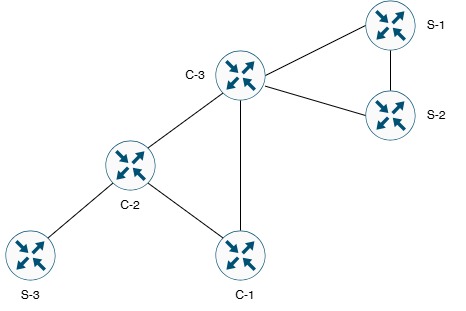
Topology Description:
- Same topology as Lab 14.1 with advanced IS-IS features
- Core Routers (C-1, C-2, C-3): Backbone with authentication and metric tuning
- Site Routers (S-1, S-2, S-3): Edge routers with passive interfaces and route leaking
- Security: IS-IS authentication on all links
- Optimization: Custom metrics, timers, and passive interfaces
⚠️ Lab 14.2 Enhancements Over Lab 14.1:
• Authentication: MD5 authentication on all IS-IS adjacencies
• Metrics: Custom wide metrics for traffic engineering
• Passive Interfaces: Loopback interfaces configured as passive
• Timers: Optimized hello/hold timers for faster convergence
• Route Leaking: Specific Level 2 routes leaked into Level 1 areas
• Production Ready: Enterprise-grade IS-IS deployment
📋 Device Information
| Device |
Role |
IS-IS Level |
Area |
System ID |
Authentication |
| C-1 |
Core Router |
Level 2 |
Backbone |
0000.0000.0001 |
MD5 (cisco123) |
| C-2 |
Core Router / ABR |
Level 1-2 |
49.0001 / Backbone |
0000.0000.0002 |
MD5 (cisco123/secure456) |
| C-3 |
Core Router / ABR |
Level 1-2 |
49.0002 / Backbone |
0000.0000.0003 |
MD5 (cisco123/secure789) |
| S-1 |
Site Router |
Level 1 |
49.0002 |
0000.0000.0004 |
MD5 (secure789) |
| S-2 |
Site Router |
Level 1 |
49.0002 |
0000.0000.0005 |
MD5 (secure789) |
| S-3 |
Site Router |
Level 1 |
49.0001 |
0000.0000.0006 |
MD5 (secure456) |
🌐 IP Addressing Table
| Connection |
Device 1 |
Interface |
IP Address |
Device 2 |
Interface |
IP Address |
Subnet |
| Link 1 |
C-1 |
G0/0 |
203.18.61.1 |
C-2 |
G0/0 |
203.18.61.2 |
/30 |
| Link 2 |
C-1 |
G0/1 |
203.18.62.1 |
C-3 |
G0/1 |
203.18.62.2 |
/30 |
| Link 3 |
C-2 |
G1/0 |
203.18.63.1 |
C-3 |
G1/0 |
203.18.63.2 |
/30 |
| Link 4 |
C-2 |
G1/1 |
203.18.64.1 |
S-3 |
G1/1 |
203.18.64.2 |
/30 |
| Link 5 |
C-3 |
G0/0 |
203.18.65.1 |
S-1 |
G0/0 |
203.18.65.2 |
/30 |
| Link 6 |
C-3 |
G1/1 |
203.18.66.1 |
S-2 |
G1/1 |
203.18.66.2 |
/30 |
🔌 Loopback Networks
| Device |
Loopback0 |
Subnet Mask |
Purpose |
Passive |
| C-1 |
192.168.1.1 |
255.255.255.0 |
Core network identification |
Yes |
| C-2 |
192.168.2.1 |
255.255.255.0 |
Core network identification |
Yes |
| C-3 |
192.168.3.1 |
255.255.255.0 |
Core network identification |
Yes |
| S-1 |
192.168.4.1 |
255.255.255.0 |
Site network identification |
Yes |
| S-2 |
192.168.5.1 |
255.255.255.0 |
Site network identification |
Yes |
| S-3 |
192.168.6.1 |
255.255.255.0 |
Site network identification |
Yes |
🔐 IS-IS Authentication Design
| Area/Level |
Authentication Type |
Password |
Applied To |
| Level 2 (Backbone) |
MD5 |
cisco123 |
C-1 ↔ C-2, C-1 ↔ C-3, C-2 ↔ C-3 |
| Area 49.0001 (Level 1) |
MD5 |
secure456 |
C-2 ↔ S-3 |
| Area 49.0002 (Level 1) |
MD5 |
secure789 |
C-3 ↔ S-1, C-3 ↔ S-2 |
⚙️ Lab Configuration Tasks Overview
ℹ️ Prerequisites: This lab assumes Lab 14.1 basic IS-IS configuration is complete. If not, configure basic IS-IS first.
Configuration Tasks:
- Task 1: Complete Basic IS-IS Configuration (from Lab 14.1)
- Task 2: Configure IS-IS Authentication
- Task 3: Configure Passive Interfaces
- Task 4: Configure IS-IS Metrics (Wide Metrics)
- Task 5: Optimize IS-IS Timers
- Task 6: Configure Route Leaking
- Task 7: Complete Verification and Testing
📝 Task 1: Complete Basic IS-IS Configuration
Objective: Ensure basic IS-IS from Lab 14.1 is configured and operational.
⚠️ Important: If you completed Lab 14.1, skip to Task 2. If not, use these quick configurations to establish basic IS-IS.
Quick Basic IS-IS Configuration (All Routers):
! ========================================
! C-1 Basic Configuration
! ========================================
hostname C-1
!
interface GigabitEthernet0/0
ip address 203.18.61.1 255.255.255.252
ip router isis CORE
isis network point-to-point
no shutdown
!
interface GigabitEthernet0/1
ip address 203.18.62.1 255.255.255.252
ip router isis CORE
isis network point-to-point
no shutdown
!
interface Loopback0
ip address 192.168.1.1 255.255.255.0
ip router isis CORE
!
router isis CORE
net 49.0000.0000.0000.0001.00
is-type level-2-only
!
! ========================================
! C-2 Basic Configuration
! ========================================
hostname C-2
!
interface GigabitEthernet0/0
ip address 203.18.61.2 255.255.255.252
ip router isis CORE
isis network point-to-point
no shutdown
!
interface GigabitEthernet1/0
ip address 203.18.63.1 255.255.255.252
ip router isis CORE
isis network point-to-point
no shutdown
!
interface GigabitEthernet1/1
ip address 203.18.64.1 255.255.255.252
ip router isis CORE
isis network point-to-point
no shutdown
!
interface Loopback0
ip address 192.168.2.1 255.255.255.0
ip router isis CORE
!
router isis CORE
net 49.0001.0000.0000.0002.00
is-type level-1-2
!
! ========================================
! C-3 Basic Configuration
! ========================================
hostname C-3
!
interface GigabitEthernet0/1
ip address 203.18.62.2 255.255.255.252
ip router isis CORE
isis network point-to-point
no shutdown
!
interface GigabitEthernet1/0
ip address 203.18.63.2 255.255.255.252
ip router isis CORE
isis network point-to-point
no shutdown
!
interface GigabitEthernet0/0
ip address 203.18.65.1 255.255.255.252
ip router isis CORE
isis network point-to-point
no shutdown
!
interface GigabitEthernet1/1
ip address 203.18.66.1 255.255.255.252
ip router isis CORE
isis network point-to-point
no shutdown
!
interface Loopback0
ip address 192.168.3.1 255.255.255.0
ip router isis CORE
!
router isis CORE
net 49.0002.0000.0000.0003.00
is-type level-1-2
!
! ========================================
! S-1 Basic Configuration
! ========================================
hostname S-1
!
interface GigabitEthernet0/0
ip address 203.18.65.2 255.255.255.252
ip router isis CORE
isis network point-to-point
no shutdown
!
interface Loopback0
ip address 192.168.4.1 255.255.255.0
ip router isis CORE
!
router isis CORE
net 49.0002.0000.0000.0004.00
is-type level-1
!
! ========================================
! S-2 Basic Configuration
! ========================================
hostname S-2
!
interface GigabitEthernet1/1
ip address 203.18.66.2 255.255.255.252
ip router isis CORE
isis network point-to-point
no shutdown
!
interface Loopback0
ip address 192.168.5.1 255.255.255.0
ip router isis CORE
!
router isis CORE
net 49.0002.0000.0000.0005.00
is-type level-1
!
! ========================================
! S-3 Basic Configuration
! ========================================
hostname S-3
!
interface GigabitEthernet1/1
ip address 203.18.64.2 255.255.255.252
ip router isis CORE
isis network point-to-point
no shutdown
!
interface Loopback0
ip address 192.168.6.1 255.255.255.0
ip router isis CORE
!
router isis CORE
net 49.0001.0000.0000.0006.00
is-type level-1
!
✅ Verification Task 1:
! Verify basic IS-IS is operational
Router# show isis neighbors
! All neighbors should be UP
Router# show ip route isis
! All networks should be reachable via IS-IS
📝 Task 2: Configure IS-IS Authentication
Objective: Implement MD5 authentication on all IS-IS adjacencies for security.
ℹ️ IS-IS Authentication Types:
• Interface Authentication: Applied per-interface (most secure)
• Area Authentication: Applied globally under router isis
• Domain Authentication: For Level 2 backbone security
This lab uses interface-level MD5 authentication for maximum security and flexibility.
Step 2.1: Configure Authentication on C-1 (Level 2 Links)
! ========================================
! C-1 IS-IS Authentication Configuration
! Password: cisco123 (for Level 2 backbone)
! ========================================
C-1(config)# interface GigabitEthernet0/0
C-1(config-if)# isis authentication mode md5
C-1(config-if)# isis authentication key-chain ISIS_L2_KEY
C-1(config-if)# exit
!
C-1(config)# interface GigabitEthernet0/1
C-1(config-if)# isis authentication mode md5
C-1(config-if)# isis authentication key-chain ISIS_L2_KEY
C-1(config-if)# exit
!
! Create key chain for Level 2 authentication
C-1(config)# key chain ISIS_L2_KEY
C-1(config-keychain)# key 1
C-1(config-keychain-key)# key-string cisco123
C-1(config-keychain-key)# exit
C-1(config-keychain)# exit
! Configuration Explained:
! - "isis authentication mode md5" = Enable MD5 authentication on interface
! - "isis authentication key-chain" = Reference to key chain
! - Key chain contains actual password
! - Must match on both ends of link
Step 2.2: Configure Authentication on C-2 (Level 2 + Level 1 Links)
! ========================================
! C-2 IS-IS Authentication Configuration
! Level 2 Password: cisco123
! Level 1 (Area 49.0001) Password: secure456
! ========================================
! Level 2 Backbone Links (G0/0 and G1/0)
C-2(config)# interface GigabitEthernet0/0
C-2(config-if)# isis authentication mode md5
C-2(config-if)# isis authentication key-chain ISIS_L2_KEY
C-2(config-if)# exit
!
C-2(config)# interface GigabitEthernet1/0
C-2(config-if)# isis authentication mode md5
C-2(config-if)# isis authentication key-chain ISIS_L2_KEY
C-2(config-if)# exit
!
! Level 1 Link to S-3 (G1/1)
C-2(config)# interface GigabitEthernet1/1
C-2(config-if)# isis authentication mode md5
C-2(config-if)# isis authentication key-chain ISIS_L1_AREA1_KEY
C-2(config-if)# exit
!
! Create key chain for Level 2 authentication
C-2(config)# key chain ISIS_L2_KEY
C-2(config-keychain)# key 1
C-2(config-keychain-key)# key-string cisco123
C-2(config-keychain-key)# exit
C-2(config-keychain)# exit
!
! Create key chain for Level 1 Area 49.0001 authentication
C-2(config)# key chain ISIS_L1_AREA1_KEY
C-2(config-keychain)# key 1
C-2(config-keychain-key)# key-string secure456
C-2(config-keychain-key)# exit
C-2(config-keychain)# exit
! Configuration Explained:
! - C-2 is ABR, needs TWO different passwords
! - G0/0 and G1/0: Level 2 password (cisco123)
! - G1/1: Level 1 password for Area 49.0001 (secure456)
Step 2.3: Configure Authentication on C-3 (Level 2 + Level 1 Links)
! ========================================
! C-3 IS-IS Authentication Configuration
! Level 2 Password: cisco123
! Level 1 (Area 49.0002) Password: secure789
! ========================================
! Level 2 Backbone Links (G0/1 and G1/0)
C-3(config)# interface GigabitEthernet0/1
C-3(config-if)# isis authentication mode md5
C-3(config-if)# isis authentication key-chain ISIS_L2_KEY
C-3(config-if)# exit
!
C-3(config)# interface GigabitEthernet1/0
C-3(config-if)# isis authentication mode md5
C-3(config-if)# isis authentication key-chain ISIS_L2_KEY
C-3(config-if)# exit
!
! Level 1 Link to S-1 (G0/0)
C-3(config)# interface GigabitEthernet0/0
C-3(config-if)# isis authentication mode md5
C-3(config-if)# isis authentication key-chain ISIS_L1_AREA2_KEY
C-3(config-if)# exit
!
! Level 1 Link to S-2 (G1/1)
C-3(config)# interface GigabitEthernet1/1
C-3(config-if)# isis authentication mode md5
C-3(config-if)# isis authentication key-chain ISIS_L1_AREA2_KEY
C-3(config-if)# exit
!
! Create key chain for Level 2 authentication
C-3(config)# key chain ISIS_L2_KEY
C-3(config-keychain)# key 1
C-3(config-keychain-key)# key-string cisco123
C-3(config-keychain-key)# exit
C-3(config-keychain)# exit
!
! Create key chain for Level 1 Area 49.0002 authentication
C-3(config)# key chain ISIS_L1_AREA2_KEY
C-3(config-keychain)# key 1
C-3(config-keychain-key)# key-string secure789
C-3(config-keychain-key)# exit
C-3(config-keychain)# exit
! Configuration Explained:
! - C-3 is ABR, needs TWO different passwords
! - G0/1 and G1/0: Level 2 password (cisco123)
! - G0/0 and G1/1: Level 1 password for Area 49.0002 (secure789)
Step 2.4: Configure Authentication on S-1 (Level 1 Only)
! ========================================
! S-1 IS-IS Authentication Configuration
! Level 1 (Area 49.0002) Password: secure789
! ========================================
S-1(config)# interface GigabitEthernet0/0
S-1(config-if)# isis authentication mode md5
S-1(config-if)# isis authentication key-chain ISIS_L1_KEY
S-1(config-if)# exit
!
! Create key chain for Level 1 authentication
S-1(config)# key chain ISIS_L1_KEY
S-1(config-keychain)# key 1
S-1(config-keychain-key)# key-string secure789
S-1(config-keychain-key)# exit
S-1(config-keychain)# exit
! Configuration Explained:
! - S-1 in Area 49.0002, uses password: secure789
! - Must match C-3's Level 1 password for this area
Step 2.5: Configure Authentication on S-2 (Level 1 Only)
! ========================================
! S-2 IS-IS Authentication Configuration
! Level 1 (Area 49.0002) Password: secure789
! ========================================
S-2(config)# interface GigabitEthernet1/1
S-2(config-if)# isis authentication mode md5
S-2(config-if)# isis authentication key-chain ISIS_L1_KEY
S-2(config-if)# exit
!
! Create key chain for Level 1 authentication
S-2(config)# key chain ISIS_L1_KEY
S-2(config-keychain)# key 1
S-2(config-keychain-key)# key-string secure789
S-2(config-keychain-key)# exit
S-2(config-keychain)# exit
! Configuration Explained:
! - S-2 in Area 49.0002, uses password: secure789
! - Must match C-3's Level 1 password for this area
Step 2.6: Configure Authentication on S-3 (Level 1 Only)
! ========================================
! S-3 IS-IS Authentication Configuration
! Level 1 (Area 49.0001) Password: secure456
! ========================================
S-3(config)# interface GigabitEthernet1/1
S-3(config-if)# isis authentication mode md5
S-3(config-if)# isis authentication key-chain ISIS_L1_KEY
S-3(config-if)# exit
!
! Create key chain for Level 1 authentication
S-3(config)# key chain ISIS_L1_KEY
S-3(config-keychain)# key 1
S-3(config-keychain-key)# key-string secure456
S-3(config-keychain-key)# exit
S-3(config-keychain)# exit
! Configuration Explained:
! - S-3 in Area 49.0001, uses password: secure456
! - Must match C-2's Level 1 password for this area
✅ Verification Task 2:
! Verify IS-IS neighbors are still UP with authentication
Router# show isis neighbors
! All neighbors should remain UP
! Authentication is transparent once configured correctly
! Verify key chains
Router# show key chain
! Should display configured key chains
! Debug authentication (use carefully)
Router# debug isis adj-packets
! Look for "authentication successful" messages
Router# undebug all
⚠️ Common Authentication Issues:
• Neighbor drops if passwords don't match
• Key chain name must be consistent (locally significant)
• Actual key-string must match on both sides
• Different passwords for Level 1 vs Level 2
• ABRs (C-2, C-3) need multiple key chains
📝 Task 3: Configure Passive Interfaces
Objective: Optimize IS-IS by making loopback interfaces passive (no hello packets).
ℹ️ Passive Interface Purpose:
• Prevents IS-IS hello packets on interfaces without neighbors
• Reduces CPU and bandwidth usage
• Network is still advertised in IS-IS
• Best practice for loopback and LAN interfaces
Step 3.1: Configure Passive Interface on C-1
! ========================================
! C-1 Passive Interface Configuration
! ========================================
C-1(config)# router isis CORE
C-1(config-router)# passive-interface Loopback0
C-1(config-router)# exit
! Configuration Explained:
! - "passive-interface Loopback0" = No IS-IS hellos on Lo0
! - Network 192.168.1.0/24 still advertised in IS-IS
! - Saves CPU and bandwidth
Step 3.2: Configure Passive Interface on C-2
! ========================================
! C-2 Passive Interface Configuration
! ========================================
C-2(config)# router isis CORE
C-2(config-router)# passive-interface Loopback0
C-2(config-router)# exit
Step 3.3: Configure Passive Interface on C-3
! ========================================
! C-3 Passive Interface Configuration
! ========================================
C-3(config)# router isis CORE
C-3(config-router)# passive-interface Loopback0
C-3(config-router)# exit
Step 3.4: Configure Passive Interface on S-1
! ========================================
! S-1 Passive Interface Configuration
! ========================================
S-1(config)# router isis CORE
S-1(config-router)# passive-interface Loopback0
S-1(config-router)# exit
Step 3.5: Configure Passive Interface on S-2
! ========================================
! S-2 Passive Interface Configuration
! ========================================
S-2(config)# router isis CORE
S-2(config-router)# passive-interface Loopback0
S-2(config-router)# exit
Step 3.6: Configure Passive Interface on S-3
! ========================================
! S-3 Passive Interface Configuration
! ========================================
S-3(config)# router isis CORE
S-3(config-router)# passive-interface Loopback0
S-3(config-router)# exit
✅ Verification Task 3:
! Verify passive interfaces
Router# show isis interface brief
! Loopback0 should show "PASSIVE" status
! Verify routes still advertised
Router# show ip route isis
! Loopback networks should still appear in routing table
📝 Task 4: Configure IS-IS Metrics (Wide Metrics)
Objective: Enable wide metrics and manipulate path selection with custom metric values.
ℹ️ IS-IS Metrics:
• Narrow Metrics: 6-bit (0-63), default = 10
• Wide Metrics: 24-bit (0-16777215), default = interface bandwidth based
• Use Wide Metrics: For large-scale networks and traffic engineering
• Custom Metrics: Influence path selection
Step 4.1: Enable Wide Metrics on All Routers
! ========================================
! Enable Wide Metrics on All Routers
! Must be configured on ALL routers
! ========================================
! On C-1
C-1(config)# router isis CORE
C-1(config-router)# metric-style wide
C-1(config-router)# exit
! On C-2
C-2(config)# router isis CORE
C-2(config-router)# metric-style wide
C-2(config-router)# exit
! On C-3
C-3(config)# router isis CORE
C-3(config-router)# metric-style wide
C-3(config-router)# exit
! On S-1
S-1(config)# router isis CORE
S-1(config-router)# metric-style wide
S-1(config-router)# exit
! On S-2
S-2(config)# router isis CORE
S-2(config-router)# metric-style wide
S-2(config-router)# exit
! On S-3
S-3(config)# router isis CORE
S-3(config-router)# metric-style wide
S-3(config-router)# exit
! Configuration Explained:
! - "metric-style wide" = Enable 24-bit metrics
! - Supports larger network topologies
! - Better scalability than narrow metrics
! - Must be consistent across all routers
Step 4.2: Configure Custom Metrics (Traffic Engineering Example)
! ========================================
! Custom Metric Configuration Example
! Make C-1 ↔ C-2 link preferred over C-1 ↔ C-3
! ========================================
! On C-1: Set higher metric on G0/1 to C-3
C-1(config)# interface GigabitEthernet0/1
C-1(config-if)# isis metric 50 level-2
C-1(config-if)# exit
! On C-3: Set higher metric on G0/1 to C-1
C-3(config)# interface GigabitEthernet0/1
C-3(config-if)# isis metric 50 level-2
C-3(config-if)# exit
! Configuration Explained:
! - Default metric = 10
! - Custom metric = 50 (higher is less preferred)
! - Traffic from C-1 to C-3 will prefer: C-1 → C-2 → C-3
! - "level-2" = Apply only to Level 2 routing
! ========================================
! Example: Prefer specific path for Area 49.0002
! ========================================
! On C-3: Make link to S-1 preferred over S-2
C-3(config)# interface GigabitEthernet1/1
C-3(config-if)# isis metric 30 level-1
C-3(config-if)# exit
! Now S-1 link (metric 10) is preferred over S-2 link (metric 30)
✅ Verification Task 4:
! Verify wide metrics enabled
Router# show isis
! Should show "Metric-style: wide"
! Verify interface metrics
Router# show isis interface detail
! Should show metric values per interface
! Verify routing table reflects metric changes
Router# show ip route isis
! Preferred paths should use lower metric routes
📝 Task 5: Optimize IS-IS Timers
Objective: Tune IS-IS hello and hold timers for faster convergence.
ℹ️ IS-IS Timers:
• Hello Interval: How often to send hello packets (default 10 sec)
• Hold Timer: How long to wait before declaring neighbor down (default 30 sec = 3x hello)
• Faster Convergence: Reduce timers for critical links
• Trade-off: Lower timers = more CPU/bandwidth, faster failure detection
Step 5.1: Optimize Timers on Core Links (Fast Convergence)
! ========================================
! Optimize Timers on C-1 ↔ C-2 Link (Critical Backbone)
! Hello: 3 seconds, Hold: 9 seconds
! ========================================
! On C-1 G0/0
C-1(config)# interface GigabitEthernet0/0
C-1(config-if)# isis hello-interval 3
C-1(config-if)# isis hello-multiplier 3
C-1(config-if)# exit
! On C-2 G0/0
C-2(config)# interface GigabitEthernet0/0
C-2(config-if)# isis hello-interval 3
C-2(config-if)# isis hello-multiplier 3
C-2(config-if)# exit
! Configuration Explained:
! - "isis hello-interval 3" = Send hellos every 3 seconds
! - "isis hello-multiplier 3" = Hold time = 3 × 3 = 9 seconds
! - Neighbor declared down after 9 seconds of no hellos
! - Faster failure detection on critical links
! ========================================
! Optimize Timers on C-2 ↔ C-3 Link
! ========================================
! On C-2 G1/0
C-2(config)# interface GigabitEthernet1/0
C-2(config-if)# isis hello-interval 3
C-2(config-if)# isis hello-multiplier 3
C-2(config-if)# exit
! On C-3 G1/0
C-3(config)# interface GigabitEthernet1/0
C-3(config-if)# isis hello-interval 3
C-3(config-if)# isis hello-multiplier 3
C-3(config-if)# exit
! ========================================
! Optimize Timers on C-1 ↔ C-3 Link
! ========================================
! On C-1 G0/1
C-1(config)# interface GigabitEthernet0/1
C-1(config-if)# isis hello-interval 3
C-1(config-if)# isis hello-multiplier 3
C-1(config-if)# exit
! On C-3 G0/1
C-3(config)# interface GigabitEthernet0/1
C-3(config-if)# isis hello-interval 3
C-3(config-if)# isis hello-multiplier 3
C-3(config-if)# exit
Step 5.2: Standard Timers on Edge Links (Default Acceptable)
! ========================================
! Edge Links Can Use Default Timers
! (No configuration needed - defaults are fine)
! ========================================
! Default timers on edge links:
! - Hello: 10 seconds
! - Hold: 30 seconds
!
! Optional: Configure custom timers if faster convergence needed
!
! Example on C-2 ↔ S-3 link (if desired):
! C-2(config)# interface GigabitEthernet1/1
! C-2(config-if)# isis hello-interval 5
! C-2(config-if)# isis hello-multiplier 3
! C-2(config-if)# exit
!
! S-3(config)# interface GigabitEthernet1/1
! S-3(config-if)# isis hello-interval 5
! S-3(config-if)# isis hello-multiplier 3
! S-3(config-if)# exit
✅ Verification Task 5:
! Verify timer configuration
Router# show isis interface GigabitEthernet0/0
! Look for:
! - Hello interval: X seconds
! - Holdtime: Y seconds
! Verify neighbors detect failures faster
Router# show isis neighbors detail
! Hold time should reflect configured timers
! Test convergence (optional - disruptive)
! Shutdown interface and measure convergence time
Router(config)# interface GigabitEthernet0/0
Router(config-if)# shutdown
! Watch how quickly neighbor is declared down
Router# show isis neighbors
! Should be down within 9 seconds (3 × 3)
📝 Task 6: Configure Route Leaking
Objective: Leak specific Level 2 routes into Level 1 areas for inter-area optimization.
ℹ️ Route Leaking Concept:
• By Default: Level 1 routers only have default route to ABR for inter-area traffic
• Route Leaking: ABR advertises specific Level 2 routes into Level 1 area
• Benefits: Optimal path selection, better load balancing
• Use Case: Allow Level 1 routers to see specific destinations in other areas
Step 6.1: Configure Route Leaking on C-2 (Area 49.0001)
! ========================================
! C-2 Route Leaking Configuration
! Leak specific Level 2 routes into Area 49.0001
! Example: Leak 192.168.4.0/24 (S-1's network)
! ========================================
! Create access list to identify routes to leak
C-2(config)# ip access-list standard ISIS_LEAK
C-2(config-std-nacl)# permit 192.168.4.0 0.0.0.255
C-2(config-std-nacl)# permit 192.168.5.0 0.0.0.255
C-2(config-std-nacl)# exit
!
! Create route-map to leak routes
C-2(config)# route-map LEAK_TO_L1 permit 10
C-2(config-route-map)# match ip address ISIS_LEAK
C-2(config-route-map)# exit
!
! Apply route leaking to IS-IS
C-2(config)# router isis CORE
C-2(config-router)# redistribute isis ip level-2 into level-1 route-map LEAK_TO_L1
C-2(config-router)# exit
! Configuration Explained:
! - Access list identifies networks 192.168.4.0 and 192.168.5.0
! - Route-map matches these networks
! - "redistribute isis ip level-2 into level-1" = Leak L2 routes to L1
! - S-3 will now see specific routes instead of just default route
Step 6.2: Configure Route Leaking on C-3 (Area 49.0002)
! ========================================
! C-3 Route Leaking Configuration
! Leak specific Level 2 routes into Area 49.0002
! Example: Leak 192.168.6.0/24 (S-3's network)
! ========================================
! Create access list to identify routes to leak
C-3(config)# ip access-list standard ISIS_LEAK
C-3(config-std-nacl)# permit 192.168.6.0 0.0.0.255
C-3(config-std-nacl)# permit 192.168.2.0 0.0.0.255
C-3(config-std-nacl)# exit
!
! Create route-map to leak routes
C-3(config)# route-map LEAK_TO_L1 permit 10
C-3(config-route-map)# match ip address ISIS_LEAK
C-3(config-route-map)# exit
!
! Apply route leaking to IS-IS
C-3(config)# router isis CORE
C-3(config-router)# redistribute isis ip level-2 into level-1 route-map LEAK_TO_L1
C-3(config-router)# exit
! Configuration Explained:
! - Access list identifies networks 192.168.6.0 and 192.168.2.0
! - Route-map matches these networks
! - S-1 and S-2 will now see these specific routes
! - Better path selection for inter-area traffic
✅ Verification Task 6:
! On S-3: Verify leaked routes
S-3# show ip route isis
! Should see specific routes:
! i L2 192.168.4.0/24 [115/XX] via 203.18.64.1
! i L2 192.168.5.0/24 [115/XX] via 203.18.64.1
! (Leaked from Level 2)
! On S-1: Verify leaked routes
S-1# show ip route isis
! Should see specific routes:
! i L2 192.168.6.0/24 [115/XX] via 203.18.65.1
! i L2 192.168.2.0/24 [115/XX] via 203.18.65.1
! (Leaked from Level 2)
! Verify route-map application
Router# show route-map
! Test connectivity with leaked routes
S-3# traceroute 192.168.4.1
! Should show optimal path via leaked route
📝 Task 7: Complete Verification and Testing
Objective: Comprehensive verification of all advanced IS-IS features.
! ========================================
! Complete Verification Commands
! ========================================
! 1. Verify IS-IS Neighbors with Authentication
Router# show isis neighbors
Router# show isis neighbors detail
! All neighbors should be UP
! Hold times should reflect configured timers
! 2. Verify Authentication
Router# show key chain
! Should display all configured key chains
! 3. Verify Passive Interfaces
Router# show isis interface brief
! Loopback0 should show "PASSIVE"
! 4. Verify Wide Metrics
Router# show isis
Router# show isis interface detail
! Should show "Metric-style: wide"
! Interface metrics should display
! 5. Verify Timers
Router# show isis interface GigabitEthernet0/0
! Should show configured hello-interval and hold time
! 6. Verify Route Leaking (on ABRs)
C-2# show route-map
C-3# show route-map
! Should show LEAK_TO_L1 route-map
! 7. Verify Routing Table
Router# show ip route isis
! All networks reachable
! Leaked routes visible on Level 1 routers
! 8. Verify IS-IS Database
Router# show isis database
Router# show isis database detail
! All LSPs present
! No errors
! 9. Test End-to-End Connectivity
Router# ping 192.168.X.1 source 192.168.Y.1
! All pings should succeed
! 10. Verify Metric-Based Path Selection
Router# show ip route 192.168.X.0
! Should use lower-metric path
! 11. Test Failover (Optional - Disruptive)
Router# configure terminal
Router(config)# interface GigabitEthernet0/0
Router(config-if)# shutdown
! Watch convergence time
Router# show isis neighbors
! Should reconverge within configured hold time
Router(config-if)# no shutdown
Router(config-if)# exit
📄 Complete Device Configurations (with Advanced Features)
C-1 Complete Advanced Configuration:
! ========================================
! C-1 Complete Advanced Configuration
! ========================================
hostname C-1
!
! Key Chains
key chain ISIS_L2_KEY
key 1
key-string cisco123
!
! Interfaces
interface GigabitEthernet0/0
description ** Link to C-2 - IS-IS L2 Optimized **
ip address 203.18.61.1 255.255.255.252
ip router isis CORE
isis network point-to-point
isis authentication mode md5
isis authentication key-chain ISIS_L2_KEY
isis hello-interval 3
isis hello-multiplier 3
no shutdown
!
interface GigabitEthernet0/1
description ** Link to C-3 - IS-IS L2 Higher Metric **
ip address 203.18.62.1 255.255.255.252
ip router isis CORE
isis network point-to-point
isis authentication mode md5
isis authentication key-chain ISIS_L2_KEY
isis metric 50 level-2
isis hello-interval 3
isis hello-multiplier 3
no shutdown
!
interface Loopback0
description ** C-1 Core Network **
ip address 192.168.1.1 255.255.255.0
ip router isis CORE
!
! IS-IS Configuration
router isis CORE
net 49.0000.0000.0000.0001.00
is-type level-2-only
metric-style wide
passive-interface Loopback0
!
end
C-2 Complete Advanced Configuration:
! ========================================
! C-2 Complete Advanced Configuration
! ========================================
hostname C-2
!
! Key Chains
key chain ISIS_L2_KEY
key 1
key-string cisco123
!
key chain ISIS_L1_AREA1_KEY
key 1
key-string secure456
!
! Access Lists for Route Leaking
ip access-list standard ISIS_LEAK
permit 192.168.4.0 0.0.0.255
permit 192.168.5.0 0.0.0.255
!
! Route Map for Route Leaking
route-map LEAK_TO_L1 permit 10
match ip address ISIS_LEAK
!
! Interfaces
interface GigabitEthernet0/0
description ** Link to C-1 - IS-IS L2 Optimized **
ip address 203.18.61.2 255.255.255.252
ip router isis CORE
isis network point-to-point
isis authentication mode md5
isis authentication key-chain ISIS_L2_KEY
isis hello-interval 3
isis hello-multiplier 3
no shutdown
!
interface GigabitEthernet1/0
description ** Link to C-3 - IS-IS L2 Optimized **
ip address 203.18.63.1 255.255.255.252
ip router isis CORE
isis network point-to-point
isis authentication mode md5
isis authentication key-chain ISIS_L2_KEY
isis hello-interval 3
isis hello-multiplier 3
no shutdown
!
interface GigabitEthernet1/1
description ** Link to S-3 - IS-IS L1 Area 49.0001 **
ip address 203.18.64.1 255.255.255.252
ip router isis CORE
isis network point-to-point
isis authentication mode md5
isis authentication key-chain ISIS_L1_AREA1_KEY
no shutdown
!
interface Loopback0
description ** C-2 Core Network **
ip address 192.168.2.1 255.255.255.0
ip router isis CORE
!
! IS-IS Configuration
router isis CORE
net 49.0001.0000.0000.0002.00
is-type level-1-2
metric-style wide
passive-interface Loopback0
redistribute isis ip level-2 into level-1 route-map LEAK_TO_L1
!
end
C-3 Complete Advanced Configuration:
! ========================================
! C-3 Complete Advanced Configuration
! ========================================
hostname C-3
!
! Key Chains
key chain ISIS_L2_KEY
key 1
key-string cisco123
!
key chain ISIS_L1_AREA2_KEY
key 1
key-string secure789
!
! Access Lists for Route Leaking
ip access-list standard ISIS_LEAK
permit 192.168.6.0 0.0.0.255
permit 192.168.2.0 0.0.0.255
!
! Route Map for Route Leaking
route-map LEAK_TO_L1 permit 10
match ip address ISIS_LEAK
!
! Interfaces
interface GigabitEthernet0/1
description ** Link to C-1 - IS-IS L2 Higher Metric **
ip address 203.18.62.2 255.255.255.252
ip router isis CORE
isis network point-to-point
isis authentication mode md5
isis authentication key-chain ISIS_L2_KEY
isis metric 50 level-2
isis hello-interval 3
isis hello-multiplier 3
no shutdown
!
interface GigabitEthernet1/0
description ** Link to C-2 - IS-IS L2 Optimized **
ip address 203.18.63.2 255.255.255.252
ip router isis CORE
isis network point-to-point
isis authentication mode md5
isis authentication key-chain ISIS_L2_KEY
isis hello-interval 3
isis hello-multiplier 3
no shutdown
!
interface GigabitEthernet0/0
description ** Link to S-1 - IS-IS L1 Area 49.0002 **
ip address 203.18.65.1 255.255.255.252
ip router isis CORE
isis network point-to-point
isis authentication mode md5
isis authentication key-chain ISIS_L1_AREA2_KEY
no shutdown
!
interface GigabitEthernet1/1
description ** Link to S-2 - IS-IS L1 Area 49.0002 Higher Metric **
ip address 203.18.66.1 255.255.255.252
ip router isis CORE
isis network point-to-point
isis authentication mode md5
isis authentication key-chain ISIS_L1_AREA2_KEY
isis metric 30 level-1
no shutdown
!
interface Loopback0
description ** C-3 Core Network **
ip address 192.168.3.1 255.255.255.0
ip router isis CORE
!
! IS-IS Configuration
router isis CORE
net 49.0002.0000.0000.0003.00
is-type level-1-2
metric-style wide
passive-interface Loopback0
redistribute isis ip level-2 into level-1 route-map LEAK_TO_L1
!
end
S-1 Complete Advanced Configuration:
! ========================================
! S-1 Complete Advanced Configuration
! ========================================
hostname S-1
!
! Key Chains
key chain ISIS_L1_KEY
key 1
key-string secure789
!
! Interfaces
interface GigabitEthernet0/0
description ** Link to C-3 - IS-IS L1 Authenticated **
ip address 203.18.65.2 255.255.255.252
ip router isis CORE
isis network point-to-point
isis authentication mode md5
isis authentication key-chain ISIS_L1_KEY
no shutdown
!
interface Loopback0
description ** S-1 Site Network **
ip address 192.168.4.1 255.255.255.0
ip router isis CORE
!
! IS-IS Configuration
router isis CORE
net 49.0002.0000.0000.0004.00
is-type level-1
metric-style wide
passive-interface Loopback0
!
end
S-2 Complete Advanced Configuration:
! ========================================
! S-2 Complete Advanced Configuration
! ========================================
hostname S-2
!
! Key Chains
key chain ISIS_L1_KEY
key 1
key-string secure789
!
! Interfaces
interface GigabitEthernet1/1
description ** Link to C-3 - IS-IS L1 Authenticated **
ip address 203.18.66.2 255.255.255.252
ip router isis CORE
isis network point-to-point
isis authentication mode md5
isis authentication key-chain ISIS_L1_KEY
no shutdown
!
interface Loopback0
description ** S-2 Site Network **
ip address 192.168.5.1 255.255.255.0
ip router isis CORE
!
! IS-IS Configuration
router isis CORE
net 49.0002.0000.0000.0005.00
is-type level-1
metric-style wide
passive-interface Loopback0
!
end
S-3 Complete Advanced Configuration:
! ========================================
! S-3 Complete Advanced Configuration
! ========================================
hostname S-3
!
! Key Chains
key chain ISIS_L1_KEY
key 1
key-string secure456
!
! Interfaces
interface GigabitEthernet1/1
description ** Link to C-2 - IS-IS L1 Authenticated **
ip address 203.18.64.2 255.255.255.252
ip router isis CORE
isis network point-to-point
isis authentication mode md5
isis authentication key-chain ISIS_L1_KEY
no shutdown
!
interface Loopback0
description ** S-3 Site Network **
ip address 192.168.6.1 255.255.255.0
ip router isis CORE
!
! IS-IS Configuration
router isis CORE
net 49.0001.0000.0000.0006.00
is-type level-1
metric-style wide
passive-interface Loopback0
!
end
✅ Complete Verification Checklist
- ☐ Basic IS-IS: All neighbors UP
- ☐ Authentication: MD5 authentication configured on all links
- ☐ Key Chains: Matching passwords on both sides
- ☐ Passive Interfaces: All loopbacks configured as passive
- ☐ Wide Metrics: Enabled on all routers
- ☐ Custom Metrics: C-1 ↔ C-3 link has higher metric (50)
- ☐ Timers: Core links use 3-second hello, 9-second hold
- ☐ Route Leaking: C-2 leaks routes to Area 49.0001
- ☐ Route Leaking: C-3 leaks routes to Area 49.0002
- ☐ Routing Table: All networks reachable
- ☐ Leaked Routes: Visible on Level 1 routers
- ☐ Path Selection: Traffic follows expected paths based on metrics
- ☐ Database: No errors in IS-IS LSDB
- ☐ Connectivity: End-to-end pings successful
- ☐ Convergence: Fast failover on core links (under 10 seconds)
- ☐ Security: Authentication prevents unauthorized adjacencies
🔧 Troubleshooting Guide
| Issue |
Possible Cause |
Verification Command |
Solution |
| Neighbor drops after auth |
Password mismatch |
show key chain
debug isis adj-packets |
Verify key-string matches on both sides |
| Authentication fails |
Key chain not applied |
show run interface |
Add "isis authentication key-chain" command |
| Wide metrics not working |
Not enabled on all routers |
show isis |
Enable "metric-style wide" on all routers |
| Custom metric not used |
Incorrect level specified |
show isis interface detail |
Verify "level-1" or "level-2" parameter |
| Slow convergence |
Default timers too high |
show isis interface |
Lower hello-interval and multiplier |
| Leaked routes not visible |
Route-map misconfigured |
show route-map
show ip route isis |
Verify ACL permits correct networks |
| Route leaking fails |
Wrong redistribute command |
show run | sec isis |
Use "redistribute isis ip level-2 into level-1" |
| Passive interface issue |
Hellos still being sent |
show isis interface brief |
Verify "PASSIVE" status on loopback |
| ABR not leaking routes |
Not Level 1-2 router |
show isis |
Configure "is-type level-1-2" |
| Neighbor flapping |
Timers mismatch |
show isis neighbors detail |
Match hello-interval on both sides |
| Authentication error |
Wrong auth mode |
debug isis adj-packets |
Verify MD5 mode on both sides |
| Metric not influencing path |
Equal-cost multipath |
show ip route isis |
Increase metric difference or verify topology |
⚠️ Common Advanced Configuration Mistakes:
1. Authentication: Key-string must match exactly (case-sensitive)
2. Key Chains: Name is local; key-string must match
3. Wide Metrics: Must be enabled on ALL routers in domain
4. Timers: Must match on both ends of link
5. Route Leaking: Only works on Level 1-2 routers (ABRs)
6. Passive Interface: Must still have "ip router isis" command
7. Metrics: Specify correct level (level-1 or level-2)
8. Route-Map: ACL must permit networks to leak
🔖 Quick Reference Summary
📝 Advanced Features Configured:
🔐 Authentication:
• Interface-level MD5 authentication
• Key chains: ISIS_L2_KEY, ISIS_L1_AREA1_KEY, ISIS_L1_AREA2_KEY
• Passwords: cisco123 (L2), secure456 (Area 49.0001), secure789 (Area 49.0002)
📊 Metrics & Optimization:
• Wide metrics enabled (24-bit) on all routers
• Custom metric on C-1 ↔ C-3: 50 (higher, less preferred)
• Custom metric on C-3 ↔ S-2: 30 (moderate preference)
⏱️ Timer Optimization:
• Core links: 3-second hello, 9-second hold (fast convergence)
• Edge links: Default timers (10-second hello, 30-second hold)
🔄 Route Leaking:
• C-2: Leaks 192.168.4.0/24 and 192.168.5.0/24 into Area 49.0001
• C-3: Leaks 192.168.6.0/24 and 192.168.2.0/24 into Area 49.0002
🛡️ Passive Interfaces:
• All Loopback0 interfaces configured as passive
• Reduces CPU and bandwidth usage
✅ Production Best Practices Applied:
• Security through authentication
• Performance through metric tuning
• Fast convergence through timer optimization
• Efficient routing through route leaking
• Resource conservation through passive interfaces