📋 Lab Overview
This laboratory focuses on implementing VLAN segmentation and configuring access ports in a multi-department enterprise network. You will create multiple Virtual Local Area Networks (VLANs) to establish logical broadcast domains, segment network traffic, and configure access ports for end-user devices.
🎯 Lab Objectives
- Create and configure VLANs (normal range: 2-1001, extended range: 1006-4094)
- Assign access ports to specific VLANs for end devices
- Understand and implement broadcast domain isolation
- Configure port security to restrict MAC addresses on access ports
- Verify VLAN configuration and membership using CLI commands
- Troubleshoot VLAN and access port connectivity issues
- Apply security best practices for layer 2 access ports
🏢 Real-World Scenario
ABC Corporation requires network segmentation across three departments: Human Resources, Information Technology, and Finance. Each department operates in a different VLAN to enforce security policies, improve performance, and maintain compliance with organizational standards. You will design and implement this segmentation using Cisco Catalyst switches.
📦 Equipment & Prerequisites
Hardware Requirements
| Equipment | Quantity | Model/Specification | Purpose |
|---|---|---|---|
| Cisco Catalyst Switch | 1 | Catalyst 2960, 3560, or higher | Primary switching platform |
| Network Cable (Ethernet) | 6+ | Cat5e or Cat6 patch cables | Device connectivity |
| End User Devices | 5 | PC, Laptop, or Virtual Machines | Simulate departments |
| Console Cable | 1 | RJ-45 to RS-232 or USB | CLI access to switch |
| Terminal Emulation Software | 1 | PuTTY, SecureCRT, or Cisco NETLAB | Console session management |
Software & Knowledge Requirements
- Cisco IOS or IOS-XE version 15.0 or later
- Basic understanding of OSI model and Layer 2 switching
- Familiarity with Cisco CLI command structure
- Knowledge of MAC addressing and broadcast domains
- Understanding of VLAN concepts and benefits
🌐 Network Topology & Lab Picture
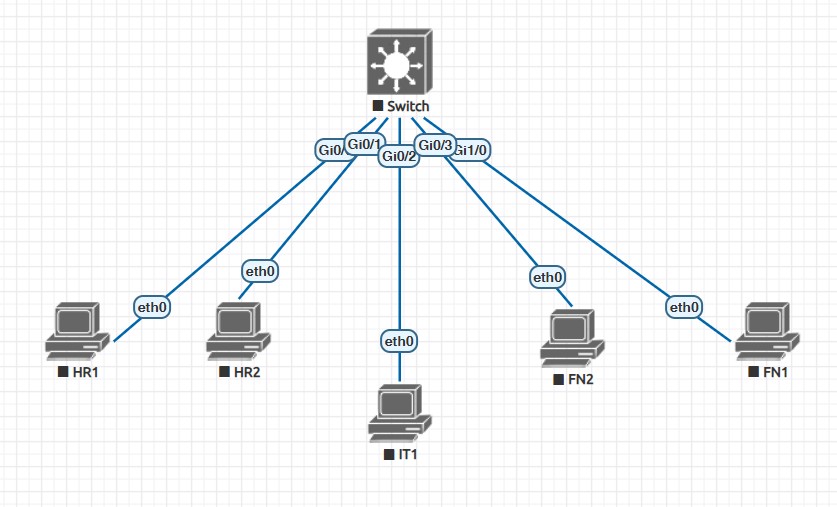
Figure 1: Lab 3.1 - Multi-Department VLAN Segmentation with ABC Corporation Network Setup
VLAN Configuration Summary
| VLAN ID | VLAN Name | Department | Assigned Ports | IP Subnet | End Devices |
|---|---|---|---|---|---|
| 10 | HR-Department | Human Resources | Gi0/0, Gi0/1 | 192.168.10.0/24 | 2 (PC-HR1, PC-HR2) |
| 20 | IT-Department | Information Technology | Gi0/2 | 192.168.20.0/24 | 1 (PC-IT1) |
| 30 | Finance-Department | Finance | Gi0/3, Gi1/0 | 192.168.30.0/24 | 2 (PC-FIN1, PC-FIN2) |
⚙️ Step-by-Step Configuration Guide
1Initial Switch Configuration & Access
Step 1.1: Enter Console Session
Switch>
Step 1.2: Enter Privileged EXEC Mode
Password: (enter enable password)
Switch#
Step 1.3: Enter Global Configuration Mode
Switch(config)#
Step 1.4: Set Device Hostname
ABC-SW1(config)#
2Create Virtual LANs (VLANs)
Step 2.1: Create VLAN 10 (HR Department)
ABC-SW1(config-vlan)# name HR-Department
ABC-SW1(config-vlan)# exit
Step 2.2: Create VLAN 20 (IT Department)
ABC-SW1(config-vlan)# name IT-Department
ABC-SW1(config-vlan)# exit
Step 2.3: Create VLAN 30 (Finance Department)
ABC-SW1(config-vlan)# name Finance-Department
ABC-SW1(config-vlan)# exit
3Configure Access Ports for End Devices
Step 3.1: Configure HR Access Ports (Gi0/0 & Gi0/1)
ABC-SW1(config-if-range)# switchport mode access
ABC-SW1(config-if-range)# switchport access vlan 10
ABC-SW1(config-if-range)# description HR-Workstation
ABC-SW1(config-if-range)# exit
Step 3.2: Configure IT Access Port (Gi0/2)
ABC-SW1(config-if)# switchport mode access
ABC-SW1(config-if)# switchport access vlan 20
ABC-SW1(config-if)# description IT-Workstation
ABC-SW1(config-if)# exit
Step 3.3: Configure Finance Access Ports (Gi0/3 & Gi1/0)
ABC-SW1(config-if-range)# switchport mode access
ABC-SW1(config-if-range)# switchport access vlan 30
ABC-SW1(config-if-range)# description Finance-Workstation
ABC-SW1(config-if-range)# exit
ABC-SW1(config)# interface range GigabitEthernet 1/0
ABC-SW1(config-if-range)# switchport mode access
ABC-SW1(config-if-range)# switchport access vlan 30
ABC-SW1(config-if-range)# description Finance-Workstation
ABC-SW1(config-if-range)# exit
4Implement Port Security on Access Ports
Step 4.1: Enable Port Security on HR Ports
ABC-SW1(config-if-range)# switchport port-security
ABC-SW1(config-if-range)# switchport port-security maximum 1
ABC-SW1(config-if-range)# switchport port-security violation shutdown
ABC-SW1(config-if-range)# exit
Step 4.2: Enable Port Security on IT Port
ABC-SW1(config-if)# switchport port-security
ABC-SW1(config-if)# switchport port-security maximum 2
ABC-SW1(config-if)# switchport port-security violation shutdown
ABC-SW1(config-if)# exit
Step 4.3: Enable Port Security on Finance Ports
ABC-SW1(config-if-range)# switchport port-security
ABC-SW1(config-if-range)# switchport port-security maximum 1
ABC-SW1(config-if-range)# switchport port-security violation shutdown
ABC-SW1(config-if-range)# exit
ABC-SW1(config)# interface range GigabitEthernet 1/0
ABC-SW1(config-if-range)# switchport port-security
ABC-SW1(config-if-range)# switchport port-security maximum 1
ABC-SW1(config-if-range)# switchport port-security violation shutdown
ABC-SW1(config-if-range)# exit
5Save Configuration to NVRAM
Step 5.1: Exit Configuration Mode
ABC-SW1#
Step 5.2: Save Running Configuration
Destination filename [startup-config]? (press Enter)
1234 bytes copied in 1.234 secs
✅ Configuration Verification & Testing
Verification Commands
Command: show vlan brief
VLAN Name Status Ports
---- -------------------------------- --------- ----------------------------
1 default active Gi0/6, Gi0/7, Gi0/8, Gi0/9
10 HR-Department active Gi0/0, Gi0/1
20 IT-Department active Gi0/2
30 Finance-Department active Gi0/3, Gi1/0
Command: show interfaces switchport
Name: Gi0/1
Switchport: Enabled
Administrative Mode: static access
Operational Mode: static access
Access Mode VLAN: 10 (HR-Department)
Command: show interface status
Port Name Status VLAN Duplex Speed Type
--------- ---------------------- ------------ ---------- ------ ----- -----
Gi0/0 HR-Workstation connected 10 a-full a-100
Gi0/1 HR-Workstation connected 10 a-full a-100
Gi0/2 IT-Workstation connected 20 a-full a-100
Gi0/3 Finance-Workstation connected 30 a-full a-100
Gi1/0 Finance-Workstation connected 30 a-full a-100
Command: show port-security
Secure Port MaxSecureAddr CurrentAddr SecurityViolation Security Action
----------- -------------- ----------- ----------------- ---------------
Gi0/0 1 1 0 Shutdown
Gi0/1 1 1 0 Shutdown
Gi0/2 2 1 0 Shutdown
Gi0/3 1 1 0 Shutdown
Gi1/0 1 1 0 Shutdown
🧪 Connectivity Testing & Validation
Test Intra-VLAN Communication
Test Case 1.1: HR-to-HR Communication
Pinging 192.168.10.11 with 32 bytes of data:
Reply from 192.168.10.11: bytes=32 time=2ms TTL=64
Reply from 192.168.10.11: bytes=32 time=1ms TTL=64
✓ Expected Result: Successful ping replies indicate VLAN 10 connectivity
Test Inter-VLAN Isolation
Test Case 2.1: HR-to-IT Communication (Should Fail)
Pinging 192.168.20.10 with 32 bytes of data:
Request timed out
Request timed out
✓ Expected Result: Timeout confirms VLAN isolation
📋 Lab Completion Checklist
Configuration Verification
- ☐ All three VLANs (10, 20, 30) created successfully
- ☐ VLAN names configured correctly
- ☐ Access ports assigned to correct VLANs
- ☐ All ports configured as switchport access mode
- ☐ Port descriptions added to all access ports
- ☐ Port security enabled on all access ports
- ☐ Port security violation action set to shutdown
- ☐ MAC address maximum limits configured appropriately
- ☐ Configuration saved to startup-config
Connectivity Testing
- ☐ Intra-VLAN communication successful
- ☐ Inter-VLAN communication blocked
- ☐ MAC addresses learned in correct VLANs
- ☐ Port status shows "connected" for all active devices
- ☐ No port-security violations detected
- ☐ All interfaces operational and error-free
💡 Key Takeaways & Learning Outcomes
- VLAN segmentation creates logical broadcast domains on a single physical switch, improving security and network performance
- Access ports carry untagged traffic for a single VLAN and are the primary connection point for end-user devices
- Broadcast domain isolation requires Layer 3 routing; Layer 2 alone cannot route traffic between VLANs
- Port security provides Layer 2 protection by restricting MAC addresses on specific ports
- Proper VLAN naming and port descriptions are essential for network documentation and troubleshooting
- Configuration verification commands are critical for validating that changes were applied correctly
- Cisco switches support normal (2-1001) and extended (1006-4094) VLAN ranges for scalability
🏆 Best Practices & Security Recommendations
VLAN Configuration Best Practices
- Always document VLAN allocation and port assignments in a network diagram
- Use meaningful VLAN names that reflect department or function
- Reserve VLAN 1 for administrative/management purposes only
- Implement consistent VLAN numbering scheme across all switches
- Regularly audit VLAN assignments to ensure compliance with security policies
- Remove unused VLANs to maintain a clean configuration
Port Security Best Practices
- Enable port security on all access ports connected to untrusted devices
- Set port security violation action to "shutdown" for high-security environments
- Use "restrict" or "protect" for production environments where port shutdown may cause business disruption
- Configure appropriate maximum MAC address limits based on device requirements
- Regularly monitor port security violations for security incidents
- Use sticky MAC address learning to persistently record authorized MAC addresses
Layer 2 Security Best Practices
- Avoid creating VLANs 1002-1005 as they are reserved legacy VLANs
- Implement STP or Rapid PVST+ to prevent Layer 2 loops
- Use VLAN access control lists (VACLs) for additional traffic filtering within VLANs
- Monitor MAC address table for signs of spoofing or flooding attacks
- Document all MAC address assignments for inventory and compliance purposes
🔧 Troubleshooting Guide
| Issue | Cause | Solution |
|---|---|---|
| Port remains in shutdown state | Port security violation or manual shutdown | ABC-SW1(config-if)# no shutdown |
| Device cannot ping others in same VLAN | Port VLAN mismatch or cable issue | Verify with show interfaces switchport and check physical connection |
| VLAN not appearing in show vlan output | VLAN created but no active ports assigned | VLAN only appears active when at least one port is assigned |
| Port security violation repeatedly | Unauthorized or multiple devices connecting | Check violation count and ensure only authorized device is connected |