📚 Lab Overview & Objectives
Duration: 75-90 minutes | Difficulty: Intermediate-Advanced
🎯 Learning Objectives
- Configure bridge priority for deterministic root bridge placement
- Set primary and secondary root bridges with appropriate priority values
- Modify STP path costs across different link speeds (100 Mbps, 1 Gbps)
- Influence root port and blocked port selection using path cost adjustments
- Verify topology changes and convergence using Cisco IOS commands
- Optimize traffic flow in multi-tier datacenter environments
- Implement failover mechanisms and network resilience strategies
Scenario: ABC Company operates a multi-tier datacenter network with STP using default settings, resulting in suboptimal traffic paths. Your task is to optimize the spanning tree topology by strategically placing the root bridge and tuning path costs for deterministic traffic flow.
🏗️ Network Topology
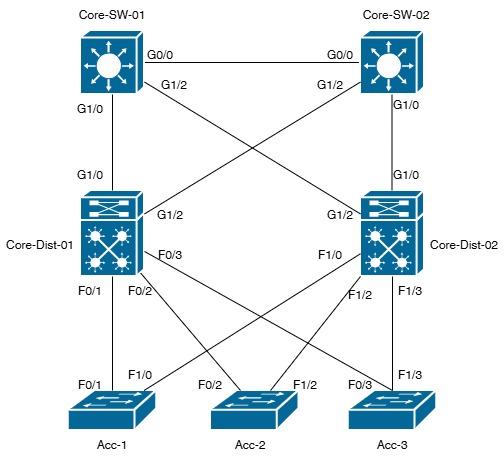
Bridge Priority Hierarchy
| Switch | Role | Priority |
|---|---|---|
| Core-SW-01 | Primary Root | 4096 |
| Core-SW-02 | Secondary Root | 8192 |
| Dist-SW-01 | Distribution Primary | 16384 |
| Dist-SW-02 | Distribution Secondary | 20480 |
| Access-SW-01/02/03 | Access Layer | 32768 |
⚙️ Configuration Guide
1Configure Primary Root Bridge (Core-SW-01)
ssh admin@core-sw-01
enable
configure terminal
spanning-tree vlan 1 priority 4096
spanning-tree vlan 1 root primary
exit
copy running-config startup-config
2Configure Secondary Root Bridge (Core-SW-02)
ssh admin@core-sw-02
enable
configure terminal
spanning-tree vlan 1 priority 8192
spanning-tree vlan 1 root secondary
exit
copy running-config startup-config
3Configure Distribution Layer (Dist-SW-01)
configure terminal
spanning-tree vlan 1 priority 16384
interface gigabitethernet 0/1
spanning-tree cost 4
exit
interface gigabitethernet 0/2
spanning-tree cost 5
exit
exit
copy running-config startup-config
4Configure Distribution Layer (Dist-SW-02)
configure terminal
spanning-tree vlan 1 priority 20480
interface gigabitethernet 0/1
spanning-tree cost 5
exit
interface gigabitethernet 0/2
spanning-tree cost 4
exit
exit
copy running-config startup-config
5Configure Access Layer (All Access Switches)
configure terminal
spanning-tree vlan 1 priority 32768
interface gigabitethernet 0/1
spanning-tree portfast
spanning-tree bpduguard enable
exit
exit
copy running-config startup-config
✅ Verification Procedures
Verify Root Bridge Election
Core-SW-01# show spanning-tree vlan 1
VLAN0001
Spanning tree enabled protocol ieee
Root ID Priority 4096
Address 0001.9600.1111
This bridge is the root
✓ Expected: "This bridge is the root" with priority 4096
Verify Port Roles & Costs
Dist-SW-01# show spanning-tree interface brief
Interface Role Sts Cost Prio.Nbr
Gi0/1 ROOT FWD 4 128.1
Gi0/2 DESG FWD 5 128.2
✓ Expected: Gi0/1 = ROOT FWD, Gi0/2 = DESIGNATED FWD
Monitor Topology Stability
Core-SW-01# show spanning-tree summary
Switch is in rapid-pvst+ mode
Root bridge for: VLAN0001
Port count: 2
Blocked ports: 5
✓ Expected: Stable topology with minimal topology changes
🧪 Failover Testing
⚠️ WARNING: Test only in LAB environments. Do NOT perform in production.
Test 1: Root Port Failover
Dist-SW-01# configure terminal
Dist-SW-01(config)# interface gigabitethernet 0/1
Dist-SW-01(config-if)# shutdown
Dist-SW-01(config-if)# exit
Dist-SW-01# show spanning-tree interface brief
Expected: Gi0/2 becomes new ROOT port within 45 seconds
Test 2: Path Cost Influence
Dist-SW-01# configure terminal
Dist-SW-01(config)# interface gi 0/1
Dist-SW-01(config-if)# spanning-tree cost 100
Dist-SW-01# show spanning-tree interface gi 0/1-2
Expected: Root port switches to Gi0/2 due to lower cost
🔧 Troubleshooting Guide
| Issue | Cause | Solution |
|---|---|---|
| Wrong switch is root | Priority not set correctly | Verify: show spanning-tree vlan 1 Reapply: spanning-tree vlan 1 root primary |
| Ports blocked unexpectedly | Path costs misconfigured | Wait 60 seconds for convergence Check: show spanning-tree interface detail |
| Secondary root won't failover | Secondary priority too high | Verify: show spanning-tree vlan 1 Lower: spanning-tree vlan 1 priority |
| Topology changes constantly | Unstable links | Check: show interfaces status Verify cable connections |
✨ Lab Completion Checklist
☐ Core-SW-01 confirmed as Primary Root (Priority 4096)
☐ Core-SW-02 confirmed as Secondary Root (Priority 8192)
☐ Distribution layer priorities configured (16384, 20480)
☐ Access layer priorities remain at default (32768)
☐ Path costs verified across all links
☐ Root ports placed on expected interfaces
☐ All designated and alternate ports correctly identified
☐ Topology is stable (no repeated TCN messages)
☐ Failover testing completed successfully
☐ Secondary root bridge promotion verified
☐ Configuration saved on all switches
☐ Lab documentation completed
🎉 Congratulations! Lab 5.1 Complete!
☐ Core-SW-02 confirmed as Secondary Root (Priority 8192)
☐ Distribution layer priorities configured (16384, 20480)
☐ Access layer priorities remain at default (32768)
☐ Path costs verified across all links
☐ Root ports placed on expected interfaces
☐ All designated and alternate ports correctly identified
☐ Topology is stable (no repeated TCN messages)
☐ Failover testing completed successfully
☐ Secondary root bridge promotion verified
☐ Configuration saved on all switches
☐ Lab documentation completed
🎉 Congratulations! Lab 5.1 Complete!