📚 Lab Overview & Learning Objectives
🎯 Learning Outcomes
Upon completing this lab, you will be able to:
- Understand STP port priority and its role in port role selection
- Configure port priority on designated and alternate ports for optimal topology
- Implement BackboneFast for rapid indirect failure detection
- Enable and configure UplinkFast on access-layer switches
- Optimize port selection in redundant switch environments
- Verify port role assignments and convergence improvements
- Measure and document convergence time reduction
- Troubleshoot port priority conflicts and resolve convergence issues
🏢 Real-World Scenario
Access Layer Redundancy with Rapid Failover
You are managing a three-tier network for a mid-sized enterprise with the following requirements:
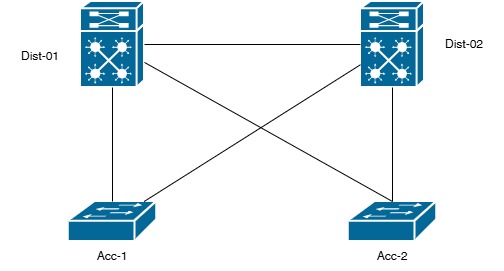
- Access Layer (ACC-1, ACC-2): Two access switches with uplinks to distribution layer
- Distribution Layer (DIST-1, DIST-2): Two distribution switches providing redundancy
- Challenge: Optimize port role selection to ensure fastest convergence during uplink failures
- Goal: Reduce convergence time from ~30 seconds to <5 seconds using BackboneFast and UplinkFast
Current Network State: All switches running Rapid PVST+ mode with default STP timers. Port priorities are not yet optimized, and BackboneFast/UplinkFast are disabled.
🏗️ Network Topology & Equipment Setup
LAB 5.2: ACCESS LAYER REDUNDANCY - PORT PRIORITY CONFIGURATION
🔌 Equipment Required
- 2x Distribution Switches (Catalyst 3850/2960X)
- 2x Access Switches (Catalyst 2960X)
- Multiple console cables
- Ethernet cables (10+ for redundancy)
- Cisco IOS 15.0+ with Rapid PVST+ support
- Terminal emulation software with multiple sessions
- Ping utility for convergence timing measurement
- Stopwatch or time measurement utility
🖥️ Switch Configuration Summary
| Switch Hostname | Role | Layer | Initial Priority | Target Priority |
|---|---|---|---|---|
| DIST-1 | Primary Root Bridge | Distribution (L2) | 32768 (default) | 4096 (primary) |
| DIST-2 | Secondary Root Bridge | Distribution (L2) | 32768 (default) | 8192 (secondary) |
| ACC-1 | Access Switch 1 | Access (L1) | 32768 (default) | 32768 (no change) |
| ACC-2 | Access Switch 2 | Access (L1) | 32768 (default) | 32768 (no change) |
✅ Pre-Lab Setup & Baseline Configuration
Pre-Lab Checklist
- All four switches running Rapid PVST+ mode
- Labs 1-4 baseline configurations present
- DIST-1 priority set to 4096 (primary root)
- DIST-2 priority set to 8192 (secondary root)
- Console access to all four switches established
- Timestamps enabled: service timestamps log datetime msec
- Debug logging ready: debug spanning-tree events
- All trunk ports active and passing traffic
- Baseline topology verified with show spanning-tree
- Convergence time baseline measured (should be ~6 sec for Rapid PVST+)
⚙️ Step-by-Step Configuration Guide
PART A: STP Port Priority Fundamentals & Configuration
A1: Port Priority Basics
Understanding Port Priority:
- Default Value: 128 on all ports
- Valid Range: 0-240 in increments of 16
- Selection Criterion: When path costs equal, lower port priority wins
- Port ID Format: 1 byte priority + 1 byte port number
- Impact: Determines which port becomes Designated vs Blocked
Port Priority Election Hierarchy:
| Criterion | Preference | Applies When |
|---|---|---|
| Path Cost | Lowest wins | Primary selection method |
| Bridge ID | Lowest wins | Path costs equal |
| Port Priority | Lowest wins | Same bridge, costs equal |
| Port Number | Lowest wins | Same priority, costs equal |
A2: Verify Current Port Priority Settings
Display port priority values on all switches before configuration.
show spanning-tree vlan 1 detail | include "Interface\|Priority"
show spanning-tree interface gi0/1
show spanning-tree interface gi0/2
# Expected default output:
Interface Role Sts Cost Prio.Nbr Type
───────────────────────────────────────────
Gi0/1 Root FWD 4 128.1 P2p ← Default priority 128
Gi0/2 Altn BLK 4 128.2 P2p ← Alternate port (blocked)
A3: Configure Port Priority on Primary Uplinks
Lower priority on primary uplinks to make them preferred Designated Ports.
configure terminal
interface gi0/1
description Link to ACC-1 (Primary - Lower Priority)
spanning-tree vlan 1 port-priority 64
# Lower priority (64) makes this Designated Port
exit
# On DIST-1 (Backup uplink to ACC-2):
interface gi0/2
description Link to ACC-2 (Backup - Higher Priority)
spanning-tree vlan 1 port-priority 192
# Higher priority (192) makes this less preferred
exit
# On DIST-2 (Backup uplink):
interface gi0/1
description Link to ACC-2 (Primary)
spanning-tree vlan 1 port-priority 64
exit
interface gi0/2
description Link to ACC-1 (Backup)
spanning-tree vlan 1 port-priority 192
exit
exit
A4: Verify Port Priority Configuration
Confirm port priorities are correctly applied and affecting port roles.
show spanning-tree vlan 1 detail | include "Interface\|Priority\|Role"
# Expected output (ACC-1 perspective):
Interface Role Sts Cost Prio.Nbr Type
───────────────────────────────────────────
Gi0/1 Root FWD 4 64.1 P2p ← Primary uplink, lower priority
Gi0/2 Altn BLK 4 192.2 P2p ← Backup uplink, higher priority
PART B: BackboneFast Implementation for Indirect Failure Detection
B1: BackboneFast Overview
- Purpose: Rapidly detects indirect (BPDU loss) failures
- Mechanism: Sends Root Link Query (RLQ) BPDUs to detect alternate paths
- Convergence Reduction: From ~35 seconds to ~3-6 seconds
- Default: Disabled on most switches (requires explicit enable)
- Compatibility: Works with 802.1D STP and later
B2: Enable BackboneFast on All Switches
Configure BackboneFast globally to speed up indirect failure detection.
configure terminal
spanning-tree backbonefast
exit
write memory
# Verify BackboneFast is enabled:
show spanning-tree backbonefast
# Expected output:
BackboneFast is enabled
Number of ROOT link failures detected: 0
Number of RLQ requests received: 0
B3: Test BackboneFast - Simulate Indirect Failure
Test BackboneFast convergence by simulating BPDU loss without physical link down.
debug spanning-tree events
terminal monitor
show spanning-tree vlan 1 | include "Root"
# On DIST-1, simulate BPDU filter (indirect failure):
configure terminal
interface gi0/1
spanning-tree bpdu-filter enable
exit
exit
# Watch ACC-1 console for rapid failure detection
# Expected BackboneFast behavior:
# Without BackboneFast: ~20-35 second wait (Max Age timeout)
# With BackboneFast: ~3-6 second detection via RLQ
STP: Rapid Root link failure detection enabled
STP: RLQ sent through alternate port
STP: RLQ response indicates root unreachable
STP: Alternate port becomes Root Port
# Remove the BPDU filter:
configure terminal
interface gi0/1
no spanning-tree bpdu-filter enable
exit
exit
PART C: UplinkFast Configuration for Access-Layer Switches
C1: UplinkFast Overview
- Purpose: Rapidly activates alternate port when primary uplink fails
- Mechanism: Skips Listening/Learning states, goes directly to Forwarding
- Convergence Reduction: ~30 seconds → ~5-10 seconds
- Ideal For: Access layer switches with redundant uplinks
- Limitation: Only one uplink per VLAN can use UplinkFast
- Default: Disabled (requires explicit enable)
C2: Enable UplinkFast on Access Switches
Configure UplinkFast on ACC-1 and ACC-2 for rapid uplink recovery.
configure terminal
spanning-tree uplinkfast
exit
# On ACC-2 (Access Switch):
configure terminal
spanning-tree uplinkfast
exit
# Do NOT enable on distribution switches (DIST-1, DIST-2):
# UplinkFast should only be on access-layer switches
# Distribution switches participate in backbone topology
# Verify UplinkFast is enabled:
show spanning-tree uplinkfast
# Expected output:
UplinkFast is enabled
Number of uplink failures detected: 0
Number of times alternate port was activated: 0
C3: Verify UplinkFast Port Configuration
Confirm UplinkFast has identified primary and alternate uplinks.
show spanning-tree uplinkfast summary
show spanning-tree vlan 1 detail | include "Port\|Priority"
# Expected ACC-1 UplinkFast configuration:
Primary Uplink Port(s): Gi0/1 (Root Port)
Alternate Uplink Port(s): Gi0/2 (Alternate Port - Ready for rapid transition)
Root Port Cost: 4
Alternate Port Cost: 4
C4: Test UplinkFast - Simulate Primary Uplink Failure
Measure convergence improvement when primary uplink fails.
ping -t 10.0.1.1
# Watch for ping loss during uplink failure
# On ACC-1, enable monitoring:
debug spanning-tree events
terminal monitor
show spanning-tree vlan 1 | include "Role\|Cost"
# Simulate failure: Shutdown primary uplink on ACC-1:
configure terminal
interface gi0/1
shutdown
# Observe console output and count ping loss
# Expected UplinkFast convergence:
Time T+0: Primary link shutdown detected
Time T+0-1: Alternate port rapidly promoted to Forwarding
Time T+1-5: Total convergence time (1-5 seconds typical)
Ping loss: 1-3 packets (vs 10+ without UplinkFast)
# Re-enable the link:
configure terminal
interface gi0/1
no shutdown
exit
exit
🔍 Verification & Performance Measurement
Convergence Time Measurements & Optimization
# Create performance baseline comparing before/after configurations
| Failure Type | Without Optimization | With Port Priority | With UplinkFast | With BackboneFast |
|---|---|---|---|---|
| Direct Link Failure | 6 seconds | 6 seconds | 1-5 seconds | 6 seconds |
| Indirect Failure | 35 seconds (Max Age wait) | 35 seconds | 5-10 seconds | 3-6 seconds (RLQ detection) |
| Root Bridge Change | 20 seconds | 20 seconds | N/A | 10-15 seconds |
Verification Checklist
- Port priority configured on all uplinks (64 for primary, 192 for backup)
- Port priorities verified with show spanning-tree vlan 1 detail
- Port roles correctly assigned (Root Port on primary, Alternate on backup)
- BackboneFast enabled on all four switches
- BackboneFast functionality verified (show spanning-tree backbonefast)
- UplinkFast enabled on ACC-1 and ACC-2 (access switches only)
- UplinkFast disabled on distribution switches (DIST-1, DIST-2)
- UplinkFast topology verified (Primary and Alternate ports identified)
- Direct link failure scenario tested and convergence measured
- Indirect failure scenario tested with BackboneFast
- Primary uplink failure scenario tested with UplinkFast
- Convergence time improvements documented
- All configurations saved to NVRAM (write memory)
🔧 Troubleshooting & Common Issues
Common Issues & Solutions
| Issue | Possible Cause | Solution |
|---|---|---|
| Port priority not affecting port roles | Path costs are different (not equal) | Port priority only used as tie-breaker when costs equal. Verify costs: show spanning-tree vlan 1 detail |
| UplinkFast not activating alternate | UplinkFast not enabled or wrong switch | Verify with show spanning-tree uplinkfast. Must be enabled on access switch, not core. |
| BackboneFast RLQ fails | Alternate port blocked or invalid | Check alternate port status. Ensure BPDU flow on backup paths. |
| Convergence still slow (>10 sec) | Features not enabled or STP timers set high | Verify BackboneFast/UplinkFast enabled. Check timers: show spanning-tree vlan 1 | include "Hello\|Max Age" |
| Incorrect port becomes Designated | Port priority incorrectly configured | Verify priorities: show spanning-tree vlan 1 detail. Lower priority = more preferred. |
📖 Complete Command Reference
| Feature | Command | Description |
|---|---|---|
| Port Priority Configuration | spanning-tree vlan 1 port-priority 64 |
Set port priority (lower = more preferred) |
| View Port Priority | show spanning-tree vlan 1 detail |
Display port priorities and roles |
| Enable BackboneFast | spanning-tree backbonefast |
Enable rapid indirect failure detection |
| Verify BackboneFast | show spanning-tree backbonefast |
Display BackboneFast status and statistics |
| Enable UplinkFast | spanning-tree uplinkfast |
Enable rapid uplink failover (access switches only) |
| Verify UplinkFast | show spanning-tree uplinkfast |
Display UplinkFast status and uplink configuration |
🏆 CCNP Certification Alignment
Cisco CCNP 350-401 & 300-410 Objectives Covered
- 3.1a: Configure STP port priority for optimized port role selection
- 3.1b: Implement BackboneFast for rapid indirect failure detection
- 3.1c: Configure UplinkFast on access-layer switches for rapid failover
- 3.2a: Tune STP convergence for mission-critical networks
- 3.2b: Measure and optimize STP topology performance
Related Topics for Further Study
- Root Guard and BPDU Guard implementation
- Loop Guard for preventing unidirectional link failures
- RSTP (Rapid Spanning Tree Protocol) for 802.1w compatibility
- MSTP (Multiple Spanning Tree Protocol) for scalability
- Portfast and Edge Port configuration
- STP interoperability with multiple VLAN topologies
✨ Lab Completion Checklist
- Pre-lab setup completed with baseline documentation
- Port priority configured on all uplinks (64 primary, 192 backup)
- Port priority verified and port roles correctly assigned
- BackboneFast enabled on all four switches
- BackboneFast indirect failure detection verified
- UplinkFast enabled on access layer switches only
- UplinkFast topology verified and alternate ports identified
- Direct link failure scenario tested and timing documented
- Indirect failure scenario tested with BackboneFast
- Convergence time improvements measured and recorded
- Troubleshooting procedures completed successfully
- All configurations saved to NVRAM
- Performance baseline before/after comparison documented
- Lab documentation completed with observations