This lab provides comprehensive hands-on training on VLAN Trunking Protocol (VTP) configuration, management, and optimization. Students will configure VTP domains, implement server/client/transparent modes, manage revision numbers, and optimize trunk links with VTP pruning .
- Configure VTP server, client, transparent, and off modes
- Manage VTP domain membership and revision numbers
- Implement VTP version selection (1, 2, and 3)
- Optimize trunk links using VTP pruning techniques
- Troubleshoot VTP synchronization issues
- Implement VTP security with password protection
VTP is a Layer 2 messaging protocol that allows automatic propagation of VLAN configurations across a network domain. VTP saves time and helps avoid configuration errors by centralizing VLAN management . VTP is enabled by default on all Cisco switches, and the default mode is server .
| Feature | Version 1 & 2 | Version 3 |
|---|---|---|
| VLAN Range Supported | 1–1005 | 1–4094 (full range) |
| Default Version | Version 1 is default | Requires manual configuration |
| Primary Server | Automatic selection | Configured using `vtp primary` command |
| Enhancement | Standard operation | Enhanced VLAN handling; pruning not required |
VTP advertisements include a 32-bit configuration revision number that identifies the most current VLAN database revision . Any change to the VLAN database increments the configuration revision number by 1 . A higher revision number represents a newer database .
| VTP Role | Description | Capabilities |
|---|---|---|
| Server | Creates, modifies, and deletes VLANs | Creates VLANs; sends advertisements to propagate changes |
| Client | Receives VTP advertisements and updates local VLAN database | Cannot configure VLANs locally |
| Transparent | Receives and forwards VTP advertisements; does not modify local database | Configures VLANs only locally; maintains independent VLAN configuration |
| Off | Does not participate in VTP | VTP communication completely disabled |
Step 1: Define the VTP version
configure terminal
vtp version {1 | 2 | 3}
end
Step 2: Define the VTP domain
configure terminal
vtp domain domain-name
end
Step 3: Define the VTP switch role
configure terminal
vtp mode {server | client | transparent | off}
end
Step 4 (Optional): Secure VTP domain (Recommended)
configure terminal
vtp password password
end
configure terminal
vtp version 2
vtp domain MARKETING
vtp mode server
vtp password VTPsecure123
end
write memory
configure terminal
vtp version 2
vtp domain MARKETING
vtp mode client
vtp password VTPsecure123
end
write memory
Sent by both VTP servers and clients every 300 seconds (5 minutes) . Contains information about VTP domain: version, domain name, configuration revision number, timestamp, and MD5 digest .
Contains detailed VLAN information . Sent immediately after VLAN database changes . Received by VTP clients to update their local VLAN database .
Sent by VTP clients to request VLAN information from VTP server . Typically sent after client boots up or detects configuration mismatch .
| Advertisement Type | Sent By | Frequency | Contents |
|---|---|---|---|
| Summary | Servers & Clients | Every 5 minutes | Domain info, revision number, MD5 digest |
| Subset | Servers | On VLAN change | Detailed VLAN data |
| Request | Clients | On mismatch | Request for VLAN database |
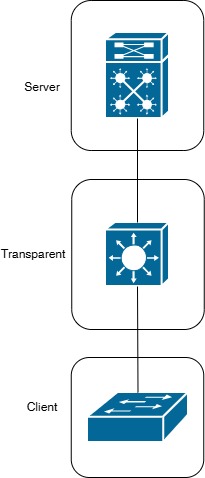
Showing Server-Client Hierarchy with Trunk Links
configure terminal
vtp domain TEMP_DOMAIN
vtp domain MARKETING
end
show vtp status
configure terminal
vtp mode transparent
vtp mode server
end
show vtp status
VTP Pruning is a feature used to optimize bandwidth utilization on trunk links . By default, switches in VTP domain flood broadcast, multicast, and unknown unicast traffic to all trunk links, even if receiving switch has no ports in that VLAN . VTP Pruning prevents unnecessary traffic from being sent across trunk links to switches that do not have ports in the VLAN .
- VTP Pruning dynamically identifies which VLANs are active on each switch
- If a VLAN is not active on a switch, that switch is removed from flooding list for that VLAN
- Traffic for pruned VLANs is not forwarded on trunk links to switches that do not need it
- Reduces unnecessary bandwidth consumption on trunk links
- Improves network performance by reducing traffic load
- Decreases CPU utilization on switches
configure terminal
vtp domain MARKETING
vtp pruning
vtp mode server
end
write memory
configure terminal
interface GigabitEthernet1/0/1
switchport trunk pruning vlan ?
exit
end
Manually restricting VLANs on trunk links using `switchport trunk allowed vlan` overrides VTP pruning . Manual restrictions take precedence over automatic pruning decisions .
configure terminal
interface GigabitEthernet1/0/1
switchport trunk allowed vlan 10,20,30
end
| Consideration | Details |
|---|---|
| Version Support | Works with VTP v1 and v2. In VTP v3, pruning not required; protocol includes enhanced VLAN handling |
| Transparent Mode | Switches in Transparent Mode do not participate in VTP pruning |
| Manual Pruning | Manual VLAN restrictions override VTP pruning |
| Spanning Tree | Ensure STP topology is stable before implementing VTP Pruning as it dynamically modifies VLAN trunk configurations |
show vtp status
! Verify VTP password
show vtp password
! Verify VLAN synchronization
show vlan brief
! View running configuration
show running-config | include vtp
show vtp status will display:
- VTP Operating Mode (Server/Client/Transparent/Off)
- Current Configuration Revision
- Number of existing VLANs
- VTP Pruning Mode enabled/disabled
| Issue | Cause | Resolution |
|---|---|---|
| VLANs not synchronizing | Domain mismatch or revision number conflict | Verify domain name matches; reset revision number using Method 1 or 2 |
| Revision number too high | Multiple VLAN changes accumulated | Reset using transparent mode method or domain name change |
| Password mismatch error | Inconsistent VTP password across domain | Verify all switches use same VTP password |
| Advertisements not received | Trunk link down or protocol disabled | Verify trunk links active; check VTP mode not set to Off |
- Configure SW1 as VTP Server for MARKETING domain
- Configure SW2 and SW3 as VTP Clients
- Create VLANs 10, 20, 30 on SW1
- Verify synchronization on SW2 and SW3 using
show vlan brief
- Add new switch (SW4) with higher revision number
- Reset revision to 0 using transparent mode method
- Verify revision number reset with
show vtp status
- Enable global VTP pruning on SW1 (VTP Server)
- Configure per-interface pruning on trunk link
- Verify pruning status with
show vtp status - Monitor trunk utilization before and after pruning
- Configure VTP password on all switches
- Test authentication by mismatching password on one switch
- Verify synchronization fails without correct password
- Restore correct password and verify sync resumes
- 1.3: Implement and troubleshoot VTP (server, client, transparent, off)
- 1.3a: VTP domain, version, pruning, password
- 2.1: Describe common issues and best practices in multi-switch topologies
- 2.1a: VLAN management and synchronization best practices