This comprehensive lab provides hands-on training on EtherChannel bundle configuration, protocol negotiation, and load balancing optimization. Students will configure LACP and PAgP EtherChannels, implement load balancing algorithms, verify port-channel status, and troubleshoot configuration mismatches .
- Configure static EtherChannel with mode on
- Implement LACP EtherChannel with active/passive modes
- Configure PAgP EtherChannel with auto/desirable modes
- Optimize load balancing using src-dst-ip hashing
- Implement LACP fast timers for rapid failure detection
- Verify port-channel status and troubleshoot common issues
EtherChannel is a Cisco technology that bundles multiple physical Ethernet links into a single logical link . It increases bandwidth by combining link capacity and provides redundancy through multiple physical paths . The combined links act as a single Layer 2 or Layer 3 interface, depending on configuration . Also known as Link Aggregation or Port Channel .
| Protocol | Standard | Negotiation Type | Platform Support |
|---|---|---|---|
| LACP | IEEE 802.3ad | Dynamic | Multi-vendor support |
| PAgP | Cisco Proprietary | Dynamic | Cisco devices only |
| Static | Mode on | No negotiation | All Cisco switches |
LACP is a standard protocol defined in IEEE 802.3ad that allows for dynamic negotiation and automatic creation of EtherChannel bundles . Both ends of the link must support LACP for it to work .
PAgP is Cisco's proprietary protocol for EtherChannel that also supports dynamic negotiation and automatic bundle creation . PAgP is only supported on Cisco devices and must be used on both ends of the link . PAgP advertises messages with multicast MAC address 0100:0CCC:CCCC and protocol code 0x0104 .
| Mode | Behavior | LACP Adjacency Requirements |
|---|---|---|
| Active | Initiates EtherChannel formation and transmits LACP packets | Active + Passive or Active + Active |
| Passive | Responds to LACP packets; does not initiate | Passive + Active only (not Passive + Passive) |
| Mode | Behavior | PAgP Adjacency Requirements |
|---|---|---|
| Desirable | Initiates EtherChannel formation and transmits PAgP packets | Desirable + Auto or Desirable + Desirable |
| Auto | Responds to PAgP packets; does not initiate | Auto + Desirable only (not Auto + Auto) |
A static EtherChannel is configured with the interface command channel-group etherchannel-id mode on . No protocol negotiation is required; both ends must match exactly .
configure terminal
interface port-channel 1
switchport mode trunk
exit
interface range GigabitEthernet 1/0/1 - 1/0/2
switchport trunk encapsulation dot1q
switchport mode trunk
channel-group 1 mode on
end
write memory
configure terminal
interface port-channel 1
switchport mode trunk
exit
interface range GigabitEthernet 1/0/1 - 1/0/2
switchport trunk encapsulation dot1q
channel-group 1 mode active
end
write memory
configure terminal
interface port-channel 1
switchport mode trunk
exit
interface range GigabitEthernet 1/0/1 - 1/0/2
switchport trunk encapsulation dot1q
channel-group 1 mode desirable
end
write memory
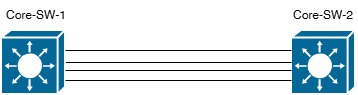
Showing LACP/PAgP Bundle with Load Balancing
EtherChannel uses hashing algorithms to distribute traffic across links . The global command port-channel load-balance hash configures the load balancing method . Options include source-based, destination-based, and source & destination-based hashing .
| Category | Method | Description |
|---|---|---|
| Source-Based | src-ip | Source IP address |
| src-mac | Source MAC address | |
| src-port | Source TCP/UDP port | |
| src-mixed-ip-port | Source IP and TCP/UDP port | |
| Destination-Based | dst-ip | Destination IP address |
| dst-mac | Destination MAC address | |
| dst-port | Destination TCP/UDP port | |
| dst-mixed-ip-port | Destination IP and TCP/UDP port | |
| Source & Destination (Recommended) | src-dst-ip | Source and destination IP addresses |
| src-dst-mac | Source and destination MAC addresses | |
| src-dst-mixed-ip-port | Source/dest IP and TCP/UDP ports | |
| src-dst-port | Source and destination TCP/UDP ports only | |
| src-dst-ip-only | Source and destination IP only |
src-dst-ip or src-dst-mixed-ip-port for most enterprise deployments . These methods provide better load distribution across multiple flows and balance bidirectional traffic more evenly
port-channel load-balance src-dst-ip
end
show etherchannel load-balance
LACP Fast Timer uses 1-second intervals for LACP PDU exchange, providing rapid link failure detection in approximately 3 seconds . Default LACP Slow Timer uses 30-second intervals, requiring ~90 seconds for failure detection .
lacp fast-switchover
end
Minimum active interfaces requirement before port-channel becomes active . Ensures port-channel only activates when sufficient member links are available .
port-channel min-links 2
end
Configures maximum active interfaces in port-channel . Excess interfaces become hot standby (H status) . Ensures active member count is power of 2 for load balancing .
lacp max-bundle 4
end
Identifies which switch is master for port-channel . Lower system priority preferred . Master switch chooses which member interfaces are active when exceeding max-bundle .
end
Master switch uses port priority to select which member interfaces remain active . Lower port priority preferred .
lacp port-priority 10
end
show etherchannel load-balance
show etherchannel detail
show running-config interface port-channel 1
show interfaces port-channel 1
| Status | Description |
|---|---|
| U | EtherChannel interface working properly and forwarding traffic |
| D | EtherChannel interface down and not forwarding traffic |
| M | At least one LACP adjacency established, but minimum active interfaces not met (port-channel min-links) |
| S | Port-channel configured for Layer 2 switching (access or trunk) |
| R | Port-channel configured for Layer 3 routing (routed interface) |
| H | Maximum active interfaces configured (lacp max-bundle). Interface is hot standby and does not forward traffic |
| I | Member interface has not detected LACP activity. Treated as individual interface, not part of EtherChannel |
show lacp counters
clear lacp counters
show pagp counters
clear pagp counters
- Configure port-channel 1 as trunk
- Assign GigabitEthernet 1/0/1 and 1/0/2 to channel-group 1 mode on
- Verify port-channel with
show etherchannel summary - Confirm both member ports show U status
- Configure port-channel 2 for LACP with active mode
- Enable LACP fast timers for rapid convergence
- Set LACP min-links to 2
- Verify with
show lacp neighbor detail
- Configure port-channel 3 for PAgP desirable mode
- Use non-silent keyword for strict packet requirement
- Verify adjacency with
show pagp neighbor
- Configure global load-balance method as src-dst-ip
- Verify with
show etherchannel load-balance - Monitor traffic distribution across members
- 350-401 (ENCOR): Configure and troubleshoot EtherChannel (LACP, PAgP, static)
- 350-401: Configure load balancing in EtherChannel for enterprise deployments
- 350-401: Implement LACP fast timers and convergence optimization
- 300-410 (ENARSI): Troubleshoot EtherChannel configuration issues