📋 Lab Overview & Objectives
Lab Objective: Master HSRP configuration, active/standby router election, priority-based failover, and dynamic tracking mechanisms for first-hop redundancy in enterprise networks .
🎯 Learning Outcomes
- Configure HSRP on two routers with active/standby roles
- Understand HSRP priority and preemption mechanisms
- Configure HSRP timers (hello interval and hold time)
- Implement object tracking for dynamic failover
- Verify HSRP status using show commands
- Simulate router failures and observe automatic failover
- Configure MD5 authentication
- Troubleshoot HSRP configuration issues
Key HSRP Components
| Component | Description | Lab Value |
|---|---|---|
| Virtual IP (VIP) | IP address shared among all routers in redundancy group | 192.168.1.1 |
| Virtual MAC | MAC associated with VIP: 0000.0C07.ACxx format | 0000.0C07.AC01 |
| Priority | Router preference (0-255, default 100) | 110 (Active), 100 (Standby) |
| Hello Interval | Keepalive frequency, default 3 seconds | 3 seconds |
| Hold Time | Failover detection timer, default 10 seconds | 10 seconds |
🌐 Network Topology
FHRD Lab Network Diagram
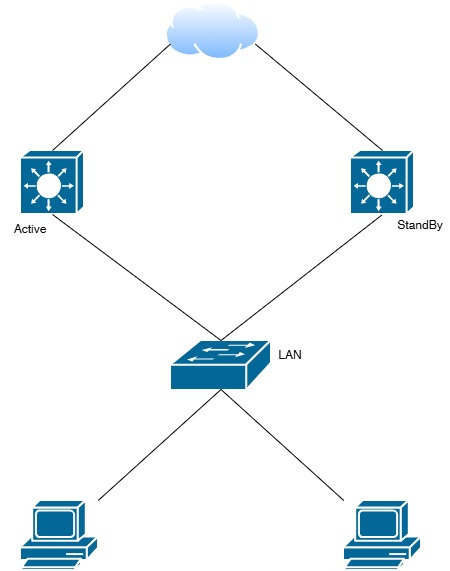
Network topology showing Router A (Active) and Router B (Standby) with HSRP configuration
✅ Two routers configured with HSRP Group 1. Router A (Active, priority 110) forwards traffic. Router B (Standby, priority 100) monitors and takes over if Router A fails. Both share VIP 192.168.1.1 and VMAC 0000.0C07.AC01 .
⚙️ Step-by-Step Configuration Guide
STEP 1: Prerequisites & Lab Setup
Equipment Required:
- 2 x Cisco Routers (ISR 2900/4000 or equivalent)
- 2 x Network Interfaces (Gi0/1)
- 1 x Layer 2 Switch (optional)
- 3+ PCs/VMs for client testing
STEP 2: Router A Configuration (Active)
enable
configure terminal
!
hostname Router-A
!
interface GigabitEthernet0/1
description HSRP Active Interface
ip address 192.168.1.2 255.255.255.0
!
! Configure HSRP Group 1
standby 1 ip 192.168.1.1
standby 1 priority 110
standby 1 preempt
standby 1 timers 3 10
!
no shutdown
!
end
write memory
STEP 3: Router B Configuration (Standby)
enable
configure terminal
!
hostname Router-B
!
interface GigabitEthernet0/1
description HSRP Standby Interface
ip address 192.168.1.3 255.255.255.0
!
! Configure HSRP Group 1
standby 1 ip 192.168.1.1
standby 1 priority 100
standby 1 preempt
standby 1 timers 3 10
!
no shutdown
!
end
write memory
STEP 4: Add MD5 Authentication
! Router A
configure terminal
interface GigabitEthernet0/1
standby 1 authentication md5 key-string CCNP@2026SecureKey
!
! Router B
configure terminal
interface GigabitEthernet0/1
standby 1 authentication md5 key-string CCNP@2026SecureKey
STEP 5: Configure Interface Tracking
! Router A - Track WAN interface for failover
configure terminal
!
track 1 interface Serial0/0 line-protocol
!
interface GigabitEthernet0/1
standby 1 track 1 decrement 20
! If Serial0/0 goes down: 110 - 20 = 90 (Router B becomes active)
!
end
write memory
STEP 6: Configure IP Route Tracking
! Router A - Track remote IP route reachability
configure terminal
!
track 2 ip route 203.0.113.0/24 reachability
!
interface GigabitEthernet0/1
standby 1 track 2 decrement 15
!
end
write memory
STEP 7: Configure IP SLA Monitoring
! Router A - Monitor WAN gateway with ICMP echo
configure terminal
!
ip sla 1
icmp-echo 10.0.0.1
frequency 10
timeout 1000
!
ip sla schedule 1 life forever start-time now
!
track 3 ip sla 1 reachability
!
interface GigabitEthernet0/1
standby 1 track 3 decrement 25
!
end
write memory
✅ Verification Procedures
Check 1: HSRP Status on Router A (Active)
Router-A# show standby
GigabitEthernet0/1 - Group 1
State is Active
Virtual IP address is 192.168.1.1
Active virtual mac address is 0000.0c07.ac01
Active router is local
Standby router is 192.168.1.3, priority 100
Priority 110 (configured 110)
Group timers:
Hello 3 sec, Hold 10 sec
Preemption enabled
MD5 authentication enabled
Sending 10 hellos every 3 seconds
✅ EXPECTED: State is Active | Priority: 110 | Standby Router: 192.168.1.3
Check 2: HSRP Status on Router B (Standby)
Router-B# show standby
GigabitEthernet0/1 - Group 1
State is Standby
Virtual IP address is 192.168.1.1
Active router is 192.168.1.2, priority 110
Standby router is local
Priority 100 (configured 100)
Group timers:
Hello 3 sec, Hold 10 sec
Preemption enabled
MD5 authentication enabled
✅ EXPECTED: State is Standby | Active Router: 192.168.1.2 (Router A)
Check 3: Quick Status Summary
Router-A# show standby brief
Interface Grp Prio P State Active Standby
Gi0/1 1 110 P Active local 192.168.1.3
Check 4: Test Client Connectivity
C:\> ping 192.168.1.1
Pinging 192.168.1.1 with 32 bytes of data:
Reply from 192.168.1.1: bytes=32 time=1ms TTL=255
Reply from 192.168.1.1: bytes=32 time=1ms TTL=255
Reply from 192.168.1.1: bytes=32 time=1ms TTL=255
Ping statistics: Sent=4, Received=4, Lost=0 (0% loss)
✅ EXPECTED: Successful ping to VIP with 0% packet loss
Check 5: Monitor Tracked Objects
Router-A# show track
Track 1
interface GigabitEthernet0/1 line-protocol
Reachability is Up
Track 2
ip route 203.0.113.0/24 reachability
Reachability is Up
Track 3
ip sla 1 reachability
Reachability is Up
🔄 Failover Testing Scenarios
Scenario 1: Active Router Failure
Test: Simulate active router failure by disabling Gi0/1 on Router A
Router-A# configure terminal
Router-A(config)# interface GigabitEthernet0/1
Router-A(config-if)# shutdown
Expected Result (Wait 10 seconds):
- ✅ Router B transitions to Active automatically
- ✅ Client ping continues without interruption
- ✅ Failover time: <10 seconds (hold time)
Scenario 2: Recovery with Preemption
Test: Re-enable Gi0/1 on Router A to test preemption
Router-A# configure terminal
Router-A(config)# interface GigabitEthernet0/1
Router-A(config-if)# no shutdown
Expected Result (Wait 30 seconds):
- ✅ Router A reclaims Active role (priority 110 > 100)
- ✅ Preemption forces immediate transition
- ✅ Router B becomes Standby again
Scenario 3: Tracked Object Failure
Test: Simulate WAN link failure to test tracking
Router-A# configure terminal
Router-A(config)# interface Serial0/0
Router-A(config-if)# shutdown
!
Router-A# show track 1
Track 1
Reachability is Down
!
Router-A# show standby
State is Standby
Priority 90 (110 - 20 decrement)
Expected Result:
- ✅ Track object detects failure
- ✅ Router A priority decrements (110 - 20 = 90)
- ✅ Router B (100) becomes Active automatically
- ✅ Dynamic failover without manual intervention
🐛 Troubleshooting Guide
Issue 1: HSRP Not Forming (State is Init)
Symptoms: Both routers stuck in "Init" state
Solutions :
- Verify interface is UP/UP:
show interface Gi0/1 - Verify HSRP group numbers match on both routers
- Check MD5 authentication key matches exactly
- Enable debugging:
debug standby
Issue 2: Both Routers Active
Symptoms: Both routers show "State is Active"
Solutions:
- Verify MD5 key matches exactly
- Ensure priorities are different (110 vs 100)
- Remove and reconfigure:
no standby 1
Issue 3: Frequent State Changes
Symptoms: Rapid state transitions, network instability
Solutions:
- Increase hold time:
standby 1 timers 3 15 - Check for interface flapping:
show interface Gi0/1 - Monitor CPU:
show processes cpu sorted
📚 Essential Reference Commands
| Command | Purpose |
|---|---|
show standby |
View complete HSRP status and details |
show standby brief |
Display concise HSRP summary |
show standby group 1 |
Show specific HSRP group details |
show standby all |
Display all HSRP groups |
show track |
View tracked object status |
show ip arp |
View ARP table and virtual MAC |
debug standby |
Real-time HSRP debugging |
show processes cpu |
Monitor router CPU usage |
📋 Lab Completion Checklist
Pre-Lab Verification
- Both routers accessible via SSH/Telnet
- Interfaces configured with correct IPs
- Layer 2 connectivity verified between routers
Configuration Deployment
- HSRP Group 1 configured on both routers
- Priorities set correctly (Router A: 110, Router B: 100)
- Preemption enabled on both routers
- Timers configured (Hello: 3s, Hold: 10s)
- MD5 authentication configured
- Track objects configured (interfaces, routes, IP SLA)
Post-Lab Validation
- show standby confirms Active/Standby roles
- Client devices ping VIP successfully
- ARP resolves VIP to virtual MAC
- Failover tested: Interface down → automatic failover
- Recovery tested: Interface up → preemption kicks in
- Track objects working correctly