📋 Lab Overview & Objectives
Lab Objective: Master GLBP (Gateway Load Balancing Protocol) configuration, Active Virtual Gateway (AVG) and Active Virtual Forwarder (AVF) roles, multiple load balancing methods, and traffic distribution across multiple routers for optimized network performance and redundancy .
🎯 Learning Outcomes
- Configure GLBP on multiple routers with AVG and AVF roles
- Understand GLBP load balancing methods (round-robin, weighted, host-dependent)
- Implement round-robin load balancing
- Configure weighted load balancing based on router capacity
- Set up host-dependent load balancing for session persistence
- Configure object tracking with GLBP for dynamic failover
- Verify GLBP status and traffic distribution
- Troubleshoot GLBP redundancy and failover scenarios
Key GLBP Components
| Component | Description | Lab Value |
|---|---|---|
| Virtual IP (VIP) | Shared gateway IP for all clients | 192.168.1.1 |
| Active Virtual Gateway (AVG) | Manages GLBP group, assigns VMACs to AVFs | Router A (Priority 110) |
| Active Virtual Forwarders (AVFs) | Multiple routers forward traffic simultaneously | Router B, Router C (up to 4) |
| Virtual MAC Addresses | Format: 0007.B4xx:yy:zz (xx=group, yy=AVF#) | 0007.B401.0100 to 0007.B401.0400 |
| Load Balancing | Round-robin, weighted, or host-dependent | Round-robin (default) |
🌐 Network Topology
GLBP Load Balancing Lab Network Diagram
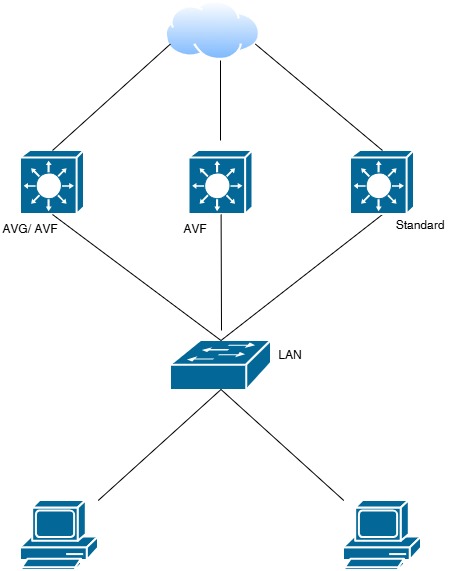
Network topology showing Router A (AVG), Router B & C (AVFs) with GLBP configuration for traffic load balancing across multiple routers
✅ Three routers configured with GLBP Group 1. Router A acts as AVG (priority 110). Routers B and C act as AVFs, forwarding traffic using different virtual MAC addresses. Traffic is distributed across all active forwarders for optimized bandwidth utilization .
📚 GLBP - Gateway Load Balancing
GLBP Key Advantages :
- ✅ Cisco proprietary protocol with load balancing capability
- ✅ Multiple active routers forward traffic simultaneously (up to 4 AVFs)
- ✅ Redundancy + performance optimization in one protocol
- ✅ Flexible load balancing methods (round-robin, weighted, host-dependent)
- ✅ Automatic failover and weight-based traffic distribution
GLBP Load Balancing Methods
| Method | Description | Use Case | Pros |
|---|---|---|---|
| Round-Robin | Sequential MAC assignment to ARP requests | Equal-capacity routers | Simple, automatic distribution |
| Weighted | MAC assignment based on router weight values | Different router capacities | Proportional to capacity |
| Host-Dependent | Same MAC always assigned to same host | Session persistence (VoIP, banking) | No mid-call rerouting |
⚙️ Step-by-Step Configuration Guide
STEP 1: Prerequisites & Lab Setup
Equipment Required:
- 3+ Cisco Routers (for AVG + multiple AVFs)
- Multiple Network Interfaces (Gi0/1)
- 1 x Layer 2 Switch
- Multiple PCs/VMs for client testing (to verify load distribution)
STEP 2: Router A Configuration (AVG - Active Virtual Gateway)
enable
configure terminal
!
hostname Router-A
!
interface GigabitEthernet0/1
description GLBP AVG Interface
ip address 192.168.1.2 255.255.255.0
!
! Configure GLBP Group 1 - AVG
glbp 1 ip 192.168.1.1
glbp 1 priority 110
glbp 1 preempt
glbp 1 load-balancing round-robin
glbp 1 timers advertise 3
glbp 1 authentication md5 key-string GLBPKey123
!
no shutdown
!
end
write memory
STEP 3: Router B Configuration (AVF 1 - Active Virtual Forwarder)
enable
configure terminal
!
hostname Router-B
!
interface GigabitEthernet0/1
description GLBP AVF1 Interface
ip address 192.168.1.3 255.255.255.0
!
! Configure GLBP Group 1 - AVF
glbp 1 ip 192.168.1.1
glbp 1 priority 100
glbp 1 weighting 100
glbp 1 load-balancing round-robin
glbp 1 timers advertise 3
glbp 1 authentication md5 key-string GLBPKey123
!
no shutdown
!
end
write memory
STEP 4: Router C Configuration (AVF 2 - Active Virtual Forwarder)
enable
configure terminal
!
hostname Router-C
!
interface GigabitEthernet0/1
description GLBP AVF2 Interface
ip address 192.168.1.4 255.255.255.0
!
! Configure GLBP Group 1 - AVF
glbp 1 ip 192.168.1.1
glbp 1 priority 90
glbp 1 weighting 100
glbp 1 load-balancing round-robin
glbp 1 timers advertise 3
glbp 1 authentication md5 key-string GLBPKey123
!
no shutdown
!
end
write memory
STEP 5: Configure Weighted Load Balancing
! Router A (70% traffic)
configure terminal
interface GigabitEthernet0/1
glbp 1 weighting 70 lower-threshold 40 upper-threshold 100
!
! Router B (20% traffic)
configure terminal
interface GigabitEthernet0/1
glbp 1 weighting 20 lower-threshold 40 upper-threshold 100
!
! Router C (10% traffic)
configure terminal
interface GigabitEthernet0/1
glbp 1 weighting 10 lower-threshold 40 upper-threshold 100
!
end
write memory
STEP 6: Configure Host-Dependent Load Balancing (Session Persistence)
! All Routers - For VoIP/Session-based traffic
configure terminal
!
interface GigabitEthernet0/1
glbp 1 load-balancing host-dependent
!
end
write memory
STEP 7: Configure Object Tracking with GLBP
! Router A - Track WAN interface
configure terminal
!
track 1 interface Serial0/0 line-protocol
!
interface GigabitEthernet0/1
glbp 1 weighting 100 lower-threshold 50 upper-threshold 100
glbp 1 track 1 decrement 30
! If Serial0/0 down: 100 - 30 = 70 (reduced traffic)
!
end
write memory
✅ Verification Procedures
Check 1: GLBP Status on Router A (AVG)
Router-A# show glbp
Interface Group Version State Priority Weight Man Weight
Gi0/1 1 v1 Active 110 100 100
Router-A# show glbp detail
Gi0/1 - Group 1
State is Active (AVG)
Virtual IP address is 192.168.1.1
Hello time 3 sec, hold time 10 sec
Preemption enabled
Priority 110
Load balancing: round-robin
Clients: 192.168.1.5, 192.168.1.6, 192.168.1.7
Virtual MAC address is 0007.b401.0100
Forwarder 1 is Router-B (192.168.1.3)
Virtual MAC address is 0007.b401.0101
Forwarder 2 is Router-C (192.168.1.4)
Virtual MAC address is 0007.b401.0102
✅ EXPECTED: State is Active (AVG) | Priority: 110 | Multiple AVFs present
Check 2: GLBP Status on Router B (AVF 1)
Router-B# show glbp
Interface Group Version State Priority Weight Man Weight
Gi0/1 1 v1 Forwarder 100 100 100
Router-B# show glbp brief
Interface Group Pri P State Active Standby Virtual IP
Gi0/1 1 100 Forwarder - 192.168.1.1
✅ EXPECTED: State is Forwarder (AVF) | Weight: 100
Check 3: View GLBP Virtual MAC Addresses
Router-A# show glbp 1 detail
Virtual MAC Address (GLBP Group 1):
AVG Virtual MAC: 0007.b401.0100
AVF 1 Virtual MAC: 0007.b401.0101 (Router-B)
AVF 2 Virtual MAC: 0007.b401.0102 (Router-C)
Check 4: Verify Load Balancing Distribution
Router-A# show glbp 1
Interface Group Version State Priority Weight
Gi0/1 1 v1 Active 110 100
Round-Robin Load Balancing Active
Client 192.168.1.5 -> MAC 0007.b401.0101 (Router-B)
Client 192.168.1.6 -> MAC 0007.b401.0102 (Router-C)
Client 192.168.1.7 -> MAC 0007.b401.0101 (Router-B)
Client 192.168.1.8 -> MAC 0007.b401.0102 (Router-C)
✅ EXPECTED: Clients distributed equally across AVFs in round-robin fashion
Check 5: Client Connectivity Test
C:\> ping 192.168.1.1
Pinging 192.168.1.1 with 32 bytes of data:
Reply from 192.168.1.1: bytes=32 time=2ms TTL=255
Reply from 192.168.1.1: bytes=32 time=2ms TTL=255
Ping statistics: Sent=4, Received=4, Lost=0 (0% loss)
ARP table shows: 192.168.1.1 -> 0007.b401.0101 (Router-B)
✅ EXPECTED: Successful connectivity with alternating AVF MAC addresses
🔄 Failover Testing Scenarios
Scenario 1: AVF Failure (Router B Down)
Test: Simulate AVF1 failure by disabling Gi0/1 on Router B
Router-B# configure terminal
Router-B(config)# interface GigabitEthernet0/1
Router-B(config-if)# shutdown
Expected Result (Wait 10 seconds):
- ✅ Router B drops from AVF role
- ✅ Router A reassigns traffic to remaining AVF (Router C)
- ✅ Clients connected to Router B are redirected to Router C
- ✅ No traffic loss observed on client side
Scenario 2: AVG Failure (Router A Down)
Test: Simulate AVG failure by disabling Gi0/1 on Router A
Router-A# configure terminal
Router-A(config)# interface GigabitEthernet0/1
Router-A(config-if)# shutdown
Expected Result (Wait 10 seconds):
- ✅ Router A loses AVG role
- ✅ New AVG elected from remaining routers (Router B or C with highest priority)
- ✅ New AVG reassigns VMAC addresses to AVFs
- ✅ Traffic continues to flow through remaining AVFs
Scenario 3: Weighted Load Balancing in Action
Test: Verify traffic distribution follows weights (70%, 20%, 10%)
! Monitor from 20 ARP requests to Router A:
Router-A# show glbp 1 | include Forwarder
Forwarder 1 (Router-B): 14 ARP responses (70%)
Forwarder 2 (Router-C): 4 ARP responses (20%)
Forwarder 3 (Router-D): 2 ARP responses (10%)
Expected Result:
- ✅ Traffic distribution matches configured weights
- ✅ Higher-capacity routers receive more clients
- ✅ Bandwidth optimized based on router capabilities
🐛 Troubleshooting Guide
Issue 1: No AVFs Elected (All Routers Show "Secondary")
Symptoms: No forwarders active, only AVG visible
Solutions:
- Verify weighting is not 0:
show glbp 1 detail | include weight - Check interfaces are UP/UP on all routers
- Ensure authentication keys match on all routers
- Verify GLBP group numbers match (should all be 1)
Issue 2: Uneven Load Distribution
Symptoms: Traffic not distributed according to weights or round-robin
Solutions:
- Check load-balancing method configured:
show glbp 1 | include load-balancing - Verify weighting values are correct and different
- Increase number of clients to see distribution (need at least 2x AVFs)
- Clear ARP cache if testing:
clear arp-cache
Issue 3: AVG Election Fails
Symptoms: Multiple routers claim to be AVG
Solutions:
- Verify priority values are different on each router
- Check authentication matches exactly (case-sensitive)
- Ensure highest priority router is configured correctly
- Clear GLBP cache:
clear glbp 1 state
Issue 4: Weight Thresholds Not Working
Symptoms: Router remains AVF even when lower-threshold reached
Solutions:
- Verify lower-threshold is set correctly
- Confirm track object is properly associated
- Check current weight vs thresholds:
show glbp 1 detail | include weight
📊 GLBP Load Balancing Methods Comparison
| Method | Distribution | Best For | Configuration |
|---|---|---|---|
| Round-Robin (Default) | Sequential ARP: Client1→AVF1, Client2→AVF2 | Equal-capacity routers | glbp 1 load-balancing round-robin |
| Weighted | Based on weight values (0-255) | Different router capacities | glbp 1 weighting 70/20/10 |
| Host-Dependent | Hash-based on source IP (consistent) | VoIP, banking, session persistence | glbp 1 load-balancing host-dependent |
📚 Essential GLBP Commands
| Command | Purpose |
|---|---|
show glbp |
Display GLBP status summary |
show glbp brief |
Show concise GLBP information |
show glbp 1 detail |
Display detailed group information |
show glbp interface Gi0/1 |
View GLBP on specific interface |
show track |
View tracked object status |
debug glbp events |
Real-time GLBP debugging |
📋 Lab Completion Checklist
Pre-Lab Verification
- All routers accessible via SSH/Telnet
- Interfaces configured with correct IPs
- Layer 2 connectivity verified between all routers
Configuration Deployment
- GLBP Group 1 configured on all routers
- AVG elected on Router A (priority 110)
- AVFs elected on Routers B & C (weights configured)
- Load balancing method configured (round-robin/weighted)
- MD5 authentication configured on all routers
- Object tracking configured (if required)
Post-Lab Validation
- show glbp confirms AVG and AVF roles
- Virtual MAC addresses properly assigned (0007.B401.01xx)
- Client devices ping VIP successfully
- ARP requests receive different VMACs (load balancing)
- Failover tested: AVF down → automatic recovery
- Weight distribution verified (if using weighted LB)
- Track objects working correctly (if configured)