Lab 9.2: VLAN and ACL-Based Layer 2 Filtering
Port ACLs, VLAN ACLs, and Layer 2 Traffic Filtering
CCNP Enterprise | Cisco CCNP 350-401 (ENCOR) & 300-410 (ENARSI)
🔒 Protected
Lab Overview
This lab demonstrates how to control traffic at the switch access layer and VLAN level using Port ACLs (PACLs), VLAN ACLs (VACLs), and routed ACLs (RACLs). Students will learn how to filter traffic entering a switch port, restrict traffic within a VLAN, and compare the policy scope of each ACL type.
Lab Goal: Implement Layer 2 and VLAN-based filtering to stop unauthorized access, restrict
specific protocols, and apply policy control directly on switching infrastructure. PACLs filter inbound traffic
on a switch port, while VACLs filter traffic within a VLAN context.
Skills Covered
MAC ACL
IP ACL
PACL
VACL
RACL
MAC ACL
IP ACL
PACL
VACL
RACL
Estimated Time
75–105 minutes
75–105 minutes
Difficulty
Intermediate to Advanced
Intermediate to Advanced
Important Note
PACLs apply inbound only and cannot filter Layer 2 control protocols such as CDP, VTP, DTP, PAgP, UDLD, and STP.
PACLs apply inbound only and cannot filter Layer 2 control protocols such as CDP, VTP, DTP, PAgP, UDLD, and STP.
Network Topology
Use the provided topology image for this lab.
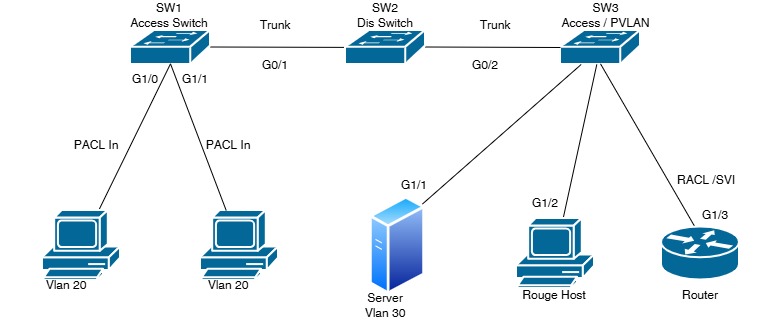
Interface Mapping:
SW1 G0/1 ↔ SW2 G0/1
SW2 G0/2 ↔ SW3 G0/2
SW1 G1/0 ↔ PC1
SW1 G1/1 ↔ PC2
SW3 G1/1 ↔ Server
SW3 G1/2 ↔ Rogue PC
SW3 G1/3 ↔ Router
SW1 G0/1 ↔ SW2 G0/1
SW2 G0/2 ↔ SW3 G0/2
SW1 G1/0 ↔ PC1
SW1 G1/1 ↔ PC2
SW3 G1/1 ↔ Server
SW3 G1/2 ↔ Rogue PC
SW3 G1/3 ↔ Router
Lab Objectives
- Configure VLANs and trunk links across the switching topology
- Apply MAC ACL or IP ACL as a Port ACL (PACL) on access ports
- Verify that PACLs only filter inbound traffic on the switch port
- Create a VLAN access map and apply a VACL to VLAN 20
- Compare PACL, VACL, and RACL behavior in a realistic enterprise design
- Test permitted and denied traffic from PC1, PC2, Server, Rogue PC, and Router
- Validate filtering results using Cisco verification commands
Step-by-Step Configuration
Lab Design Assumptions:
VLAN 10 = Management
VLAN 20 = Users
VLAN 30 = Servers / Restricted
SW1 connects to SW2 on G0/1
SW2 connects to SW3 on G0/2
VLAN 10 = Management
VLAN 20 = Users
VLAN 30 = Servers / Restricted
SW1 connects to SW2 on G0/1
SW2 connects to SW3 on G0/2
Part 1: Create VLANs and Configure Trunks
! On SW1, SW2, and SW3
conf t
vlan 10
 name MGMT
vlan 20
 name USERS
vlan 30
 name SERVERS
exit
! SW1 trunk to SW2
interface g0/1
description Trunk to SW2
switchport mode trunk
switchport trunk allowed vlan 10,20,30
exit! SW2 trunk links
interface g0/1
description Trunk to SW1
switchport mode trunk
switchport trunk allowed vlan 10,20,30
exit
interface g0/2
description Trunk to SW3
switchport mode trunk
switchport trunk allowed vlan 20,30
exit! SW3 trunk to SW2
interface g0/2
description Trunk to SW2
switchport mode trunk
switchport trunk allowed vlan 20,30
exit
endPart 2: Configure Access Ports
! SW1 access ports
conf t
interface g1/0
 description PC1
 switchport mode access
 switchport access vlan 20
exit

interface g1/1
 description PC2
 switchport mode access
 switchport access vlan 20
exit
end
! SW3 access ports
conf t
interface g1/1
description Server
switchport mode access
switchport access vlan 30
exit
interface g1/2
description Rogue PC
switchport mode access
switchport access vlan 20
exit
interface g1/3
description Router
exit
endPart 3: Configure PACL
! Example PACL to block Telnet and ICMP, but allow all other IP traffic at SW1
conf t
ip access-list extended PACL_USERS
 deny tcp any any eq 23
 deny icmp any any
 permit ip any any
exit

! Apply inbound on user-facing access ports
interface g1/0
 ip access-group PACL_USERS in
exit

interface g1/1
 ip access-group PACL_USERS in
exit
end
Optional MAC ACL PACL Example:
If you want MAC-based filtering instead of IP-based filtering, use
If you want MAC-based filtering instead of IP-based filtering, use
mac access-list extended and apply it with mac access-group ... in.
! Example MAC ACL on an access port in SW1
conf t
mac access-list extended MAC_ACL_USERS
 permit host 00:1A:2B:3C:4D:5E any
 deny any
exit

interface g1/0
 mac access-group MAC_ACL_USERS in
exit
end
Part 4: Configure VACL
! Create ACLs used by the VACL in SW3
conf t
ip access-list extended ICMP
 deny icmp any any
 permit ip any any
exit

ip access-list extended TELNET
 deny tcp any any eq 23
 permit ip any any
exit

ip access-list extended OTHER
 permit ip any any
exit

! Create the VLAN access-map
vlan access-map VACL_20 10
 match ip address ICMP
 action drop
exit

vlan access-map VACL_20 20
 match ip address TELNET
 action drop log
exit

vlan access-map VACL_20 30
 match ip address OTHER
 action forward
exit

! Apply VACL to VLAN 20
vlan filter VACL_20 vlan-list 20
end
Part 5: Optional RACL on Router Interface
! Example routed ACL for the router interface
conf t
ip access-list extended RACL_OUT
 deny tcp any any eq 23
 permit ip any any
exit

interface g1/3
 description Router Interface
 ip access-group RACL_OUT in
exit
end
Important: VACLs filter traffic within the VLAN context and can apply to traffic entering or leaving the VLAN processing path. RACLs are used on routed/SVI interfaces, not on Layer 2 switchports.
Verification Checklist
| Check | Command | Expected Result |
|---|---|---|
| VLANs created | show vlan brief |
VLAN 10, 20, and 30 appear |
| Trunks operational | show interfaces trunk |
G0/1 and G0/2 show trunking and allowed VLANs |
| PACL applied | show running-config interface g1/0 |
ip access-group PACL_USERS in is present |
| PACL counters | show access-lists PACL_USERS |
Hit counts increase when blocked traffic is sent |
| MAC ACL check | show mac access-list |
Permitted MAC entry appears if using MAC ACL |
| VACL created | show vlan access-map |
VACL_20 sequences displayed |
| VACL applied | show vlan filter |
VACL_20 is bound to VLAN 20 |
| RACL applied | show running-config interface g1/3 |
RACL_OUT appears on router interface |
| Traffic test | Ping / Telnet / ICMP tests | Denied traffic is blocked, permitted traffic succeeds |
Troubleshooting Guide
Problem: ACL does not block traffic
Cause: ACL applied to wrong interface, wrong direction, or wrong VLAN scope
Fix: Verify PACL is applied inbound on the correct access port
Cause: ACL applied to wrong interface, wrong direction, or wrong VLAN scope
Fix: Verify PACL is applied inbound on the correct access port
Problem: VACL not taking effect
Cause: VLAN filter missing or access-map sequence order incorrect
Fix: Confirm
Cause: VLAN filter missing or access-map sequence order incorrect
Fix: Confirm
vlan filter VACL_20 vlan-list 20 and check rule order
Problem: Traffic still passes unexpectedly
Cause: ACL statement order is wrong or the matching traffic is not what you expected
Fix: Review ACL logic and test counters with
Cause: ACL statement order is wrong or the matching traffic is not what you expected
Fix: Review ACL logic and test counters with
show access-lists
Problem: L2 control traffic still appears on port
Cause: PACLs cannot filter STP, CDP, DTP, VTP, PAgP, or UDLD
Fix: Use the appropriate Layer 2 protection feature for control-plane security
Cause: PACLs cannot filter STP, CDP, DTP, VTP, PAgP, or UDLD
Fix: Use the appropriate Layer 2 protection feature for control-plane security
Problem: Router ACL does not affect switchport traffic
Cause: RACLs work on routed interfaces/SVIs, not Layer 2 switchports
Fix: Apply the ACL on the routed interface or SVI
Cause: RACLs work on routed interfaces/SVIs, not Layer 2 switchports
Fix: Apply the ACL on the routed interface or SVI
Best Practice: Use PACL for ingress control on access ports, VACL for VLAN-wide policy enforcement,
and RACL for routed traffic between networks. This layered approach provides stronger segmentation and control.
Short Student Summary
This lab teaches three filtering methods: PACL for inbound switch-port protection,
VACL for VLAN-wide traffic control, and RACL for routed interfaces.
Students learn how each method works and when to use it in an enterprise network.